Before you buy, furnish or lease a short-term rental, it helps to know whether the numbers work. This free Airbnb calculator spreadsheet turns a few assumptions, such as nightly rate, occupancy and monthly costs, into annual revenue, cash flow, cash-on-cash return and break-even occupancy.
It runs in Google Sheets, so you can change one input and watch every result update. It covers three situations: buying with a mortgage, buying outright, and renting a property to host (rental arbitrage). Once you are hosting, the Airbnb income and expense tracker lets you compare your estimate with real bookings.
What the Airbnb Calculator Does
You enter your assumptions in the blue cells. The sheet then calculates:
- Revenue: booked nights, stays, nightly revenue, cleaning fee revenue and gross revenue, shown per month and per year.
- Costs: Airbnb fees, cleaning costs, utilities, supplies, insurance, taxes, property management and a maintenance reserve.
- Net operating income (NOI): what the property earns before your mortgage or rent.
- Cash flow: NOI after mortgage payments or rent.
- Return and risk: cash invested, cash-on-cash return, cap rate, payback period and break-even occupancy.
Inside the Template
The workbook has five tabs: Start Here, Calculator, Startup Costs, Settings and Feedback.
Calculator Tab
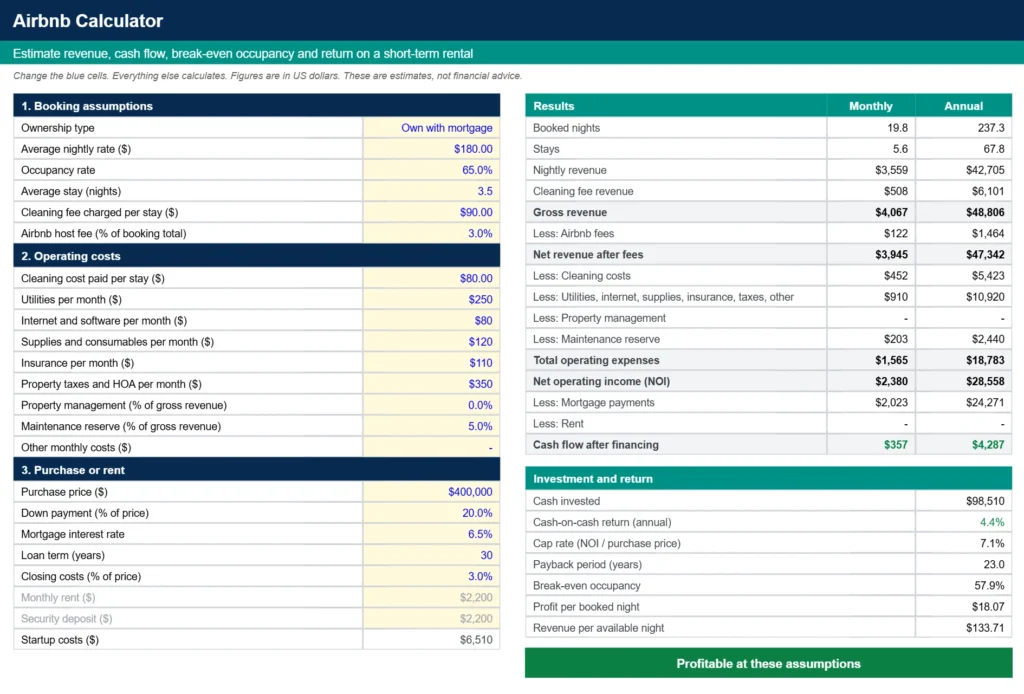
Everything you change lives on the left, in three blocks, and the results sit on the right so you can see the effect of each change.
- Booking assumptions: ownership type, average nightly rate, occupancy rate, average stay, cleaning fee charged and the Airbnb host fee.
- Operating costs: cleaning cost per stay, utilities, internet and software, supplies, insurance, property taxes and HOA, property management and maintenance percentages, and any other monthly costs.
- Purchase or rent: purchase price, down payment, interest rate, loan term and closing costs if you own, or monthly rent and security deposit if you rent.
Pick the ownership type from the dropdown at the top. Inputs that do not apply to your choice turn gray, so you always know which numbers matter. A bar under the results tells you whether the property is profitable or loses money at your assumptions.
Startup Costs Tab
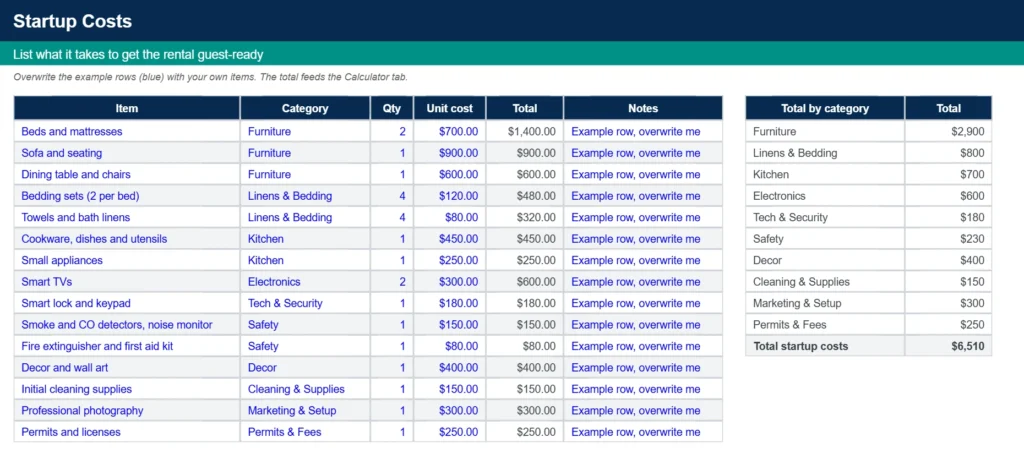
Furnishing a rental adds up quickly. The Startup Costs tab gives you 40 rows to list furniture, linens, kitchen items, electronics, safety gear, decor, supplies, photography and permits, each with a quantity and unit cost. The total feeds the calculator, where it counts toward the cash you invest. A category table shows where the money goes, and the sheet includes 15 example rows you can overwrite.
Settings Tab
The Settings tab holds the yellow dropdown lists: the three ownership types and the startup cost categories. You can add your own categories without touching a formula.
Airbnb Profit Example
The template opens with a realistic example so you can see how the pieces fit. It assumes a $400,000 property bought with 20% down, a $180 nightly rate, 65% occupancy and a 3.5-night average stay.
| Result | Annual | Monthly |
|---|---|---|
| Booked nights | 237.3 | 19.8 |
| Gross revenue | $48,806 | $4,067 |
| Total operating expenses | $18,783 | $1,565 |
| Net operating income | $28,558 | $2,380 |
| Mortgage payments | $24,271 | $2,023 |
| Cash flow after financing | $4,287 | $357 |
On $98,510 of cash invested, that is a 4.4% cash-on-cash return and a 7.1% cap rate. The property breaks even at 57.9% occupancy, so it has some room to absorb a slow month. Drop occupancy to 30% and the same property loses about $17,000 a year, which is why the break-even number is worth checking before you commit.
How to Calculate Airbnb Profit, Cash Flow and Break-Even Occupancy
The math follows a short chain, and every step is visible in the sheet:
- Booked nights = 365 × occupancy rate. Stays = booked nights ÷ average stay.
- Gross revenue = booked nights × nightly rate, plus stays × cleaning fee.
- Net operating income = gross revenue, minus Airbnb fees, cleaning costs, monthly operating costs, management and the maintenance reserve.
- Cash flow = net operating income minus mortgage payments or rent.
- Cash-on-cash return = annual cash flow ÷ cash invested.
Break-even occupancy is the occupancy at which annual cash flow is zero. The sheet divides your fixed costs, including the mortgage or rent, by the margin each 100% of occupancy earns after fees, cleaning and percentage costs. If the result is over 100%, the property cannot break even at your nightly rate.
Owning, Owning Outright or Renting (Rental Arbitrage)
The same operating assumptions give very different results depending on how you hold the property. Using the example above:
| Own with mortgage | Own outright | Rent it | |
|---|---|---|---|
| Annual cash flow | $4,287 | $28,558 | $2,158 |
| Cash invested | $98,510 | $418,510 | $8,710 |
| Cash-on-cash return | 4.4% | 6.8% | 24.8% |
| Break-even occupancy | 57.9% | 18.0% | 61.5% |
Renting needs far less cash up front, which is why its return looks high, but the rent is a fixed cost that raises your break-even occupancy and leaves little cushion. If you are still working out financing, our vacation home loan calculator, second home loan calculator and HELOC calculator can help you estimate the payment.
How to Use the Airbnb Calculator Spreadsheet
- Make your copy. Enter your email below and open the link we send you.
- Pick your ownership type on the Calculator tab: own with mortgage, own outright or rent it.
- Replace the blue example numbers with your nightly rate, occupancy, stay length, fees and costs.
- List your startup costs on the Startup Costs tab and delete the example rows you do not need.
- Read the results and change one assumption at a time, such as occupancy or nightly rate, to see how your cash flow moves.
Calculator or Tracker?
This is a planning tool. It estimates a typical year from your assumptions. The Airbnb income and expense tracker is a bookkeeping tool: you log each booking and cost, and it shows your real income and net profit by month and by property. Use the calculator before you start and the tracker once you are hosting.
Airbnb Calculator FAQ
Is this Airbnb calculator free?
Yes. It is a free Google Sheets template. Enter your email to get the link, then choose Make a copy to save your own editable version to Google Drive.
What does the Airbnb calculator spreadsheet calculate?
It calculates booked nights, stays, gross revenue, fees, operating costs, net operating income, cash flow after mortgage or rent, cash invested, cash-on-cash return, cap rate, payback period and break-even occupancy, shown per month and per year.
How is break-even occupancy calculated?
The sheet divides your yearly fixed costs, including the mortgage or rent, by the margin you earn at 100% occupancy after Airbnb fees, cleaning costs and percentage costs. If the answer is over 100%, the property cannot break even at your nightly rate.
Can I use it for rental arbitrage?
Yes. Choose Rent it from the ownership dropdown and enter your monthly rent and security deposit. The sheet then uses rent instead of a mortgage and counts the deposit and startup costs as your cash invested.
Does it include taxes?
No. Occupancy or lodging taxes that you collect from guests and pass on are not income, so leave them out of your nightly rate. Income tax and depreciation are not modeled. Property taxes and HOA fees are an input in the operating costs.
What nightly rate and occupancy should I use?
Use numbers from your own market, such as comparable listings or your past results. Then test a lower occupancy and a lower rate to see whether the property still works.
Can I use this Airbnb calculator in Excel?
The template is built in Google Sheets. After you make your copy, choose File, then Download, then Microsoft Excel (.xlsx). The formulas, including the mortgage payment, carry over, but dropdowns and color formatting can behave differently, so check your results after downloading.
Does it model seasonality?
No. The free version estimates a flat average year, so enter an occupancy and nightly rate that reflect a typical year for your property.
How do I track real bookings after I start hosting?
Use the Airbnb income and expense tracker. You log each booking and cost, and its Yearly View shows monthly income, expenses by category and net income for each property.
Is this template affiliated with Airbnb?
No. It is not affiliated with or endorsed by Airbnb, Inc. Airbnb is a trademark of Airbnb, Inc. The results are estimates, not financial, tax or legal advice.
Get Your Free Airbnb Calculator Spreadsheet
- Free Template
- Fully Editable
- Instant Access
- Works for owners and renters
Already hosting? Log real bookings with the Airbnb expenses spreadsheet.
How to Access Your Copy
- Enter your email for instant access
- Open the link we send you
- Start using the spreadsheet right away
Run the numbers before you commit, then keep the sheet handy: change one assumption at a time and watch how your cash flow, return and break-even occupancy respond.