Taking out a business loan is one of the most significant financial decisions a business owner can make. Whether you are funding new equipment, expanding your team, or covering a cash flow gap, understanding exactly what that loan will cost you over time is critical. That is where a well-built loan calculator spreadsheet becomes invaluable. This Business Loan Calculator Google Sheets template gives you a complete, real-time picture of your loan from day one all the way through your final payment.
Built entirely in Google Sheets, this template is free to customize, easy to share with your accountant or business partner, and requires no software installation. If you have ever stared at a loan offer wondering what the total interest will actually add up to, or tried to figure out how much of each payment goes toward interest versus principal, this template answers all of those questions clearly and automatically.
Overview of the Template
This Business Loan Calculator template is designed for small business owners, freelancers, startup founders, and anyone who wants to understand the full cost of a business loan before or after signing. It combines a clean summary dashboard with a detailed payment-by-payment amortization schedule, all inside a single Google Sheets file.
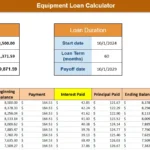
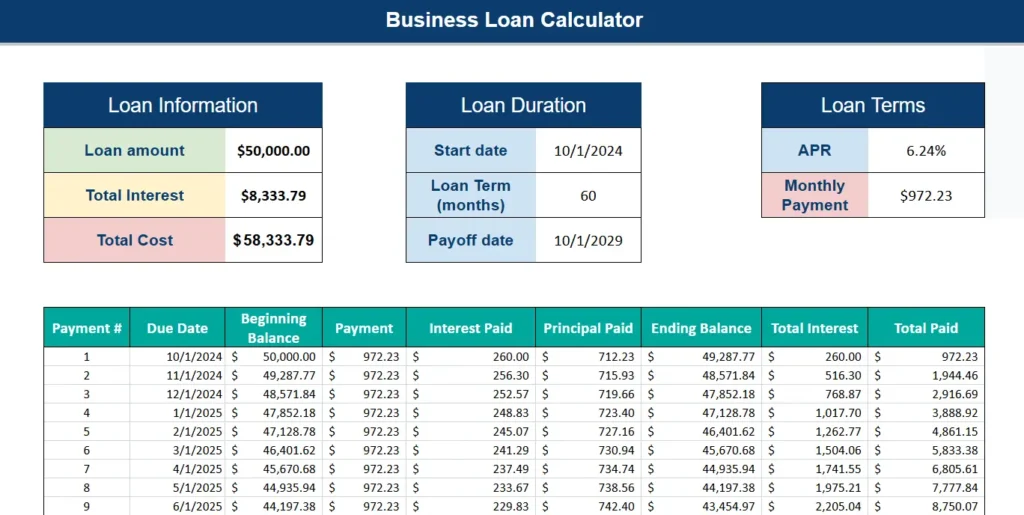
At the top of the sheet, you will find three summary panels: Loan Information, Loan Duration, and Loan Terms. Together, these three sections give you an at-a-glance view of your loan’s total cost, timeline, and monthly obligation. Below that sits a complete amortization table that breaks down every single payment over the life of the loan.
For example, a $50,000 loan at 6.24% APR over 60 months results in a monthly payment of $972.23, total interest paid of $8,333.79, and a total repayment amount of $58,333.79. All of those numbers calculate automatically the moment you enter your loan details. There is no need to run separate formulas or cross-reference a bank’s paperwork.
This template is ideal for business owners who want to compare loan offers side by side, accountants preparing financial forecasts, or anyone who simply wants more transparency around what they are agreeing to.
Key Features and Sections
Loan Information Panel
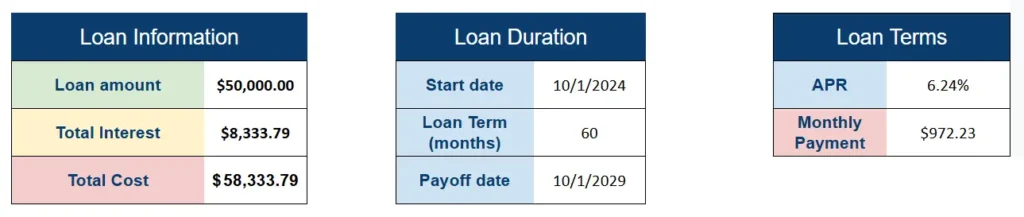
The Loan Information panel sits in the upper left of the template and displays three calculated outputs: the loan amount you entered, the total interest you will pay over the full loan term, and the total cost of the loan. These figures update instantly whenever you change any input.
Having the total interest figure displayed prominently is particularly useful during the loan shopping phase. For instance, if you are comparing a 48-month loan versus a 60-month loan, you can quickly see how the longer term increases total interest even if the monthly payment drops. On a $50,000 loan at 6.24%, extending from 48 to 60 months saves roughly $100 per month but costs several hundred dollars more in cumulative interest.
Loan Duration Panel
The Loan Duration panel handles the time-based inputs and outputs for your loan. You enter the start date and the loan term in months, and the template automatically calculates the payoff date. No manual date math required.
This is especially useful for businesses that need to align their loan payoff with a lease renewal, a product launch, or a projected revenue milestone. If you know you want to be debt-free before a planned expansion in Q4 of a specific year, you can adjust the loan term until the payoff date lines up with your goal.
Loan Terms Panel
The Loan Terms panel is where you enter the APR and where the calculated monthly payment appears. The monthly payment cell uses a standard loan amortization formula built directly into Google Sheets, so it recalculates accurately every time you update the interest rate or loan term.
This panel is particularly helpful when evaluating offers from different lenders. Enter one lender’s APR, note the monthly payment, then swap in a competing lender’s rate and see the difference instantly. Over a 60-month loan, even a half-percent difference in APR can meaningfully change both your monthly payment and total interest.
Amortization Schedule Table
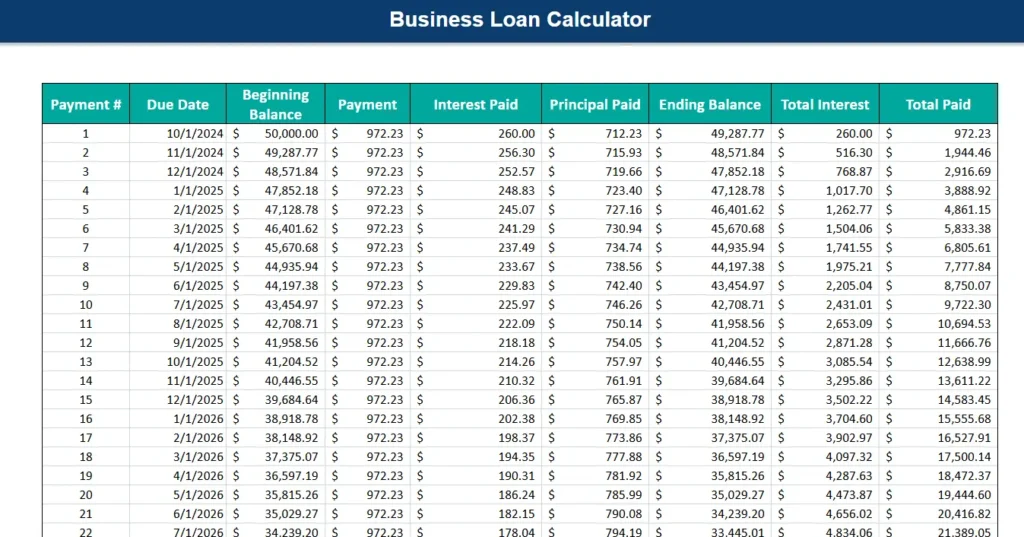
The amortization table is the core of this template. It lists every payment in the loan from payment number one through the final payment, with columns for due date, beginning balance, payment amount, interest paid, principal paid, ending balance, running total interest, and running total paid.
This level of detail is something many borrowers never see until they request an official amortization schedule from their lender, and even then it is often buried in paperwork. Having it in Google Sheets means you can filter it, sort it, or reference specific rows in other sheets or reports.
A real-world example: a small business owner making payment number 12 on their $50,000 loan would see that their beginning balance is $41,958.56, they are paying $218.18 in interest and $754.05 in principal, and their running total interest is $2,871.28. That kind of granular detail helps with bookkeeping, tax preparation, and general financial awareness.
How to Use the Template
Using this template in Google Sheets is straightforward. Once you have made a copy to your own Google Drive, simply locate the input fields in the three summary panels at the top of the sheet. Enter your loan amount, your start date, the loan term in months, and the APR. Every other cell in the template will calculate automatically.
The amortization table below will populate with one row per payment, covering the full loan term. For a 60-month loan, that means 60 rows of detailed payment data, each one precisely calculated based on the inputs you provided.
If you are using this template to compare scenarios, the easiest approach is to make two or three copies of the sheet within the same Google Sheets file. Rename each tab with a label like “Lender A” or “60-Month Option” and enter different loan details in each one. This way you can flip between tabs and compare total interest, monthly payment, and payoff date without losing your original data.
For business owners who share financials with a bookkeeper or CPA, you can share the Google Sheets file directly using the standard share button. No exports, no email attachments, no version confusion. Everyone sees the same live data.
Why Choose This Template
There are plenty of basic loan calculators online that will tell you your monthly payment. What makes this Google Sheets template different is the combination of a clean summary view and a full amortization breakdown in one place. Most online tools show you one number. This template shows you everything.
It is also completely editable. If you want to add a column tracking deductible business interest, highlight rows where more than 50% of the payment goes toward principal, or add a chart showing your declining balance over time, you can do all of that inside Google Sheets with no coding or special tools required.
The template is also accessible from any device. Google Sheets works on desktop, tablet, and mobile, which means you can pull up your amortization schedule during a meeting with your bank, review it on your phone before signing, or share it with a business partner from across the country.
Business owners who benefit most from this template include sole proprietors taking out their first SBA loan, restaurant owners financing kitchen equipment, contractors financing a vehicle fleet, and e-commerce sellers financing inventory. Essentially, anyone with a fixed-term business loan who wants more financial clarity than a basic monthly payment figure provides.
Download Your Free Business Loan Calculator Spreadsheet
- Free Template
- Fully Editable
- Instant Access
- Organize your information
How to Access Your Copy
- Enter your email for instant access
- Open the link we send you
- Start using the spreadsheet right away