If you searched for a cupcake pricing calculator, chances are you are trying to answer one simple question: how much should I charge per cupcake? The challenge is that pricing is not just about ingredients. You also need to factor in labor, packaging, platform fees, and profit.
This cupcake pricing calculator is built in Google Sheets, making it easy to access, edit, and use from anywhere. You can open it on your laptop while planning orders, adjust numbers from your phone, or duplicate it for different recipes. Because it runs in Google Sheets, all calculations update automatically as you change your inputs.
Whether you are a home baker operating under cottage food laws, selling through Etsy, or taking custom event orders, this Google Sheets cupcake pricing calculator gives you a structured, professional way to price your products.
Overview of the Template
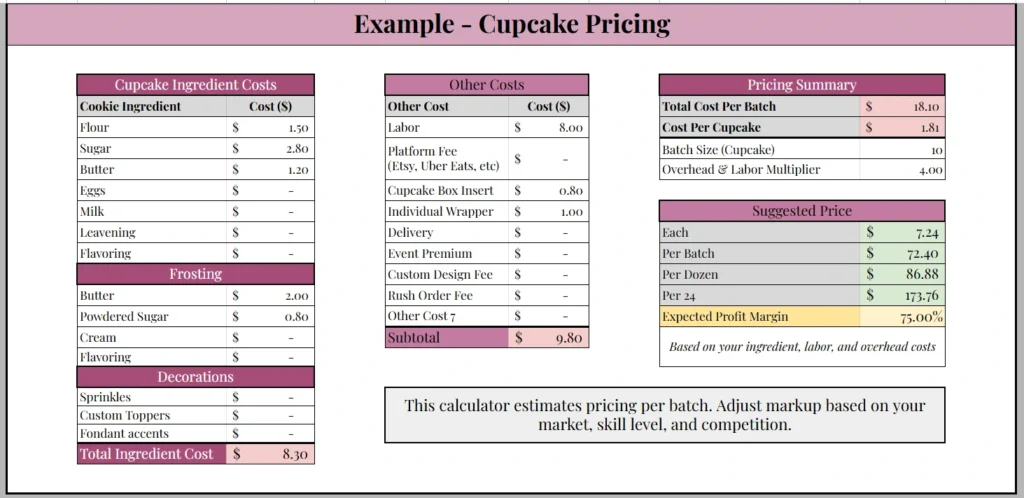
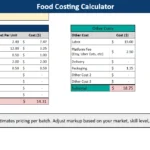
This cupcake pricing calculator in Google Sheets is designed to show you the full picture of your costs before you set your selling price. Instead of guessing what competitors charge or using a flat markup without context, you build your price from real data.
The sheet is divided into three main sections:
- Cupcake Ingredient Costs
- Other Costs
- Pricing Summary
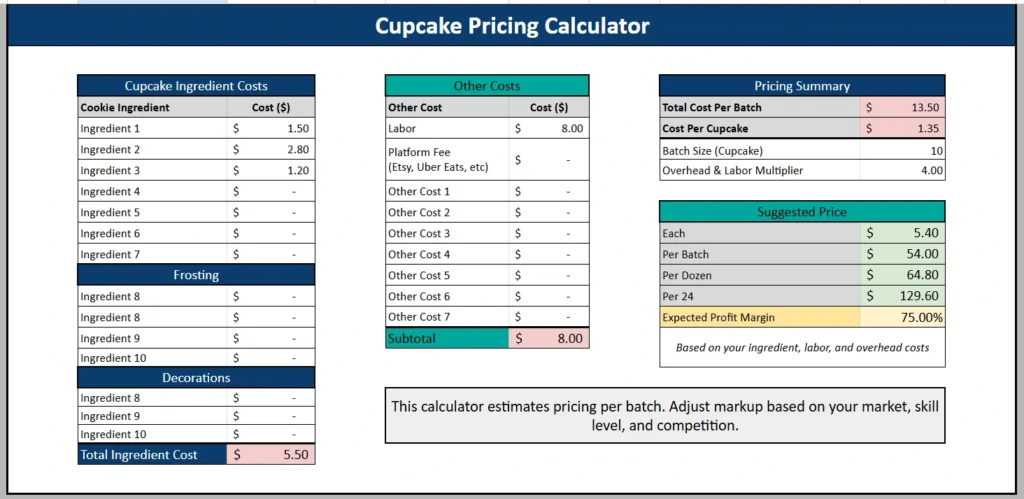
All three sections are visible in one clean layout. You enter your ingredient and business costs on the left and middle. On the right, Google Sheets formulas automatically calculate:
- Total cost per batch
- Cost per cupcake
- Suggested price per cupcake
- Suggested price per dozen
- Suggested price per 24
- Expected profit margin
Because it is built in Google Sheets, the spreadsheet updates instantly. Change one ingredient cost and every pricing field recalculates without manual adjustments.
The template works for any batch size. You can leave it at 10 cupcakes, change it to 12 for a dozen, or adjust it to match your specific recipe. This flexibility makes it practical for everyday baking and custom event orders.
Key Features and Sections
Cupcake Ingredient Costs
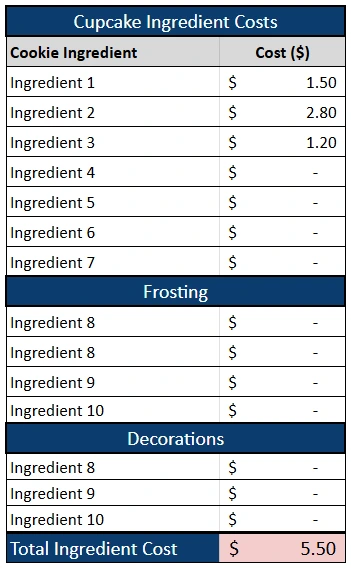
The Cupcake Ingredient Costs section helps you calculate the true cost of your batter, frosting, and decorations. Instead of lumping everything into one total, the spreadsheet separates:
- Cupcake batter ingredients
- Frosting ingredients
- Decorations
For batter, you might include flour, sugar, butter, eggs, milk, leavening, and flavoring. You enter the cost used per batch, not the entire grocery package price. For example, if a 5 dollar bag of flour produces five batches, you would enter 1 dollar for that batch.
Under Frosting, you can include butter, powdered sugar, cream, and flavorings. Frosting often represents a large portion of cupcake cost, especially when using premium ingredients.
The Decorations section is especially useful for custom cupcakes. You can include sprinkles, custom toppers, fondant accents, or edible images. For event orders, these small details can significantly increase your cost per cupcake.
At the bottom of this section, Google Sheets automatically calculates your Total Ingredient Cost. This gives you a clear baseline before adding labor and overhead.
This detailed breakdown is ideal for home bakers who offer multiple cupcake styles. You can duplicate the Google Sheets file and adjust ingredient lines for chocolate, red velvet, or specialty themed cupcakes without rebuilding the pricing structure.
Other Costs
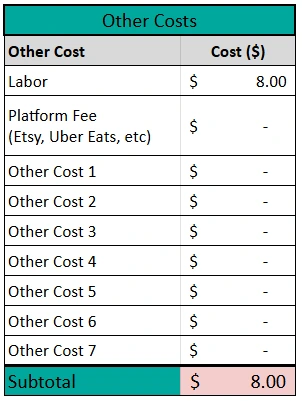
Most cupcake sellers underprice because they ignore indirect expenses. The Other Costs section in this Google Sheets cupcake pricing calculator prevents that mistake.
Here you can enter:
- Labor
- Platform fees such as Etsy or Uber Eats
- Cupcake box inserts
- Individual wrappers
- Delivery
- Event premium
- Custom design fee
- Rush order fee
Labor is critical. Even if you bake from home, your time has value. If it takes two hours to prepare, bake, frost, and package a batch, that time should be reflected in your pricing.
Packaging is another commonly overlooked cost. Professional presentation often requires cupcake boxes with inserts and individual wrappers. These supplies add up, especially for larger orders.
If you sell through an online platform, include their fees here. The Google Sheets calculator adds them into your total cost so you do not accidentally absorb those expenses.
The subtotal at the bottom combines all non ingredient costs. When added to your ingredient total, you get your true total cost per batch.
Pricing Summary
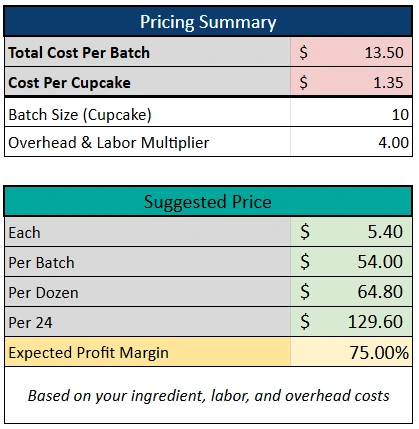
The Pricing Summary section is where the Google Sheets formulas do the heavy lifting.
This section displays:
- Total Cost Per Batch
- Cost Per Cupcake
- Batch Size
- Overhead and Labor Multiplier
- Suggested Price per cupcake
- Suggested Price per batch
- Suggested Price per dozen
- Suggested Price per 24
- Expected Profit Margin
Once your costs are entered, you only need to adjust your multiplier. For example, if your total cost per batch is 13.50 and your batch size is 10, your cost per cupcake is 1.35. Applying a multiplier of 4.00 automatically generates a suggested selling price of 5.40 per cupcake and 64.80 per dozen.
The Expected Profit Margin field shows the percentage difference between your cost and selling price. This helps you understand whether your pricing aligns with your income goals.
Because this is built in Google Sheets, you can experiment with different multipliers to see how pricing changes in real time. This is especially helpful when comparing your prices to local bakeries.
How to Use the Template
Start by making a copy of the Google Sheets cupcake pricing calculator to your own Google Drive. This allows you to edit freely without affecting the original file.
Next, enter your ingredient costs based on actual usage per batch. Do not enter the full grocery receipt amount. Break it down to the portion used for that specific recipe.
Then fill in your frosting and decoration costs. For a simple everyday order, these may be minimal. For a wedding or themed party, you might increase decoration costs significantly.
Move to the Other Costs section and enter labor and packaging expenses. If you are quoting a custom event, add a custom design fee or event premium.
Adjust the batch size if needed. If your recipe yields 12 cupcakes, change the number from 10 to 12. Google Sheets will automatically update cost per cupcake and suggested prices.
Finally, adjust your multiplier. Test different values and compare your suggested price per dozen to what similar bakeries charge in your area. This helps you remain competitive without undervaluing your work.
For example, if you receive an order for 24 custom cupcakes, increase decoration and design fees, then review the updated suggested price per 24. This gives you a quick and professional quote based on real numbers.
Why Choose This Google Sheets Cupcake Pricing Calculator
There are many cupcake pricing calculators online, but most are either too basic or not customizable. This template was built specifically in Google Sheets so you can:
- Access it from any device
- Automatically calculate totals and margins
- Easily duplicate it for different cupcake flavors
- Adjust pricing in seconds
The structure reflects real world baking. It accounts for labor, packaging, platform fees, and event based pricing. It is practical for hobby bakers and serious small business owners alike.
Because everything recalculates automatically in Google Sheets, you avoid manual math errors. If butter prices rise or you introduce premium decorations, you change one number and the entire pricing model updates.
Most importantly, this cupcake pricing calculator helps you price with confidence. Instead of relying on guesswork, you base your selling price on actual costs and target profit margins.
Get Your Free Cupcake Pricing Calculator Spreadsheet
- Free Template
- Fully Editable
- Instant Access
- Organize your information
How to Access Your Copy
- Enter your email for instant access
- Open the link we send you
- Start using the spreadsheet right away