Managing multiple debts at the same time can feel overwhelming. Between tracking different due dates, interest rates, and balances, it is easy to lose sight of the bigger picture. This free Debt Consolidation Loan Calculator template for Google Sheets gives you a clear, organized way to see exactly what consolidating your debts would look like, from the total loan cost down to each individual monthly payment in a full amortization schedule.
Whether you are a first-time borrower researching your options or someone who has already been quoted a consolidation loan and wants to verify the numbers, this template walks you through everything in plain terms.
Overview
The Debt Consolidation Loan Calculator is a Google Sheets template designed to help you model a single consolidation loan that replaces several smaller debts. Instead of juggling credit card payments, personal loans, and bills separately, you enter those balances in one place, input your new loan terms, and the template calculates the full picture for you automatically.
The template covers two core areas. The first is the loan summary, which shows you at a glance what the consolidation loan will cost in total, including origination fees, interest, and monthly payments. The second is a complete month-by-month amortization table, which breaks down every single payment over the life of the loan.
This kind of tool is especially useful for people who have recently received a loan offer and want to understand what they are actually agreeing to before signing. It is also helpful for anyone comparing two or more loan options side by side, since changing the APR or loan term immediately recalculates everything.
Key Features and Sections
Loan Information Panel
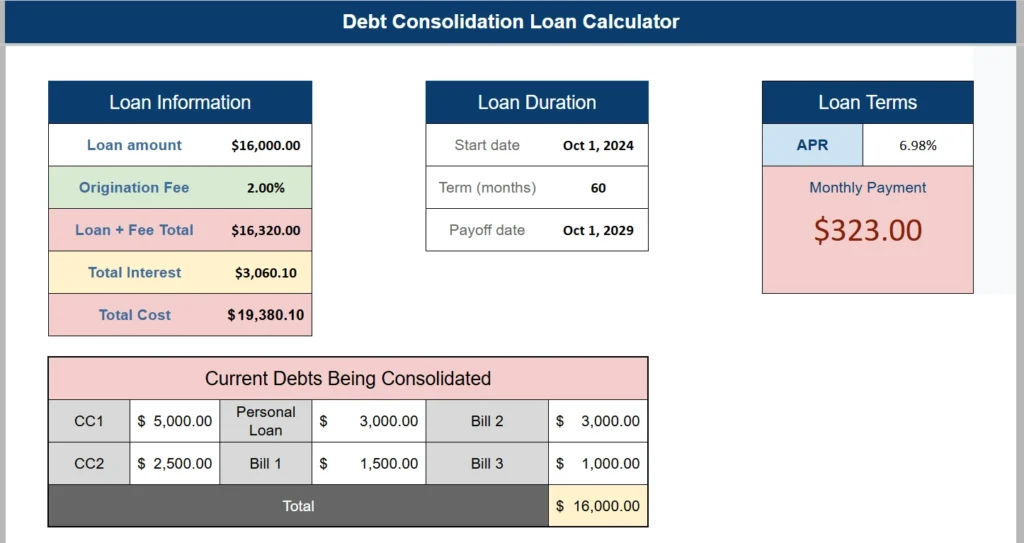
The Loan Information panel is the starting point for the entire template. Here you enter your base loan amount, which in this example is $16,000.00, and your origination fee percentage, set at 2.00%. The template automatically calculates the combined total of the loan plus that fee, which comes out to $16,320.00. This is an important number because the origination fee gets rolled into the loan balance, meaning you pay interest on it just like the rest of the principal.
Below that, the panel displays the total interest you will pay over the loan term ($3,060.10) and the all-in total cost ($19,380.10). Having this figure visible upfront helps borrowers make an honest comparison against the cost of keeping their current debts and paying them off separately.
Loan Duration Panel
The Loan Duration panel captures the timeline of your loan. You enter a start date (October 1, 2024 in this example) and the loan term in months (60 months, or 5 years). The payoff date calculates automatically, which in this case lands on October 1, 2029.
This section is straightforward but valuable because it anchors the loan in real calendar time. Seeing a specific payoff date makes the commitment concrete, which is something that an abstract number of months does not always communicate.
Loan Terms Panel
The Loan Terms panel highlights the two numbers most borrowers focus on first: the APR and the monthly payment. Here the APR is 6.98% and the monthly payment comes out to $323.00. The monthly payment figure is displayed prominently so it is never buried in the data.
For context, a borrower with $16,000 spread across credit cards at 20% to 25% APR could realistically cut their monthly interest cost by more than half by consolidating at 6.98%. That savings potential is exactly the kind of insight this panel makes visible.
Current Debts Being Consolidated
This section is where you list the individual debts being replaced by the new loan. The example includes two credit cards (CC1 at $5,000 and CC2 at $2,500), a personal loan ($3,000), and three separate bills ($1,500, $3,000, and $1,000). The total adds up to $16,000, which matches the loan amount entered above.
Having this table in the same view as the loan summary reinforces the purpose of the whole exercise. You are not just borrowing money, you are replacing a group of obligations with a single, more manageable one.
Amortization Schedule
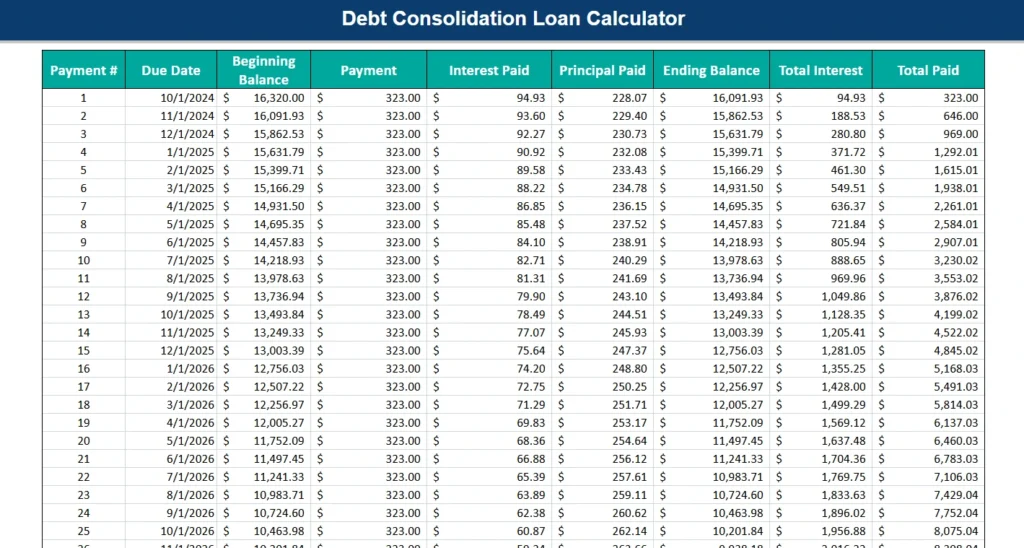
The amortization schedule is the most detailed part of the template. It produces a row for every payment over the life of the loan, 60 rows in total for a five-year term. Each row shows the payment number, due date, beginning balance, payment amount, how much of that payment goes to interest, how much reduces the principal, the ending balance, cumulative interest paid to date, and cumulative total paid.
For payment 1 on October 1, 2024, the beginning balance is $16,320.00. Of the $323.00 payment, $94.93 goes to interest and $228.07 reduces the principal, leaving an ending balance of $16,091.93. By payment 25, the interest portion has dropped to $60.87, reflecting how amortization shifts the split over time in favor of principal repayment.
This level of detail is something most online loan calculators skip entirely. Seeing the full schedule helps borrowers understand exactly when their balance crosses key milestones, and it can inform decisions like when to make an extra payment to save the most on interest.
How to Use the Template
Using this template in Google Sheets takes only a few minutes to set up. Start by making a copy of the file to your own Google Drive so that you can edit it freely without affecting the original.
Once you have your copy open, navigate to the loan summary section at the top. Enter your loan amount in the Loan Amount field. If your lender charges an origination fee, enter that percentage in the Origination Fee field. If there is no origination fee, simply enter 0% and the Loan + Fee Total will match the loan amount exactly.
Next, enter your start date, your loan term in months, and your APR. These three inputs drive the monthly payment calculation and populate the full amortization table automatically. You do not need to manually update anything in the amortization schedule; it recalculates based on what you enter.
After that, fill in your individual debts in the Current Debts section. You can relabel the rows to match your actual creditors, for example “Chase Sapphire” instead of CC1, or “Medical Bill” instead of Bill 2. The total will update as you go.
If you want to compare two loan scenarios, the simplest approach is to duplicate the sheet tab within your Google Sheets file and adjust the second copy with different terms. Keeping both tabs open side by side makes the comparison straightforward.
Why Choose This Template
There are plenty of basic loan calculators available online, but most of them give you a monthly payment and stop there. They do not show you the full cost of borrowing, the impact of origination fees, or a detailed breakdown of every payment you will make. This template does all of that in a single Google Sheets file that you own, can customize, and can return to anytime.
It is well-suited for a wide range of users. Someone in their late twenties with student loan debt and a few credit cards can use it to figure out whether a personal consolidation loan actually saves them money. A parent helping a college graduate understand a loan offer can open the template together and walk through the numbers in real time. A small business owner consolidating vendor invoices and short-term credit lines can adapt the current debts section to reflect their situation.
Because the file lives in Google Sheets, there is no software to install and no subscription required. It works on any device with a browser, and you can share it with a partner, financial advisor, or family member with a single link.
The template also makes the math transparent. Every figure in the summary ties back to a formula that you can inspect, which builds confidence in the numbers. This matters when you are making a significant financial commitment.
Download Your Free Debt Consolidation Calculator Spreadsheet
- Free Template
- Fully Editable
- Instant Access
- Organize your information
How to Access Your Copy
- Enter your email for instant access
- Open the link we send you
- Start using the spreadsheet right away