If you have ever financed a piece of equipment for your business, you already know how quickly the numbers can get complicated. Between interest rates, loan terms, down payments, and monthly obligations, it is easy to lose track of what you are actually committing to before you sign anything. That is exactly why having a clear, organized tool in your corner makes such a big difference. This free Equipment Loan Calculator for Google Sheets takes the guesswork out of equipment financing and gives you a complete picture of your loan from day one.
Whether you are a small business owner buying your first commercial oven, a contractor picking up a new skid steer, or a medical practice financing diagnostic equipment, this template is built for real-world use. It is straightforward enough for someone with no finance background, yet detailed enough to satisfy someone who wants to track every dollar over a 60-month term.
Overview of the Template
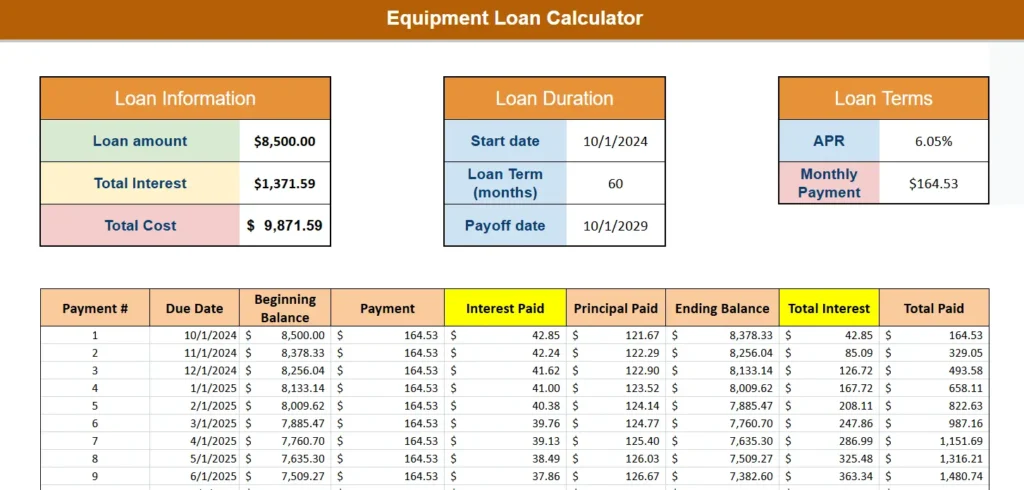
The Equipment Loan Calculator is a single-sheet Google Sheets template designed to calculate and display the full cost of an equipment loan. You enter a few key inputs, including the equipment cost, any trade-in value or down payment, the interest rate, and the loan term, and the sheet does everything else automatically.
At the top, you will find three summary panels that give you an at-a-glance breakdown: total loan amount, total interest paid over the life of the loan, and the total cost of ownership. Below that sits the Equipment Cost section, where you account for the purchase price, any trade-in credit, and your down payment. The remainder flows directly into a full amortization schedule that maps out every single payment from the first month to the last.
The template is built entirely in Google Sheets, which means you can access it from any device, share it with a business partner or accountant, and make edits without needing any software installs. It is also free to download and use immediately.
Key Features and Sections

Loan Information Panel
This panel sits in the top left of the template and summarizes the three numbers that matter most: your total loan amount, the total interest you will pay, and the combined total cost of the loan. These figures update automatically as you adjust your inputs, so you can experiment with different scenarios before committing. For example, if you are debating whether to put $2,000 down versus $5,000 down, you can see the impact on total interest in real time without running any separate calculations.
Loan Duration Panel
The Loan Duration panel captures your start date and loan term in months, then automatically calculates your payoff date. This is more useful than it sounds. Knowing that a 60-month loan starting in October 2024 wraps up in October 2029 helps you plan around future purchases, lease renewals, or cash flow needs. If your business runs on seasonal revenue, for instance, you may want to time your payoff date to land after your strongest quarter.
Loan Terms Panel
Here is where you enter your APR and see your resulting monthly payment. The monthly payment field recalculates instantly when you change either the APR or the loan term, making it easy to compare offers from different lenders. If one lender is offering 6.05% over 60 months and another is offering 5.75% over 48 months, you can plug both in and compare not just the monthly payment but the total interest paid across each scenario.
Equipment Cost Section
This section breaks down how your loan amount is determined. You enter the full purchase price of the equipment, subtract any trade-in value, and subtract any down payment. The remaining balance becomes your financed loan amount, which feeds directly into all of the calculations above and below it.
As a practical example: say you are buying a used commercial refrigeration unit for $15,000. Your vendor accepts a trade-in of your old unit worth $3,000, and you put $2,000 down. That leaves $10,000 financed, which is the number your monthly payment and interest calculations are based on. The template handles all of that math automatically so nothing slips through the cracks.
Amortization Schedule
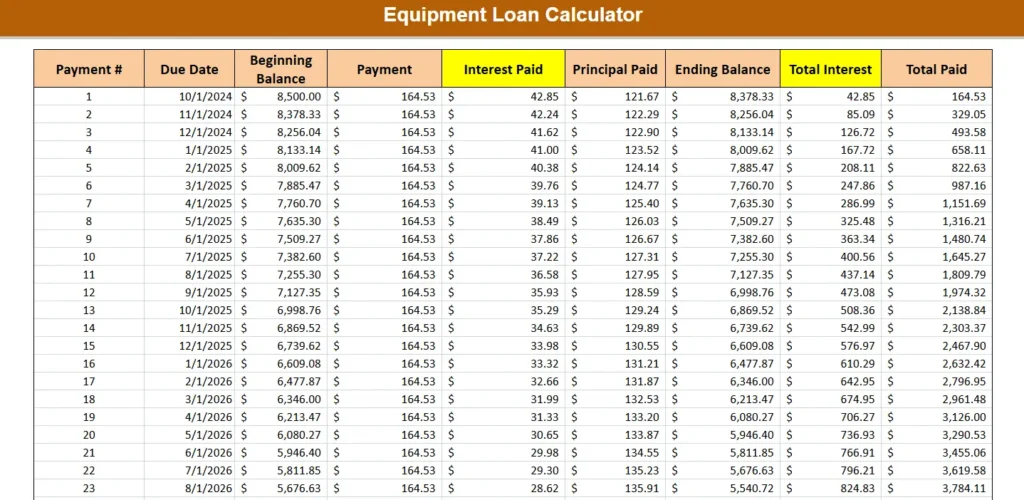
The amortization schedule is the backbone of the template. It generates a row-by-row breakdown of every payment over the full loan term, showing you the payment number, due date, beginning balance, payment amount, how much of each payment goes toward interest, how much goes toward principal, the ending balance after each payment, and a running total of both interest paid and total amount paid.
This level of detail is particularly valuable for business owners who track expenses closely or need documentation for accounting purposes. You can see, for example, that in the early months of a $8,500 loan at 6.05% APR, nearly 26% of each payment goes toward interest. By the final year of the loan, that ratio flips dramatically in your favor. Understanding this shift can inform decisions about making extra payments or refinancing.
How to Use the Template
Step 1: Enter Your Equipment Cost Details
Start by filling in the Equipment Cost section. Enter the full purchase price of the equipment in the first field. If the seller is accepting a trade-in or if you have any subsidy or grant applied to the purchase, enter that in the Trade-in Value field. Then add your down payment if applicable. The template will subtract both from the purchase price and display your financed loan amount automatically.
Step 2: Set Your Loan Terms
Move to the Loan Terms panel and enter your APR. This is the annual percentage rate quoted by your lender, not the monthly rate. The template converts it automatically. Then go to the Loan Duration panel, enter your start date, and set your loan term in months. Common terms are 36, 48, or 60 months, though some equipment loans run longer.
Step 3: Review Your Summary Numbers
Once your inputs are in place, check the three summary panels at the top. Your monthly payment, total interest, and total cost of ownership will all be calculated and displayed. If the numbers look higher than expected, try adjusting the loan term or increasing your down payment to see how the totals change.
Step 4: Walk Through the Amortization Schedule
Scroll down to the amortization table and review the full payment schedule. This is a good step to do before finalizing any loan agreement. You can see exactly when your balance dips below certain thresholds, which may be relevant if you are considering early payoff or refinancing at a later date. The running total columns on the right also make it easy to see your cumulative interest at any point during the loan.
Why Choose This Template
There are a lot of loan calculators out there, but most of them give you only a monthly payment number and call it a day. This template gives you the full picture, which is what you actually need when making a significant financial decision.
It is built in Google Sheets, which means it is accessible, shareable, and easy to customize. You do not need to be a spreadsheet expert to use it, and you do not need to pay for any software subscription to open it. If you want to make a copy for a second piece of equipment, or share it with your accountant before signing a financing agreement, you can do that in a couple of clicks.
The template is especially useful for small business owners who are financing equipment for the first time and want to understand what they are agreeing to. It is also a great fit for equipment dealers or leasing consultants who want to walk clients through payment scenarios during a sales conversation.
Beyond the numbers, having a documented amortization schedule in Google Sheets gives you a reference point for your records. You can print it, save it to your Google Drive, or share it with your bookkeeper as part of your year-end documentation.
If you are comparing multiple pieces of equipment at different price points, you can duplicate the sheet inside the same Google Sheets file and run each scenario side by side. It is a simple trick that turns one template into a full comparison tool without any extra setup.
Download Your Free Equipment Loan Calculator Spreadsheet
- Free Template
- Fully Editable
- Instant Access
- Organize your information
How to Access Your Copy
- Enter your email for instant access
- Open the link we send you
- Start using the spreadsheet right away