If you searched for a cupcake pricing calculator in Excel, you are likely looking for something practical, editable, and built for real world baking. Many online calculators are too basic or locked behind web forms. This Excel cupcake pricing calculator gives you full control inside a familiar spreadsheet environment.
Designed specifically for cupcake sellers, this template helps you calculate total ingredient cost, factor in labor and packaging, apply a markup, and instantly see suggested prices per cupcake, per dozen, and per 24. Because it is built in Microsoft Excel, you can fully customize it, duplicate it for different recipes, and even expand it as your business grows.
Whether you bake from home, sell at markets, or take custom event orders, this Excel cupcake pricing calculator gives you a structured way to price with confidence.
Overview of the Template
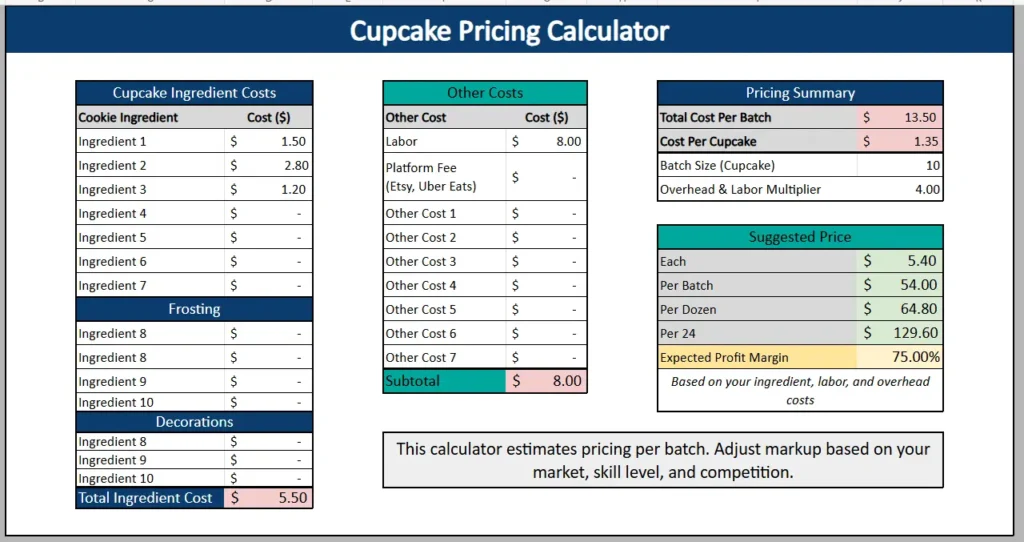
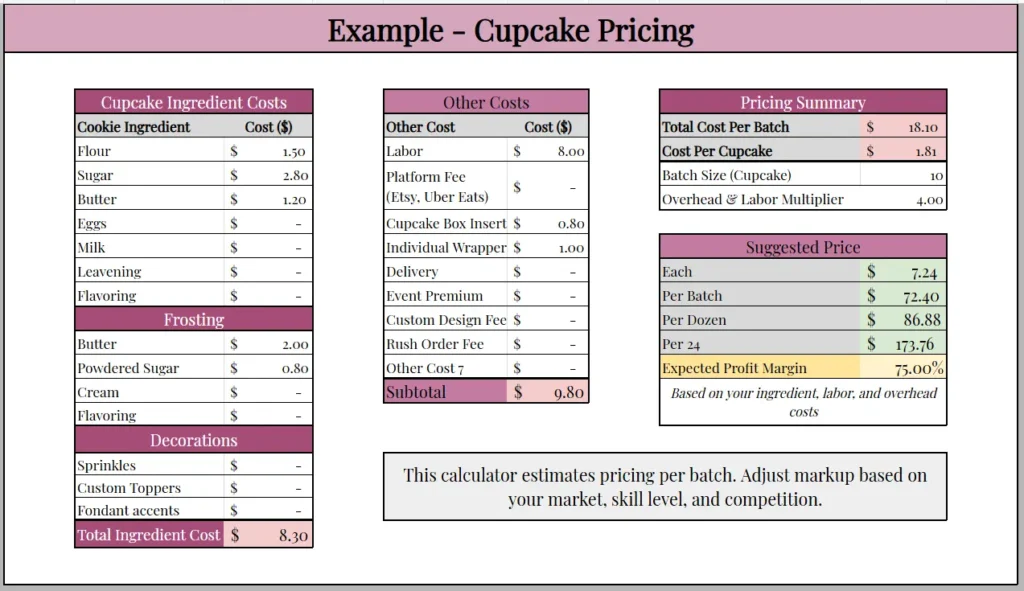
This Excel cupcake pricing calculator is organized into three clear sections on one main sheet:
- Cupcake Ingredient Costs
- Other Costs
- Pricing Summary
The left side focuses on your ingredient breakdown. The middle section captures labor and additional expenses. The right side automatically calculates your final numbers using Excel formulas.
Once you enter your ingredient and business costs, Excel calculates:
- Total Cost Per Batch
- Cost Per Cupcake
- Suggested Price Per Cupcake
- Suggested Price Per Batch
- Suggested Price Per Dozen
- Suggested Price Per 24
- Expected Profit Margin
Because this is an Excel spreadsheet, every formula updates automatically when you change a number. If butter prices increase or you add a custom topper, your totals adjust instantly.
The layout keeps everything visible without switching tabs. This makes it easy to quote customers quickly or test different pricing scenarios.
Key Features and Sections
Cupcake Ingredient Costs
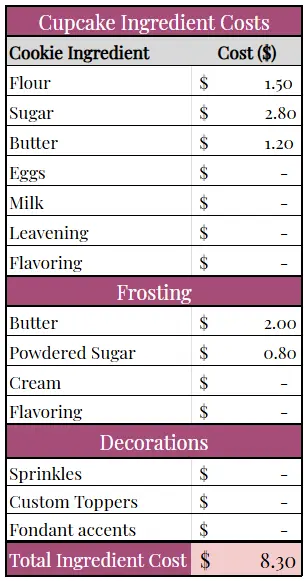
The Cupcake Ingredient Costs section is structured to reflect how cupcakes are actually made. Instead of one generic list, it separates:
- Batter ingredients
- Frosting
- Decorations
In the batter portion, you might list flour, sugar, butter, eggs, milk, leavening, and flavoring. You enter the cost used per batch, not the entire grocery purchase. For example, if a bag of sugar costs 4 dollars and makes four batches, you would enter 1 dollar for that batch.
The Frosting section allows you to account for butter, powdered sugar, cream, and flavorings. Frosting can represent a large portion of cupcake cost, especially when using high quality ingredients.
The Decorations section includes sprinkles, custom toppers, or fondant accents. This is particularly important for themed cupcakes and event orders, where decoration costs can significantly increase your total expense.
At the bottom, Excel calculates the Total Ingredient Cost automatically. This number forms the foundation of your pricing.
This breakdown is especially helpful if you offer multiple cupcake flavors. You can save separate versions of the file for vanilla, chocolate, red velvet, or specialty cupcakes while keeping the same pricing structure.
Other Costs
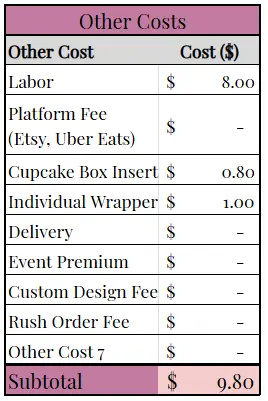
The Other Costs section captures expenses beyond ingredients. Many cupcake sellers underestimate their pricing because they ignore these factors.
In this Excel template, you can enter:
- Labor
- Platform fees such as Etsy or Uber Eats
- Cupcake box insert
- Individual wrapper
- Delivery
- Event premium
- Custom design fee
- Rush order fee
Labor is critical. If you spend two hours baking and decorating a batch, that time should be reflected in your pricing. Excel allows you to enter a fixed labor amount per batch.
Packaging is another overlooked cost. Cupcake box inserts and wrappers add up quickly, especially for larger orders. By listing them individually, you ensure that nothing is forgotten.
If you take custom event orders, you can include event premiums or design fees directly in the spreadsheet. This keeps your pricing consistent instead of adjusting numbers manually each time.
The Subtotal at the bottom of this section adds all non ingredient costs. Combined with your ingredient total, this gives you the true total cost per batch.
Pricing Summary
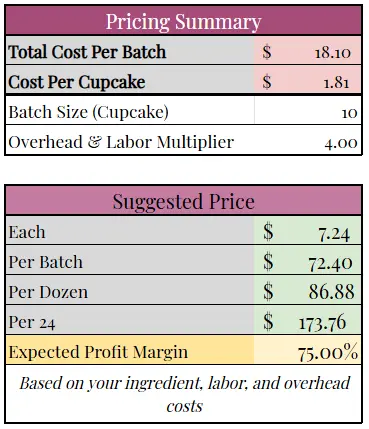
The Pricing Summary section is where the Excel formulas bring everything together.
This section displays:
- Total Cost Per Batch
- Cost Per Cupcake
- Batch Size
- Overhead and Labor Multiplier
- Suggested Price Per Cupcake
- Suggested Price Per Batch
- Suggested Price Per Dozen
- Suggested Price Per 24
- Expected Profit Margin
For example, in the provided screenshot, the Total Cost Per Batch is 18.10 and the Batch Size is 10. Excel calculates the Cost Per Cupcake at 1.81.
When you apply an Overhead and Labor Multiplier of 4.00, the spreadsheet generates a Suggested Price of 7.24 per cupcake, 86.88 per dozen, and 173.76 per 24. The Expected Profit Margin shows 75 percent.
Because this is Excel, you can easily experiment with different multipliers. Try adjusting from 3.5 to 4.5 and see how your selling price changes. This makes it easy to compare your numbers with local bakery pricing.
The visual layout highlights key numbers so you can quickly see whether your pricing aligns with your goals.
How to Use the Excel Cupcake Pricing Calculator
Start by opening the Excel file and saving a copy under your own business name. This allows you to create different versions for various cupcake flavors or event types.
Step one is entering your ingredient costs. Calculate the cost per batch, not per package. Break down each grocery item into the portion used in your recipe.
Next, complete the Frosting and Decorations sections. For standard cupcakes, decoration costs may be minimal. For wedding or themed orders, they may increase significantly.
Move to the Other Costs section and enter your labor, packaging, and platform fees. If you are quoting a custom order, add any design or rush fees here.
Adjust the Batch Size to match your recipe yield. If your recipe makes 12 cupcakes instead of 10, update the number. Excel automatically recalculates the Cost Per Cupcake and Suggested Prices.
Finally, set your Overhead and Labor Multiplier. This is where you determine your markup. Compare the Suggested Price Per Dozen to what other bakeries in your area charge. Adjust until you find a balance between competitiveness and profitability.
For example, if you receive an order for 24 custom cupcakes with premium decorations, increase decoration costs and design fees. The spreadsheet will immediately show the updated price per 24, giving you a clear and professional quote.
Why Choose This Excel Cupcake Pricing Calculator
This Excel cupcake pricing calculator is ideal for bakers who prefer full control over their spreadsheets. Unlike online tools, you are not limited by a web interface. You can customize formulas, add new cost lines, or expand the sheet as your business grows.
It reflects real baking scenarios by including labor, packaging, and event fees. It also provides multiple pricing outputs so you can confidently quote per cupcake, per dozen, or per bulk order.
Excel is widely used and trusted. Many small business owners are already comfortable with it. That familiarity makes this template easy to adopt and adapt.
Most importantly, this spreadsheet removes guesswork. Instead of pricing emotionally or copying competitors, you rely on real numbers. That leads to more sustainable profit margins and better business decisions.
Download Your Excel Cupcake Pricing Calculator Spreadsheet
- Free Template
- Fully Editable
- Instant Access
- Organize your information
How to Access Your Copy
- Enter your email for instant access
- Download from the link we send you
- Start using the spreadsheet right away