Understanding your home mortgage before you commit to it is one of the smartest financial moves you can make. A mortgage is not just a monthly payment. It is a long-term financial structure that determines how much interest you pay, how quickly you build equity, and how much your home truly costs over time.
This Home Loan Calculator Spreadsheet built in Excel gives you a complete view of your loan amortization from start to finish. It calculates your monthly mortgage payment, automatically applies PMI when your down payment is under 20 percent, and generates a detailed amortization schedule that shows every payment across the life of the loan.
Instead of relying on a basic online calculator, this Excel template gives you full control and transparency over your numbers.
Overview of the Template
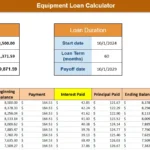
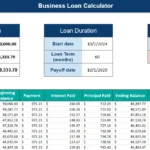
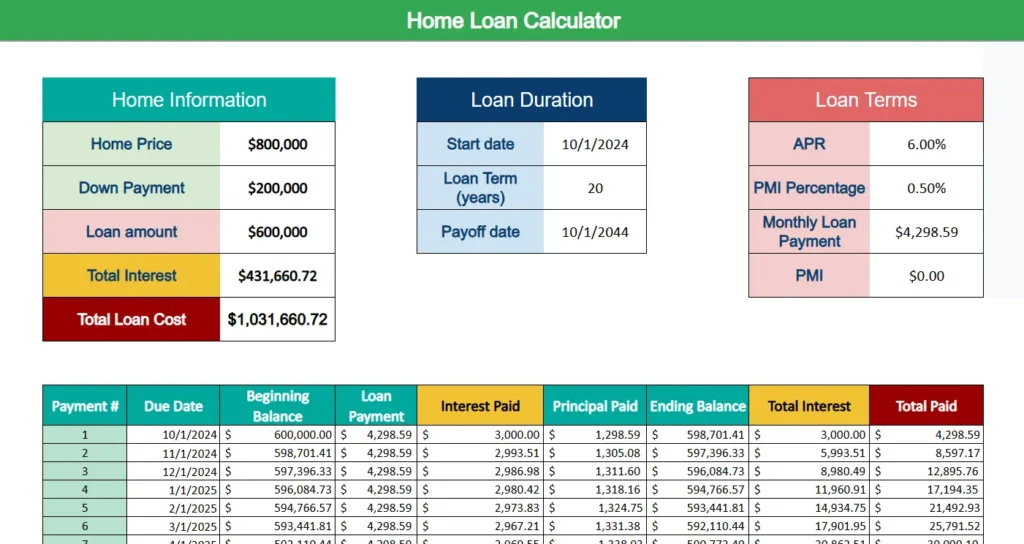
This Excel Home Loan Calculator is organized into three clear sections at the top: Home Information, Loan Duration, and Loan Terms. Below those sections is a fully automated loan amortization table.
The template is color coded to make inputs easy to identify and outputs easy to interpret. You enter your home price, down payment, interest rate, and loan term. Everything else updates automatically.
The spreadsheet calculates:
- Loan amount
- Monthly mortgage payment
- PMI when applicable
- Total interest paid over the loan term
- Total loan cost
- Complete loan amortization schedule
- Payoff date
Because this is built in Excel, you can save multiple versions, create scenario comparisons, or customize it further if needed. It is flexible enough for first-time buyers and detailed enough for investors or financial planners.
Key Features and Sections
Home Information
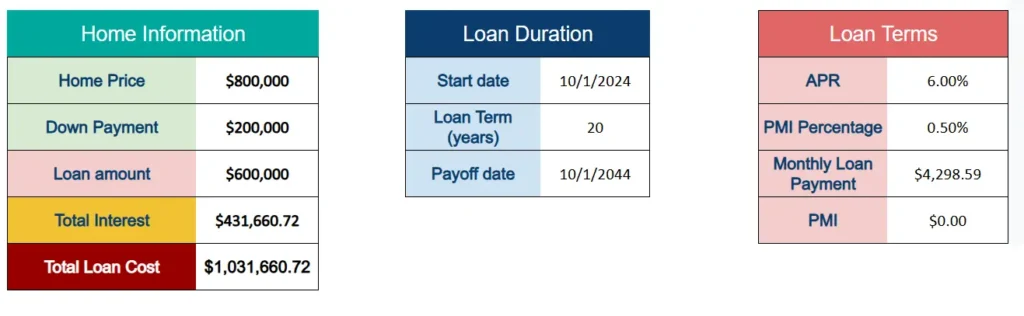
The Home Information section is where you enter your property details. It includes:
- Home Price
- Down Payment
- Loan Amount
- Total Interest
- Total Loan Cost
The Loan Amount is calculated automatically by subtracting your down payment from the home price. For example, if you enter a home price of $800,000 and a down payment of $200,000, the spreadsheet calculates a $600,000 mortgage.
The Total Interest field shows how much you will pay in interest over the entire loan term. This number can be surprising, especially on a 30-year mortgage. The Total Loan Cost combines principal and interest to show the full cost of borrowing.
The color coding helps separate inputs from calculated fields so you always know which values can be edited and which ones are formulas.
Loan Duration
The Loan Duration section defines the timeline of your home mortgage. It includes:
- Start Date
- Loan Term (years)
- Payoff Date
When you change the loan term, the entire loan amortization schedule recalculates. If you switch from a 30-year mortgage to a 20-year mortgage, the monthly payment increases, but total interest decreases significantly.
The Payoff Date updates automatically based on the loan term and start date. This gives you a clear view of when your mortgage will be completely paid off.
This section is especially useful for comparing long-term strategies. For example, you might test:
- 30 years at 7 percent
- 20 years at 6 percent
- 15 years at 5.75 percent
With each change, Excel recalculates the payment and total interest instantly.
Loan Terms
The Loan Terms section controls the financial mechanics of the mortgage. It includes:
- APR
- PMI Percentage
- Monthly Loan Payment
- PMI
The Monthly Loan Payment is calculated using standard amortization logic. Excel splits each payment into interest and principal based on your APR and remaining balance.
The PMI logic is built directly into the spreadsheet. If your down payment is less than 20 percent of the total home price, PMI is automatically triggered. The spreadsheet calculates the PMI amount based on the PMI Percentage value you enter.
For example, if your home price is $800,000 and your down payment is $100,000, that is 12.5 percent down. Since this is below 20 percent, PMI applies. If the PMI Percentage is set to 0.50 percent, the spreadsheet calculates the monthly PMI accordingly.
If your down payment reaches or exceeds 20 percent, PMI automatically drops to zero. You can also adjust the PMI Percentage value if your lender offers a different rate. The sheet updates immediately.
This feature makes the template realistic and adaptable to real lender scenarios.
Loan Amortization Table
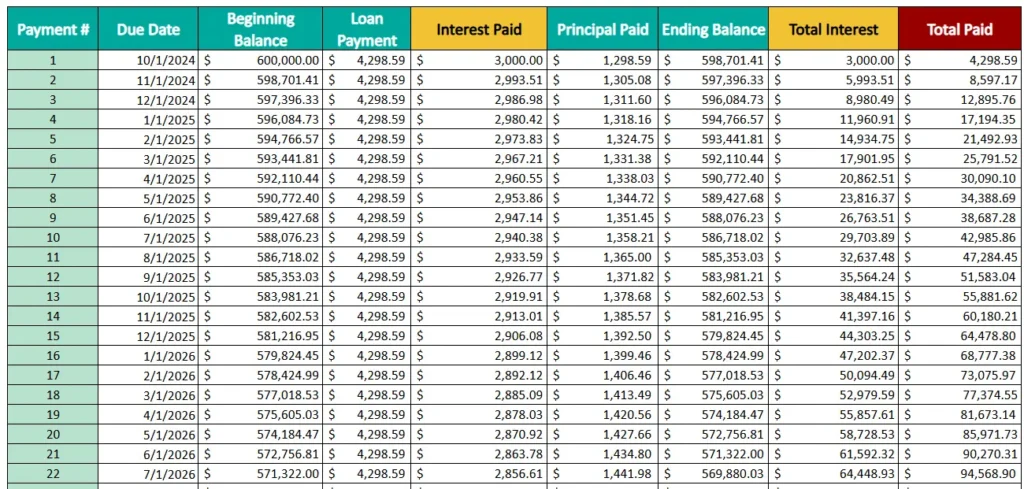
The loan amortization table is the core of the spreadsheet. It provides a detailed month-by-month breakdown of your home mortgage.
Each row shows:
- Payment Number
- Due Date
- Beginning Balance
- Loan Payment
- Interest Paid
- Principal Paid
- Ending Balance
- Total Interest (cumulative)
- Total Paid (cumulative)
This structure allows you to clearly see how mortgage amortization works. In the early years of a long-term mortgage, most of your payment goes toward interest. Over time, the principal portion increases.
For example, with a $600,000 mortgage at 6 percent over 20 years, your first payment may include about $3,000 in interest and just over $1,200 toward principal. By year 10, that balance shifts significantly, with more of each payment reducing the loan balance.
The cumulative columns allow you to track how much interest you have paid at any point in time. This is extremely helpful if you plan to refinance, sell, or make additional principal payments.
The amortization table gives you complete visibility into the life of your home mortgage, not just the monthly payment.
How to Use the Template
Using the Excel Home Loan Calculator is straightforward.
Step one is to enter your Home Price and Down Payment in the Home Information section. The Loan Amount updates automatically.
Step two is to enter your APR in the Loan Terms section. Be sure to enter it as a percentage, such as 6 percent or 7.5 percent.
Step three is to confirm your Loan Term in years under the Loan Duration section. The spreadsheet will calculate the Payoff Date based on your start date.
If your down payment is below 20 percent, check the PMI Percentage field. Adjust it to match your lender’s rate. The PMI amount will calculate automatically.
Once all inputs are set, scroll down to the loan amortization table. Review the first few rows to understand how your monthly payment is divided between interest and principal.
To run comparisons:
- Increase your down payment to eliminate PMI.
- Shorten the loan term to see how total interest decreases.
- Adjust the APR to see how small rate changes affect total cost.
Because it is built in Excel, every change recalculates instantly. This makes it ideal for side-by-side comparisons of different home mortgage scenarios.
Why Choose This Template
Many online mortgage calculators provide a single monthly payment number. They do not show the full loan amortization breakdown or cumulative interest over time.
This Excel Home Loan Calculator Spreadsheet provides:
- Full amortization schedule
- Automatic PMI logic based on 20 percent down payment threshold
- Adjustable PMI percentage for realistic modeling
- Cumulative interest tracking
- Clear payoff date calculation
- Structured, color-coded layout for readability
It is designed for practical use. First-time homebuyers can use it to understand mortgage amortization. Real estate investors can evaluate rental property financing. Homeowners considering refinancing can compare different loan structures.
Because it is built in Excel, you maintain full control over your file. You can customize formatting, add charts, create additional comparison tabs, or build advanced financial models on top of it.
Download Your Excel Home Loan Calculator Spreadsheet
- Free Template
- Fully Editable
- Instant Access
- Organize your information
How to Access Your Copy
- Enter your email for instant access
- Download from the link we send you
- Start using the spreadsheet right away