Taking out a personal loan should never feel like guessing. Before you commit to monthly payments for three, four, or five years, you should know exactly how much interest you will pay, when the loan will be fully paid off, and how your balance declines over time.
This Personal Loan Calculator Excel template was built to give you complete visibility into your loan. Instead of relying on a basic online calculator that only shows a monthly payment, this spreadsheet provides a full amortization schedule, total interest breakdown, payoff date, and running totals for every payment.
If you want a clear, professional way to evaluate a personal loan inside Excel, this template gives you structure, transparency, and flexibility.
Overview of the Template
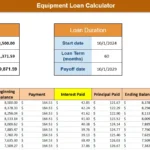
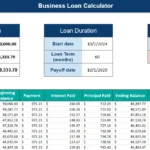
This Excel personal loan calculator is designed for real-world borrowers who want clarity and control. It combines summary panels at the top with a detailed amortization schedule below, so you can see both the big picture and the month-by-month breakdown.
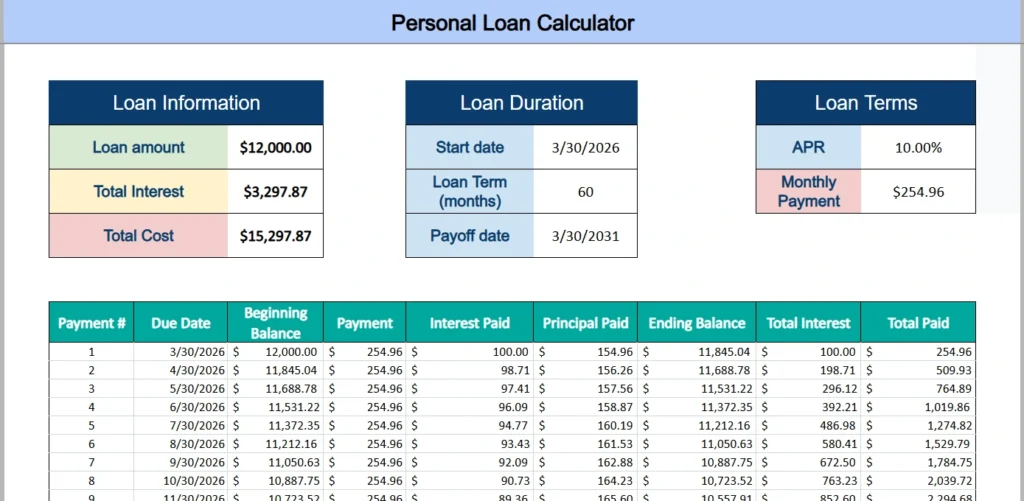
At the top of the worksheet, the template is divided into three main areas:
- Loan Information
- Loan Duration
- Loan Terms
These sections display:
- Loan amount
- Total interest over the life of the loan
- Total cost of the loan
- Start date
- Loan term in months
- Payoff date
- APR
- Monthly payment
Once you enter the loan details, Excel automatically calculates the monthly payment using built-in financial formulas and generates a complete amortization table underneath.
This structure makes the template useful for planning, comparing offers, and understanding the true cost of borrowing.
Key Features and Sections
Loan Information Section
The Loan Information section summarizes the core financial impact of your loan.
After entering the loan amount, the template calculates:
- Total interest paid over the full term
- Total cost of the loan, which includes principal plus interest
For example, if you borrow $12,000 at 10 percent APR for 60 months, the template calculates your total interest and shows the complete cost of the loan over five years. This number is often eye-opening. Many borrowers focus only on the monthly payment, but the total interest can significantly increase the true cost.
This section is especially helpful when comparing multiple loan offers. If two lenders offer different rates or terms, you can quickly see which option results in lower total interest.
Loan Duration Section
The Loan Duration section allows you to define:
- Start date
- Loan term in months
- Automatic payoff date
Once you enter a start date and the term length, Excel calculates the final payoff date instantly. This makes it easy to answer questions like:
- When will I be debt-free?
- Will this loan be paid off before I apply for a mortgage?
- How long will this affect my monthly cash flow?
Instead of manually counting months forward, the spreadsheet handles the date calculations for you.
Loan Terms Section
In the Loan Terms section, you enter the APR. The monthly payment is then calculated automatically using Excel’s financial functions.
This section allows you to test different scenarios quickly. For example:
- What happens if the APR increases from 9 percent to 11 percent?
- How much higher is the payment if you shorten the term from 60 months to 36 months?
- Does extending the term lower the payment enough to justify the extra interest?
Because the formulas update instantly, you can evaluate multiple scenarios in just a few minutes.
Amortization Schedule
The amortization schedule is the most powerful part of this Excel personal loan calculator.
Each row represents one payment and includes:
- Payment number
- Due date
- Beginning balance
- Payment amount
- Interest paid
- Principal paid
- Ending balance
- Cumulative total interest
- Cumulative total paid
Early in the loan, a larger portion of your payment goes toward interest. Over time, the interest portion decreases and more of each payment reduces the principal. Seeing this breakdown helps you understand how amortized loans work in practice.
This schedule is also extremely useful if you are considering early payoff. By scrolling down to a specific payment number, you can see exactly how much principal remains at that point in time.
For example, if you want to know the remaining balance after 24 payments, you can find it instantly without calling your lender.
How to Use the Template
Using this Excel personal loan calculator is simple and does not require advanced spreadsheet knowledge.
Step 1: Enter the Loan Amount
Input the total amount you plan to borrow. This might be $5,000 for a small emergency expense or $20,000 for debt consolidation.
Step 2: Enter the APR
Type in the annual percentage rate offered by your lender. Make sure the rate is entered correctly as a percentage.
Step 3: Set the Loan Term
Enter the number of months for the loan term. Common terms include 24, 36, 48, or 60 months.
Step 4: Choose the Start Date
Enter the date your first payment will be due. The payoff date will calculate automatically.
Once these values are filled in, the template calculates your monthly payment and builds the entire amortization schedule automatically.
You can then experiment with adjustments. For example:
- Reduce the term from 60 months to 48 months and see how much interest you save.
- Increase the loan amount slightly and observe how it affects the monthly payment.
- Compare two interest rates side by side using duplicate versions of the file.
Real-world example:
Suppose you are consolidating credit card debt into a personal loan. One lender offers 10 percent APR for 60 months. Another offers 8.5 percent APR for 48 months.
By entering both scenarios into separate copies of this template, you can clearly compare:
- Monthly payment difference
- Total interest difference
- Overall cost difference
- Time to payoff
Instead of guessing which loan is better, you can see the exact numbers and make a confident decision.
Why Choose This Excel Template
There are countless online loan calculators available, but most of them are limited in functionality. They typically provide a payment estimate without a full breakdown. You cannot adjust them freely, save your scenarios, or customize them.
This Excel personal loan calculator offers several important advantages.
Full Transparency
All formulas are visible and editable. You can see exactly how the payment is calculated and how interest is applied each month.
Professional Structure
The layout separates summary information from detailed amortization data, making it easy to read and present.
Customizable
You can add extra features such as additional payments, extra principal contributions, or visual charts that track balance decline over time.
Reusable
The template can be used for multiple loans. Whether you are evaluating a personal loan, a family loan agreement, or short-term financing, the structure works the same.
Educational Value
Many borrowers do not fully understand how interest accumulates. This spreadsheet visually demonstrates how amortization works month by month, which builds financial awareness.
If you are detail-oriented or like to analyze numbers before making decisions, this template gives you the control that online tools often lack.
Download Your Excel Personal Loan Calculator Spreadsheet
- Free Template
- Fully Editable
- Instant Access
- Organize your information
How to Access Your Copy
- Enter your email for instant access
- Download from the link we send you
- Start using the spreadsheet right away