If you have a home equity line of credit or are thinking about opening one, keeping track of your payments, interest costs, and remaining balance can get complicated fast. HELOC terms are not like a standard mortgage. You have a draw period, a repayment period, a variable interest rate, and sometimes the option to make interest-only payments during the draw phase. A lot of online calculators oversimplify this. They give you a monthly payment number and call it a day.
This free HELOC calculator spreadsheet, built in Google Sheets, gives you the full picture. It calculates your draw period payments, your repayment period payments, and walks you through a complete month-by-month amortization schedule covering all 360 months if needed. Whether you are planning a home renovation, consolidating debt, or just stress-testing a scenario before you sign anything, this tool is designed to help you understand exactly what you are getting into.
Overview of the Template
The HELOC Calculator Google Sheets template is a single-file tool with two tabs: the main calculator and an instructions sheet. Everything you need is on the calculator tab. You enter your loan details in a set of blue input cells, and the rest of the sheet updates automatically.
The template is built for homeowners who want more transparency than a basic online calculator offers. It is useful for first-time HELOC borrowers trying to understand the difference between draw period and repayment period costs, for homeowners comparing different draw amounts, and for anyone who wants to see a full amortization breakdown without having to pay for financial software.
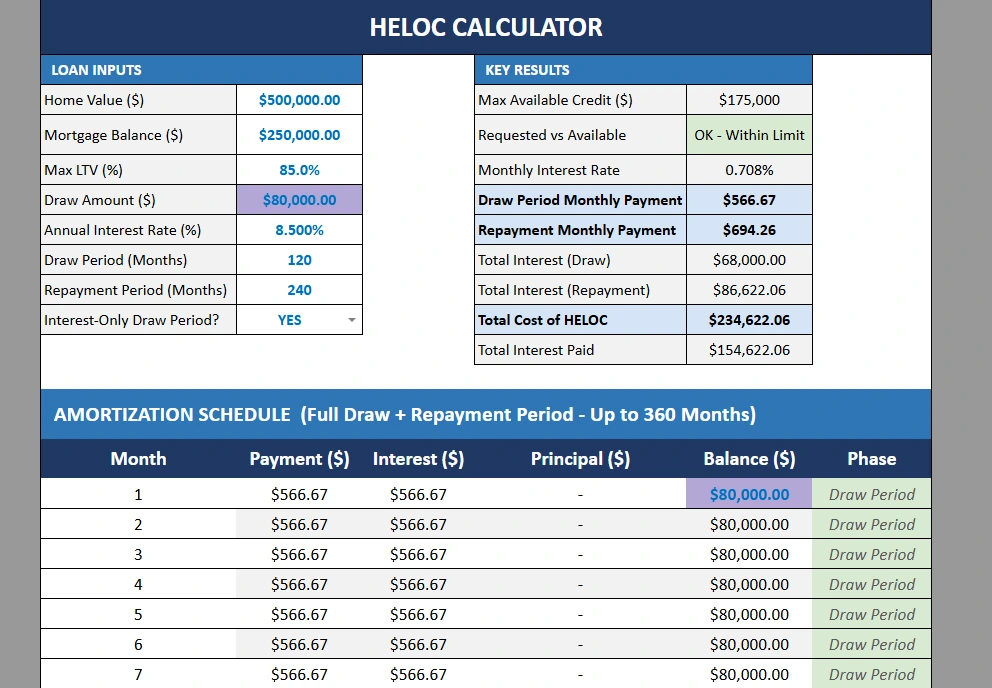
The default inputs use realistic numbers: a $500,000 home value, $250,000 mortgage balance, 85% max LTV, and an 8.5% annual interest rate. You can swap in your own numbers in under a minute.
Key Features and Sections
Loan Inputs
The inputs section is where you enter your specific details. There are nine input fields, all highlighted in blue so they are easy to spot. These include your home value, mortgage balance, the lender’s maximum loan-to-value ratio, your requested credit limit, your draw amount, the annual interest rate, the draw period length in months, the repayment period length in months, and whether your lender offers interest-only payments during the draw period.
The interest-only toggle is a simple YES or NO field. When set to YES, the calculator switches to interest-only payment math during the draw period. This reflects how most HELOCs actually work in practice, where lenders only require you to pay the accruing interest while the line is open. When set to NO, the sheet calculates a fully amortizing draw period payment instead.
Key Results
Directly to the right of the inputs, the Key Results panel shows you the most important numbers at a glance. This includes your maximum available credit based on your home value and LTV, a quick check confirming whether your requested credit limit is within that available amount, and the monthly interest rate.
The two numbers most borrowers care about are highlighted in bold: the Draw Period Monthly Payment and the Repayment Monthly Payment. For example, with an $80,000 draw at 8.5% interest-only, the draw period payment comes to $566.67 per month. Once the draw period ends and repayment begins, that same balance shifts to a fully amortizing payment of $694.26 per month over 240 months. Seeing both numbers side by side helps you plan your budget for both phases of the loan.
The panel also shows Total Interest during the draw period, Total Interest during repayment, Total Interest Paid overall, and the Total Cost of the HELOC including principal. In the example above, the total cost comes to $234,622.06 on an $80,000 draw, which puts the true cost of borrowing in plain sight.
Rate Sensitivity Table
Because HELOCs carry variable interest rates, your payment can change over time as the prime rate moves. The Rate Sensitivity section shows you what your draw and repayment payments would look like at six different rate scenarios, from two percentage points below your current rate up to three percentage points above it. This is one of the most practical sections in the sheet because it forces you to ask: can I still afford this if rates go up by 2%? By 3%? Having those numbers in front of you before you open the line is far more useful than finding out after the fact.
Amortization Schedule
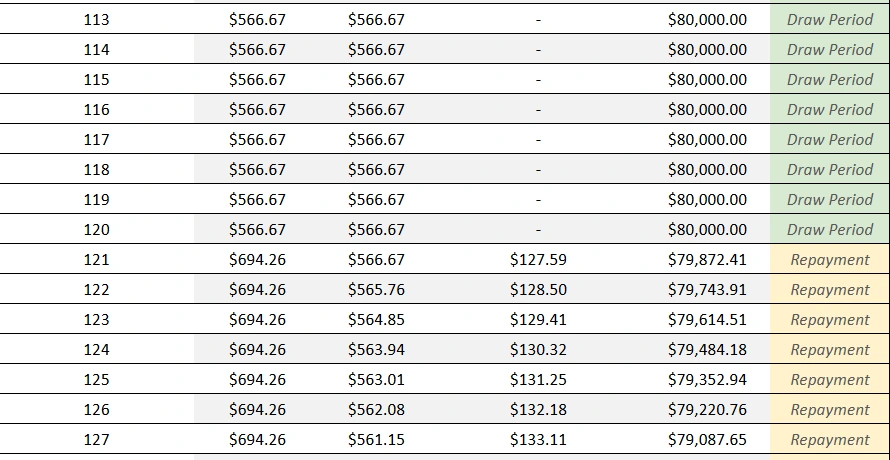
The amortization schedule is the most detailed section of the template. It runs for up to 360 rows, one for each month across both the draw period and the repayment period. Each row shows the month number, the payment amount, the interest portion, the principal portion, the remaining balance, and a Phase label that tells you whether that month falls in the Draw Period or the Repayment phase.
The transition between phases is easy to spot. In the example screenshots, months 1 through 120 are labeled Draw Period with a $566.67 interest-only payment and a flat $80,000 balance. Starting at month 121, the Phase column switches to Repayment, the payment increases to $694.26, and you can watch the balance start declining month by month. By month 127, the balance has dropped to $79,087.65. The schedule keeps going all the way to month 360 or until the balance reaches zero, whichever comes first.
How to Use the Template
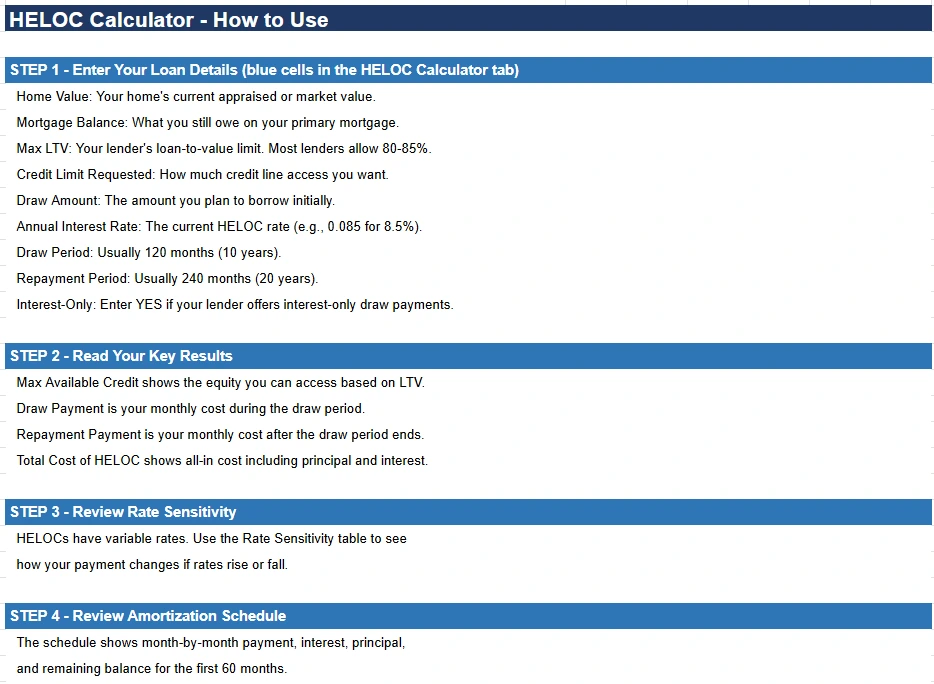
Using the template takes only a few minutes. Open the file in Google Sheets, go to the HELOC Calculator tab, and start filling in the blue cells with your numbers.
Start with your home value and your current mortgage balance. Enter the maximum LTV your lender offers, which is typically between 80% and 90%. Then enter the credit limit you are requesting and the amount you plan to draw. Input your current interest rate as a decimal (for example, 8.5% goes in as 0.085). Set your draw period and repayment period in months (120 and 240 are the most common). Finally, enter YES or NO for the interest-only question based on your loan terms.
Once those nine fields are filled in, every other cell in the sheet calculates automatically. Review your Key Results first to confirm your requested credit limit is within the available equity. Then scroll down to the amortization schedule to see how your balance and payments evolve over time. If you want to test a different scenario, such as a larger draw amount or a higher interest rate, just change the relevant input cell and the entire sheet updates instantly.
The Instructions tab walks through each step in plain language if you want a reference guide to share with a spouse or financial advisor.
Why Choose This Template
Most HELOC calculators you find online are built for speed, not depth. They ask for a loan amount and a rate, and they return a single monthly payment. They do not show you the difference between draw and repayment costs. They do not show you what happens if rates rise. And they definitely do not give you a row-by-row breakdown of 30 years of payments.
This Google Sheets template does all of that in one place, for free. It is built with standard Google Sheets formulas, so there are no macros, no add-ons, and no complicated setup. You can make a copy to your own Google Drive and it works immediately.
It is also easy to customize. If your lender has different terms, you can adjust the draw and repayment period lengths to match. If you want to model a partial draw rather than the full credit line, just change the draw amount. The sheet is transparent by design, so you can see exactly how every number is calculated.
For homeowners who take their financial planning seriously, having a tool like this before signing a HELOC agreement can mean catching an affordability problem before it becomes a real one.
Download Your Free HELOC Loan Calculator Spreadsheet
- Free Template
- Fully Editable
- Instant Access
- Organize your information
How to Access Your Copy
- Enter your email for instant access
- Open the link we send you
- Start using the spreadsheet right away