Buying a home is one of the biggest financial decisions most people will ever make. Before signing a mortgage agreement, it helps to clearly understand your monthly payment, total interest, PMI costs, and full loan amortization schedule. That is exactly what this Home Loan Calculator Spreadsheet in Google Sheets is designed to do.
This template gives you a complete breakdown of your home mortgage, including principal and interest, private mortgage insurance calculations, payoff date, and a detailed loan amortization table. It is color coded, easy to follow, and built for real-world scenarios where down payments, PMI percentages, and loan terms vary.
Whether you are a first-time buyer, refinancing, or simply comparing scenarios, this Google Sheets template gives you a transparent look at how your loan behaves over time.
Overview of the Template
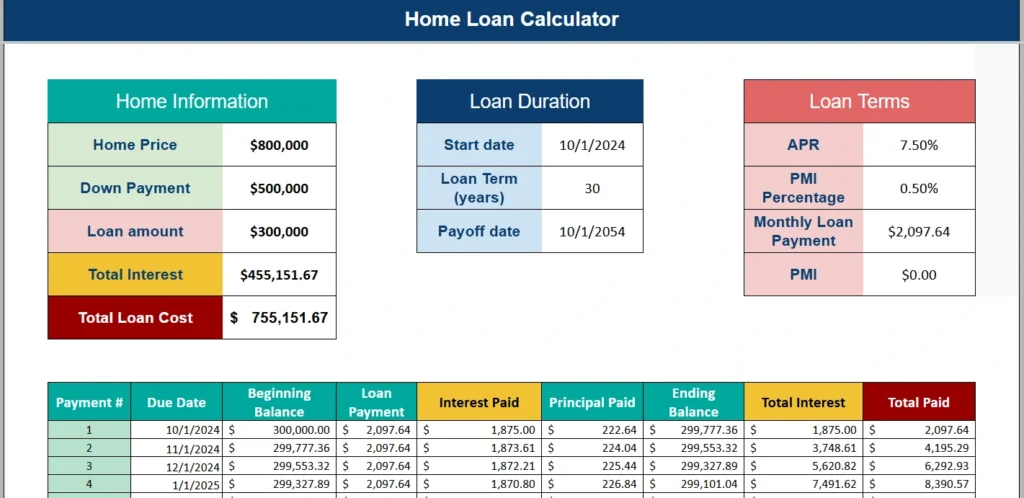
This Home Loan Calculator Spreadsheet is built entirely in Google Sheets and structured around three main sections at the top: Home Information, Loan Duration, and Loan Terms. Below those sections is a fully automated loan amortization table that calculates each payment line by line.
The goal of the template is simple: give you clarity. Instead of relying on a basic online calculator that only shows a monthly payment, this spreadsheet shows you how interest accumulates, how much principal you pay down each month, and what your total home mortgage will cost over time.
The template automatically calculates:
- Loan amount based on home price and down payment
- Monthly mortgage payment using your APR and term
- PMI if your down payment is below 20 percent
- Total interest over the life of the loan
- Total loan cost (principal plus interest)
- A full amortization schedule with cumulative totals
Because it is built in Google Sheets, you can duplicate it, customize it, and run unlimited scenarios. You are not locked into a single result. You can adjust the home price, change the PMI percentage, increase the down payment, or test different loan terms and immediately see how your home mortgage changes.
Key Features and Sections
Home Information
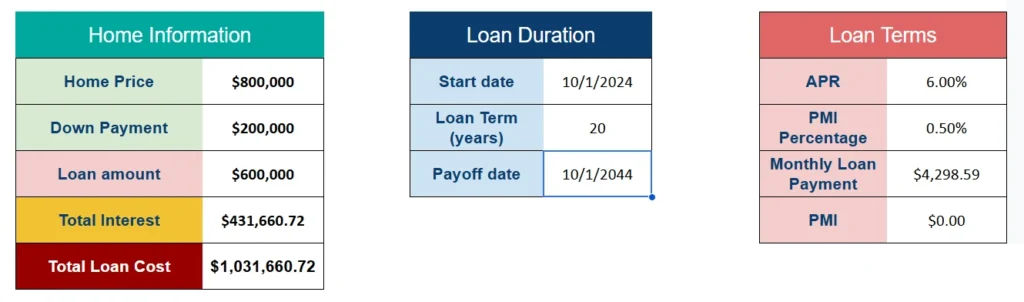
The Home Information section is where your core purchase details live. It includes:
- Home Price
- Down Payment
- Loan Amount
- Total Interest
- Total Loan Cost
The spreadsheet automatically calculates the loan amount by subtracting the down payment from the home price. If you enter a home price of $800,000 and a down payment of $200,000, the loan amount updates instantly to $600,000.
From there, the sheet calculates total interest based on your loan term and APR. The Total Loan Cost shows the true cost of borrowing by combining principal and interest. This is critical when evaluating a long-term home mortgage because even a small change in interest rate can mean tens or hundreds of thousands of dollars in difference over 30 years.
The color coding makes it easy to distinguish between inputs and calculated outputs. This helps reduce mistakes and makes the sheet intuitive, even for users who are not spreadsheet experts.
Loan Duration
The Loan Duration section controls the timeline of your mortgage. It includes:
- Start Date
- Loan Term (years)
- Payoff Date
When you change the loan term from 30 years to 15 years, the amortization schedule instantly recalculates. The payoff date updates automatically based on your start date and term length.
This section is especially useful for comparing different mortgage strategies. For example, you might compare:
- A 30-year mortgage at 7.5 percent
- A 15-year mortgage at 6.75 percent
By simply changing the loan term value in Google Sheets, you can see how the monthly payment increases but total interest drops significantly. This makes the loan amortization comparison visual and practical.
Loan Terms
The Loan Terms section is where the financial mechanics of the home mortgage are defined. It includes:
- APR
- PMI Percentage
- Monthly Payment
- PMI (calculated amount)
The monthly payment is calculated automatically using your APR, loan amount, and loan term. The spreadsheet uses standard amortization logic so that each payment is correctly split between interest and principal.
One of the most powerful features of this template is its PMI calculation. If your down payment is less than 20 percent of the total home price, PMI is automatically triggered. The spreadsheet checks the loan-to-value ratio and adds a PMI payment when applicable.
For example, if you purchase a $800,000 home and put down $100,000, that is 12.5 percent down. Because this is below 20 percent, PMI will apply. You can adjust the PMI Percentage value in the Loan Terms section to reflect your lender’s actual rate. The sheet will immediately recalculate the monthly PMI cost.
If your down payment reaches 20 percent or more, PMI automatically drops to zero. This makes it easy to see the financial benefit of increasing your down payment.
Loan Amortization Table
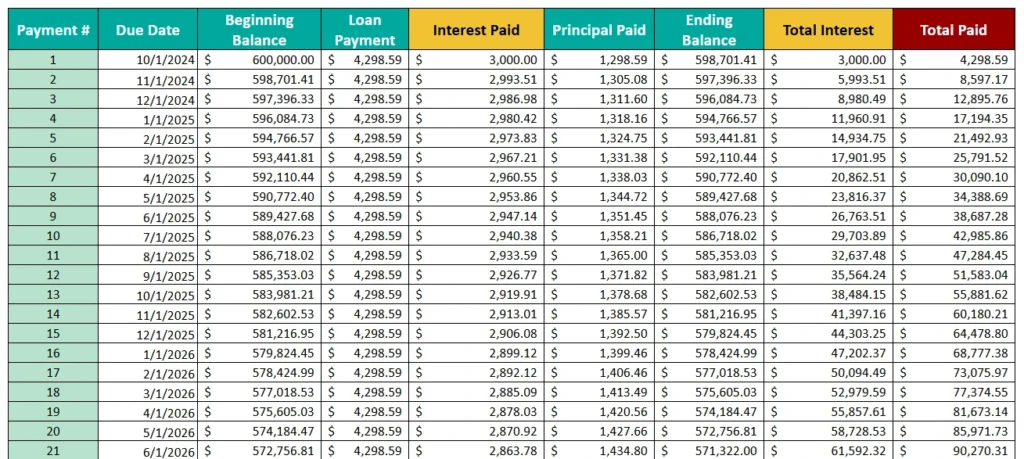
The loan amortization section is where this template truly shines. It provides a complete month-by-month breakdown of your home mortgage.
Each row includes:
- Payment Number
- Due Date
- Beginning Balance
- Loan Payment
- Interest Paid
- Principal Paid
- Ending Balance
- Cumulative Interest
- Cumulative Paid
This structure allows you to see how mortgage amortization works in real life. In the early years of a 30-year loan, most of your payment goes toward interest. As time passes, more of each payment goes toward principal.
For example, on a $300,000 mortgage at 7.5 percent, your first payment might include roughly $1,875 in interest and only a few hundred dollars toward principal. By year 20, the ratio flips dramatically.
The cumulative columns help you track how much total interest you have paid at any point in the loan. This is especially useful if you plan to sell or refinance in 5 to 10 years. You can scroll down the amortization schedule and see exactly how much equity you have built and how much interest you have already paid.
How to Use the Template
Using this Google Sheets home loan calculator is straightforward.
Start by entering your Home Price and Down Payment in the Home Information section. The Loan Amount will update automatically.
Next, enter your APR in the Loan Terms section. Make sure to input it as a percentage, such as 7.5 percent. Then confirm the Loan Term in years under Loan Duration.
If your lender requires PMI, adjust the PMI Percentage value. The spreadsheet will calculate the monthly PMI payment automatically if your down payment is under 20 percent. If it is 20 percent or more, PMI will show as zero.
Once these values are entered, scroll down to the loan amortization table. Review the first few rows to understand how your monthly payment is divided between interest and principal.
To test different scenarios:
- Increase your down payment to see how PMI disappears.
- Change the loan term from 30 to 15 years to compare total interest.
- Adjust the APR to see how rate changes affect total loan cost.
Because it is built in Google Sheets, every change updates in real time. This makes it ideal for buyers comparing multiple home mortgage options.
Why Choose This Template
There are countless online mortgage calculators, but most of them only show a single monthly payment number. They do not show the full loan amortization breakdown or cumulative interest over time.
This Home Loan Calculator Spreadsheet gives you:
- Complete transparency into your home mortgage
- Automatic PMI logic tied to down payment percentage
- Adjustable PMI percentage for realistic lender scenarios
- Detailed amortization schedule with cumulative tracking
- Clear color-coded sections for easy navigation
- Flexible scenario testing inside Google Sheets
It is designed for real users, not just theoretical calculations. First-time buyers can use it to understand how mortgage amortization works. Investors can evaluate rental property financing. Homeowners can compare refinancing options. Even financial coaches can use it to walk clients through the true cost of borrowing.
Because it lives in Google Sheets, you can store it in your Drive, share it with a spouse or advisor, or duplicate it for different property scenarios. There are no restrictions and no subscription requirements.
Download Your Free Home Loan Calculator Spreadsheet
- Free Template
- Fully Editable
- Instant Access
- Organize your information
How to Access Your Copy
- Enter your email for instant access
- Open the link we send you
- Start using the spreadsheet right away