If you have ever taken out a personal loan, auto loan, or any fixed-term financing, you know how hard it can be to understand exactly where your money is going each month. How much of that payment is actually reducing your balance? How much is going straight to interest? And when will you finally be done paying it off?
This free Loan Amortization Calculator for Google Sheets answers all of those questions clearly and automatically. Whether you are a first-time borrower trying to understand your loan terms or someone comparing financing options before signing anything, this template gives you a full picture of your loan from the first payment to the last.
Overview of the Template
The Loan Amortization Calculator is a Google Sheets template designed to break down any fixed-rate loan into a complete, month-by-month payment schedule. You enter a few basic details about your loan, and the spreadsheet does the rest. No manual calculations, no confusing formulas to write, and no financial background required.
The template is built around three input fields: the loan amount, the annual percentage rate (APR), and the loan term in months. From those three numbers, the sheet calculates your monthly payment, your total interest over the life of the loan, the total cost of borrowing, and a full amortization table that shows exactly how each payment is applied.
This template works well for anyone dealing with a personal loan from a bank or credit union, a car loan, a home equity loan, a student loan, or any other installment-based financing with a fixed rate and fixed term. It is especially useful for people who want to understand their loan before they commit to it, not just after.
Key Features and Sections
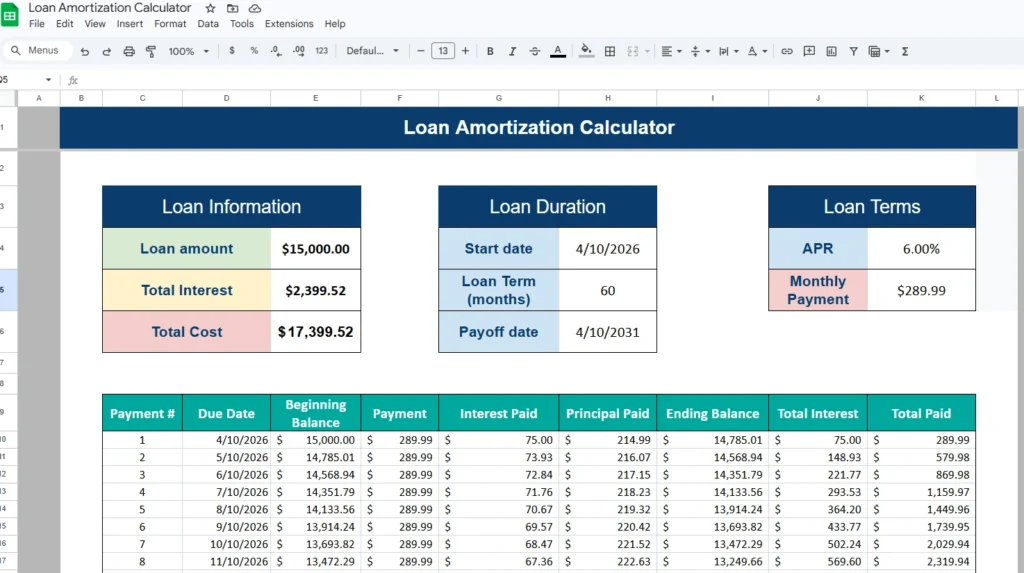
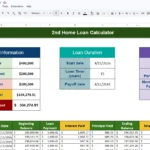
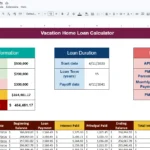
The template is divided into two main areas: a summary section at the top and a detailed payment schedule table below it. Both work together to give you both the big picture and the granular detail.
Loan Information Panel
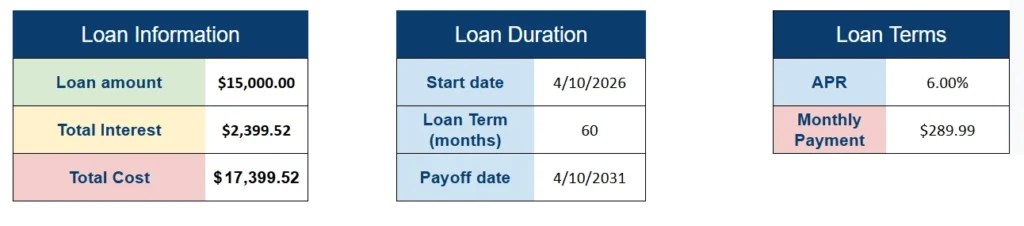
The Loan Information panel shows three calculated values that summarize your borrowing costs at a glance. The loan amount field reflects what you entered, while the total interest and total cost fields are automatically calculated based on your APR and loan term.
For example, if you borrow $15,000 at 6% APR over 60 months, the template immediately shows you that you will pay $2,399.52 in interest and a total of $17,399.52 by the time the loan is paid off. Seeing that number up front can be eye-opening, especially when you are deciding between a shorter or longer loan term.
Loan Duration Panel
The Loan Duration panel handles the timeline of your loan. You enter a start date and a loan term in months, and Google Sheets calculates your payoff date automatically. This is a small detail that makes a real difference when you are planning your finances around a specific goal, like paying off a car before you need to replace it, or finishing a personal loan before a major life event.
Loan Terms Panel
The Loan Terms panel displays your APR and your calculated monthly payment side by side. This is the section most people look at first. Seeing a monthly payment of $289.99 on a $15,000 loan over 5 years is far easier to evaluate than trying to calculate it on your own. If you are shopping around for loans, you can plug in different rates and see how your payment changes in real time.
Amortization Schedule Table
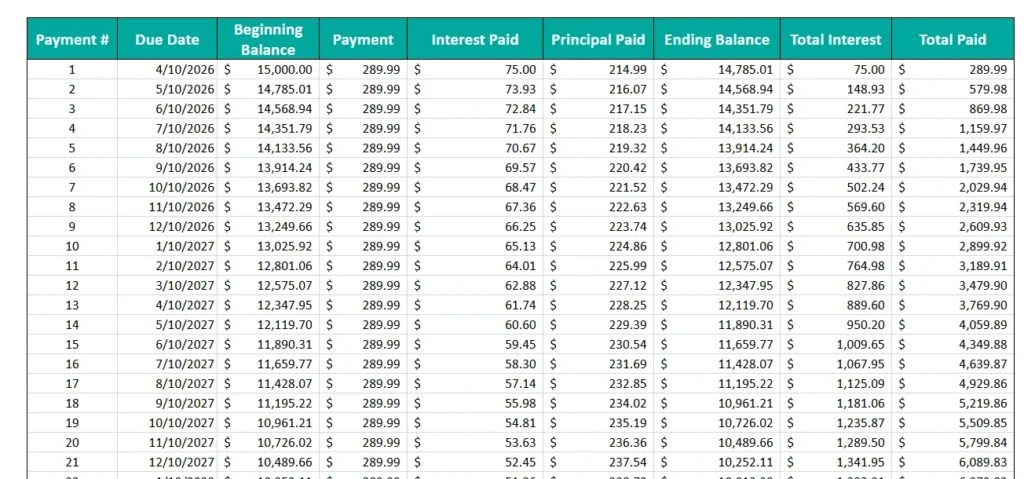
This is where the template really delivers its value. The amortization table lists every single payment from month one through the final payoff, with columns for the payment number, due date, beginning balance, payment amount, interest paid, principal paid, ending balance, cumulative interest, and total amount paid to date.
Each row in the table updates automatically based on your inputs. In the early months of a loan, most of your payment goes toward interest. As you progress through the schedule, the principal portion grows while the interest portion shrinks. The table makes this shift visible in a way that a simple monthly statement never does.
For someone making a $289.99 monthly payment on a $15,000 loan, the first payment sends $75.00 to interest and $214.99 to principal. By month 30, that ratio has shifted noticeably, with more going toward principal than interest. The table tracks all of this automatically so you never have to wonder.
How to Use the Template
Getting started with this Google Sheets template takes less than two minutes.
Step 1: Enter Your Loan Details
Open the template in Google Sheets and locate the three input fields: the loan amount, the APR, and the loan term in months. Type in your values and watch the rest of the sheet update instantly. There is nothing else to configure for basic use.
Step 2: Set Your Start Date
Enter the date your first payment is due in the start date field. Google Sheets will automatically calculate the due date for every payment in the schedule below, as well as your final payoff date.
Step 3: Review the Summary Panels
Once your inputs are entered, check the three summary panels at the top. These give you a quick read on your monthly payment, total interest, total cost, and payoff timeline. If any of those numbers surprise you, try adjusting the loan term or APR to see how different scenarios compare.
Step 4: Review the Amortization Table
Scroll down to the full payment schedule and review the breakdown of each payment. You can use this table to identify how long it takes to pay off more than half of the principal, which is useful for understanding your equity position on a secured loan. It also helps you see the long-term cost of a lower monthly payment when it comes with a longer loan term.
Step 5: Make a Copy in Google Sheets
To save your data and customize the template, go to File and select Make a Copy. This saves the spreadsheet to your own Google Drive so you can edit it freely without affecting the original.
Why Choose This Template
There are plenty of loan calculators available online, but most of them only give you a single monthly payment number and nothing else. This Google Sheets template goes further by giving you a complete view of your loan from start to finish.
The amortization table is especially valuable for people who are weighing their options. If a lender offers you the choice between a 36-month term and a 60-month term, you can plug both scenarios into the template and see the difference in total interest paid, not just the difference in monthly payment. That additional context helps you make a more informed decision, not just a comfortable one.
The template also works as a reference tool after you have taken out a loan. Homeowners who took out a home equity loan, families with auto financing, and borrowers managing personal debt can all use this sheet to stay aware of their balance, track their progress, and plan for early payoff scenarios.
Because it lives in Google Sheets, the template is accessible from any device with an internet connection. You can open it on your phone before a dealership visit, share it with a partner or financial advisor, or keep it updated as you make payments over time. Everything syncs automatically since Google Sheets works in the cloud.
The design is clean and easy to read, which matters more than people often expect. A well-organized spreadsheet saves time and reduces mistakes because important numbers are always easy to find. The color-coded summary panels and consistently formatted table make this template approachable even for people who do not spend a lot of time in spreadsheets.
There is no software to install and no account required beyond a free Google account. The template is built entirely in Google Sheets, which means it is compatible with any device and always available.
If you are dealing with a loan and want to understand it more clearly, this template gives you the tools to do that in one place. Download it today, enter your loan details, and get a complete picture of your payments from start to payoff.
Ready to apply for a personal loan?
Browse real lender offers at Honest Loans. No impact on your credit score to check rates.
Download Your Free Loan Amortization Calculator Spreadsheet
- Free Template
- Fully Editable
- Instant Access
- Organize your information
How to Access Your Copy
- Enter your email for instant access
- Open the link we send you
- Start using the spreadsheet right away
Important Disclosures
Sheetrix is not a lender, does not make loan or credit decisions, and does not broker loans. We are a lead generator and advertising referral service. We do not charge any application fee. Submitting your information through a link on this website does not guarantee approval for a loan, and we cannot guarantee any specific loan amount. Loans are not available in all states, and amounts, rates, and terms vary by state and lender. Short-term loans are not a long-term financial solution and should be used only for short-term financial needs. For full details, see our Terms & Conditions page.