Managing the financial side of a medical procedure can feel overwhelming, especially when you are dealing with loan terms, insurance reimbursements, and monthly payments all at once. That is why having a clear, organized tool makes such a difference. This Medical Loan Calculator Google Sheets template was built to take the guesswork out of healthcare financing, giving you a complete picture of what you owe, what you will pay each month, and exactly how long it will take to pay it off.
Whether you are financing a surgery, dental work, fertility treatments, or any other out-of-pocket medical expense, this template gives you the structure to plan responsibly and stay on top of your payments from day one.
Overview of the Template
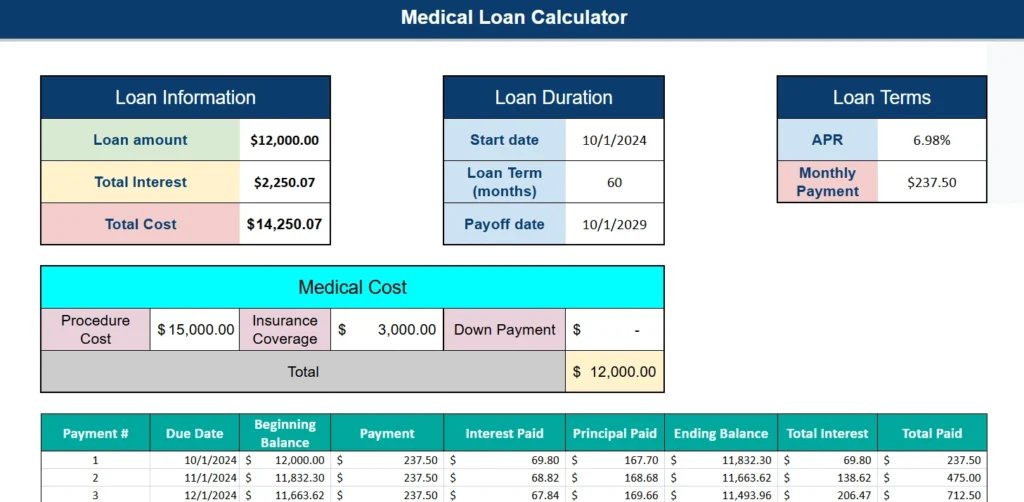
This Google Sheets template is a fully functional medical loan calculator designed for individuals who need to finance a medical expense and want to understand the full cost of borrowing before committing to a loan. It is not just a basic monthly payment calculator. It combines loan details, insurance coverage, procedure costs, and a complete amortization schedule into one clean, easy-to-navigate spreadsheet.
The template is ideal for patients facing elective procedures, families managing ongoing healthcare costs, or anyone who received a medical bill and is exploring financing options. It is also useful for financial coaches, healthcare advocates, or anyone helping a patient understand their loan terms.
At its core, the template answers three critical questions: How much will this loan actually cost me? What will I pay each month? And how does my payment break down between principal and interest over time? With this Google Sheets calculator, those answers are always visible and automatically updated whenever you change an input.
Key Features and Sections
Loan Information Panel
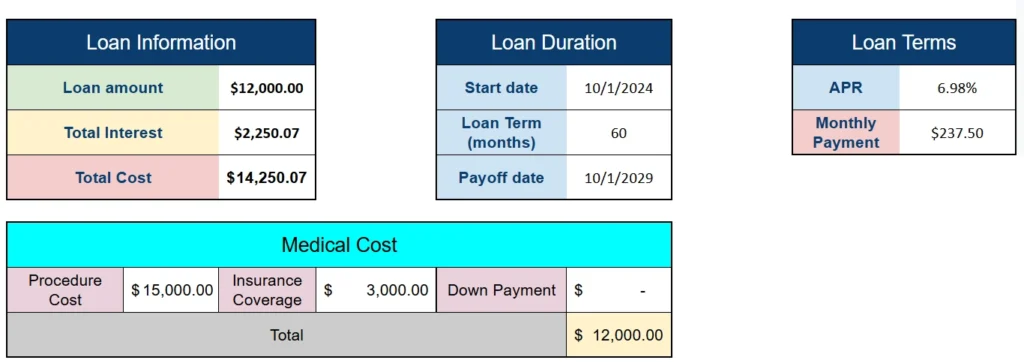
The Loan Information section gives you a high-level summary of your borrowing costs at a glance. It displays three key figures: the total loan amount, total interest paid over the life of the loan, and the overall cost of the loan when you combine principal and interest.
For example, in the sample template, a $12,000 loan at 6.98% APR over 60 months results in $2,250.07 in total interest, bringing the full repayment cost to $14,250.07. Seeing that figure upfront helps borrowers make informed decisions, like whether to put more money down, shorten the loan term, or shop for a lower interest rate.
Loan Duration Panel
This section captures your start date, loan term in months, and automatically calculates the payoff date. In the example, a loan starting on October 1, 2024 with a 60-month term results in a payoff date of October 1, 2029. Having the payoff date visible is more useful than most people realize. It helps you plan for other major financial goals, like knowing that your medical loan will be paid off before you take on a car loan or mortgage.
Loan Terms Panel
The Loan Terms section is where you enter your APR and where the template calculates your fixed monthly payment. In the sample, a 6.98% APR on a $12,000 loan produces a monthly payment of $237.50. This section uses a standard amortization formula built directly into Google Sheets, so the calculation is accurate and updates automatically when you adjust the rate or term.
Medical Cost Panel
What sets this template apart from a generic loan calculator is the Medical Cost section. This panel lets you break down the actual cost of the procedure, not just the loan amount. You enter the full procedure cost, the amount covered by insurance, and any down payment you are making upfront.
In the example, the procedure costs $15,000. Insurance covers $3,000 and there is no down payment, which means the loan amount is $12,000. This is a realistic scenario for someone with a high-deductible health plan who has already hit their deductible but still has a large out-of-pocket balance remaining. The template automatically subtracts coverage and down payments to arrive at the exact amount you need to finance.
Amortization Schedule
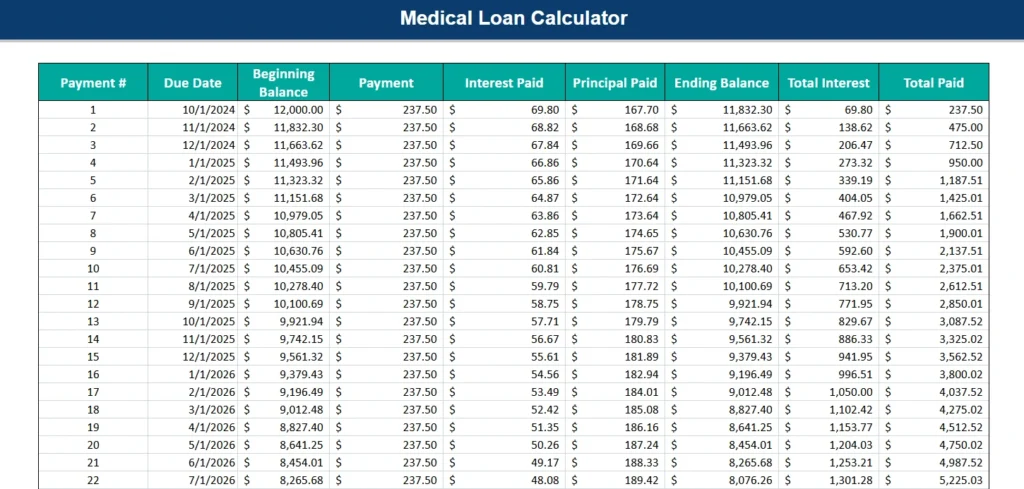
The amortization schedule is the most detailed and arguably most valuable part of the template. It is a full month-by-month table that shows every payment from the first to the last, including the due date, beginning balance, payment amount, interest paid, principal paid, ending balance, cumulative interest, and cumulative total paid.
This level of detail is genuinely useful. For instance, you can look at payment 12 and see that after one year of payments, your balance has dropped from $12,000 to $9,921.94, and you have paid $771.95 in interest so far. That kind of transparency helps borrowers stay motivated and allows them to see the real-time impact of making extra payments if they choose to do so.
How to Use the Template
Using this Google Sheets template is straightforward, even if you are not experienced with spreadsheets. Here is a step-by-step walkthrough:
Start by entering your procedure cost in the Medical Cost panel. Then enter the amount your insurance will cover and any down payment you plan to make. The template will automatically calculate the total loan amount needed.
Next, move to the Loan Terms panel and enter your APR. You can usually find this in your loan offer or financing agreement. If you are comparing multiple loan options, try entering different rates to see how they affect your monthly payment and total interest paid.
Then fill in the Loan Duration panel. Enter your loan start date and the loan term in months. For a standard medical loan, terms typically range from 12 to 84 months. The template will calculate your payoff date and update the entire amortization schedule automatically.
Once all inputs are filled in, the Loan Information panel will display your total loan amount, total interest, and total cost. Scroll down to the amortization schedule to review your full payment breakdown. You can use this table to identify specific milestones, like when your balance drops below $5,000 or when you have paid off 50% of the loan.
If you want to model a scenario where you make an extra payment one month, you can adjust the schedule manually and see how it affects future rows. Google Sheets makes this kind of what-if analysis easy without needing any advanced formulas on your end.
Why Choose This Template
There are plenty of generic loan calculators available online, but most of them stop at giving you a monthly payment number. This Google Sheets template goes further by incorporating the medical-specific context that matters: the procedure cost, insurance coverage, and down payment, all in one place.
It is also completely transparent. Because the entire calculator is built in Google Sheets, you can see every formula and understand exactly how each number is calculated. There are no black boxes, no hidden assumptions, and no subscription fees. You open it, enter your numbers, and get real results.
The template is also highly flexible. You can adjust the loan term from 12 months to 84 months, swap in different APRs to compare offers, or model scenarios where you contribute a larger down payment to reduce your loan principal. This makes it a practical planning tool, not just a one-time calculation.
For patients who are already working with a financial counselor or hospital billing department, this template gives you a structured document you can reference during those conversations. You are not relying on verbal estimates or generic calculators on a lender’s website. You have your own independently verified breakdown.
Finally, this template works entirely within Google Sheets, which means it is accessible from any device, easy to share with a spouse or financial advisor, and automatically saved to your Google Drive. There is no software to install and no compatibility issues to worry about.
Download Your Free Medical Loan Calculator Spreadsheet
- Free Template
- Fully Editable
- Instant Access
- Organize your information
How to Access Your Copy
- Enter your email for instant access
- Open the link we send you
- Start using the spreadsheet right away