Taking out a personal loan can be a smart move when you need to consolidate debt, cover medical expenses, finance a home improvement project, or handle an unexpected cost. The challenge is understanding exactly how much that loan will cost you over time. Interest adds up, payment schedules can feel confusing, and it is not always clear how much of each payment goes toward principal versus interest.
This Personal Loan Calculator Spreadsheet for Google Sheets was built to solve that problem in a simple and transparent way. Instead of relying on basic online calculators that only show a monthly payment, this template gives you a full amortization schedule, total interest breakdown, payoff date, and cumulative totals. Everything updates automatically as soon as you change the loan amount, term, or APR.
If you want to clearly see the true cost of borrowing and make smarter decisions before signing a loan agreement, this template gives you full control inside Google Sheets.
Overview of the Template
This Personal Loan Calculator Spreadsheet is designed for everyday borrowers who want clarity. It works directly in Google Sheets and requires no scripts, add-ons, or advanced setup. You simply enter your loan details and the spreadsheet calculates everything in real time.
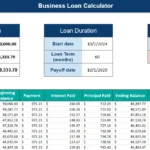
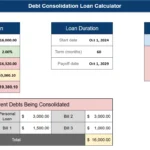
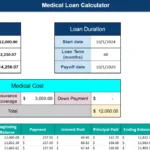
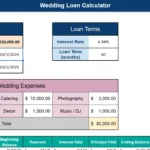
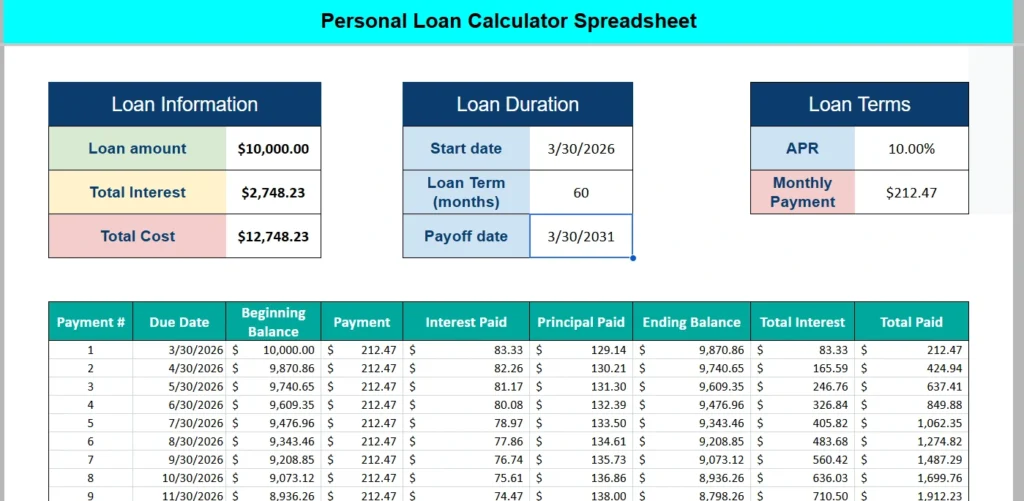
At the top of the sheet, you will find three clearly organized sections:
- Loan Information
- Loan Duration
- Loan Terms
These sections summarize the most important numbers, including:
- Loan amount
- Total interest
- Total cost of the loan
- Start date
- Loan term in months
- Payoff date
- APR
- Monthly payment
Below that, the spreadsheet automatically generates a detailed amortization table. This table breaks down each payment by date and shows:
- Beginning balance
- Payment amount
- Interest paid
- Principal paid
- Ending balance
- Running total interest
- Running total paid
Instead of guessing how interest compounds over time, you can see exactly how your balance declines month by month.
Because this template is built in Google Sheets, you can duplicate it, rename it, and customize it to fit multiple loan scenarios. You can also share it with a spouse, partner, or financial advisor for collaborative planning.
Key Features and Sections
Loan Information Section
The Loan Information area provides a high-level summary of your borrowing costs. You enter your loan amount, and the spreadsheet automatically calculates total interest and total cost based on your APR and term.
For example, if you borrow $10,000 at 10 percent APR for 60 months, the sheet calculates the total interest and adds it to your principal to show the full cost of the loan. This makes it easier to compare different loan offers from banks, credit unions, or online lenders.
Seeing total interest upfront often changes how people think about borrowing. A loan with a slightly lower monthly payment may cost significantly more in total interest if the term is extended.
Loan Duration Section
The Loan Duration section allows you to set the start date and loan term in months. Once those values are entered, the payoff date updates automatically.
This is especially helpful if you are timing a loan around other financial goals. For example:
- Paying off a loan before applying for a mortgage
- Clearing debt before a major life event
- Planning to be debt-free by a certain age
Instead of manually counting months on a calendar, Google Sheets calculates the payoff date for you.
Loan Terms Section
The Loan Terms section includes your APR and the calculated monthly payment. The monthly payment is determined using standard loan amortization formulas built directly into Google Sheets.
When you adjust the APR or term length, the monthly payment recalculates instantly. This allows you to compare scenarios such as:
- 36-month loan versus 60-month loan
- 8 percent APR versus 12 percent APR
- Shorter term with higher payment versus longer term with lower payment
Having these comparisons in one place makes decision-making much easier.
Amortization Schedule
The amortization schedule is the heart of this personal loan calculator spreadsheet. Each row represents a payment period and includes detailed breakdowns.
You can see how much of each payment goes toward interest and how much reduces the principal balance. Early in the loan, interest makes up a larger portion of each payment. As the balance decreases, more of each payment goes toward principal.
The table also includes running totals for interest paid and total amount paid. This gives you a clear picture of how much you have spent at any point during the loan term.
This feature is particularly useful if you are considering early payoff. You can scroll down the schedule and see exactly how much principal remains at any payment number.
How to Use the Template
Using this Google Sheets template is straightforward, even if you are not a spreadsheet expert.
Step 1: Enter the Loan Amount
Start by typing your desired loan amount in the Loan Information section. This could be $5,000 for a small consolidation loan or $25,000 for a larger expense.
Step 2: Enter the APR
Input the annual percentage rate offered by your lender. Make sure you enter it as a percentage, such as 10 percent, so the formulas calculate correctly.
Step 3: Set the Loan Term
Enter the number of months for your loan term. Common terms include 24, 36, 48, or 60 months.
Step 4: Choose a Start Date
Select the date your first payment will be due. The payoff date will automatically adjust based on your term.
Once these values are entered, the spreadsheet calculates your monthly payment and generates the full amortization schedule.
You can then experiment with different scenarios. For example:
- What happens if you shorten the term from 60 months to 36 months?
- How much interest do you save if the APR drops by 1 percent?
- Is it worth refinancing at a lower rate?
Because everything updates instantly in Google Sheets, you can run multiple what-if analyses in minutes.
Real-world example:
Imagine you are consolidating credit card debt. You compare two offers:
Offer A: 10 percent APR for 60 months
Offer B: 8 percent APR for 48 months
By entering both scenarios into separate copies of the template, you can clearly see which option results in lower total interest and how the monthly payments differ.
This makes the spreadsheet a practical decision-making tool, not just a calculator.
Why Choose This Template
There are many loan calculators available online, but most of them are limited. They show a payment amount and maybe total interest, but they rarely provide a full breakdown that you can adjust and save.
This Personal Loan Calculator Spreadsheet in Google Sheets offers several advantages:
Full Transparency
You see every formula and every calculation. There are no hidden assumptions.
Editable and Customizable
Because it is a Google Sheets template, you can duplicate it and modify formatting, add extra columns, or build additional tracking features.
Shareable
You can share the sheet with a partner or advisor and collaborate in real time.
Educational
Many borrowers do not fully understand how amortization works. This spreadsheet visually demonstrates how interest behaves over time.
Reusable
You can use the same template for multiple loans. Personal loans, medical financing, debt consolidation, even informal family loans can all be modeled here.
It is especially helpful for people who want to take control of their finances rather than relying solely on lender-provided numbers.
If you run a small business and are considering a short-term personal loan, this sheet helps you evaluate the cost before committing. If you are managing household finances, it gives you clarity about future cash flow.
Most importantly, it encourages informed borrowing. When you clearly see total interest and total cost, you make smarter choices.
Download Your Free Personal Loan Calculator Spreadsheet
- Free Template
- Fully Editable
- Instant Access
- Organize your information
How to Access Your Copy
- Enter your email for instant access
- Open the link we send you
- Start using the spreadsheet right away