Pricing food correctly is one of the biggest challenges for home bakers, meal prep businesses, and small food brands. Many people guess their prices based on what competitors charge, without fully understanding their actual costs. That usually leads to underpricing, shrinking margins, and burnout.
This Recipe Costing & Pricing Calculator was designed to solve that problem in a practical, easy-to-use format inside Google Sheets. It helps you calculate your true ingredient costs, factor in labor and overhead, determine cost per serving, and set a selling price based on a clear markup strategy.
Instead of being limited to cupcakes or baked goods, this template works for any recipe. You can use it for catering trays, sauces, desserts, packaged goods, food truck menu items, or weekly meal prep containers. Whether you are selling eight servings of lasagna, twelve protein bowls, or a batch of specialty cookies, the structure adapts to your product.
The layout keeps everything on one main sheet so you can see ingredient costs, operational expenses, and pricing summaries side by side. A second sheet called Dropdowns supports clean data validation, making unit selection consistent and organized. Together, these sheets create a streamlined costing system that is simple enough for beginners and detailed enough for small business owners.
If you have ever wondered, “Am I charging enough?” this template gives you a clear answer.
Key Features and Sections
Ingredient Costs Sheet
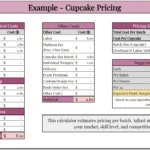
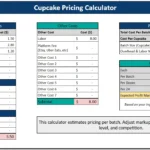
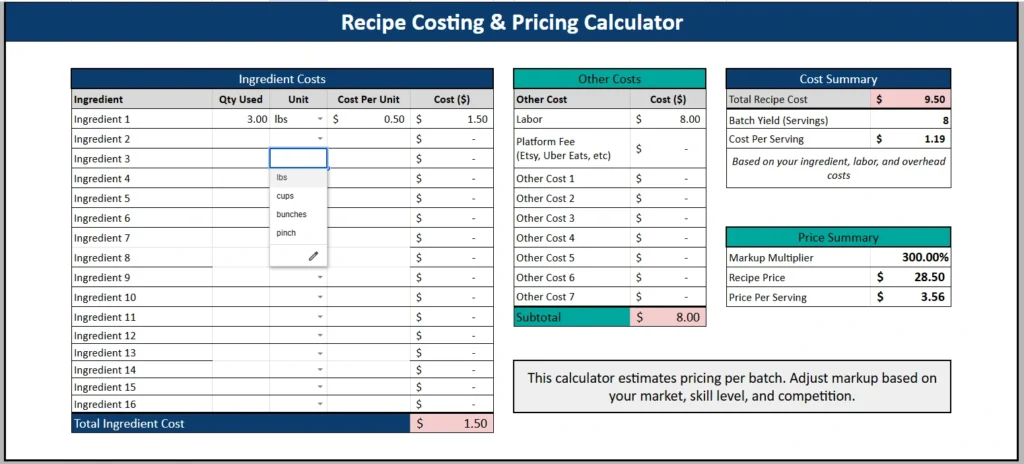
The Ingredient Costs section is the core of the calculator. This is where you enter each ingredient used in your recipe along with the quantity and unit. The table includes the following columns:
Ingredient
Qty Used
Unit
Cost Per Unit
Cost ($)
Here is how it works in practice. Suppose you are making a batch of garlic butter shrimp pasta for eight servings. You might enter:
Shrimp – 3 lbs – $6.00 per lb
Pasta – 2 lbs – $1.50 per lb
Butter – 0.5 lbs – $4.00 per lb
Garlic – 3 cloves – cost per unit calculated from bulk price
The Cost Per Unit column allows you to break down bulk purchases into usable portions. For example, if you buy 10 pounds of flour for $5.00, your cost per pound is $0.50. By entering that unit cost, the sheet automatically calculates the exact cost of the amount used in your recipe.
The template then totals all ingredient costs at the bottom in a clearly highlighted Total Ingredient Cost row. This immediate visibility makes it easy to see where most of your expenses are coming from.
There is also a Waste % row. This small detail is important. In real kitchens, not everything is used perfectly. Some ingredients spoil, some are trimmed, and some are lost during preparation. By including a waste percentage, you can adjust your ingredient total to reflect real-world conditions rather than ideal assumptions.
Other Costs Sheet
The Other Costs section expands beyond ingredients and captures operational expenses that are often overlooked.
This table includes:
Labor
Platform Fees (Etsy, Uber Eats, etc.)
Additional customizable cost rows
Subtotal
If you are running a small catering business, your labor might include two hours of prep time at $20 per hour. If you are selling through a delivery app, you might factor in service fees. If you package your food in branded containers, those costs can be included here as well.
For example:
Labor – $8.00
Packaging – $1.50
Platform Fee – $2.00
These amounts are added together to create a subtotal. That subtotal contributes to your Total Recipe Cost in the Cost Summary section.
This structure ensures you are not just pricing based on groceries. You are pricing based on the full cost of producing and selling your food.
Cost Summary Sheet
The Cost Summary section brings everything together.
It displays:
Total Recipe Cost
Batch Yield (Servings)
Cost Per Serving
The Total Recipe Cost combines ingredient totals and other operational costs. The Batch Yield field allows you to enter how many servings your recipe produces. This is a crucial step because your pricing strategy depends heavily on portion size and yield accuracy.
If your total recipe cost is $9.50 and your batch yields 8 servings, your cost per serving becomes $1.19. That number is the foundation of your pricing.
By isolating cost per serving, the sheet gives you clarity. Instead of guessing what to charge for a plate or container, you see exactly what it costs you to produce one unit.
Price Summary Sheet
The Price Summary section focuses on profitability.
It includes:
Markup Multiplier
Recipe Price
Price Per Serving
When you enter a markup multiplier, such as 300 percent, the sheet calculates your suggested recipe price and price per serving automatically.
For example, if your cost per serving is $1.19 and you apply a 300 percent markup, your price per serving becomes $3.56. This allows you to adjust your pricing strategy quickly. You can test different markup levels to see how they affect your final price.
This feature is especially helpful for food entrepreneurs comparing different pricing scenarios. If competitors are charging $4.00 per serving, you can determine whether your current costs allow you to compete comfortably or whether you need to adjust your markup.
Dropdowns Sheet
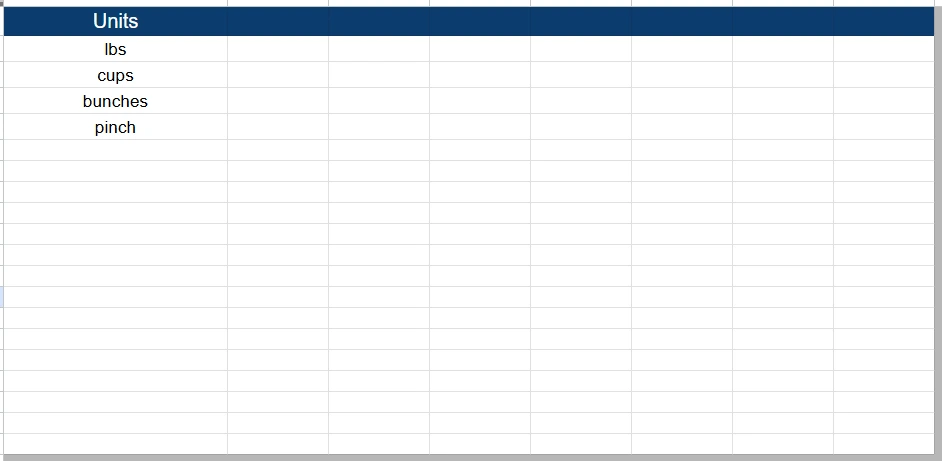
The second sheet, titled Dropdowns, supports the unit selection system.
It includes a list of units such as:
lbs
cups
bunches
pinch
These units are used for data validation in the Ingredient Costs section. When you click on the Unit column, you can select from the predefined list rather than typing manually. This helps maintain consistency and prevents spelling variations from affecting calculations.
For example, instead of having “lb,” “lbs,” and “pounds” entered differently across rows, you select one standardized option. This keeps your Google Sheets file clean and professional.
You can easily customize the Dropdowns sheet to include additional units such as grams, ounces, milliliters, or tablespoons, depending on your business needs.
How to Use the Template
Start by opening the template in Google Sheets and making a copy for your own use.
Step one is entering your ingredient list. Add each ingredient used in the recipe, along with the quantity and unit. If you purchased items in bulk, calculate your cost per unit and enter it in the appropriate column. The sheet will automatically compute the cost for each line item.
Step two is reviewing your waste percentage. If you experience spoilage or trimming losses, enter a reasonable percentage to reflect that reality.
Step three is filling out the Other Costs section. Include labor time, packaging materials, service fees, and any additional overhead directly related to that recipe.
Step four is entering your batch yield in the Cost Summary section. Be honest and realistic here. If your recipe sometimes produces 7 servings instead of 8, account for that variation.
Finally, adjust your markup multiplier in the Price Summary section. Watch how your recipe price and price per serving update automatically. Experiment with different percentages to see how your margins change.
This hands-on process helps you understand your numbers instead of relying on guesswork.
Why Choose This Template
This template balances simplicity and structure. It does not overwhelm you with excessive complexity, but it also does not leave out essential components like labor and waste.
It works well for:
Home bakers selling through social media
Meal prep businesses offering weekly menus
Caterers pricing event trays
Food truck operators testing new menu items
Small restaurant owners reviewing cost control
Because it is built in Google Sheets, it is accessible from any device with an internet connection. You can update ingredient prices quickly when market costs change. If butter prices increase, you can adjust the unit cost and instantly see how it affects your margins.
The inclusion of a separate Dropdowns sheet adds a layer of professionalism. Clean unit selection reduces errors and makes the file easier to maintain over time.
Most importantly, this template encourages smarter pricing decisions. Instead of copying competitors or relying on rough estimates, you base your prices on actual numbers. That approach builds a more sustainable business.
If you are serious about understanding your food costs and protecting your profit margins, this Recipe Costing & Pricing Calculator provides a clear starting point.
Download Your Free Recipe Costing Calculator Spreadsheet
- Free Template
- Fully Editable
- Instant Access
- Organize your information
How to Access Your Copy
- Enter your email for instant access
- Open the link we send you
- Start using the spreadsheet right away