Buying an RV is a big financial decision. Whether you are financing a compact travel trailer for weekend trips or a fully equipped motorhome for full time living, understanding the true cost of the loan is critical. That is exactly why this RV loan calculator spreadsheet was built in Google Sheets.
This template is designed to give you a complete financial picture before you sign anything. It calculates your monthly payment, total interest, total cost, and even generates a full amortization schedule that shows exactly how each payment is split between interest and principal.
Instead of relying on a basic online calculator that only shows one number, this spreadsheet lets you see the entire loan structure. You can adjust the loan amount, APR, start date, and loan term, and the entire sheet updates automatically. Every figure flows through clean formulas so users can understand what is happening behind the scenes.
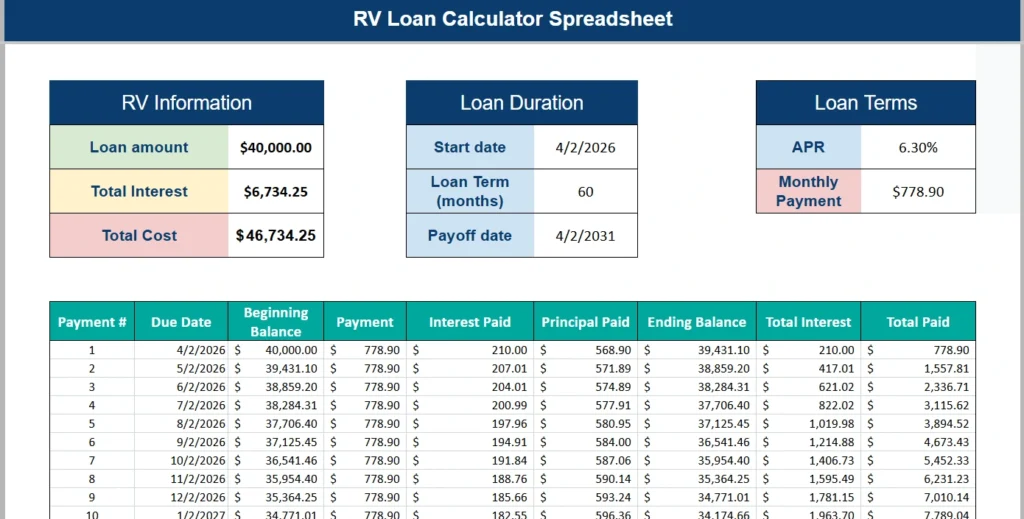
The layout is simple and professional. The top section summarizes key loan details in three clear panels. Below that, the full payment breakdown shows how your balance declines month by month. It is built for clarity, accuracy, and real world decision making.
This RV loan calculator spreadsheet works well for:
- First time RV buyers comparing financing options
- Families upgrading to a larger motorhome
- Retirees planning extended road trips
- RV flippers estimating financing costs
- Budget conscious buyers trying to minimize interest
If someone is searching for an “rv loan calculator spreadsheet,” they likely want more than a basic calculator. They want control, transparency, and the ability to experiment with numbers. That is exactly what this Google Sheets template delivers.
Key Features and Sections
RV Information
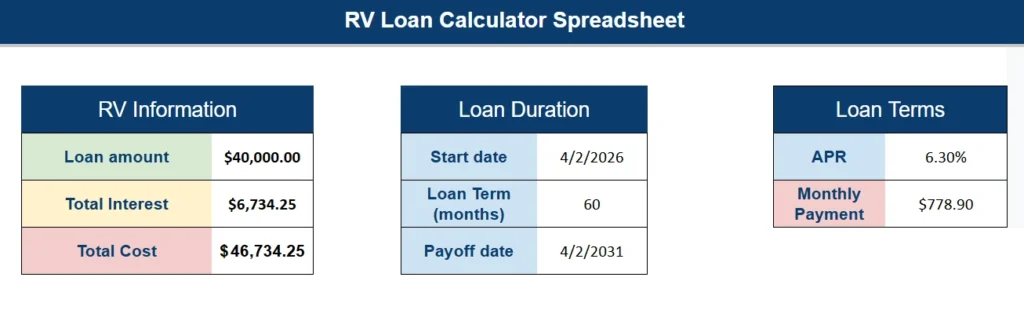
The first panel focuses on the core financial totals. This section automatically displays:
- Loan amount
- Total interest paid over the life of the loan
- Total cost of the RV including interest
For example, in the screenshot, a $40,000 loan at 6.30% over 60 months results in $6,734.25 in total interest and a total repayment cost of $46,734.25. These numbers are not static. When the user changes the loan amount or APR, the totals instantly recalculate.
This is especially useful for comparison shopping. A buyer can test scenarios like:
- What happens if I put $5,000 more down?
- How much extra will I pay if I stretch from 60 months to 84 months?
- How much interest do I save if I refinance at a lower APR?
Instead of guessing, they can see exact dollar impacts.
Loan Duration
The second panel focuses on time. It includes:
- Start date
- Loan term in months
- Automatic payoff date
The payoff date is calculated based on the start date and the term length. If someone begins payments on April 2, 2026 and chooses a 60 month loan, the spreadsheet calculates the payoff date as April 2, 2031.
This section is more important than many buyers realize. Knowing your exact payoff date helps with:
- Planning upgrades
- Timing a resale
- Coordinating with retirement goals
- Avoiding overlapping loans
When users adjust the loan term from 60 to 72 months, the payoff date updates automatically. This reinforces how extending the term lowers monthly payments but increases total interest.
Loan Terms
The third panel highlights:
- APR
- Monthly payment
The monthly payment is calculated using the PMT function in Google Sheets. It factors in the loan amount, interest rate, and number of payments. Because it is formula driven, users can experiment with different APRs and instantly see how the payment changes.
For example, increasing the APR from 6.30% to 7.30% will increase the monthly payment and total interest significantly. This is powerful for negotiation. Buyers can walk into a dealership knowing exactly how a small rate change impacts their finances.
Amortization Schedule
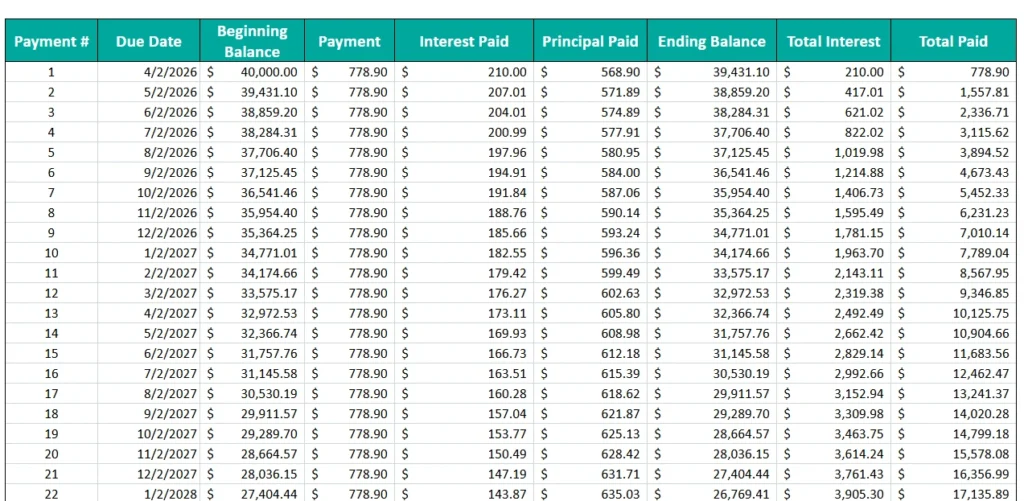
Below the summary panels is the heart of the spreadsheet: the amortization table.
This section includes:
- Payment number
- Due date
- Beginning balance
- Payment amount
- Interest paid
- Principal paid
- Ending balance
- Cumulative total interest
- Cumulative total paid
Each row represents one monthly payment. The sheet calculates interest as a percentage of the current balance, then subtracts principal accordingly.
Looking at the first few rows in the example:
- Payment 1: $210 goes to interest and $568.90 goes to principal
- Payment 2: Slightly less interest is paid because the balance is lower
- Over time, principal portions increase while interest portions decrease
This progression is critical for financial awareness. Many RV buyers do not realize that early payments are interest heavy. Seeing it visually makes the concept much clearer.
The cumulative columns are especially helpful. By payment 12, the user can see exactly how much total interest has been paid so far. This is valuable for:
- Deciding when refinancing makes sense
- Understanding early payoff benefits
- Comparing loan options
Because it is built in Google Sheets, the amortization schedule automatically fills down for the full loan term. If the user changes the term from 60 months to 48 months, the schedule adjusts accordingly.
How to Use the Template
Using this RV loan calculator spreadsheet is straightforward.
Step one is entering the loan amount. This is the financed amount after any down payment. For example, if the RV costs $50,000 and the buyer puts down $10,000, they would enter $40,000.
Step two is entering the APR. This should match the lender’s quoted annual percentage rate.
Step three is entering the loan term in months. Common RV terms range from 60 to 180 months, depending on the loan size and lender.
Step four is selecting or entering the start date. This ensures the payoff date and due dates are accurate.
Once those four fields are filled in, everything else updates automatically.
Here are a few realistic scenarios users can test:
Scenario one: Shorter loan term
Change from 60 months to 48 months. The monthly payment increases, but total interest drops. This shows the trade off between payment size and long term savings.
Scenario two: Lower APR negotiation
Reduce APR from 6.30% to 5.75%. Watch how both the monthly payment and total interest decline. This gives buyers motivation to negotiate rates.
Scenario three: Larger down payment
Lower the loan amount by increasing the down payment. The sheet instantly shows interest savings over the life of the loan.
Users can duplicate the sheet within Google Sheets and run multiple scenarios side by side. That makes it ideal for comparison planning before signing financing paperwork.
Why Choose This Template
There are many online RV calculators, but most of them are limited. They show only a payment estimate and nothing else. This spreadsheet offers far more detail.
First, it provides transparency. Users see exactly how interest is calculated and how the balance declines over time.
Second, it allows customization. Buyers can test unlimited scenarios without restrictions.
Third, it is fully editable in Google Sheets. That means:
- No subscription required
- No locked formulas
- No data tracking
- Easy sharing with family or financial advisors
Fourth, it is structured clearly. The top panels summarize the big picture, while the amortization schedule provides detailed breakdowns. This layered design makes it suitable for both beginners and experienced spreadsheet users.
From an educational standpoint, it also teaches how amortization works. Someone financing their first RV can gain a much deeper understanding of loan mechanics simply by reviewing the table.
Finally, it is practical. RV financing often involves large amounts and long terms. Even small changes in APR or term length can result in thousands of dollars in difference. This spreadsheet makes those differences visible instantly.
Download Your Free RV Loan Calculator Spreadsheet
- Free Template
- Fully Editable
- Instant Access
- Organize your information
How to Access Your Copy
- Enter your email for instant access
- Open the link we send you
- Start using the spreadsheet right away