Buying a second home is one of the biggest financial decisions you can make. Whether you are purchasing a vacation property, a rental investment, or a place for a family member, the numbers have to work before you sign anything. Most online mortgage calculators give you a single monthly payment estimate and nothing else. This template goes further. It is built in Google Sheets and gives you a complete picture of your loan, your affordability, and how every single payment breaks down over the life of the loan.
If you have ever found yourself asking “can I actually afford two mortgages at the same time?”, this is the tool that answers that question clearly.
Overview of the Template
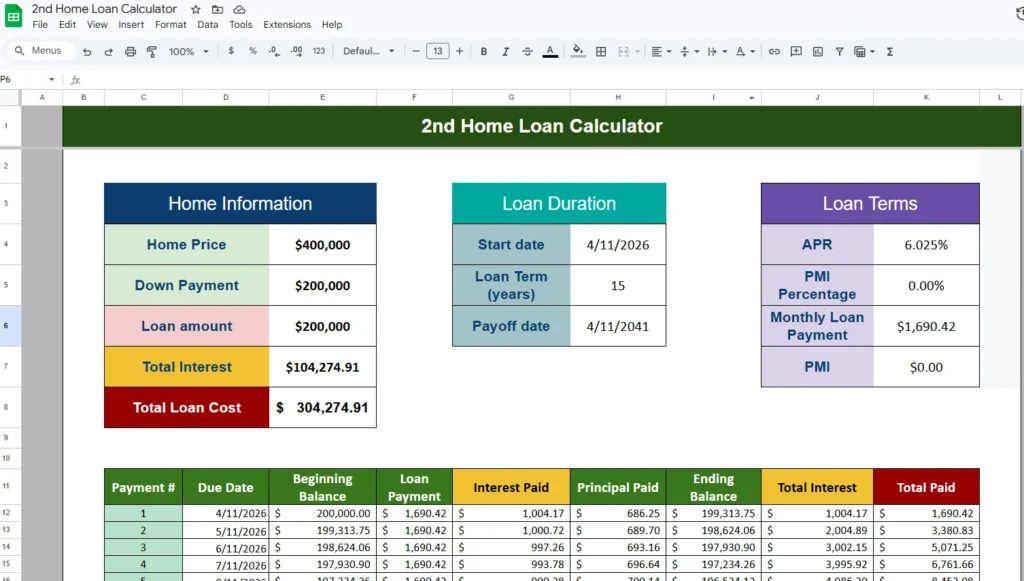
The Second Home Mortgage Calculator is a free Google Sheets template designed specifically for people evaluating a second property purchase. Unlike generic mortgage calculators, this one is built around the reality that most buyers already have an existing mortgage. That context matters. A payment that looks manageable in isolation can look very different when you stack it on top of your current housing costs, car payments, and other monthly debts.
The template is organized into four main areas: a loan summary section at the top, an affordability check, a side-by-side payment comparison, and a full amortization schedule that covers every payment from your first to your last. Everything updates automatically when you change any of the blue input cells. You do not need to know any formulas or have any spreadsheet experience to use it.
A first-time vacation home buyer, a real estate investor running numbers on a rental property, or someone helping an aging parent purchase a smaller home are all exactly the type of person this template was built for.
Key Features and Sections
Home Information
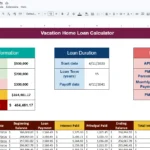
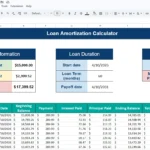
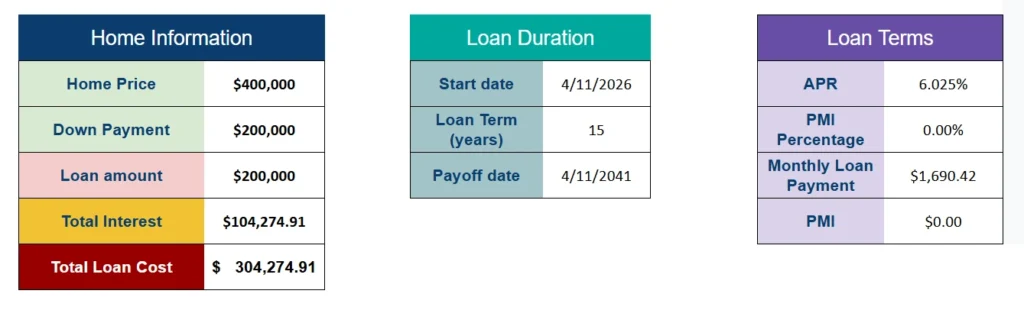
This panel is where you enter the basics of the purchase. You input the home price and your down payment in dollars, and the template automatically calculates your down payment as a percentage of the purchase price. That percentage matters because it determines whether you will owe PMI (private mortgage insurance), which the template also accounts for.
For example, if you are buying a $400,000 vacation home with $80,000 down, the template instantly shows you that you are putting down 20%, your loan amount is $320,000, and your estimated total interest over the life of the loan is calculated from there. The panel also displays your total loan cost, which is the loan amount plus all the interest you will pay. Seeing that number upfront is genuinely useful when comparing different down payment scenarios.
Loan Duration
The loan duration panel captures your start date and your loan term in years. Enter the date you expect your first payment to begin, choose a term (10, 15, 20, or 30 years are the most common), and the template calculates your payoff date automatically. This is helpful for planning purposes. If you are 45 years old and considering a 30-year mortgage, seeing a payoff date of 2055 can be a useful reality check that pushes some buyers toward a shorter term.
Loan Terms
This panel is where you enter your interest rate and PMI percentage. The APR field accepts any rate your lender quotes you. The template then calculates your monthly principal and interest payment, your monthly PMI if applicable, and displays both separately. PMI typically applies when your down payment is below 20% and usually runs between 0.5% and 1.5% of the loan amount annually. The template makes it easy to see exactly what that adds to your monthly payment and when it would drop off as your equity increases.
Can I Afford A 2nd Home Loan?
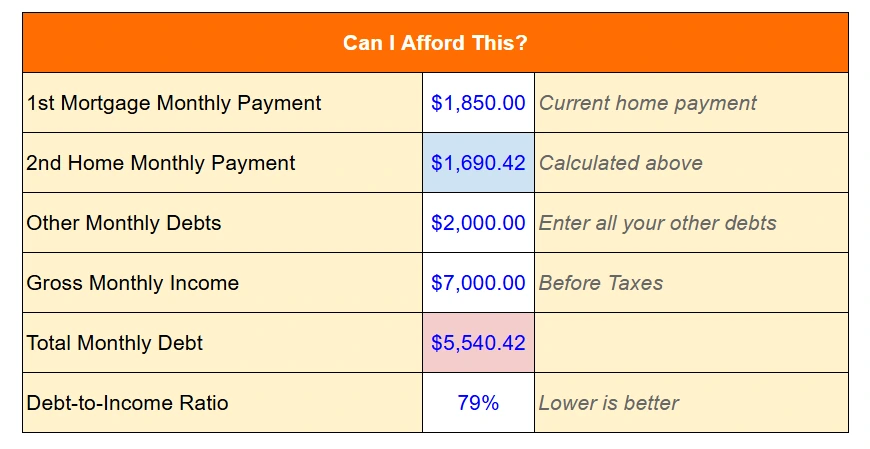
This section is what separates this template from every standard mortgage calculator. It asks you to enter three additional numbers: your current first mortgage payment, your other monthly debts (car loans, student loans, credit card minimums), and your gross monthly income before taxes. From those inputs, it calculates your debt-to-income ratio, which is the number lenders actually use to decide whether to approve your loan.
Most lenders require a DTI below 43%, and many prefer it under 36%. The template displays a plain-language verdict based on where your number lands. If your DTI comes in at 38%, it will tell you that you are in borderline territory and that some lenders may require a higher credit score. If you come in at 28%, it confirms you are in strong shape. This kind of immediate feedback helps you understand not just what your payment would be, but whether a lender is likely to approve the loan in the first place.
Monthly Payment Comparison
This panel shows your first mortgage payment, your second home payment, and the combined total side by side. It sounds simple, but having that combined number visible is something that surprises a lot of people. A buyer might feel comfortable with a $1,600 second home payment, but when they see it next to their existing $2,100 first mortgage and realize their combined housing cost is $3,700 per month, that changes the conversation. This section makes sure you are looking at the full picture, not just one piece of it.
Amortization Schedule
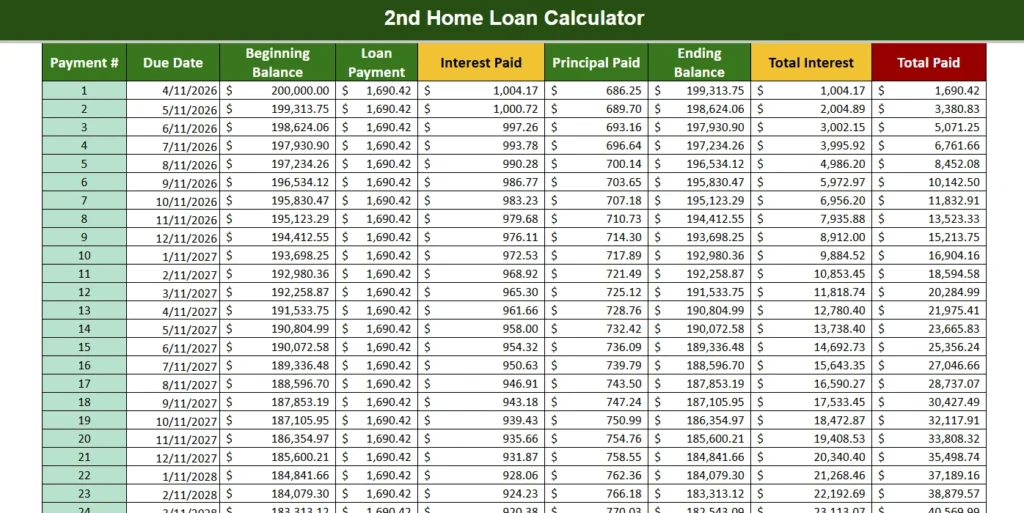
The amortization schedule covers every payment for the full life of your loan, up to 360 months for a 30-year mortgage. Each row shows the payment number, due date, beginning balance, total payment amount, how much of that payment goes toward interest, how much goes toward principal, the ending balance, running total interest paid, and running total paid overall.
This level of detail is useful in several practical ways. You can scroll to any point in the schedule and see exactly how much of the loan you have paid off. You can find the crossover point where your principal payment exceeds your interest payment each month. You can also see the true cost of a longer loan term. The difference in total interest between a 15-year and a 30-year loan on the same amount can easily be $100,000 or more, and the schedule makes that visible in a way that a single monthly payment figure does not.
How to Use the Template
Using the template is straightforward. Open it in Google Sheets and look for the cells with blue numbers. Those are your input cells. Start with the Home Information panel and enter the purchase price and your planned down payment. Move to Loan Duration and enter your expected start date and loan term. In Loan Terms, enter the APR your lender has quoted you and your PMI rate if applicable.
Once those are filled in, scroll down to the Can I Afford This section and add your first mortgage payment, any other monthly debts, and your gross monthly income. The template will immediately calculate your DTI and display the verdict. Check the Monthly Payment Comparison panel to see your combined housing cost. Then scroll down to the amortization schedule to review the full breakdown.
If you want to compare scenarios, the easiest approach is to make a copy of the sheet for each option. For example, you might run one version with a 15-year term and another with a 30-year term, or compare a 10% down payment against a 20% down payment to see how PMI and monthly costs change. Google Sheets makes it easy to duplicate tabs and compare them side by side.
Why Choose This Template
There are plenty of mortgage calculators available online, but most of them answer only one question: what is my monthly payment? They do not account for your existing debts. They do not show you a DTI ratio. They do not let you compare your two mortgages side by side. And they do not give you a row-by-row breakdown of 180 or 360 payments.
This template was built specifically for second home buyers because the financial situation of someone buying a second property is fundamentally different from someone buying their first. You are not starting from zero. You already have obligations, and this tool is designed to surface all of them in one place so you can make a confident, informed decision.
It is also built in Google Sheets, which means it is free to use, accessible from any device, and easy to share with a partner, financial advisor, or real estate agent. No software to install, no subscription required.
Download Your Free Second Home Loan Calculator Spreadsheet
- Free Template
- Fully Editable
- Instant Access
- Organize your information
How to Access Your Copy
- Enter your email for instant access
- Open the link we send you
- Start using the spreadsheet right away