Thinking about going solar but not sure if the numbers make sense for your budget? A solar loan is one of the most popular ways to finance a residential solar system, and understanding the true cost before you sign anything can save you thousands of dollars. This free Solar Loan Calculator, built in Google Sheets, gives you a clear picture of your monthly payment, total interest, and how much you will actually save on your electricity bill every month.
Whether you are a first-time homeowner exploring solar for the first time or someone who has already gotten a few installer quotes and wants to compare financing options, this template does the heavy lifting for you. No financial background required. Just enter your numbers and the sheet does the rest.
Overview of the Template
This Solar Loan Calculator is a Google Sheets template designed to help homeowners evaluate the cost and savings of financing a solar panel system with a loan. It is built around two core sheets: the main calculator and a full amortization schedule. Together, they give you both a high-level summary and a detailed month-by-month breakdown of your loan.
The template uses standard financial formulas, including the PMT function, to calculate your exact monthly payment based on real loan inputs. Every result updates instantly when you change an input, so you can run through different scenarios in seconds. Want to see what happens if you put $2,000 down instead of $0? Change one cell and every number adjusts automatically.
The design is clean and color-coded. Blue cells are where you enter your own values. Black cells are calculated results that you should not edit. Yellow-bordered cells are the key inputs that drive the most important outputs. This system makes it easy for anyone to use the sheet without accidentally breaking a formula.
Key Features and Sections
Loan Inputs
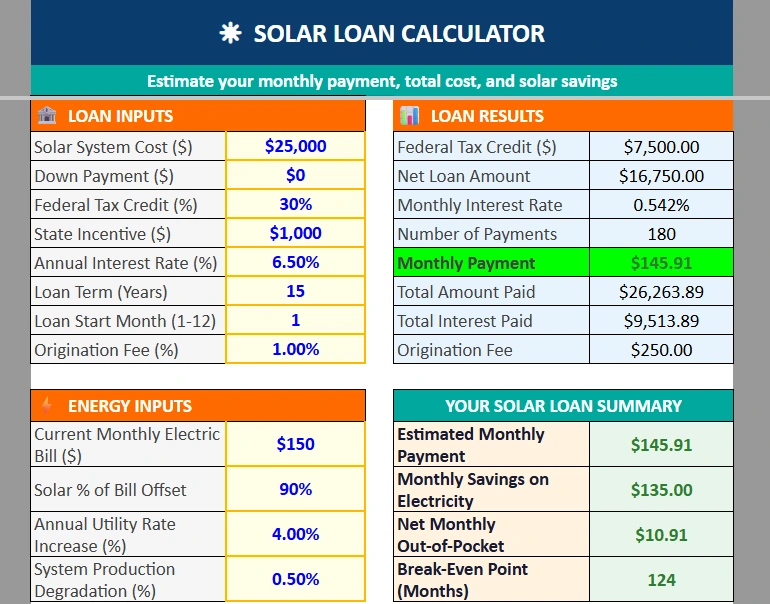
The Loan Inputs section is where you enter the details of your solar purchase and financing. There are eight input fields, and each one plays a specific role in the calculation.
You start with the solar system cost. The national average for a residential solar installation is somewhere between $18,000 and $35,000 before incentives, depending on system size and your location. For this example, a $25,000 system is used as the starting point.
Next is the down payment. Many solar loans are structured as zero-down, meaning the full cost rolls into the loan. If your installer is offering a special deal with a cash deposit, you can enter that here and it will reduce your loan balance right away.
The Federal Tax Credit field lets you enter the percentage you expect to claim. As of 2025, the residential clean energy credit is 30% of the total system cost. On a $25,000 system, that is $7,500 back on your federal taxes. The sheet automatically calculates the dollar amount and subtracts it from your loan principal, because many solar lenders assume you will apply that credit toward your balance in the first year.
The State Incentive field is for any additional rebates or credits your state offers. Some states offer anywhere from a few hundred to several thousand dollars in additional incentives. You can check the DSIRE database at dsireusa.org for your state.
Annual interest rate, loan term in years, and loan start month round out the loan details. The origination fee field is important because many solar-specific lenders charge a dealer fee that gets baked into the loan amount. Entering even 1% here shows you that on a $25,000 system, you are adding $250 to your principal before you make a single payment.
Energy Inputs
The Energy Inputs section connects your loan cost to your electricity savings, which is where solar financing decisions really get interesting.
You enter your current monthly electric bill. In the example shown, that is $150 per month. You then enter the percentage of your bill that solar is expected to offset. A well-sized system in a sunny climate might offset 90% or more of your usage. A smaller system or a home with high consumption might land closer to 70%.
The annual utility rate increase field accounts for the fact that electricity costs have historically risen year over year. Using 4% is a reasonable assumption based on national averages, though some regions see higher increases. The system production degradation field captures the gradual decline in panel efficiency over time, typically around 0.5% per year.
Loan Results
The Loan Results section shows all the calculated outputs tied to your loan. With the example inputs, the monthly payment comes out to $145.91, the total amount paid over the life of the loan is $26,263.89, and the total interest paid is $9,513.89.
These numbers help you understand the full cost of the loan, not just the monthly payment. A lot of homeowners focus only on what they owe each month. Seeing the cumulative interest figure is a reminder that the length of your loan term has a major impact on total cost.
Solar Loan Summary
The summary box at the bottom of the calculator pulls everything together in one place. It shows your estimated monthly payment, your monthly savings on electricity, your net monthly out-of-pocket cost, and your break-even point in months.
In the example, the monthly payment is $145.91 and the monthly savings on electricity is $135.00, which means the net monthly cost of going solar is just $10.91. The break-even point is 124 months, or just over 10 years. After that point, the loan is paid off and the savings are pure benefit.
This summary is useful when presenting your solar decision to a spouse or a financial advisor. It turns a complex loan structure into four easy-to-understand numbers.
Amortization Schedule
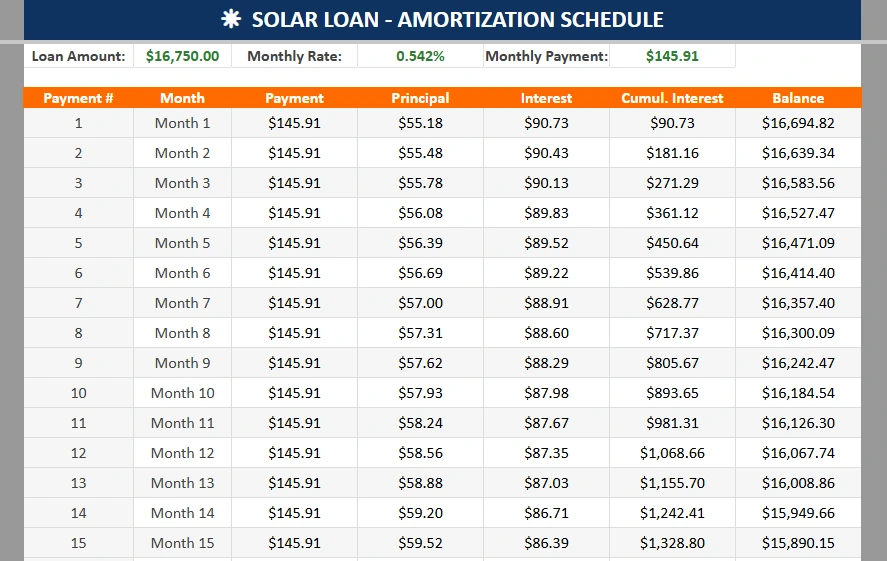
The Amortization Schedule sheet gives you a full payment-by-payment breakdown for the entire loan term. Each row shows the payment number, a month label, the total payment, how much goes to principal, how much goes to interest, the cumulative interest paid to date, and the remaining loan balance.
In the example, payment number one applies $55.18 to principal and $90.73 to interest, leaving a balance of $16,694.82. By month 12, cumulative interest has reached $1,068.66. This kind of detail is valuable if you are considering making extra payments to reduce the balance faster, or if you want to understand exactly where your money is going each month.
All of the values in the amortization sheet are linked directly to the inputs on the main calculator tab. Change your loan term or interest rate on the main sheet and the amortization table updates to match.
How to Use the Template
Using this template is straightforward. After downloading and opening the file in Google Sheets, navigate to the Solar Loan Calculator tab. Start in the Loan Inputs section and work your way down through each blue cell, replacing the default values with your own numbers.
If you have not yet received an installer quote, you can use the defaults as a realistic starting point for a mid-sized residential system. Once you have actual quotes, swap in the real numbers. Many homeowners use this sheet to compare multiple quotes side by side by duplicating the tab and running each scenario in a separate copy.
After filling in the loan inputs, move to the Energy Inputs section and enter your average monthly electric bill. Check a few recent utility statements to get an accurate figure. If your bill varies seasonally, use an annual average divided by 12.
Once all inputs are filled in, review the Solar Loan Summary box. If the net monthly out-of-pocket number looks too high, try adjusting the loan term or down payment to see how those changes affect your payment. The amortization schedule is there whenever you want to dig into the monthly detail.
Why Choose This Template
There are a lot of solar calculators online, but most of them are built by installers or lenders who have an interest in showing you a favorable outcome. This template is neutral. It uses standard financial formulas with no hidden assumptions, and you can see every formula in every cell.
Because it lives in Google Sheets, there is nothing to install and nothing to pay for. You can access it from any device, share it with a co-owner or partner, and make a copy to test as many scenarios as you want. It works the same whether you are on a laptop in your kitchen or reviewing numbers on your phone.
This template is especially useful for homeowners who are in the comparison-shopping phase, people who have gotten quotes from two or three installers and want to understand the real cost differences between a 10-year loan and a 15-year loan, or between putting $2,000 down versus going zero-down.
It is also a helpful tool for homeowners who want to have a more informed conversation with their installer or lender. Walking into that meeting already knowing your break-even point and total interest paid puts you in a much stronger position.
Download Your Free Solar Loan Calculator Spreadsheet
- Free Template
- Fully Editable
- Instant Access
- Organize your information
How to Access Your Copy
- Enter your email for instant access
- Open the link we send you
- Start using the spreadsheet right away