Buying a vacation home is one of the biggest financial decisions you can make. Whether you are eyeing a lakeside cabin, a beach condo, or a mountain retreat, understanding what that loan actually costs over time is just as important as falling in love with the property itself. That is where this free vacation home mortgage calculator comes in.
Built entirely in Google Sheets, this template gives you a complete picture of your loan from the very first payment to the last. You get a monthly payment estimate, a running total of interest paid, a projected payoff date, and a full payment-by-payment amortization schedule. Everything updates automatically when you change your inputs. No complicated software, no subscription, and no finance degree required.
Overview of the Template
This vacation home mortgage calculator was designed for anyone who wants to run real numbers before committing to a loan. That includes first-time vacation property buyers who want to compare financing scenarios, existing homeowners thinking about refinancing a second property, real estate investors stress-testing deals before making an offer, and financial planners who work with clients on property purchases.
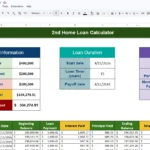
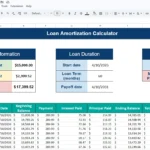
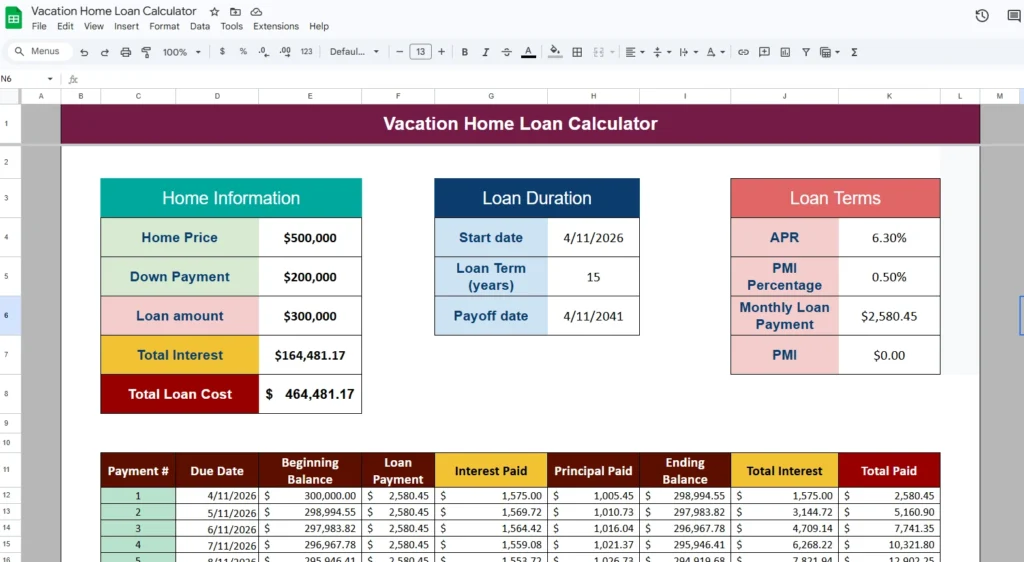
The Google Sheets template is organized into two main areas. At the top, you have three input and summary tables covering your home information, loan duration, and loan terms. Below that, a full amortization schedule automatically populates based on your inputs, showing every single payment for the life of the loan.
The color coding is intentional. Blue cells are the ones you type into. Black cells are calculated automatically. This makes it immediately clear what you should change and what you should leave alone. The design follows standard financial spreadsheet conventions so it feels familiar even if you have never used a mortgage template before.
Key Features and Sections
Home Information Table
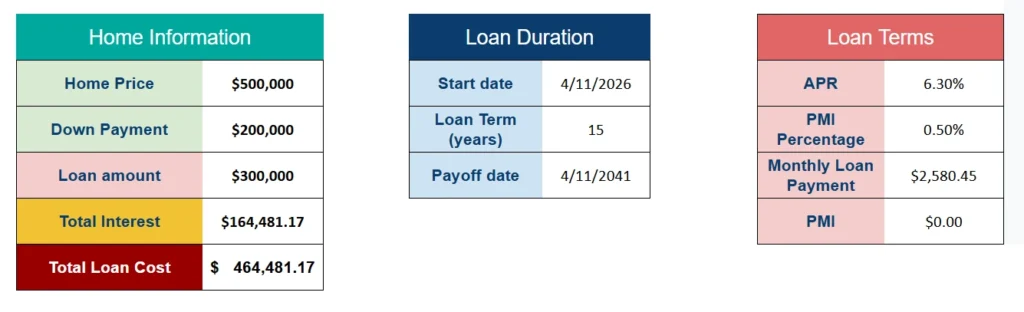
The Home Information table is where you enter the core details of your purchase. You type in the home price and your down payment, and the template instantly calculates your loan amount by subtracting one from the other. There is no need to do that math separately.
Below the loan amount, you will see two automatically calculated fields: Total Interest and Total Loan Cost. These pull from the amortization schedule below and reflect the full financial picture of your loan over its entire term. For example, if you borrow $400,000 at 6.5% over 30 years, your total interest paid alone can exceed $510,000. Seeing that number before you sign is exactly the kind of context this template is designed to provide.
Loan Duration Table
The Loan Duration table has three fields: start date, loan term in years, and payoff date. You enter the first two, and the payoff date calculates automatically.
The loan term field makes it easy to compare scenarios side by side. Enter 30 years, note the monthly payment. Then switch to 15 years and watch the monthly payment climb but the total interest drop significantly. For a $300,000 vacation home loan at 6.3%, the difference in total interest between a 15-year and 30-year term is often more than $150,000. That is a number worth knowing.
Loan Terms Table
The Loan Terms table captures your APR, your PMI percentage, and then displays two calculated outputs: your monthly loan payment and your monthly PMI amount.
The monthly payment is calculated using a standard PMT formula in Google Sheets, which accounts for the loan amount, interest rate, and number of payments. The PMI field is particularly useful for vacation home buyers who are putting down less than 20 percent. It calculates your monthly PMI automatically based on the percentage you enter. Once your loan-to-value ratio drops below 80 percent, the PMI field will show zero, reflecting the point at which you would no longer owe that additional cost.
Amortization Schedule
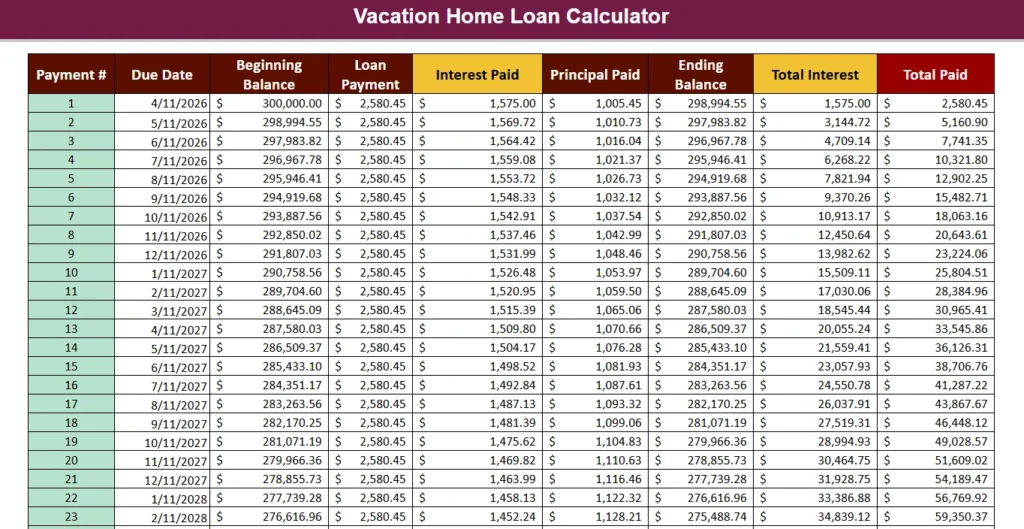
The amortization schedule is the most detailed section of this vacation home mortgage calculator. It generates one row per payment for the full life of your loan, up to 360 months for a 30-year term.
Each row includes the payment number, the due date, the beginning balance, the full loan payment amount, how much of that payment goes toward interest, how much goes toward principal, the ending balance, the cumulative total interest paid to date, and the cumulative total paid to date.
This level of detail is genuinely useful. You can scroll to any point in the loan and see exactly where you stand. For instance, if you are five years into a 30-year vacation home mortgage, the schedule will show you that the majority of your payments so far have gone toward interest, not principal. That insight often motivates buyers to consider making extra principal payments or refinancing at a lower rate.
How to Use the Template
Getting started takes less than two minutes. After downloading and opening the file in Google Sheets, look for the blue cells in the top three tables. These are the only cells you need to update.
Start with the Home Information section. Enter your home price and down payment. The loan amount will calculate instantly. Next, move to the Loan Duration table and enter your loan start date and the number of years for your term. The payoff date fills in automatically. Finally, go to the Loan Terms table and enter your APR and PMI percentage if applicable.
Once those inputs are in place, the entire spreadsheet updates on its own. The summary figures at the top reflect your totals, and every row in the amortization schedule recalculates. You do not need to touch any other cell.
A realistic example: a buyer purchases a vacation condo for $450,000, puts 20 percent down, and takes out a $360,000 loan at 6.75% for 30 years. The template immediately shows a monthly payment of roughly $2,335, a payoff date 30 years out, and a total interest figure over $480,000. That is useful information to have in hand before walking into a lender meeting.
Because this is a Google Sheets file, you can also duplicate the sheet tab and test a second scenario without overwriting your first. Comparing a 20-year term against a 30-year term side by side takes seconds and gives you a clear basis for making a smarter borrowing decision.
Why Choose This Template
There are a lot of mortgage calculators available online, but most of them give you one number and nothing else. They tell you the monthly payment and stop there. This vacation home mortgage calculator in Google Sheets goes much further.
You get a transparent, line-by-line breakdown of every payment for the life of your loan. You can see the exact moment your loan balance drops below a key threshold. You can test different interest rates, down payment amounts, and loan terms in seconds. And because it lives in Google Sheets, you can access it from anywhere, share it with a partner or financial advisor, and keep a running record of different scenarios you have modeled.
The template is also built to be durable. All the calculations use native Google Sheets formulas with no third-party add-ons or plugins required. You do not need to worry about it breaking when a browser extension updates or a service changes its pricing.
For vacation home buyers especially, this kind of clarity matters. Vacation property loans often come with slightly higher interest rates and stricter lending requirements than primary mortgages. Having a tool that lets you model the true cost of different loan structures puts you in a much stronger position when comparing lenders, negotiating terms, or deciding how much to put down.
If you are serious about buying a vacation home and want to understand exactly what you are signing up for, download this free Google Sheets vacation home mortgage calculator and start running your own numbers today. It takes two minutes to set up and could save you from a very expensive surprise.
Download Your Free Vacation Home Loan Calculator Spreadsheet
- Free Template
- Fully Editable
- Instant Access
- Organize your information
How to Access Your Copy
- Enter your email for instant access
- Open the link we send you
- Start using the spreadsheet right away