Getting married is one of the most exciting milestones in life, but the financial side of it can quickly become overwhelming. Between deposits, vendor contracts, and last-minute additions, costs have a way of creeping past your original budget before you even realize it. That’s exactly why having the right planning tool matters so much.
This Wedding Loan Calculator Google Sheets template was built to give couples a clear, organized picture of what they’re spending, what they’re borrowing, and what it will actually cost them over time. It’s not just a loan calculator, it’s a full financial planning companion that walks you through every stage of managing a wedding loan, from setting up your expense categories to tracking your very last payment.
Whether you’re a budget-conscious couple managing every dollar or someone who simply wants to stay informed about how interest affects the total cost of your wedding, this template was designed with you in mind. It’s free to download, easy to customize in Google Sheets, and built to work for real people in real financial situations.
Overview of the Template
At its core, this Google Sheets template brings together three things that most couples need to manage simultaneously: a breakdown of wedding expenses, a working loan calculator, and a full amortization schedule showing how each monthly payment is applied over time.
The template is structured to be intuitive from the moment you open it. You don’t need a finance degree to understand what’s happening on the page. The layout is clean, the formulas are pre-built, and the color coding helps distinguish input fields from calculated results. All you need to do is enter a few key numbers: your loan amount, interest rate, loan term, and first payment date. And the rest updates automatically.
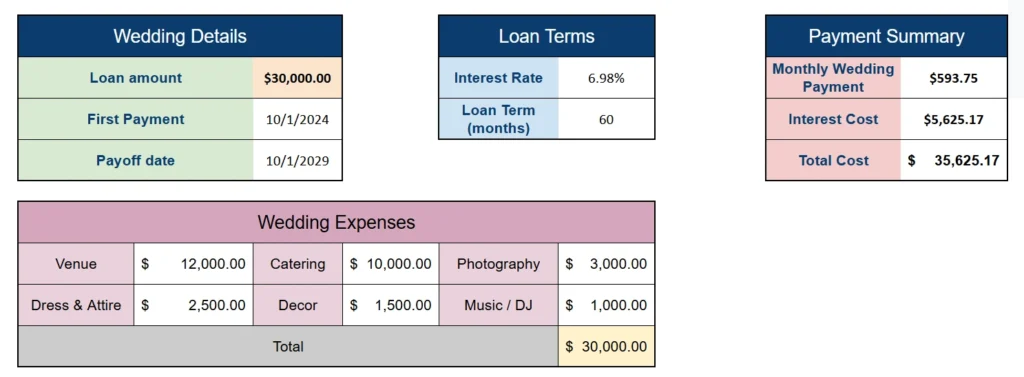
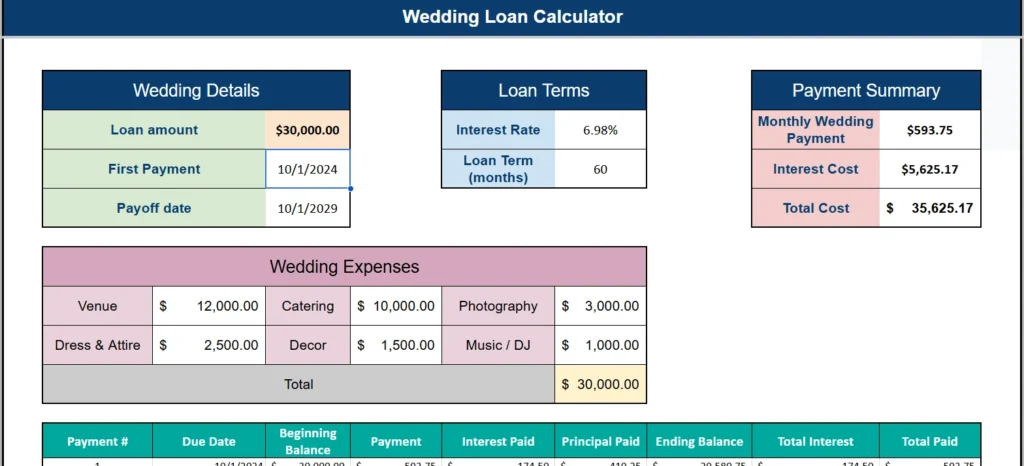
For example, a couple borrowing $30,000 at 6.98% interest over 60 months would see their monthly payment calculated at $593.75, with a total interest cost of $5,625.17, bringing their actual wedding cost to $35,625.17. That kind of transparency is what this template is all about: no surprises, no confusion, just clear numbers you can plan around.
The template is ideal for engaged couples who are financing part or all of their wedding through a personal loan, as well as financial planners, wedding budget coaches, or anyone helping a couple navigate the borrowing process. It works equally well whether you’re planning a $15,000 backyard celebration or a $50,000 formal event.
Key Features and Sections
This template is divided into several well-organized sections that each serve a specific purpose. Here’s a closer look at what each one does and why it matters.
Wedding Details
This section is where you enter the foundational information for your loan. You input your total loan amount, the date of your first payment, and the template automatically calculates your payoff date based on the loan term you specify. For instance, if you enter a first payment date of October 1, 2024, and you’re borrowing over 60 months, the template tells you your loan will be paid off by October 1, 2029. That kind of at-a-glance visibility is incredibly helpful when you’re trying to plan your financial life around a major purchase.
Loan Terms
This is where you enter the two variables that most directly affect how much your loan costs: the annual interest rate and the loan term in months. These fields are designed to be easy to adjust so you can run multiple scenarios. Want to see what happens if you pay off the loan in 36 months instead of 60? Just change the loan term and watch all the calculations update instantly. Want to compare a 5.5% rate from one lender against a 7.25% offer from another? This section makes it simple to see exactly how much more you’d pay in interest over the life of the loan with each option.
Payment Summary
Once you’ve entered your loan amount and terms, this section gives you the three numbers that matter most: your monthly payment, the total interest cost, and the all-in total cost of your wedding. These figures are calculated using the standard PMT formula built into Google Sheets, so they’re accurate and reliable. The Payment Summary is designed to sit prominently at the top of the sheet so it’s always visible, because these are the numbers you need to keep in mind throughout the entire planning process.
Wedding Expenses
This section is a visual budget breakdown that shows where your loan money is being allocated. It includes six common wedding expense categories: Venue, Catering, Photography, Dress & Attire, Decor, and Music/DJ. Each category has a dollar amount you can edit, and the section automatically totals everything to confirm it matches your loan amount.
Using the example from the template, a $30,000 wedding budget might break down like this: $12,000 for the venue, $10,000 for catering, $3,000 for photography, $2,500 for dress and attire, $1,500 for decor, and $1,000 for music. Seeing this laid out clearly helps you identify where the bulk of your spending is going and whether any category might need to be adjusted. It also helps you have honest conversations with your partner or family members about priorities.
Amortization Table
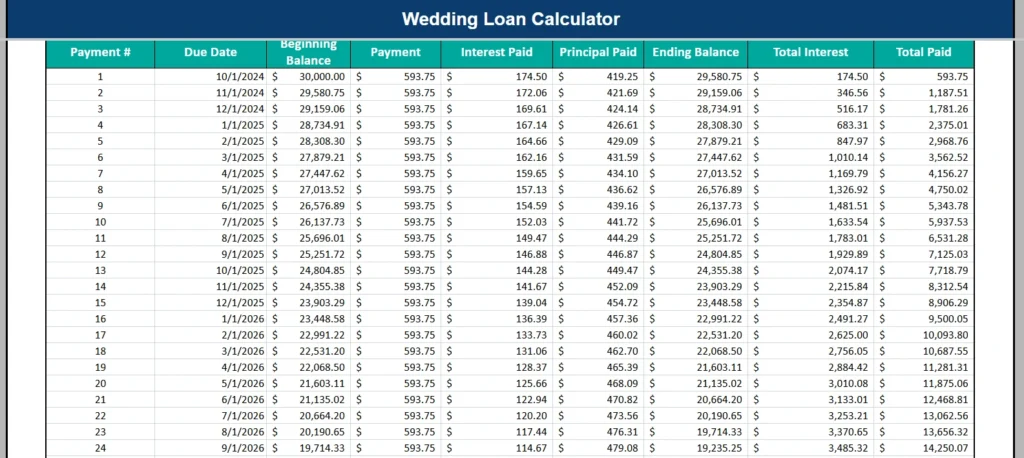
This is arguably the most powerful part of the entire template. The amortization schedule is a full month-by-month breakdown of every single payment you’ll make over the life of your loan. For each payment, the table shows: the payment number, the due date, the beginning balance, the payment amount, the portion that goes to interest, the portion that goes to principal, the ending balance, the cumulative total interest paid, and the cumulative total paid to date.
This level of detail is genuinely eye-opening for most people. You can see, for example, that your very first payment of $593.75 applies $174.50 to interest and only $419.25 to your actual loan balance. By payment 24, your interest portion has dropped to $114.67 while your principal payment has grown to $479.08. This shift is how amortization works, and being able to see it visually helps you understand why paying a little extra each month can save you a meaningful amount in interest over time.
How to Use the Template
Using this Google Sheets template is straightforward, even if you’re not particularly comfortable with spreadsheets. Here’s how to get started from the moment you open the file.
Step 1: Enter Your Loan Details
Start by filling in the Wedding Details and Loan Terms sections. Enter the total amount you’re borrowing in the Loan Amount field. Then enter the date of your first expected payment. Move over to the Loan Terms section and enter your annual interest rate as a percentage (for example, 6.98) and your loan term in months (for example, 60 for a five-year loan). As soon as you’ve filled in these fields, the Payment Summary will update automatically to show your monthly payment, total interest, and total cost.
Step 2: Customize Your Expense Breakdown
Next, update the Wedding Expenses section to reflect your actual planned spending. Replace the default dollar amounts with your own budget estimates for each category. If your expenses don’t match the six default categories exactly, you can rename them to fit your situation. Maybe you want to replace ‘Music/DJ’ with ‘Honeymoon Fund,’ or change ‘Decor’ to ‘Flowers & Rentals.’ The flexibility is there because no two weddings are exactly alike. Just make sure your expenses total up to your loan amount so the numbers stay consistent throughout the sheet.
Step 3: Review the Amortization Schedule
Scroll down to the amortization table and take time to actually read through it. Look at how your balance decreases month by month. Find the midpoint of your loan term and check how much of your total interest you’ve paid by then, you may be surprised to find that you’ve paid more than half your interest before you’ve paid off half your balance. This is useful information when deciding whether to make extra payments or refinance.
Step 4: Run Scenarios and Compare
One of the best ways to use this template is to experiment with different loan scenarios before you commit to anything. Try changing the interest rate to see how much you save by locking in a better offer. Try shortening the loan term to 36 months and see how much your monthly payment increases, but also notice how much total interest you save. Google Sheets makes it easy to do this because all the formulas are connected, so every change cascades through the entire sheet immediately. You can even duplicate the tab in Google Sheets and keep two versions side by side for direct comparison.
Why Use This Calculator
There’s no shortage of loan calculators on the internet, but most of them do one thing: they tell you what your monthly payment will be. This template goes much further. It connects your loan to your actual wedding expenses, shows you the full cost of your decision over time, and gives you a living document you can return to again and again as plans evolve.
Because it lives in Google Sheets, you get all the benefits of cloud-based access. You can open it on your phone while meeting with a caterer, share it with your partner so you’re both looking at the same numbers, or send it to a parent who wants to understand the financial plan. No software to install, no files to manage, just a link and a Google account.
The template is also genuinely useful for people who may not be taking out a loan at all. Even if you’re paying for your wedding entirely from savings, the amortization schedule and expense breakdown can help you model a payment plan if you’re relying on family contributions over time, or help you understand what a loan would cost in case your budget gets tighter than expected.
Think about the real people who benefit from a tool like this. A couple in their late twenties with a solid income but limited savings might be weighing a $25,000 personal loan against a smaller, more modest wedding. This template lets them run those numbers concretely, not just in their heads. A parent helping to co-sign a loan can use it to understand exactly what the repayment commitment looks like. A wedding planner working with a client who has a financing contingency can share this template to set transparent expectations from the start.
The design is also worth mentioning. The template uses a clean, professional color scheme that’s easy on the eyes and makes the data easy to read at a glance. Color-coded sections distinguish input areas from results, and the consistent formatting throughout means you never have to wonder where to look or what a number means. It’s the kind of spreadsheet you’d feel comfortable sharing with your bank or showing to a financial advisor.
Finally, unlike most financial tools you’ll find behind a paywall or buried in a confusing app interface, this template is completely free. You don’t need to create an account, enter your email, or sit through an upsell. Just download it, open it in Google Sheets, and start planning. Your wedding day deserves to be remembered for all the right reasons, and knowing exactly what your loan will cost is a big part of making sure the financial side of things doesn’t cast a shadow over the celebration.
Download Your Free Wedding Loan Calculator Spreadsheet
- Free Template
- Fully Editable
- Instant Access
- Organize your information
How to Access Your Copy
- Enter your email for instant access
- Open the link we send you
- Start using the spreadsheet right away