
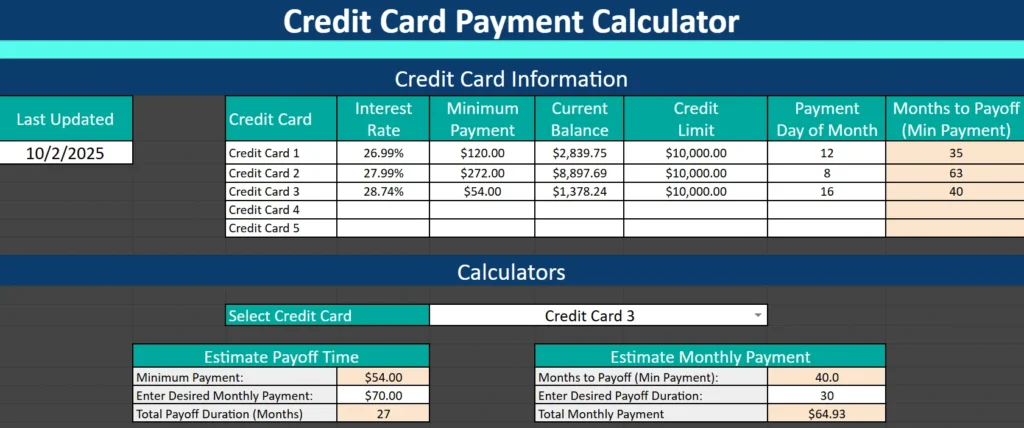
If you’re juggling multiple credit cards and want a clear plan for paying them off, this Credit Card Calculator Spreadsheet can help you organize, plan, and stay motivated.
Instead of guessing how long it will take to get out of debt—or how much to pay each month—you can see real numbers, realistic timelines, and the impact of every payment decision.
Built in Google Sheets, this calculator gives you a simple yet powerful way to understand your credit card balances, interest rates, and payoff progress. Whether you’re trying to pay off debt faster, reduce interest, or manage several cards at once, this spreadsheet helps you stay on track with confidence.
Understand What the Credit Card Calculator Spreadsheet Does
This spreadsheet is designed to simplify the complex math behind credit card payments. You simply enter your balance, interest rate, and minimum payment—and it does the rest.
It automatically estimates how long it will take to pay off your debt at your current payment rate and allows you to test “what-if” scenarios—such as paying an extra $20 a month or setting a target payoff date.
Who it’s for:
- Anyone managing two or more credit cards
- People who want to become debt-free faster
- Users who prefer clear visual tracking over confusing online calculators
- Anyone who wants to stay organized and in control of their finances
This isn’t just a calculator—it’s a full credit card management tool that gives you a better understanding of your debt and helps you create an actionable plan.
Explore the Key Sections of the Spreadsheet
The Credit Card Calculator Spreadsheet includes two main areas: the Credit Card Information Section and the Calculator Section.
Each part is clearly structured, with color-coded cells and built-in formulas that make it easy to use even if you’re not an Excel or Google Sheets expert.
Credit Card Information Section

At the top of the sheet, you’ll find the Credit Card Information table. This is where you enter all your essential details for each card you’re managing.
You’ll fill in:
- Last Updated: Record when you last entered or changed data. This helps you keep your information fresh.
- Credit Card Name: Customize each row to reflect the actual card name (for example, “Chase Freedom,” “Citi Rewards,” or simply “Card 1,” “Card 2,” etc.).
- Interest Rate (APR): Enter the annual percentage rate for each card.
- Minimum Payment: Note your monthly minimum payment.
- Current Balance: Enter the current amount you owe.
- Credit Limit: Optional, but useful for tracking your utilization rate.
- Payment Day of Month: Keep track of due dates so you never miss a payment.
- Months to Payoff (Min Payment): This column is automatically calculated by the spreadsheet, showing how long it will take to pay off each balance if you only make minimum payments.
You can track up to five credit cards at once, giving you a complete overview of your credit situation. This structure makes it easy to compare balances, interest rates, and timelines—all in one place.
Example:
If one of your cards has a $1,200 balance at 20% interest with a $50 minimum payment, the spreadsheet might calculate that it’ll take about 33 months to pay it off. But once you see that number, you can explore how adding just $15 more to each payment can dramatically reduce that time—and the total interest paid.
Calculator Section
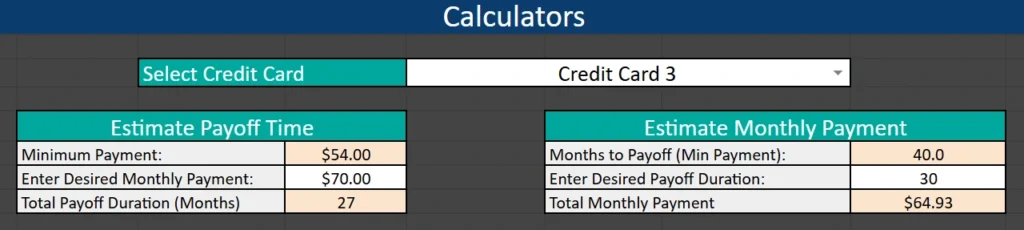
Below your list of credit cards, the spreadsheet includes two built-in calculators that help you test strategies and make smarter payment decisions.
1. Estimate Payoff Time
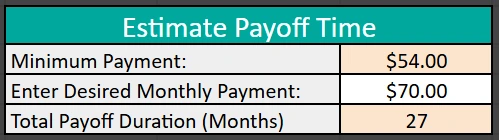
Use this calculator to find out how long it’ll take to pay off a specific credit card based on your chosen payment amount.
- Select the card from a dropdown menu.
- Enter your planned monthly payment.
- The spreadsheet automatically calculates the estimated payoff time in months.
Example:
If your current minimum payment is $54, and you decide to increase it to $70, the spreadsheet might show your payoff time dropping from 36 months to 27 months. That’s nine months sooner—and potentially hundreds of dollars in interest saved.
2. Estimate Monthly Payment
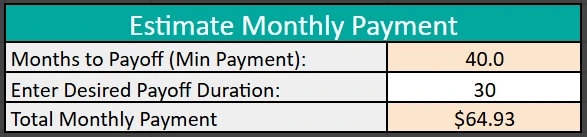
If you have a target date for becoming debt-free, this calculator shows how much you need to pay monthly to reach that goal.
- Select your credit card from the dropdown.
- Enter your desired payoff timeframe (in months).
- The calculator will instantly estimate the required monthly payment.
Example:
Let’s say you owe $1,500 and your current plan has you debt-free in 40 months. If you want to finish in 30 months, the spreadsheet will calculate that you need to pay roughly $64.93 per month instead of your current payment.
Both calculators are designed to be interactive, letting you experiment with different scenarios so you can find the most realistic and effective debt repayment plan for your budget.
Protected Formulas
To make the experience smooth and worry-free, all formula cells are protected. These cells—shaded in light orange—handle the automatic calculations behind the scenes.
If you try to edit them, you’ll get a small warning message. This helps prevent accidental errors, while still giving you full control over your input data. You can freely adjust your interest rates, balances, or target months without breaking any formulas.
How to Use the Credit Card Calculator Spreadsheet
You don’t need to be an Excel expert to get started. The template is already formatted and ready to go in Google Sheets.
Here’s a quick step-by-step guide:
- Open the template in Google Sheets and make your own editable copy.
- Enter your credit card details in the top section (balances, interest rates, and payments).
- Review your automatic payoff estimates for each card.
- Use the calculators below to test payment strategies or set payoff goals.
- Update regularly—ideally once a month—to track progress and keep your plan current.
Over time, you’ll see your balances drop and your payoff months shorten. It’s a motivating way to visualize your debt-free journey.
Why This Spreadsheet Is Better Than a Regular Calculator
There are many online debt calculators, but they often limit you to one card at a time or hide the math behind generic charts. This spreadsheet gives you transparency and control.
Here’s why users love it:
- All your cards in one place: Compare balances, rates, and timelines side by side.
- Realistic payoff modeling: See exactly how small payment increases affect your timeline.
- No hidden formulas: Every calculation is built right into the sheet—you can review how it works.
- Accessible anywhere: Because it’s built in Google Sheets, you can open it on your phone, tablet, or computer anytime.
- Perfect for planning and accountability: Whether you’re following the debt snowball or avalanche method, this tool keeps you focused.
Who benefits most:
This spreadsheet is perfect for anyone who’s ready to take control of their finances—especially if you’re balancing several credit cards or paying down high-interest debt. It’s equally useful for families, young professionals, and small business owners managing personal or business credit.
Download the Credit Card Calculator and Start Taking Control
Ready to take the guesswork out of credit card payments?
This Credit Card Calculator Spreadsheet gives you the clarity and motivation you need to make faster progress toward financial freedom.
You can get your copy directly in Google Sheets and start using it right away.
Simply enter your details, adjust your goals, and let the spreadsheet handle the math.
Take charge of your debt today—and see how much sooner you can be free from credit card balances.