Financing a vehicle is a major financial commitment, and understanding the long-term impact of an auto loan is just as important as negotiating the purchase price. This free Auto Loan Calculator Spreadsheet for Excel is designed to give you a clear, structured breakdown of your loan from the first payment to the final payoff.
Instead of relying on basic online calculators that only show a monthly payment estimate, this Excel template walks you through the full amortization process. It calculates your monthly payment, total interest, payoff date, and total cost, then breaks down every payment month by month so you can see exactly how much goes toward interest and principal.
Built specifically for Excel, this version takes advantage of standard financial formulas like PMT and structured references to provide accurate, dynamic calculations. Once downloaded, you can edit, customize, and model different financing scenarios directly within Excel. Whether you are planning to purchase a vehicle, refinancing an existing auto loan, or simply analyzing financing options, this spreadsheet gives you complete visibility into your numbers.
This free version focuses on clarity and simplicity. You enter your loan amount, APR, term, and start date, and Excel handles the rest.
Key Features and Sections
Vehicle Information
The Vehicle Information section provides a high-level financial summary of your loan. It highlights the three most important numbers borrowers need to understand:
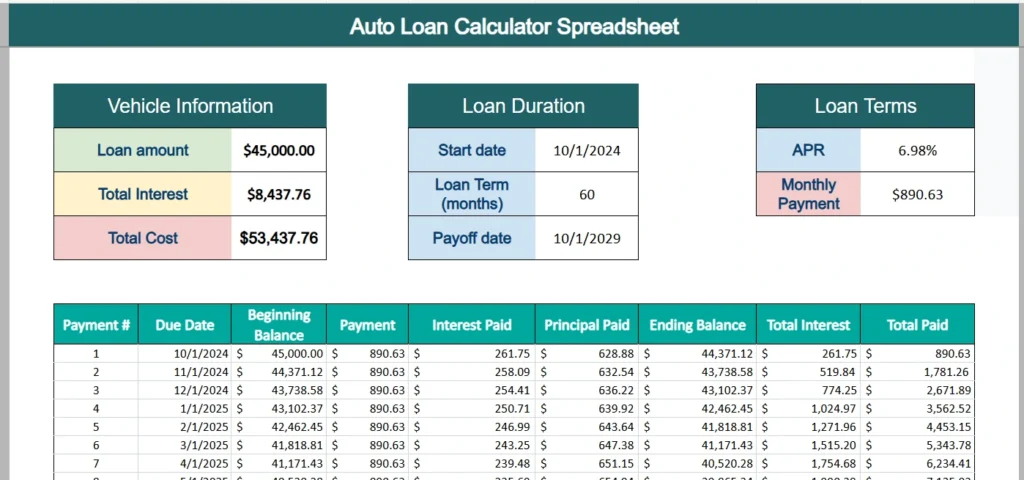
Loan Amount represents the total amount financed. In the example shown, the loan amount is $45,000. This value serves as the starting balance for the amortization schedule.
Total Interest calculates the full amount of interest paid over the life of the loan. At 6.98% over 60 months, the total interest in the example is $8,437.76. This number clearly shows the cost of borrowing, separate from the vehicle price itself.
Total Cost combines the principal and interest to show the total out-of-pocket amount paid over the loan term. In the example, that total reaches $53,437.76. Seeing this figure upfront helps you evaluate whether a longer term or higher interest rate is truly worth the lower monthly payment.
This section is designed to be straightforward and easy to read. It gives you a quick summary before you even scroll down to the payment schedule.
Loan Duration
The Loan Duration section defines the timeline of your financing.
Start Date establishes when the loan begins. Excel uses this value to generate each monthly due date in the amortization schedule. This makes the spreadsheet feel realistic and grounded in actual calendar dates.
Loan Term (months) determines how many payments you will make. In the example provided, the loan term is 60 months. Adjusting this number instantly updates your payoff date, total interest, and monthly breakdown.
Payoff Date is automatically calculated based on your start date and loan term. This feature gives you a clear target for when the loan will be fully paid. Many borrowers underestimate how long they will be making payments, and seeing the payoff date prominently displayed reinforces the long-term nature of the commitment.
Together, these inputs define the structure and length of your loan in a simple, organized way.
Loan Terms
The Loan Terms section focuses on the core financial inputs that determine your payment.
APR (Annual Percentage Rate) drives the interest calculation. Excel divides the APR by 12 to determine the monthly interest rate applied to the remaining balance.
Monthly Payment is calculated using Excel’s PMT function. In the example shown, the monthly payment is $890.63. This payment includes both interest and principal.
Total Interest in this area reinforces the cumulative cost of borrowing and updates automatically when you adjust the APR or loan term.
This section is particularly useful when comparing financing offers. For example, reducing the APR from 6.98% to 6.25% can significantly lower total interest. Increasing the term from 60 to 72 months will reduce the monthly payment but increase total interest. Excel recalculates everything instantly, making it easy to evaluate trade-offs.
Amortization Schedule
The amortization schedule is where the spreadsheet truly adds value. It provides a complete breakdown of each payment over the life of the loan.
Each row includes:
Payment # to track how many payments have been made.
Due Date generated from the start date.
Beginning Balance showing what you owe before the payment.
Payment reflecting the fixed monthly amount.
Interest Paid representing the portion allocated to interest.
Principal Paid showing how much reduces the loan balance.
Ending Balance after the payment is applied.
Total Interest as a cumulative running total.
Total Paid tracking total payments made to date.
In the first payment of the example, $261.75 goes toward interest and $628.88 reduces the principal. As the balance declines, the interest portion gradually decreases and more of each payment goes toward principal.
By the final payment, almost the entire amount is reducing the remaining balance. This is the nature of amortization, and seeing it clearly laid out in Excel helps borrowers understand how their loan behaves over time.
The amortization table is especially valuable for those who want transparency. It eliminates guesswork and gives you a precise view of how your loan balance changes month by month.
How to Use the Template
Using this Excel auto loan calculator is straightforward.
First, open the spreadsheet and enter your Loan Amount in the Vehicle Information section. This should reflect the amount financed, not necessarily the total vehicle price.
Next, enter your APR in the Loan Terms section. Be sure to enter it as a percentage.
Then, input your Loan Term in months. Common options include 36, 48, 60, or 72 months. Keep in mind that shorter terms generally mean higher monthly payments but lower total interest.
Enter your Start Date in the Loan Duration section. Excel will automatically generate due dates and calculate your payoff date.
Once these inputs are entered, Excel calculates your Monthly Payment using the PMT formula. The amortization schedule will automatically populate with detailed monthly breakdowns.
To compare scenarios, change one variable at a time. For example, try reducing the loan term from 60 to 48 months and observe how total interest decreases. Alternatively, adjust the APR to see how sensitive your monthly payment is to rate changes.
This template works well for:
Buyers preparing to finance a new or used vehicle.
Borrowers refinancing an existing auto loan.
Individuals comparing dealership financing with bank or credit union offers.
Anyone who wants a clearer understanding of how auto loans function in Excel.
Because it is built in Excel, you can duplicate the worksheet, create side-by-side comparisons, or integrate it into a broader budgeting workbook.
Why Choose This Template
Many online calculators provide only a quick payment estimate, but they do not offer transparency into how your loan actually works. This Excel Auto Loan Calculator Spreadsheet gives you full visibility.
You can see the complete amortization schedule, track cumulative interest, and understand exactly when your loan will be paid off. The structured layout makes it easy to interpret, even if you are not an advanced Excel user.
Excel also gives you flexibility. You can adjust formatting, add notes, build charts, or expand the model with additional features if desired. The spreadsheet is entirely under your control.
Most importantly, this template helps you make informed financial decisions. It transforms abstract loan terms into concrete numbers. You can clearly see how much interest you will pay, how long you will be in debt, and how each payment affects your balance.
If you are preparing to finance a vehicle or want to analyze your current loan in more detail, download this free Excel Auto Loan Calculator Spreadsheet and start exploring your numbers with confidence.
Download Your Excel Auto Loan Calculator Spreadsheet
- Free Template
- Fully Editable
- Instant Access
- Organize your information
How to Access Your Copy
- Enter your email for instant access
- Download from the link we send you
- Start using the spreadsheet right away