If you’ve ever needed to count how many cells meet a condition in Google Sheets, you’ve probably come across COUNTIF. Then, just when things start to click, you see COUNTIFS and wonder why Google added a second version of what looks like the same function.
The short answer is simple: COUNTIF handles one condition, while COUNTIFS handles multiple conditions. But in real spreadsheets, the difference matters more than it seems. Choosing the wrong one can lead to inaccurate counts, broken formulas, or unnecessary complexity.
This guide explains how COUNTIF and COUNTIFS actually work, when to use each, and the practical mistakes to avoid so your counts stay reliable as your sheets grow.
When should you use COUNTIF instead of COUNTIFS?
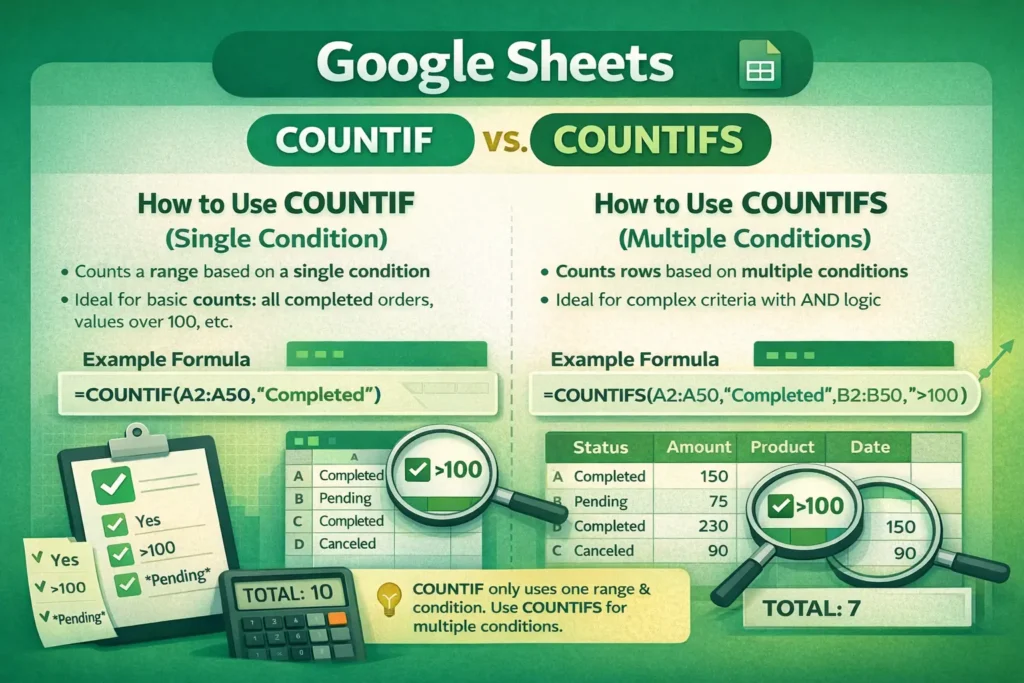
COUNTIF is designed for straightforward questions where only one condition matters. It answers questions like:
- How many orders are marked “Completed”?
- How many cells contain the word “Yes”?
- How many values are greater than 100?
If your logic can be expressed as “count cells where this one thing is true,” COUNTIF is usually the cleanest option. It’s shorter, easier to read, and quicker to audit later.
COUNTIFS, on the other hand, is built for compound logic. It answers questions like:
- How many orders are “Completed” and over $100?
- How many rows belong to “Sales” and were created this month?
- How many tasks are “In Progress” and assigned to a specific person?
The key decision isn’t complexity—it’s whether you need more than one test at the same time.
How does COUNTIF actually work in Google Sheets?
COUNTIF scans a range and evaluates each cell against a single criterion. If the condition is met, it increments the count by one.
Conceptually, it works like this:
- Look at each cell in the range
- Check whether it matches the condition
- Count it if it does
This makes COUNTIF ideal for summary metrics, dashboards, and quick checks where you don’t want to over-engineer the formula.
COUNTIF Formula Examples
Count cells equal to a specific value
=COUNTIF(A2:A50,"Yes")Count numbers greater than a threshold
=COUNTIF(B2:B50,">100")Count cells containing partial text
=COUNTIF(C2:C50,"*Pending*")One important detail many users miss: COUNTIF only evaluates one range. You can’t test multiple columns or conditions without switching functions.
How does COUNTIFS differ when multiple conditions are involved?
COUNTIFS evaluates pairs of ranges and criteria. Each row must satisfy all conditions to be counted. This makes it an AND-based function by default.
Instead of scanning one column, COUNTIFS moves row by row across multiple ranges, checking each condition in parallel.
This row-level logic is what makes COUNTIFS essential for structured datasets like order logs, CRM exports, or signup sheets.
COUNTIFS Formula Examples
Count rows meeting two conditions
=COUNTIFS(A2:A50,"Completed",B2:B50,">100")Count based on text and date conditions
=COUNTIFS(C2:C50,"Sales",D2:D50,">=1/1/2026")Count non-blank values only when another condition is met
=COUNTIFS(A2:A50,"<>",B2:B50,"Active")Every additional condition must include both a range and a criterion, and all ranges must be the same size.
What are the most common mistakes with COUNTIF and COUNTIFS?
One frequent mistake is using COUNTIF when COUNTIFS is required. Users sometimes try to nest COUNTIF functions or add extra logic with plus signs, which leads to incorrect totals.
Another common issue is mismatched ranges in COUNTIFS. If one range is shorter or starts in a different row, the formula will either return errors or misleading counts.
A less obvious mistake is forgetting that COUNTIFS uses AND logic only. If you need OR logic (for example, count rows where status is “Open” or “Pending”), you must combine multiple COUNTIF formulas or use helper columns.
Finally, COUNTIF and COUNTIFS are not case-sensitive. If case matters, you’ll need an alternative approach using SUMPRODUCT or helper formulas.
Are there performance or scaling differences between COUNTIF and COUNTIFS?
On small sheets, performance differences are negligible. However, on large datasets with tens of thousands of rows, COUNTIFS can become slower because it evaluates multiple ranges simultaneously.
A practical optimization many advanced users miss is reducing full-column references. Instead of A:A, limit your ranges to the actual data area (for example, A2:A5000). This applies to both COUNTIF and COUNTIFS and can noticeably improve sheet responsiveness.
Another advanced tip: if you find yourself repeating the same COUNTIFS logic across many formulas, consider adding a helper column that pre-labels rows. This often reduces complexity and improves recalculation speed.
When should you use something other than COUNTIF or COUNTIFS?
COUNTIF and COUNTIFS are great for counting, but they’re not universal solutions.
You may need a different approach when:
- You need OR conditions across multiple columns
- You need case-sensitive counts
- You want to count unique values that meet criteria
- You’re combining arithmetic logic with conditions
In those cases, functions like COUNTUNIQUEIFS, FILTER combined with COUNTA, or even QUERY may be more appropriate.
How do COUNTIF and COUNTIFS fit into real-world spreadsheet workflows?
In real spreadsheets, COUNTIF often powers quick summaries, KPI cards, and simple validation checks. COUNTIFS is more common in reports, dashboards, and templates where multiple attributes matter.
At Sheetrix, we often use COUNTIFS behind the scenes in templates for event planning, signup tracking, and financial summaries, especially when users need counts that update automatically as data changes.
Understanding the difference between COUNTIF and COUNTIFS helps you choose the simplest tool that still scales as your spreadsheet grows. When you start with the right function, your formulas stay readable, accurate, and easier to maintain over time.