
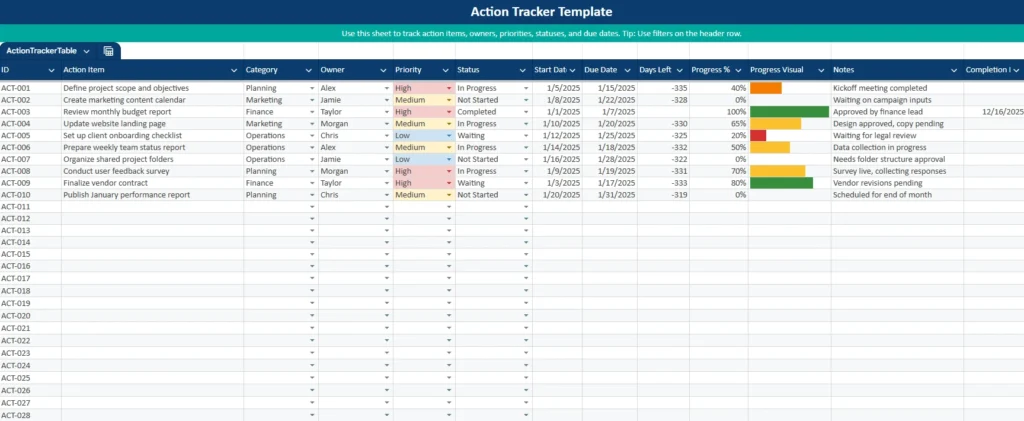
Keeping track of action items sounds simple, but in practice it’s one of the most common points of failure for teams and individuals. Tasks get discussed in meetings, assigned verbally, and then slowly disappear as deadlines pass and priorities shift. That’s where a well-designed action item tracker template makes a real difference.
This Action Item Tracker Template for Google Sheets and Excel is built to give you clarity, accountability, and real-time visibility into what needs to be done, who owns it, and when it’s due. It’s designed to work equally well for solo users, small teams, and managers running recurring meetings. The spreadsheet is clean, intuitive, and powerful without being overwhelming, making it easy to adopt and stick with long term.
Overview of the Template
This action item tracker template is a multi-sheet Google Sheets file that combines structured task tracking with an automatic dashboard. All data lives in one central table, while summaries and visuals update automatically in the background.
At its core, the template answers four critical questions:
- What action items exist?
- Who owns each action?
- What is the current status?
- Which items need attention now?
The main Action Tracker sheet is where all entries are created and maintained. From there, the Dashboard sheet pulls live data to show totals, overdue actions, upcoming deadlines, and a visual breakdown by status. A separate Dropdowns sheet stores lists for categories, priorities, statuses, and owners, making the template easy to customize without breaking formulas.
This structure ensures the template stays flexible while remaining reliable, even as your list of action items grows.
Key Features and Sections
Action Tracker Sheet
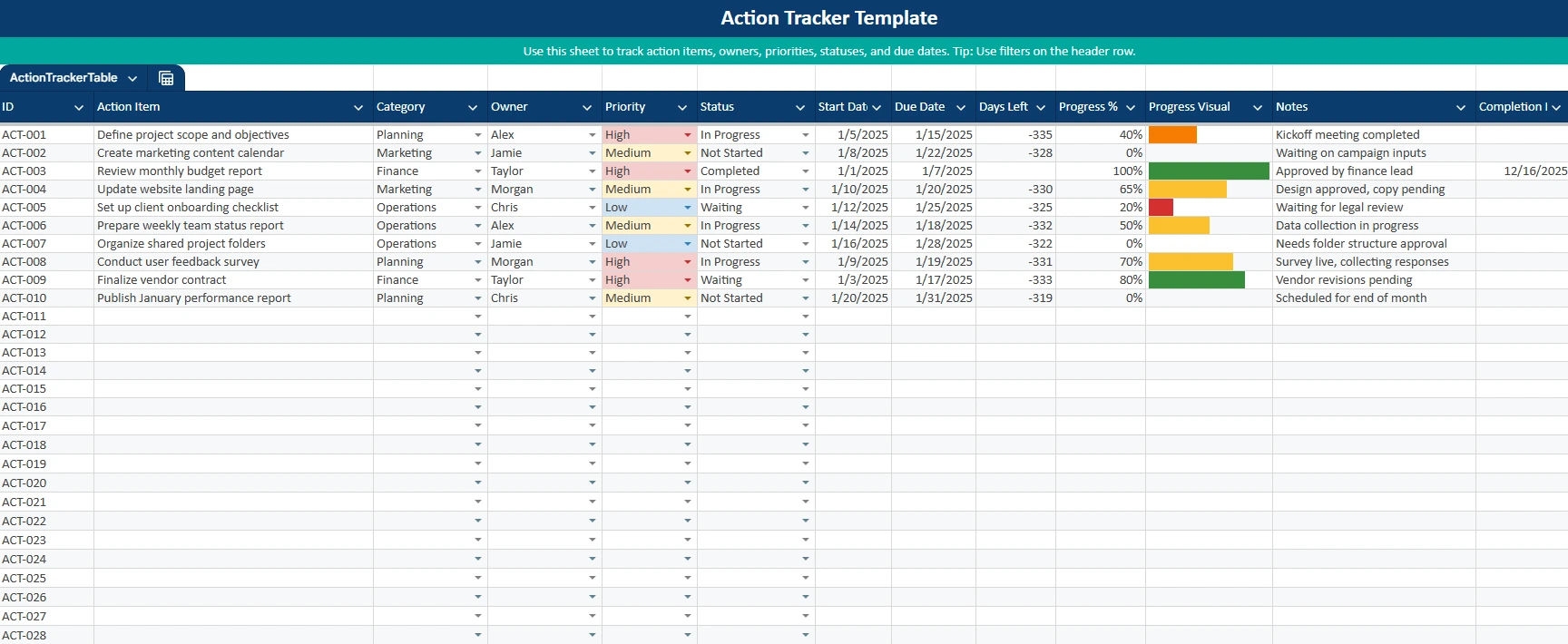
The Action Tracker sheet is the heart of the template. Each row represents a single action item, with clearly labeled columns that guide users through entering consistent, useful information.
The ID column assigns a unique reference like ACT-001 or ACT-010, which is especially helpful in meetings when actions need to be referenced quickly. The Action Item column captures a clear, specific description of the task, such as “Finalize vendor contract” or “Prepare weekly team status report.”
Dropdown-based fields for Category, Owner, Priority, and Status ensure consistency and prevent data errors. Instead of free-text entries that vary from row to row, users select standardized values like Planning, Marketing, or Operations for categories, and Not Started, In Progress, Waiting, or Completed for status.
Dates play a central role in the template. Start Date and Due Date fields drive the Days Left calculation, which automatically shows how much time remains. Overdue items are instantly visible, making it easy to spot risks before they become problems.
Progress tracking is handled through a Progress % column paired with a visual progress bar. This combination allows for quick scanning while still providing precise updates. Notes give space for context, blockers, or follow-ups, and the Completion Date fills in automatically when an item is marked as completed.
Together, these elements turn the sheet into a living action register rather than a static task list.
Dashboard Sheet
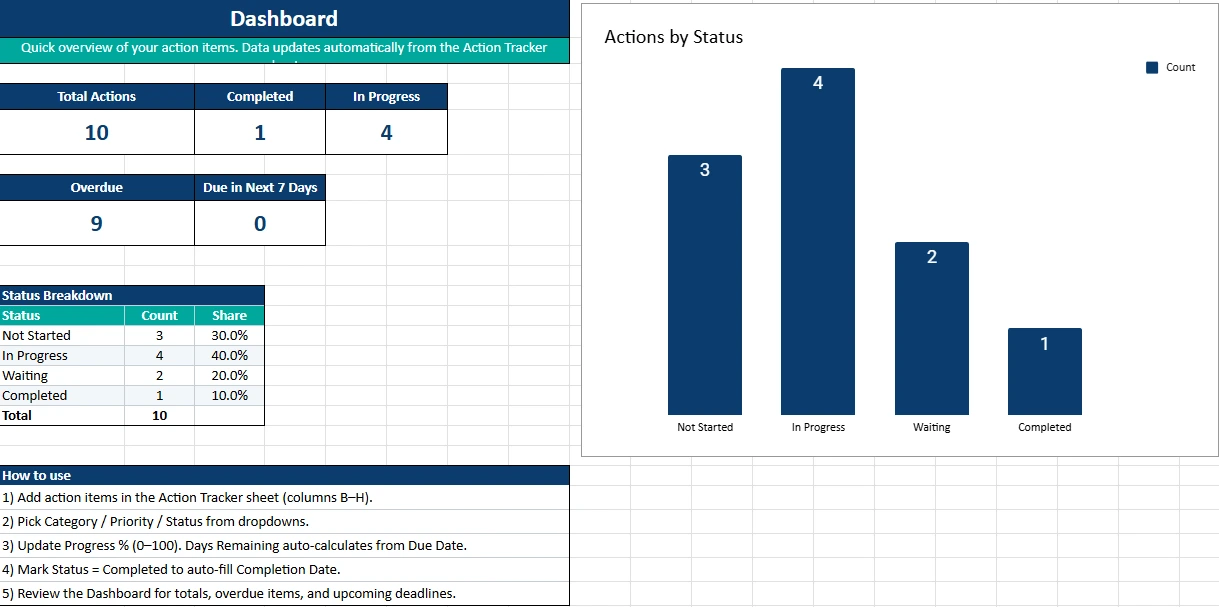
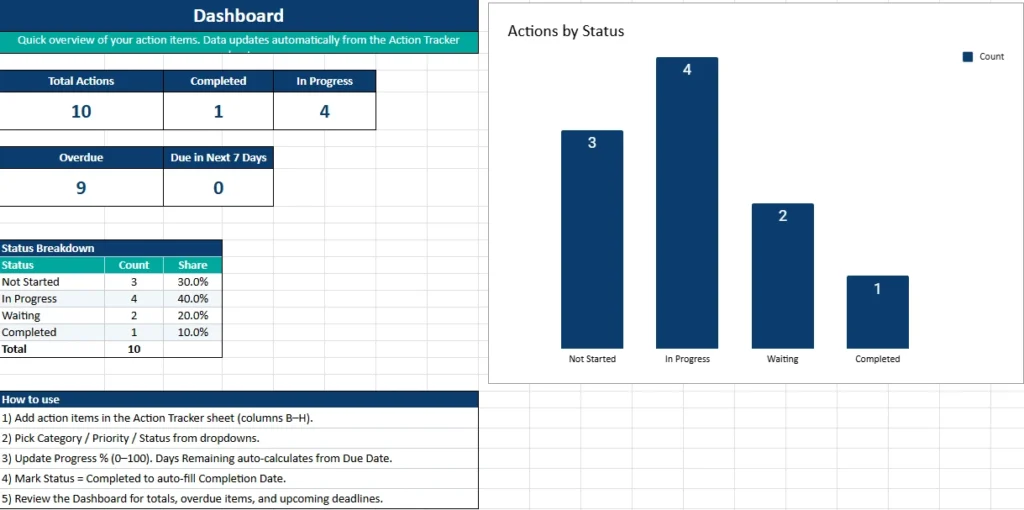
The Dashboard sheet transforms raw action data into clear, decision-ready insights. Without any manual updates, it shows total actions, how many are completed, how many are in progress, and how many are overdue.
A dedicated section highlights actions due in the next seven days, helping users prioritize what needs immediate attention. The status breakdown table shows both counts and percentages for each status, which is especially useful for managers tracking overall execution health.
The bar chart visualizing actions by status provides instant clarity. At a glance, you can see whether work is moving forward or stalling. This makes the dashboard ideal for weekly reviews, leadership updates, or personal check-ins.
Because everything is formula-driven, users can trust that the dashboard always reflects the latest data from the Action Tracker sheet.
Dropdowns Sheet
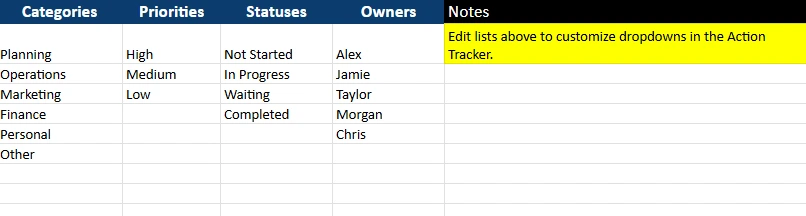
The Dropdowns sheet is a behind-the-scenes helper that keeps the template flexible. It stores the lists used for all dropdown menus, including Categories, Priorities, Statuses, and Owners.
Instead of editing data validation rules or formulas, users can simply update these lists to match their needs. For example, a team could add a new category like “Client Work” or rename “Waiting” to “Blocked.” Owners can be added or removed as team membership changes.
This separation of structure and data entry makes the action item tracker template easy to adapt for different workflows without risking errors.
How to Use the Template
Using this action item tracker template is straightforward, even for users who don’t consider themselves spreadsheet experts.
Start by opening the Action Tracker sheet and adding new rows for each action item. Enter a clear description, select a category, assign an owner, and choose a priority level. Setting a realistic due date is critical, as many of the template’s insights depend on it.
As work progresses, update the Status and Progress % fields. The progress bar will update automatically, providing a visual cue of how close the action is to completion. If an item is waiting on external input, marking it as Waiting helps distinguish it from tasks that are actively being worked on.
When an action item is completed, simply change the status to Completed. The Completion Date will fill in automatically, and the dashboard will immediately reflect the change. Over time, this creates a useful historical record of completed work.
For regular use, the Dashboard sheet becomes the control center. Users can review overdue items, check upcoming deadlines, and monitor overall progress without scanning the entire tracker table. Filters on the Action Tracker sheet make it easy to view actions by owner, status, or priority during meetings.
Why Choose This Template
There are many task lists and project tools available, but this action item tracker template stands out because it balances simplicity with structure. It doesn’t require subscriptions, logins, or training. Everything works directly inside Google Sheets, a tool most users already know.
The template is flexible enough for different use cases. A manager can use it to track meeting follow-ups. A freelancer can manage client deliverables. A student can track assignments and deadlines. A small business owner can monitor operational tasks without adopting heavy project management software.
Because the design emphasizes clarity and accountability, it encourages consistent use. The automatic dashboard reduces manual reporting, saving time while improving visibility. Most importantly, the template helps turn discussions into completed actions, which is the real goal of any action tracking system.
Get Your Free Action Item Tracker Spreadsheet
- Free Template
- Fully Editable
- Instant Access
- Organize your information
How to Access Your Copy
- Enter your email for instant access
- Open the link we send you
- Start using the spreadsheet right away





