
Running an Airbnb can be rewarding, but it also comes with a long list of expenses to manage — from cleaning services and supplies to utilities, maintenance, and platform fees. If you don’t have a simple system in place, your profits can quickly disappear without you realizing it.
That’s why this Airbnb Expenses Spreadsheet for Google Sheets was built — to give hosts a clear, automated, and organized way to track their income and expenses throughout the year. Whether you manage one property or several, this spreadsheet provides a complete financial snapshot that helps you understand where your money is going and how much you’re really earning.
Unlike basic budgeting templates, this sheet is designed specifically for Airbnb and short-term rental hosts. It automatically connects your property details, expense categories, and yearly summaries, so you can spend less time tracking numbers and more time hosting.
A Complete Overview of the Template
This Airbnb spreadsheet is built with three key sheets that work together to give you a full financial view: Categories, Income & Expenses, and Yearly View. Each one has its own purpose and set of automatic calculations, making it easy to use even if you’re not experienced with spreadsheets.
You can think of it as your personal Airbnb accounting system inside Google Sheets. The “Categories” sheet defines your properties and expense types, the “Income & Expenses” sheet captures your transactions, and the “Yearly View” pulls everything together into a clean monthly summary.
Let’s take a closer look at what makes each sheet useful and how they fit together.
Key Features and Sections
Categories Sheet
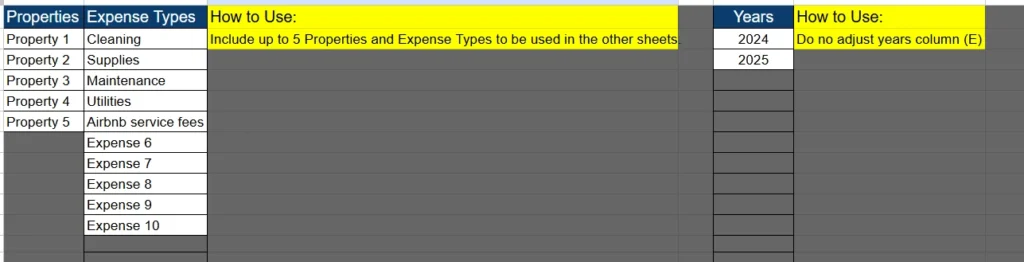
The Categories sheet is the foundation of the entire template. This is where you define up to five properties and ten expense categories that automatically feed into the rest of the workbook.
For example, you might enter:
- Property 1: Beach House
- Property 2: Downtown Loft
- Expense Types: Cleaning, Supplies, Maintenance, Utilities, Airbnb Service Fees, and so on.
You’ll also notice a “Years” column that lets you track financial data for multiple years — like 2024 and 2025 — without changing any formulas.
Each entry you make here is automatically available as a dropdown option on the other sheets, which helps keep your data consistent and eliminates typing errors. Think of this sheet as your setup page — you define the rules once, and the rest of your spreadsheet follows them.
Income & Expenses Sheet
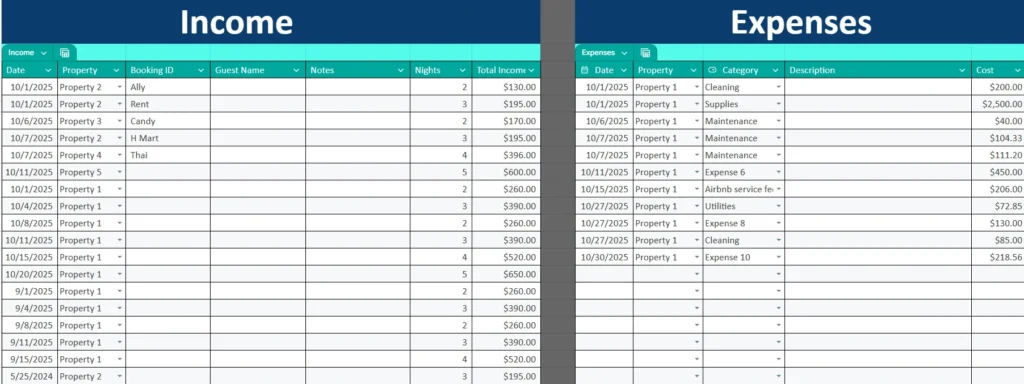
This is where the action happens. The Income & Expenses sheet is divided into two main tables — one for recording Airbnb income and one for logging your expenses.
On the Income side, you’ll enter details such as:
- Date: The day your guest checked in or payment was received.
- Property: Chosen from your property list.
- Booking ID or Guest Name: To identify each reservation.
- Nights Booked: The total nights for that stay.
- Total Income: The full amount you earned from that booking.
This makes it easy to see patterns — for example, if your “Beach House” earns more in summer months or if “Property 3” has fewer bookings during the off-season.
On the Expenses side, you’ll track all hosting-related costs. This includes cleaning, utilities, repairs, supplies, and Airbnb’s own service fees. Each expense entry includes:
- Date: When the expense occurred.
- Property: Which property the cost belongs to.
- Category: From your custom list in the Categories sheet.
- Description: What the payment was for.
- Cost: The total amount paid.
Together, these two tables give you a daily or monthly overview of how your Airbnb operations are performing. You can easily sort or filter by date, property, or category to find out exactly where your money is going.
For example, if you notice maintenance costs creeping up for one property, you can spot it immediately and make decisions before it affects your bottom line.
Yearly View Sheet
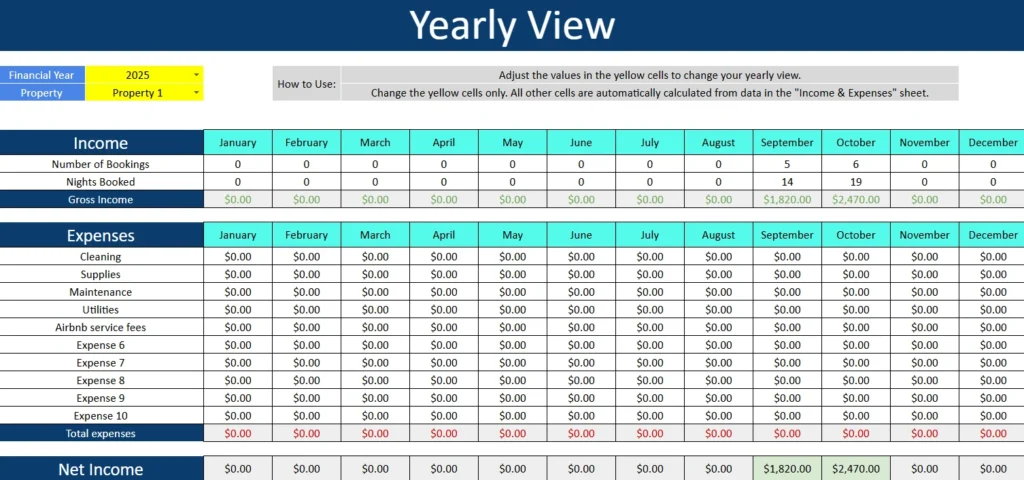
The Yearly View sheet is where all your data comes together. It’s your dashboard — showing your Airbnb performance month by month, automatically calculated from the Income & Expenses sheet.
At the top, you’ll find two dropdown menus: one for selecting the Financial Year and another for choosing the Property you want to analyze. Once those are set, every figure in the sheet updates instantly.
The first section summarizes your Income by month, displaying:
- Number of Bookings
- Nights Booked
- Gross Income
Below that, the Expenses section breaks down every category you set earlier — cleaning, supplies, maintenance, utilities, Airbnb fees, and more — across each month of the year. You’ll see monthly totals and a grand total for the year, color-coded for easy reading.
Finally, the Net Income row at the bottom shows your monthly and yearly profits automatically, helping you understand how each property performs over time.
This view makes it simple to answer key questions like:
- Which property earned the most profit in 2025?
- Which months had the highest cleaning or maintenance costs?
- How much did you actually make after expenses last year?
No manual calculations required — everything updates as you add data.
How to Use the Template Effectively
Getting started is straightforward:
- Open the Categories sheet and list your properties, expense types, and years.
- Go to the Income & Expenses sheet and begin entering your bookings and costs. Use the dropdowns for consistency.
- Switch to the Yearly View sheet and select the year and property you want to review. The summary updates automatically.
To get the most from this template, enter your data regularly — even once a week is enough. Over time, you’ll build a clear picture of your Airbnb’s financial health.
For example, imagine you manage two properties:
- Property 1 earns $4,000 per month but has $1,200 in cleaning and utility costs.
- Property 2 earns $2,800 per month with only $400 in expenses.
The Yearly View instantly shows that Property 2, though smaller, is actually more profitable. That kind of insight can guide your pricing, cleaning schedules, or future investment decisions.
The template is also flexible enough for non-Airbnb hosts. You can easily adapt it for Vrbo, Booking.com, or short-term rental managers who handle multiple listings.
Why This Airbnb Spreadsheet Is Worth Using
Most Airbnb hosts start with a simple list of numbers — maybe on paper, or a messy Excel file. But without clear structure, it’s hard to see the full picture. This spreadsheet was designed to fix that.
Here’s what sets it apart:
- Automation built in: You only enter data once. The summary updates on its own.
- No complicated setup: Everything’s ready to use — just fill in your bookings and expenses.
- Completely transparent: All formulas are visible and editable, so you can tweak it to your needs.
- Professional design: Easy-to-read colors, dropdowns, and logical organization.
- Perfect for taxes and accounting: At the end of the year, your records are already sorted by category and month.
Whether you’re a casual host renting out a spare room or a full-time property manager, this spreadsheet saves time and removes guesswork from your financial tracking.
Get Your Free AirBnB Expenses Spreadsheet
- Free Template
- Fully Editable
- Instant Access
- Organize your information
How to Access Your Copy
- Enter your email for instant access
- Open the link we send you
- Start using the spreadsheet right away
It’s simple, flexible, and not just another generic budget tracker.





