Are you tired of losing track of your books? Do you wish you had a better way to organize your collection, track your reading progress, and even analyze your habits? A book collection spreadsheet built in Google Sheets might be the perfect solution.
Whether you’re a dedicated bookworm, a casual reader, or someone who wants to build a home library, keeping track of your books can feel overwhelming. With a book collection spreadsheet, you can simplify the process, monitor your reading goals, and even assess the value of your collection over time.
In this guide, I’ll walk you through everything you need to know about setting up and using a book collection spreadsheet in Google Sheets. By the end, you’ll have a powerful tool to manage your books efficiently and even gain insights into your reading habits.
Overview of the Template
A well-designed book collection spreadsheet serves as a central hub for all your book-related information. Instead of relying on memory or scattered notes, you can input details about each book—such as title, author, genre, purchase date, and current location—into a single, organized sheet.
This template is perfect for anyone who wants to:
- Catalog their entire book collection
- Track which books they’ve read, are currently reading, or want to read
- Monitor the value of their collection over time
- Analyze their reading habits and goals
The beauty of using a book collection spreadsheet is that it’s customizable. You can add or remove columns based on your specific needs, making it a versatile tool for both casual readers and serious collectors.
Key Features and Sections
Book Collection (Main Database)
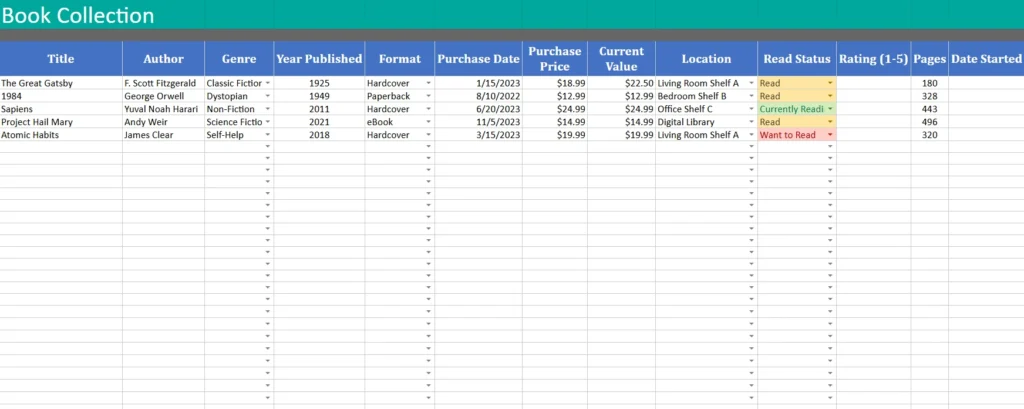
This is the heart of your book collection spreadsheet. Here, you’ll list every book in your possession, along with key details that help you stay organized.
Columns to Include:
- Title: The title of the book.
- Author: The author’s name.
- Genre: The genre of the book (e.g., Fiction, Non-Fiction, Science Fiction, Self-Help).
- Year Published: The year the book was published.
- Format: Whether the book is a hardcover, paperback, eBook, or audiobook.
- Purchase Date: When you bought the book.
- Purchase Price: How much you paid for it.
- Current Value: The estimated or resale value of the book.
- Location: Where the book is stored (e.g., Living Room Shelf A, Bedroom Shelf B, Digital Library).
- Read Status: Whether the book is marked as “Want to Read,” “Currently Reading,” or “Read.”
- Rating (1-5): Your personal rating for the book.
- Pages: The total number of pages in the book.
- Date Started: When you began reading the book.
- Notes: Any additional comments, quotes, or thoughts about the book.
Example of Book Collection Data:
| Title | Author | Genre | Year Published | Format | Purchase Date | Purchase Price | Current Value | Location | Read Status | Rating (1-5) | Pages | Date Started |
|---|---|---|---|---|---|---|---|---|---|---|---|---|
| The Great Gatsby | F. Scott Fitzgerald | Classic Fiction | 1925 | Hardcover | 1/15/2023 | $18.99 | $22.50 | Living Room Shelf A | Read | 5 | 180 | 3/16/2026 |
| Sapiens | Yuval Noah Harari | Non-Fiction | 2011 | Hardcover | 6/20/2023 | $24.99 | $24.99 | Office Shelf C | Currently Reading | – | 443 | 3/20/2026 |
This format allows you to easily sort and filter your books by genre, location, or read status. For example, if you want to find all the hardcover books in your collection, you can sort the “Format” column. If you’re looking for books to read next, filter by “Want to Read.”
Reading Log
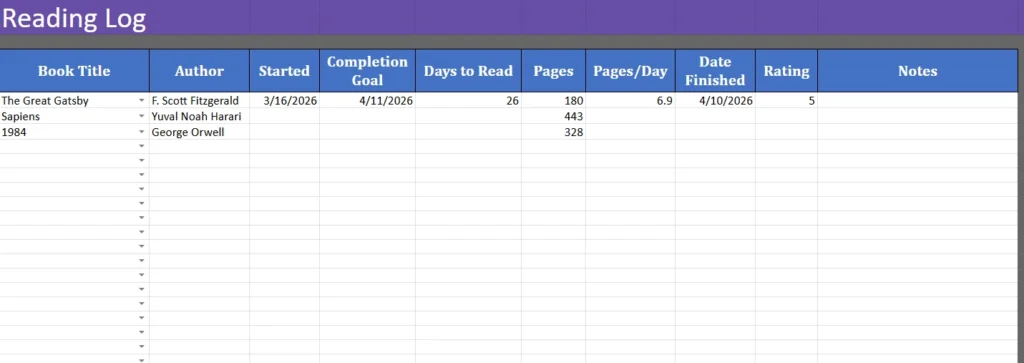
The Reading Log sheet is optional but incredibly useful for tracking your progress and analyzing your reading habits. This sheet helps you:
- Record when you start and finish a book.
- Calculate your reading speed (pages per day).
- Set and track completion goals.
- Monitor your reading pace over time.
Columns to Include:
- Book Title: The title of the book.
- Author: The author’s name.
- Started: The date you began reading the book.
- Completion Goal: Your target completion date.
- Days to Read: The number of days it took you to finish the book.
- Pages: The total number of pages in the book.
- Pages/Day: Your average reading speed.
- Date Finished: The date you completed the book.
- Rating: Your personal rating for the book.
- Notes: Any additional comments or thoughts.
Example of Reading Log Data:
| Book Title | Author | Started | Completion Goal | Days to Read | Pages | Pages/Day | Date Finished | Rating (1-5) | Notes |
|---|---|---|---|---|---|---|---|---|---|
| The Great Gatsby | F. Scott Fitzgerald | 3/16/2026 | 4/11/2026 | 26 | 180 | 6.9 | 4/10/2026 | 5 | Great classic! |
By tracking your reading progress, you can identify patterns, such as whether you read faster in certain months or genres. This data can help you set realistic reading goals and stay motivated.
Dropdowns
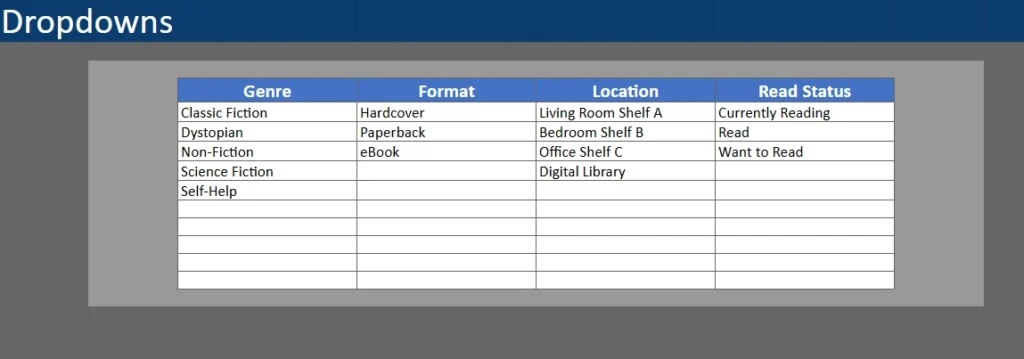
Dropdown menus are a game-changer in a book collection spreadsheet. They ensure consistency in your data entry and make it easier to sort and filter your books.
Examples of Dropdown Menus:
- Genre: Classic Fiction, Dystopian, Non-Fiction, Science Fiction, Self-Help.
- Format: Hardcover, Paperback, eBook, Audiobook.
- Location: Living Room Shelf A, Bedroom Shelf B, Office Shelf C, Digital Library.
- Read Status: Want to Read, Currently Reading, Read.
Using dropdowns reduces errors and makes your spreadsheet more user-friendly. For example, if you always use “Classic Fiction” instead of variations like “Fiction – Classic” or “Classic,” your data will be cleaner and easier to analyze.
How to Use the Template
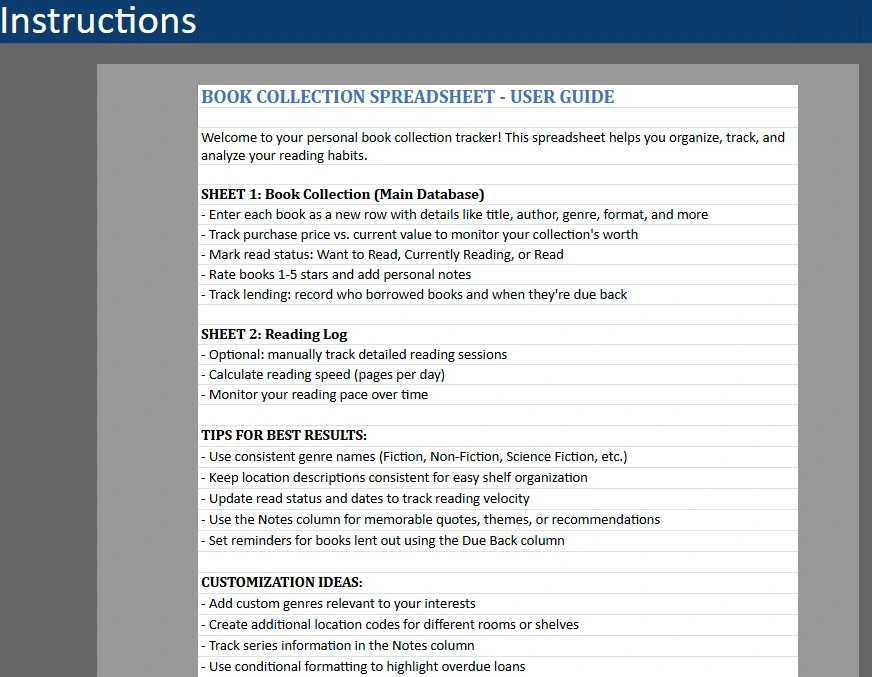
Step 1: Set Up Your Spreadsheet
- Create a new Google Sheet and name it “Book Collection Tracker.”
- Add the following sheets:
- Book Collection (Main Database)
- Reading Log (optional)
- Dropdowns (for consistent data entry)
- Customize the columns based on your needs. For example, if you track audiobooks, add a column for “Narrator” or “Listening Duration.”
Step 2: Input Your Book Collection
Start by entering the books you already own. Fill in as much detail as possible, especially the columns that will help you with future searches or analysis (e.g., genre, location, read status).
Pro Tip:
Use the “Data Validation” feature in Google Sheets to create dropdown menus for columns like Genre, Format, Location, and Read Status. This ensures consistency and saves time.
Step 3: Track Your Reading Progress
If you choose to use the Reading Log sheet, update it as you start and finish books. Record the date you began reading, your completion goal, and the actual date you finished. Over time, this data will help you identify trends in your reading habits.
Example Calculation:
If you read 180 pages in 26 days, your average reading speed is:Pages / Days to Read = Pages/Day180 / 26 = 6.9 pages/day
Step 4: Analyze Your Data
Use Google Sheets’ built-in features to analyze your book collection and reading habits:
- Sort and Filter: Quickly find books by genre, location, or read status.
- Conditional Formatting: Highlight books you’ve read in green or those you want to read in yellow.
- Charts and Graphs: Visualize your reading progress or the value of your collection over time.
Example Use Case:
Imagine you want to see which genres you read the most. Create a pivot table with the “Genre” column as rows and “Count of Titles” as values. This will give you a clear breakdown of your reading preferences.
Step 5: Update Regularly
Set aside time each month to update your book collection spreadsheet. Add new books as you purchase them, update the read status, and adjust values if you sell or trade books.
Why Choose This Template
Ease of Use
Google Sheets is free, accessible from any device with an internet connection, and easy to use—even for beginners. Unlike physical lists or apps with complex interfaces, a book collection spreadsheet is straightforward and customizable.
Customization
This template is designed to grow with you. Whether you’re a casual reader or a serious collector, you can add or remove columns to fit your needs. For example:
- Add a “Series” column if you read books in a series.
- Include a “Lent To” column to track books you’ve loaned out.
- Use the “Notes” column for memorable quotes or recommendations.
Data Insights
A book collection spreadsheet isn’t just for organization—it’s a tool for self-reflection. By analyzing your data, you can:
- Identify your favorite genres.
- Track your reading speed and set goals.
- Monitor the financial value of your collection.
Community and Sharing
Unlike physical lists, a Google Sheet can be shared with friends, book clubs, or family. You can even collaborate on a shared reading challenge or swap recommendations.
Tips for Best Results
- Be Consistent: Use the same genre names, location descriptions, and read status options throughout your spreadsheet.
- Update Regularly: The more accurate and up-to-date your data is, the more useful your spreadsheet will be.
- Use Conditional Formatting: Highlight books you’ve read in green or those you want to read in yellow to make your spreadsheet visually intuitive.
- Explore Formulas: Google Sheets offers powerful formulas like
VLOOKUP,COUNTIF, andSUMIFthat can help you analyze your data more deeply. - Backup Your Data: Regularly export your spreadsheet as a CSV file or copy it to a new sheet to avoid losing your data.
Who Should Use This Template?
Casual Readers
If you enjoy reading but struggle to keep track of what you’ve read, this template is perfect for you. It’s a simple way to catalog your books and stay motivated.
Book Collectors
If you have a growing home library, a book collection spreadsheet helps you monitor the value of your collection and organize your shelves efficiently.
Book Clubs
Book clubs can use this template to track books they’ve read, plan future reads, and share recommendations with members.
Students
Students who need to keep track of textbooks, research material, or assigned readings can benefit from a structured system.
Download Your Free Book Collection Spreadsheet
- Free Template
- Fully Editable
- Instant Access
- Organize your information
How to Access Your Copy
- Enter your email for instant access
- Open the link we send you
- Start using the spreadsheet right away