
The holidays should be joyful — but if you’ve ever hosted Christmas dinner, you know it can quickly turn into a juggling act. Between cooking, shopping, and organizing guests, there’s a lot to manage. That’s why the Christmas dinner spreadsheet from Sheetrix was created: a clear, easy-to-use Google Sheets planner that brings every part of your holiday meal together in one organized place.
This template helps you plan your menu, coordinate cooking times, track guest RSVPs, and even keep an eye on servings and ingredients. It’s the perfect balance of structure and simplicity — ideal for families, couples, or anyone hosting a Christmas gathering.
Overview of the Template
The Christmas Dinner Spreadsheet is built to take the stress out of hosting. It organizes everything you need to plan a memorable meal, from appetizers to desserts, all in one easy-to-read format.
The template includes three main sheets:
- A Menu Planner to outline dishes and recipes.
- A Guest List to track RSVPs, dietary needs, and headcounts.
- A Dropdowns Sheet to keep everything running smoothly behind the scenes.
Each sheet is color-coded, formatted for readability, and ready to print or share digitally. You can use it for a small family dinner or a large holiday feast — and customize it freely to fit your traditions.
Key Features and Sections
Menu Planner Sheet

The Menu Planner sheet is where your Christmas meal starts to take shape. It’s designed to help you plan every dish while staying mindful of time, servings, and responsibilities.
Each column gives you a clear structure for organizing your cooking plan:
- Dish Name – Write what you’ll serve, like “Honey-Glazed Ham” or “Garlic Mashed Potatoes.”
- Recipe Link – Add a clickable recipe or personal notes.
- Category – Select from Appetizer, Main, Side, Dessert, or Beverage using the dropdown menu.
- Servings – Estimate portions based on your total guest count.
- Ingredients – List main ingredients for easy reference while shopping.
- Prep Day and Cook Day – Split tasks across multiple days so you’re not overwhelmed on Christmas.
- Cook Start Time and Cook Time (minutes) – Keep your oven schedule on track.
- Assigned To and Notes – Delegate tasks or leave reminders for yourself.
Example: You might plan “Roasted Vegetables” as a side dish, schedule prep for the night before, assign it to a family member, and note “Toss in olive oil and herbs before reheating.”
The goal of this sheet is to help you see your full Christmas menu at a glance — what needs to be done, when it needs to be done, and who’s doing it.
Guest List Sheet

The Guest List sheet keeps your dinner organized beyond the kitchen. You can track who’s attending, manage RSVPs, and plan for dietary restrictions — all without scribbling notes or guessing headcounts.
Each row gives you space for:
- Guest Name – Individual, couple, or family name.
- Bringing Dish – Track what they’re contributing (if it’s a potluck-style dinner).
- Dietary Needs – Add notes like “gluten-free” or “vegetarian.”
- RSVP Status – Select Yes, No, or Maybe from the dropdown list.
- # Guests – Record how many people are coming with each RSVP.
- Notes – Use this for arrival times, gift exchanges, or seating details.
At the top of the sheet, you’ll find a Dinner Headcount Summary box that updates automatically as you add information. It includes:
- # in Household – The number of people in your home.
- Guest Count – The total number of confirmed attendees.
- Event Total – The full number of people eating at your Christmas dinner table.
Example: If your household includes 4 people and you’ve received “Yes” RSVPs from 8 guests, your total will automatically show 12. It’s a small touch that makes menu planning — especially portions — a lot easier.
Dropdowns Sheet
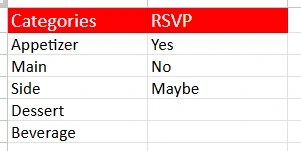
The Dropdowns sheet is the behind-the-scenes helper that makes everything run smoothly. It houses all the editable lists that feed your dropdown menus throughout the spreadsheet.
By default, you’ll find:
- Categories: Appetizer, Main, Side, Dessert, Beverage
- RSVP Options: Yes, No, Maybe
You can edit these lists any time to personalize your planner. For example, you might add “Drinks,” “Kids Menu,” or “Brunch” if you’re hosting multiple meals. The Dropdowns sheet ensures consistency so your menus, filters, and data all stay clean and organized.
How to Use the Christmas Dinner Spreadsheet
You don’t need to be a spreadsheet expert to use this template. Here’s how to make it work for your celebration:
- Start with the Menu Planner
Enter your dishes and fill out servings, prep times, and recipe links. Plan out when you’ll start cooking, and assign helpers if you have them. For instance, you could assign “Jason – Appetizers” or “Maria – Desserts.” - Fill Out the Guest List
Add your friends and family along with their RSVP responses and dietary preferences. As you update their details, the total guest count at the top will automatically change — giving you instant insight into how much food to prepare. - Customize Categories and Options
Open the Dropdowns sheet and make any changes you want. This is where you can rename categories or tweak RSVP wording to fit your family’s style. - Review Your Schedule and Details
Before Christmas Eve, review the Cook Day and Cook Time columns to ensure your timing makes sense. If your oven will be full, you can stagger cooking or prep some dishes early. - Share or Print
Because it’s a Google Sheet, you can share it with family members so everyone can collaborate. Or print a copy to keep on your fridge for a quick reference during cooking day.
Why Choose This Template for Your Holiday Dinner
Hosting a holiday dinner doesn’t have to feel chaotic. This spreadsheet was created for real families and hosts who want to stay organized while still enjoying the season.
Here’s what makes it so effective:
- Easy to use – You don’t need complex formulas or spreadsheet knowledge.
- Fully customizable – Add columns, categories, or notes to suit your needs.
- Reusable – Copy it every year and refresh your guest list and menu.
- Collaborative – Share it with family members to plan together.
- Time-saving – Keeps cooking, scheduling, and coordination in one place.
Whether you’re hosting Christmas Eve dinner, Christmas Day brunch, or both, this planner helps you focus on what matters most — good food and good company.
Download Your Free Christmas Dinner Spreadsheet
- Free Template
- Fully Editable
- Instant Access
- Organize your information
How to Access Your Copy
- Enter your email for instant access
- Open the link we send you
- Start using the spreadsheet right away
Plan ahead, stay organized, and enjoy your holiday — your dinner deserves it.





