
If you want to stay organized this holiday season — without overspending or forgetting anyone — this Google Sheets Christmas list template is exactly what you need.
Designed for simplicity and flexibility, this free template helps you plan, track, and manage every part of your Christmas shopping in one place. You can record gift ideas, monitor spending, track order status, and see at a glance how close you are to finishing your list — all from a clean, easy-to-use Google Sheet.
Stay Organized and On Budget This Christmas
The holidays can be stressful. Between finding the perfect gifts, remembering who’s been shopped for, and staying within your budget, it’s easy to lose track. That’s where a Google Sheets Christmas List Template comes in handy.
This spreadsheet takes the guesswork out of holiday shopping by giving you a clear, visual overview of:
- Who you’re buying for
- How much you’ve spent
- Which gifts are purchased, wrapped, or delivered
- What’s still left to do
It’s the perfect balance between structure and flexibility — detailed enough to manage dozens of recipients, yet simple enough for anyone to use.
Overview of the Template
This Google Sheets Christmas List Template includes two main sheets that work together:
- Gift & Recipient Planner (Main Sheet)
- Online Orders Tracker (Shipping Sheet)
Each section is color-coded, neatly formatted, and easy to read — even for users who aren’t spreadsheet experts.
Gift & Recipient Planner Sheet
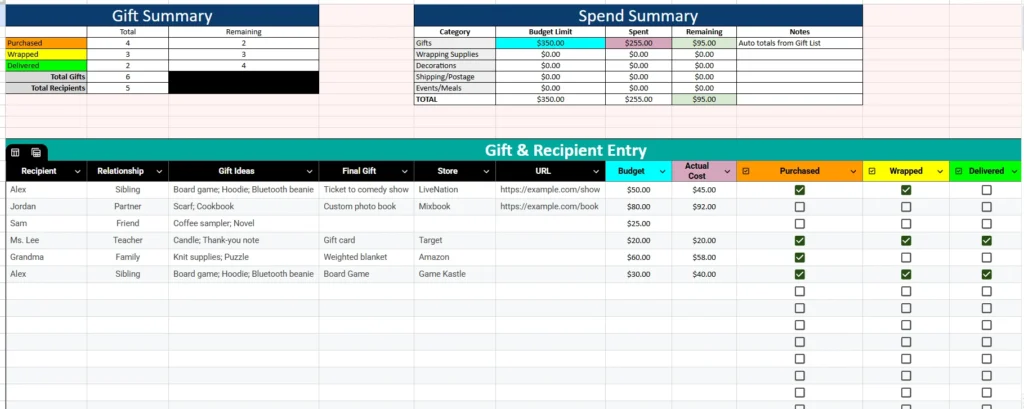
The Gift & Recipient Entry section is where most of your Christmas organization happens. Think of it as your central control center for the season.
This part of the spreadsheet helps you plan out each recipient’s gift ideas, store information, and budget — while automatically updating your summaries at the top of the page.
Here’s how it’s structured:
- Recipient & Relationship: List everyone you’re buying for and note their relationship (sibling, friend, teacher, etc.).
- Gift Ideas: Add multiple ideas before deciding on the final gift — perfect for brainstorming or comparing prices.
- Final Gift & Store: Once you’ve chosen what to buy, record where you plan to purchase it.
- URL: Add a direct link to the product for easy access later.
- Budget & Actual Cost: Plan your spending and enter the real amount once you’ve purchased. The template automatically totals your spending at the top.
- Purchased / Wrapped / Delivered: Checkbox-style dropdowns make it easy to track your progress visually — the colored cells (orange, yellow, green) show at a glance how much you’ve completed.
Gift Summary
Above your list is a Gift Summary table that automatically updates as you shop. It shows:
- Total gifts
- Recipients count
- How many gifts are purchased, wrapped, and delivered
- Remaining gifts for each stage
The table uses clear color highlights — orange for Purchased, yellow for Wrapped, and green for Delivered — giving you a quick visual snapshot of your progress.
For example, if you’ve purchased four gifts but only wrapped two, you’ll immediately see how much is left to do before Christmas week.
Spend Summary
Right beside the Gift Summary is the Spend Summary, a simple but powerful budgeting tool.
Here you can see:
- Category totals (like Gifts, Wrapping Supplies, Decorations, etc.)
- Your total budget limit
- How much you’ve spent
- How much remains
The “Gifts” category pulls data automatically from your entries below, so as you update each gift’s cost, your Spend Summary reflects your current total in real time.
This feature helps you stay on track financially — no surprises when your credit card bill arrives in January.
Online Orders Tracker Sheet

The second sheet focuses entirely on your online shopping — because let’s face it, most holiday gifts come from Amazon, Target, or Etsy these days.
The Online Orders sheet lets you track everything about your internet purchases in one organized table.
Here’s what it includes:
- Order Date – When you placed the order.
- Store – Where you bought it (Amazon, Walmart, etc.).
- Order Number – Useful for returns or customer service.
- Item & Recipient – Which gift this order corresponds to.
- Cost – Automatically included in your total cost summary.
- Tracking Link – Add your package’s tracking page so you can check delivery status instantly.
- Expected Delivery Date – Know when to expect your package.
- Status – Choose from dropdown options: Planned, Ordered, Shipped, Delivered, Returned.
Example of How It Works
Imagine you ordered a Weighted Blanket for Grandma from Amazon on November 25 for $58. You paste the Amazon tracking link, enter the expected delivery date (December 1), and set the status to Delivered once it arrives.
Or let’s say you ordered a LEGO Star Wars Set for Alex from Target for $49.99. It’s still on the way, so you set the status to Shipped. The color-coded dropdowns make it easy to see what’s pending and what’s done.
This sheet gives you peace of mind — no more digging through emails to find tracking numbers or wondering which gifts have arrived.
How to Use the Template
You don’t need to be a spreadsheet pro to use this Google Sheets Christmas List Template. It’s designed for anyone who wants a fast, visual, and mobile-friendly way to organize the holidays.
Here’s how to get started:
- Open the Template in Google Sheets.
- Set your total budget.
Update the “Budget Limit” under the Spend Summary to reflect how much you want to spend overall. - List your recipients.
Add everyone you plan to shop for — family, friends, coworkers, neighbors, or teachers. - Add gift ideas and costs.
Fill in your planned gifts, stores, and links. Enter estimated or actual prices to track totals automatically. - Track progress.
Use the checkboxes to mark each gift as purchased, wrapped, and delivered. Your Gift Summary will update instantly. - Monitor online orders.
Switch to the Online Orders tab to track shipments and confirm deliveries as packages arrive.
The template syncs in real time across devices, so you can open it on your phone while shopping or update it at home from your laptop.
Who Will Benefit Most from This Template
This Christmas gift spreadsheetis perfect for:
- Families who want to stay within a holiday budget.
- Couples coordinating shared shopping lists.
- Parents managing multiple kids’ gifts and stocking stuffers.
- Secret Santa organizers tracking participant lists and gifts.
- Online shoppers who need to monitor multiple deliveries.
No matter your holiday style — minimalist or full-blown festive — this spreadsheet brings structure and calm to what’s usually a hectic season.
Why Use Google Sheets for Christmas Planning
There are plenty of printable gift list templates online, but none offer the flexibility, automation, and collaboration that Google Sheets provides.
- Access anywhere — Check your list from your phone, tablet, or computer.
- Automatic updates — Totals and progress calculations happen instantly.
- Collaborate easily — Share with your partner or family to split up shopping.
- Cloud-based storage — No risk of losing your list or outdated versions.
- Eco-friendly — No printing needed — just a clean, digital planner.
With built-in color coding, dropdowns, and smart calculations, this template saves time and prevents duplicate purchases or forgotten gifts.
Get Your Free Christmas List Spreadsheet
- Free Template
- Fully Editable
- Instant Access
- Organize your information
How to Access Your Copy
- Enter your email for instant access
- Open the link we send you
- Start using the spreadsheet right away
From tracking ideas to managing budgets and deliveries, this all-in-one template helps you stay on top of every detail — so you can focus on enjoying the season instead of stressing about it.





