
Managing church finances requires accuracy, consistency, and transparency, especially when tracking weekly tithes and offerings across multiple services, events, and payment methods. This church tithe and offering spreadsheet was designed to give churches a simple but reliable system for recording donations and automatically summarizing giving at the weekly, monthly, and annual level.
The template is built in Google Sheets, making it easy to access, share, and update without specialized accounting software. It works well for small churches with volunteers handling finances, as well as growing ministries that need clearer reporting for leadership teams. All calculations update automatically, which helps reduce manual errors and saves time week after week.
Rather than overwhelming users with unnecessary complexity, this spreadsheet focuses on the most important financial tracking needs churches face: recording donations accurately, organizing them by type and service, and producing clear summaries that are easy to review and understand.
Key Features and Sections
Offerings Log Sheet
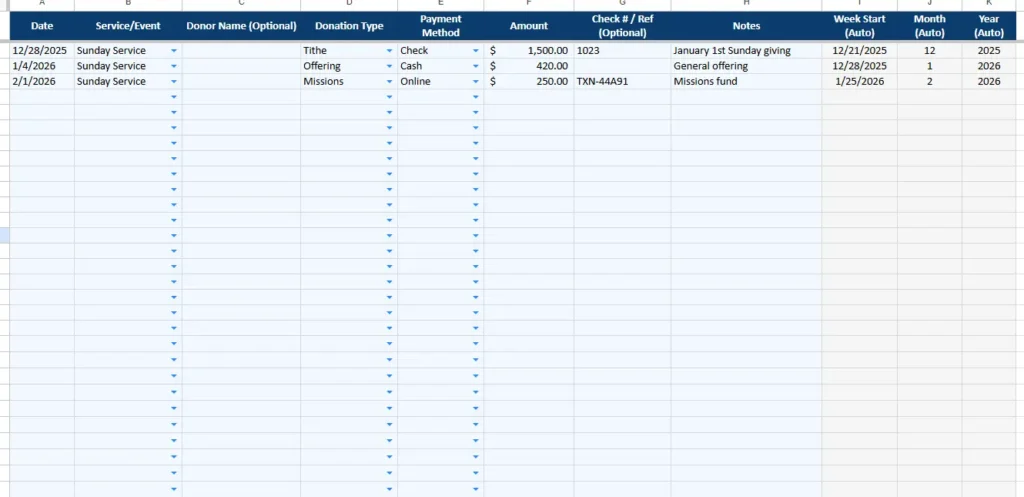
The Offerings Log is the heart of the spreadsheet and the only place where manual data entry is required. Each row represents a single donation, whether it comes from a Sunday service, a special event, or online giving.
Columns include the donation date, service or event, optional donor name, donation type, payment method, amount, optional check or reference number, and notes. To make data entry fast and consistent, the Service/Event, Donation Type, and Payment Method columns use dropdown menus that pull directly from the Settings sheet.
Several columns are auto-calculated in the background. The spreadsheet automatically determines the week start date, month number, and year based on the entered donation date. These hidden calculations power the Weekly Summary and Monthly & Annual Summary sheets without requiring any additional formulas from the user.
This structure allows churches to mix different giving methods in one place. For example, a single week might include cash offerings from a Sunday service, online donations submitted midweek, and a credit card payment for a special missions fund. Everything stays organized in one log while still rolling up correctly in summaries.
Weekly Summary Sheet
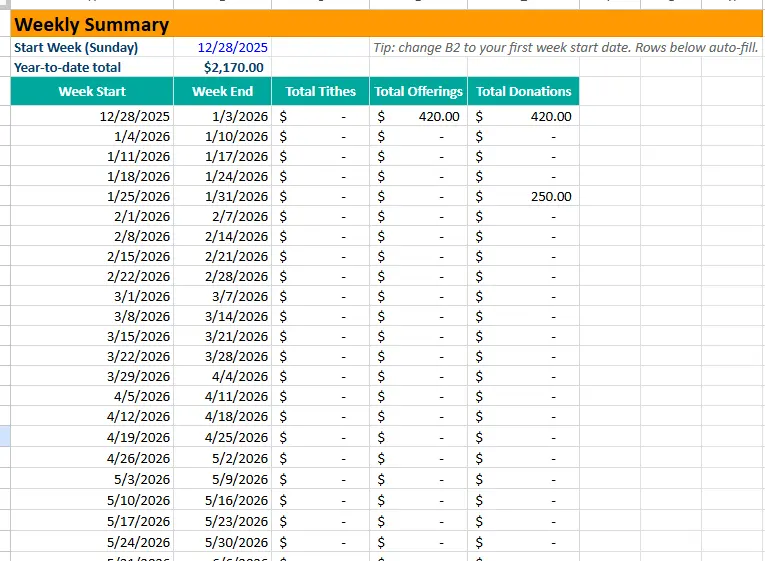
The Weekly Summary sheet provides a clear view of giving by week, starting on Sunday. At the top of the sheet, users set the initial start week date, and the rows below automatically populate week start and end ranges moving forward.
For each week, the spreadsheet calculates total tithes, total offerings, and total donations based on the entries in the Offerings Log. This makes it easy to see patterns in weekly giving and quickly answer common questions such as how much was collected during a specific service week or how one week compares to another.
A year-to-date total is displayed at the top of the sheet, giving church leaders an immediate sense of overall progress without needing to scroll or run reports. This is particularly helpful for pastors, finance teams, or treasurers who want a quick snapshot before meetings.
Monthly & Annual Summary Sheet
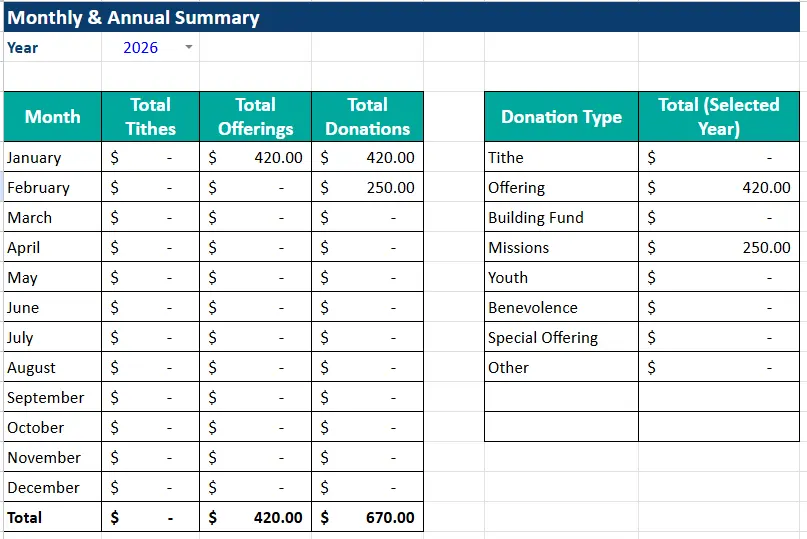
The Monthly & Annual Summary sheet is designed for higher-level reporting and long-term planning. At the top, users select the year they want to analyze using a dropdown menu populated from the Settings sheet.
Below that, monthly totals are displayed for tithes, offerings, and overall donations. Each month updates automatically based on the selected year and the data entered in the Offerings Log. A total row at the bottom provides annual sums, making it easy to see full-year giving at a glance.
On the right side of the sheet, donations are also summarized by donation type for the selected year. This allows churches to understand how funds are distributed across categories such as tithes, offerings, missions, building funds, or special offerings. For example, leadership can quickly see how much was given to missions over the course of the year compared to general offerings.
This dual view, monthly totals on one side and donation type totals on the other, makes the sheet useful for both operational tracking and strategic planning.
Settings Sheet
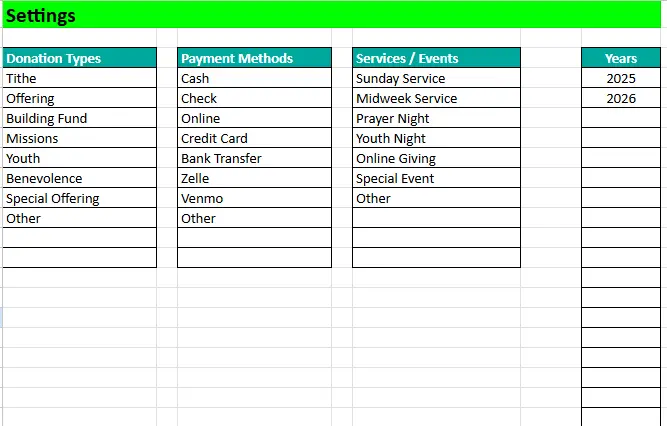
The Settings sheet controls all dropdowns and makes the spreadsheet easy to customize without touching formulas. Churches can edit donation types, payment methods, services or events, and available years.
If a church adds a new giving category, such as a benevolence fund or youth program, it can be added to the Donation Types list and immediately becomes available throughout the spreadsheet. The same applies to new payment methods or services.
Because all summaries reference this sheet, customization does not break calculations. This design ensures the spreadsheet remains flexible as church needs evolve over time.
How to Use the Template
Using the church tithe and offering spreadsheet follows a simple weekly workflow. After each service or during the week, donations are entered into the Offerings Log. Volunteers or staff select the appropriate service, donation type, and payment method from dropdowns and enter the amount received.
Once data is entered, no additional work is required. Weekly totals appear automatically in the Weekly Summary sheet, allowing church leaders to review giving shortly after services. Monthly totals build naturally as weeks pass, and annual summaries are always up to date.
For example, a church might record offerings from Sunday service checks, online donations from midweek giving, and a special missions contribution from a prayer night. All of these entries flow into the correct week, month, and donation category without manual sorting.
At the end of each month or year, leadership teams can use the Monthly & Annual Summary to review trends, evaluate budgeting decisions, or prepare reports for boards or accountants.
Why Choose This Template
This church tithe and offering spreadsheet was built to balance simplicity with reliability. It avoids unnecessary accounting features while still providing accurate, automated summaries that churches actually need.
Because it runs in Google Sheets, there is no software cost, no installation, and no learning curve. Multiple users can access the file securely, and updates are saved automatically. Churches retain full control over their data without relying on third-party platforms.
The structure encourages consistent data entry, reduces errors through dropdowns, and provides transparency through clear summaries. Whether a church is tracking a handful of donations per week or managing multiple services and giving channels, the spreadsheet scales smoothly.
Most importantly, the template was designed by someone who understands how spreadsheets are used in real-world church settings. It focuses on practical workflows, clear reporting, and flexibility, making it a dependable tool for churches of all sizes.
Download Your Free Church Tithe and Offerings Spreadsheet
- Free Template
- Fully Editable
- Instant Access
- Organize your information
How to Access Your Copy
- Enter your email for instant access
- Open the link we send you
- Start using the spreadsheet right away





