
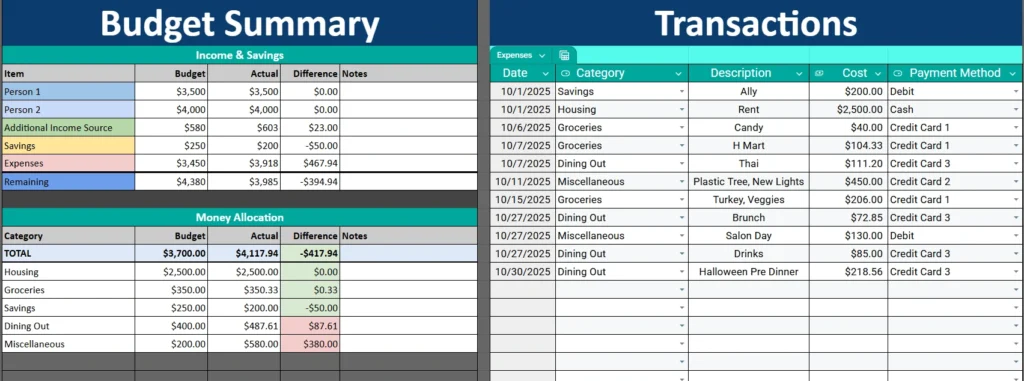
Money can be one of the hardest topics for couples to navigate — not because it’s complicated, but because it’s rarely organized in a way that both people can see clearly. That’s exactly what this Couples Budget Template in Google Sheets was made to solve.
Instead of juggling multiple tabs, apps, or conversations, this single-sheet layout gives you a complete financial snapshot you can both understand and update together. Whether you’re newly sharing expenses or have been managing a household for years, this spreadsheet helps you stay transparent, track goals, and reduce financial stress.
A Clear and Simple Overview of the Template
This template combines everything — income, spending, and savings — into one easy-to-navigate Google Sheet. It’s designed with couples in mind, but it’s flexible enough for any two people managing shared finances, such as roommates or partners planning for a trip.
At the top, you’ll find a Budget Summary section that shows total income, expenses, and how much you have left over each month. Directly below it, there’s a Money Allocation section that breaks down your spending by category. On the right side, a detailed Transactions Table records every expense you enter, while a small Payment Methods list helps you track which account or card was used for each purchase.
Because everything is on one page, you don’t have to click through multiple tabs. You can see your budget come to life in real time — every time you log a transaction, totals and differences update automatically.
Key Features and Sections That Keep You Organized
This Couples Budget Template may look simple, but it’s packed with smart details that make it powerful and practical. Let’s look at each section and how it works in everyday use.
Budget Summary

The top section of the sheet gives you a complete overview of your financial situation. It’s divided into two main parts: Income & Savings and Money Allocation.
Under Income & Savings, you can enter both partners’ incomes, any additional income sources (like freelance work or rental income), and your savings targets. The sheet automatically calculates the total and compares your budgeted amounts to the actual numbers you record throughout the month.
If you or your partner earn bonuses, commissions, or variable pay, those differences are instantly visible in the “Difference” column. This helps you spot whether you’re meeting your goals or if adjustments are needed for the next month.
The Remaining line at the bottom is one of the most useful metrics. It shows how much money is left after expenses and savings are accounted for — essentially, your true disposable income.
Everything in this section is color-coded:
- Blue for totals
- Green for savings
- Yellow for income
- Red for overspending
That visual layout makes it easy to scan and understand even if you’re not a spreadsheet expert.
Money Allocation
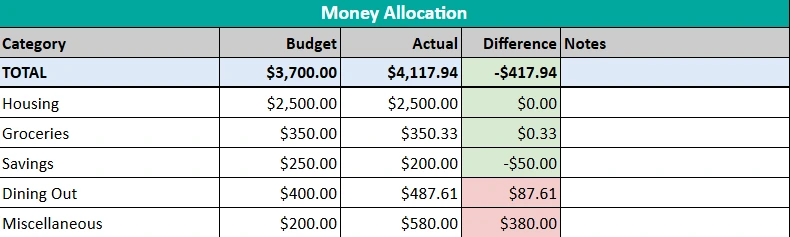
Directly below the summary is your Money Allocation table. This area breaks down your spending by category, such as Housing, Groceries, Dining Out, Savings, and Miscellaneous.
Each category has columns for Budget, Actual, and Difference. As you log new expenses, the totals automatically refresh. If you spend less than expected, the difference shows in green; if you go over, it turns red.
This part of the sheet helps couples identify spending patterns. For example, if “Dining Out” is consistently over budget, you might decide to set a weekly eating-out limit or move that money toward a shared savings goal.
Transactions Log
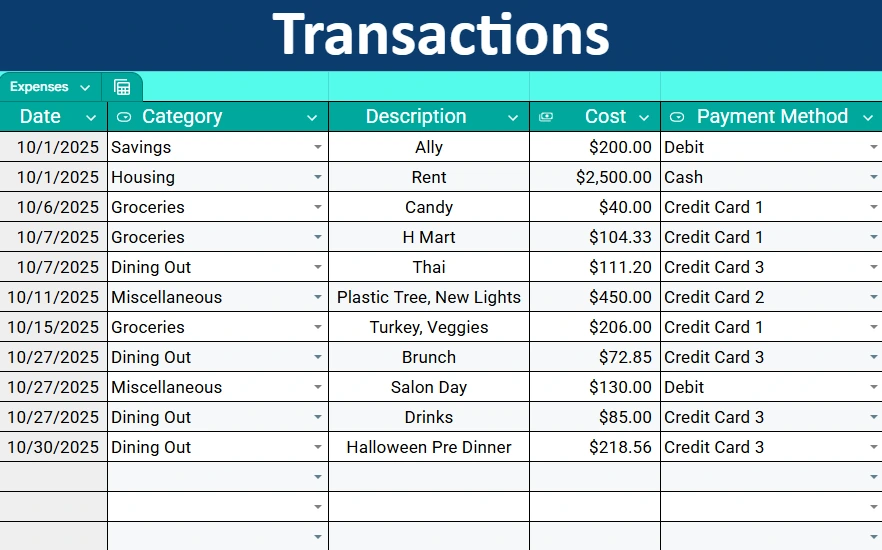
On the right side of the sheet, you’ll find the Transactions table — the engine that drives your entire budget. This section is where you enter every expense as it happens. Each row includes:
- Date of the transaction
- Category (linked to your budget categories via dropdowns)
- Description (for details like “Rent,” “Grocery Store,” or “Anniversary Dinner”)
- Cost
- Payment Method (selected from a dropdown list)
As you add new transactions, the sheet automatically updates your category totals and overall spending summary. You don’t have to calculate anything — everything runs on built-in formulas.
This design makes it especially easy for two people to use the same sheet without confusion. You can both enter transactions separately, and the spreadsheet keeps everything organized and balanced.
Payment Methods Reference
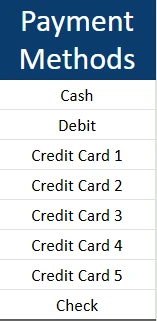
Along the side of the sheet, there’s a simple Payment Methods list. It includes common options like Cash, Debit, Credit Card 1–5, and Check. This helps you track which card or account each expense came from.
For example, if Partner 1 usually pays with “Credit Card 2” and Partner 2 uses “Credit Card 3,” you can sort or filter your transactions by that column to see how much each person contributed that month. It’s a small feature that makes accountability and transparency easy.
How to Use the Couples Budget Template
The template is fully editable, so you can customize it to fit your lifestyle. Here’s how to get started:
- Set your budget goals.
In the Budget Summary, enter your expected income and savings targets for both partners. Add categories under Money Allocation and set monthly limits. - Log your transactions regularly.
Each time you spend money — whether on groceries, rent, or date nights — add it to the Transactions table. The sheet will automatically update your totals. - Review your progress weekly.
Schedule a short “money check-in” once a week to review your spending and talk about any changes. This habit keeps both partners involved and reduces surprises at the end of the month. - Adjust and improve.
Over time, you’ll see where your money tends to go. Use that data to adjust future budgets, prioritize savings, or cut back in areas that don’t align with your goals.
Example: Let’s say you planned $400 for Dining Out, but your Actual shows $487. You might notice that a few extra coffee shop visits or takeout orders pushed you over. By spotting those small patterns, you can make smarter choices next month without arguments or confusion.
Why This Template Works So Well for Couples
What makes this Couples Budget Template stand out is its balance between simplicity and functionality. Many budgeting tools are either too basic or overly complicated, requiring multiple tabs, formulas, or integrations.
This one-sheet design eliminates all that friction. Both partners can open it in Google Sheets, update it from their phones, and instantly see the same information. There’s no need for complex apps or paid subscriptions — just real, transparent budgeting.
It’s also flexible. Some couples use it to manage shared expenses only (like rent, utilities, and groceries), while others use it for full household budgeting that includes both individual and joint spending.
Whether you’re splitting bills 50/50 or adjusting based on income, this layout adapts easily. You can even duplicate it each month to create a financial timeline and track progress toward larger goals like paying off debt or saving for a home.
Get Your Free Couples Budget Spreadsheet
- Free Template
- Fully Editable
- Instant Access
- Organize your information
How to Access Your Copy
- Enter your email for instant access
- Open the link we send you
- Start using the spreadsheet right away





