Managing leads and tracking calls doesn’t have to be complicated or expensive. With this free CRM template for Google Sheets, you can organize your prospects, track inbound and outbound calls, and see an instant visual summary of your monthly activity—all inside a simple spreadsheet. Whether you’re a freelancer, a small business owner, or part of a growing sales team, this CRM template gives you a clean, easy way to stay on top of your pipeline without relying on heavy CRM software.
This template was built to be fast, flexible, and easy to customize. You’ll find dropdown lists, built-in summaries, automated charts, and a well-structured leads table that helps you record everything from call method to follow-up dates. If you’ve been looking for a lightweight CRM that works inside Google Sheets, this template is a perfect fit.
Overview of the Template
This CRM template contains two main sheets:
- CRM Summary & Leads Tracking Sheet
- Dropdown Lists Sheet
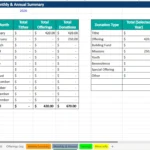
The first sheet is your main workspace. It includes the monthly call summary chart, a breakdown of inbound vs. outbound calls, missed calls, and closed sales. Below the summary, you’ll find a structured leads table where you can add new prospects, track call outcomes, and record follow-up tasks. Everything is designed to be intuitive, even if you’re not a spreadsheet expert.
The second sheet functions as the “settings” area of the template. All dropdown values (such as call methods, call types, and outcomes) are stored in one place so you can customize them without breaking the layout of your CRM. Google Sheets automatically pulls these lists into dropdown menus in the main leads table, making your data organized and consistent.
This simple two-sheet structure keeps the template lightweight, fast to load, and user-friendly on both desktop and mobile.
Key Features and Sections
This template includes a number of built-in features designed to improve clarity and reduce administrative work. Here’s a deeper look at how each part of the spreadsheet functions.
CRM Summary Sheet
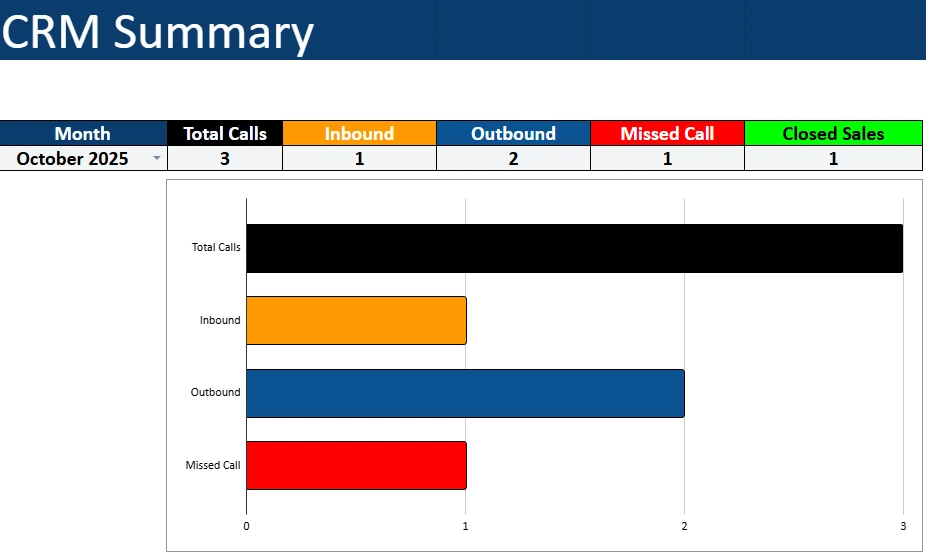
The CRM Summary section provides a clean monthly overview of your performance. You’ll see metrics such as:
- Total Calls
- Inbound Calls
- Outbound Calls
- Missed Calls
- Closed Sales
Each month’s numbers are summarized in a table at the top, followed by a bar chart that automatically visualizes your activity. This makes it easy to see patterns—such as whether you made more outbound calls than inbound, or whether missed calls are increasing over time.
This summary feature is extremely useful for:
- Solopreneurs reviewing their weekly and monthly outreach
- Small teams that need a simple performance dashboard
- Consultants tracking sales activities
- Service providers who want more structure around client calls
Because the summary is driven by the data you enter in the leads table, there’s no need to manually update anything. Add call details once, and the dashboard updates instantly.
Leads Sheet
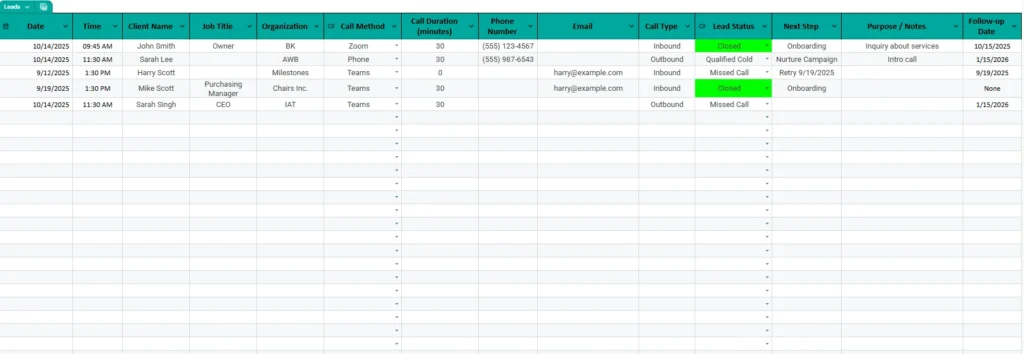
The Leads section is the core of the template. This is where you’ll enter information for every call, meeting, or prospect interaction. It includes columns for:
- Date & Time
- Client Name
- Job Title
- Organization
- Call Method (Phone, Zoom, Teams, etc.)
- Call Duration
- Phone Number
- Call Type (Inbound / Outbound)
- Lead Status (Closed, Qualified Cold, Missed Call, etc.)
- Next Step
- Purpose / Notes
- Follow-up Date
This structure keeps your CRM organized the same way professional tools do—without the cost.
For example:
If you spoke with a potential client named Sarah, you could record that the interaction was an Outbound call lasting 30 minutes, that the outcome was Qualified Cold, and that the assigned next step was to follow up in January. Later, that data feeds directly into your dashboard.
The color coding (such as green for “Closed”) makes the table even easier to scan, especially when dealing with high call volume.
Dropdowns Sheet
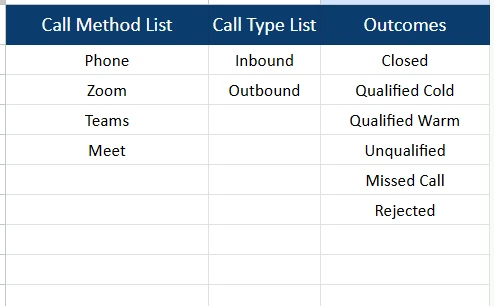
The Dropdown Lists sheet stores the data used in your dropdown menus. It keeps your CRM clean and consistent by preventing typos or inconsistent labels that can throw off your reports.
The template includes lists for:
- Call Method List (Phone, Zoom, Teams, Meet)
- Call Type List (Inbound, Outbound)
- Outcomes (Closed, Qualified Cold, Qualified Warm, Unqualified, Missed Call, Rejected)
You can modify these lists at any time, and the changes will automatically update the dropdown menus used throughout your Leads table.
This design keeps the CRM template flexible enough for different industries, whether you run a sales department, a consulting agency, a small local service business, or a recruiting team.
How to Use the Template
Once you download and open the file in Google Sheets, you’ll be ready to start using your CRM immediately. Here’s a step-by-step guide.
1. Review the Dropdown Lists First
Go to the Dropdown Lists sheet and confirm that the call methods, call types, and outcome options match your workflow. If your team uses special call categories—such as “Discovery Call” or “Demo”—you can add them here safely.
2. Start Logging Calls in the Leads Sheet
Use the Leads section to record every interaction. For example:
- Log inbound calls from new prospects
- Track each outbound call attempt
- Record missed calls that need a callback
- Note closed sales and the steps that led to them
This sheet is formatted to keep your data neat. Dates, call types, statuses, and next steps all use dropdown selections, making data entry quick and consistent.
3. Use the Notes and Follow-Up Date to Stay Organized
Every lead has space for:
- Additional notes
- Purpose of the call
- Next follow-up date
This is especially useful for service businesses, consultants, and agencies that need a record of conversations and commitments.
4. Check the CRM Summary for Instant Insights
As soon as leads are added, your CRM Summary chart updates automatically.
This gives you a real-time picture of:
- Monthly activity
- Trends in missed or inbound calls
- How many conversations turn into closed deals
- Where your time is really going
It’s a simple but powerful dashboard that replaces the need for complicated CRM software.
Why Choose This Template
This CRM template is designed for real people who want a tool that works without spending hours learning a new system. It’s especially valuable if:
- You’re a solo business owner managing your own outreach
- You run a small team and need a simple tracking system
- You prefer spreadsheets over complicated software
- You want full transparency into call activity
- You need an organized place to store notes, outcomes, and follow-ups
- You want a lightweight CRM without monthly fees
Because everything is built inside Google Sheets, you can:
- Access it on any device
- Share it with your team instantly
- Make comments, tags, or assignments
- Add conditional formatting or automation if needed
- Customize every part of the layout
It’s flexible enough for beginners but robust enough to use daily for business.
Get Free CRM Spreadsheet
- Free Template
- Fully Editable
- Instant Access
- Organize your information
How to Access Your Copy
- Enter your email for instant access
- Open the link we send you
- Start using the spreadsheet right away
Once you make a copy, you’ll be able to customize it to your business, add branding, and extend it however you like. Whether you’re improving your sales process or simply staying organized, this CRM template will help you work more efficiently every day.