Selling on Depop becomes much easier when every listing, sale, fee, and profit number is organized in one place. Many sellers start by keeping notes in different apps or trying to remember what each item cost, but that quickly becomes difficult once inventory grows. A structured Google Sheets template solves that problem by turning your shop activity into a simple system that you can update every time you list or sell an item.
This Depop Google Sheet template was designed for sellers who want more control over their listings without using expensive software. It works especially well for vintage sellers, casual side hustlers, students reselling clothing, and anyone managing secondhand inventory from home. Because it runs in Google Sheets, it is easy to open on desktop, tablet, or phone, and it updates automatically when formulas are already built into the file.
Instead of only tracking item names and prices, this spreadsheet also helps calculate fees, monitor sell through rate, and understand profit across multiple listings. It includes a listings tracker, a dashboard, a checklist sheet, and a short guide so even first time users can start immediately.
Overview of the Template
This template is built to help Depop sellers organize the full listing cycle from sourcing an item to marking it sold. Every sheet has a clear purpose, and each one supports the others through formulas and dropdown selections.
At the center of the file is the listings tracker, where each item is recorded line by line. Sellers can enter product details such as title, category, brand, condition, source, era, cost paid, and list price. Once the item sells, the status can be changed and profit updates automatically.
The dashboard sheet pulls information from the tracker and displays key business numbers in one place. This gives sellers a quick summary without needing to manually calculate totals.
The additional sheets make the file more practical. The how to use sheet explains what each area does, while the Depop listing checklist helps sellers stay consistent when preparing products for upload.
Because the template uses Google Sheets formulas and dropdown tools, users do not need advanced spreadsheet knowledge to benefit from it.
Key Features and Sections
Listings Tracker Sheet
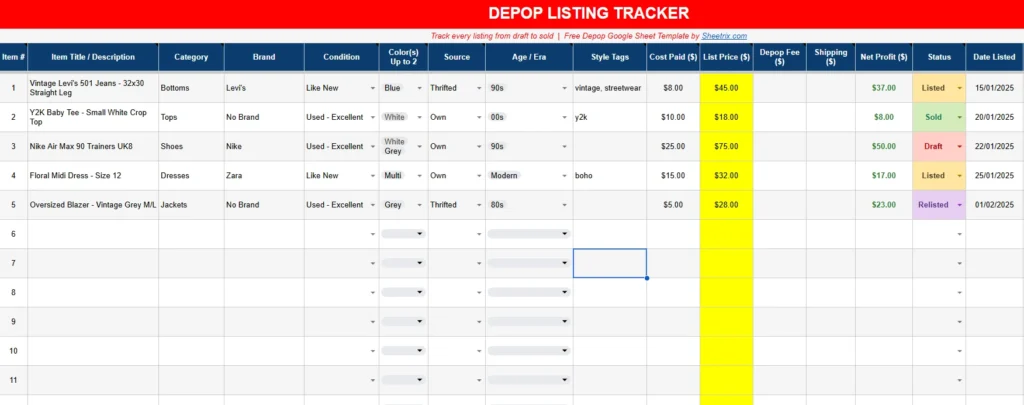
The listings tracker is the main working sheet and the one most sellers will use every day. Each row represents one item.
Important columns include:
- Item number
- Item title or description
- Category
- Brand
- Condition
- Color
- Source
- Age or era
- Style tags
- Cost paid
- List price
- Depop fee
- Shipping
- Net profit
- Status
- Date listed
This layout helps sellers answer practical questions quickly. For example, if someone sources five jackets from a thrift store, each one can be entered with a separate cost and expected resale price. A seller can then compare which items produced the highest margin.
The style tags section is particularly useful because many Depop sellers rely on search visibility. Entering tags such as vintage, streetwear, y2k, minimalist, or boho can help users remember what language they used in each listing.
The source column also becomes valuable over time. A seller may notice that thrifted items produce stronger profit than personal wardrobe sales, which helps with future sourcing decisions.
Because the sheet is built in Google Sheets, dropdowns make data entry faster and reduce mistakes. Categories and status values stay consistent, which improves dashboard calculations later.
Depop Sales Dashboard Sheet
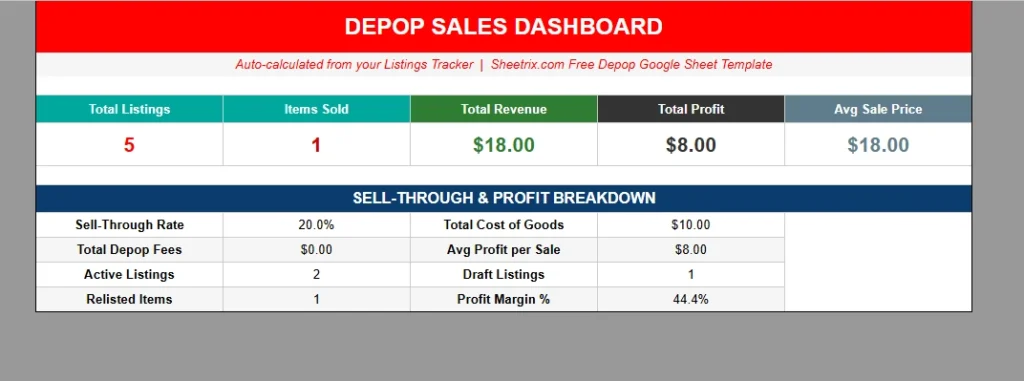
The dashboard sheet turns the listing data into useful summaries. Instead of checking dozens of rows manually, users can open one tab and immediately see business performance.
This section includes:
- Total listings
- Items sold
- Total revenue
- Total profit
- Average sale price
- Sell through rate
- Total Depop fees
- Active listings
- Draft listings
- Relisted items
- Profit margin percentage
A small seller with five active listings may use this to simply monitor weekly sales, while someone with fifty items can quickly identify whether inventory is moving efficiently.
For example, if total listings are 40 and only 4 items sold, the sell through rate shows that pricing, photos, or item selection may need adjustment.
Profit margin percentage is especially useful because revenue alone can be misleading. A seller may generate $300 in sales but only keep $90 after fees and item cost. Seeing margin inside Google Sheets makes those numbers easier to understand.
The dashboard also helps sellers decide when to relist older inventory. If draft items remain high while sold items stay low, the seller knows where attention is needed.
How to Use Sheet
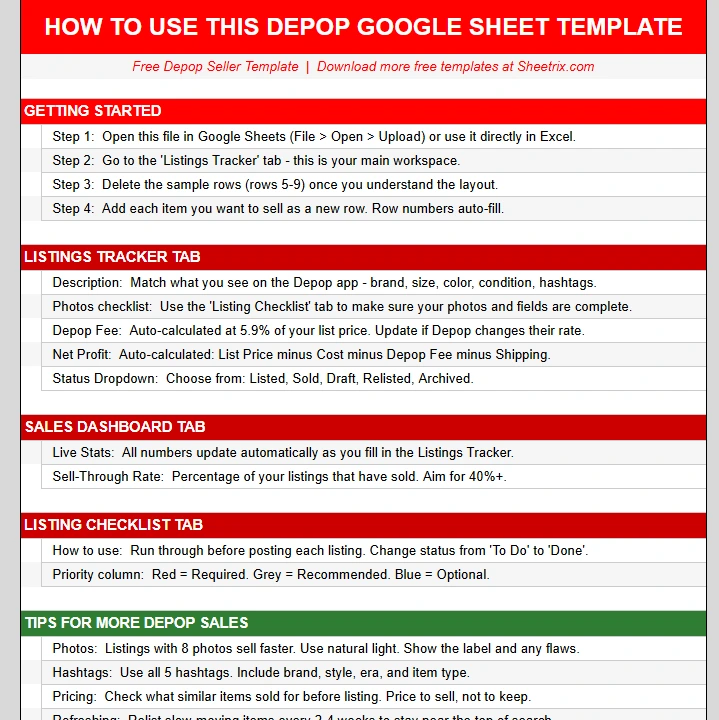
The how to use sheet helps new users understand the file without needing outside instructions.
This sheet explains:
- Which cells accept manual entry
- Which cells calculate automatically
- Which dropdown values should remain unchanged
- How status affects dashboard totals
A practical example is the list price and fee relationship. When a seller enters a list price, the fee area may calculate automatically depending on the formula setup. This means users should only type into highlighted cells and leave formula cells untouched.
This guide also helps prevent accidental deletion of formulas, which is common when people first use spreadsheet templates.
Because many users discover spreadsheet tools through downloads rather than formal spreadsheet training, having this sheet increases usability and trust.
Depop Listing Checklist Sheet
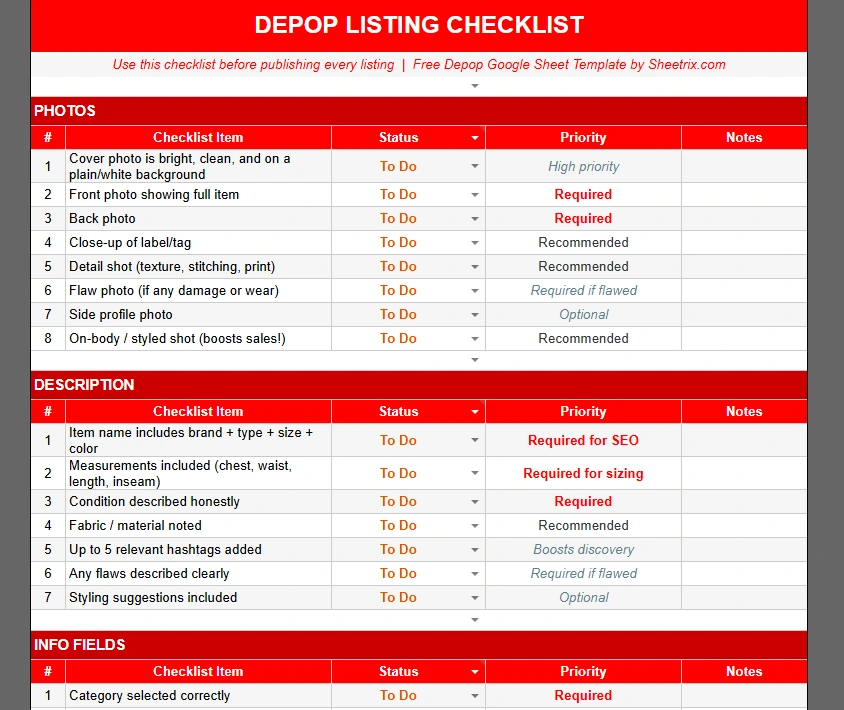
This sheet adds value because it supports listing quality, not just tracking.
A typical checklist may include:
- Photograph front of item
- Photograph back of item
- Photograph label
- Photograph flaws
- Measure item
- Write title
- Add style tags
- Check price
- Choose shipping option
- Publish listing
For new sellers, this reduces missed steps. For experienced sellers, it speeds up batch listing sessions.
A realistic example would be someone preparing ten items on a Sunday evening. Instead of switching between memory and notes, they can follow the checklist row by row and complete listings more efficiently.
This sheet also helps maintain consistency across listings, which matters for shops trying to build a recognizable style.
How to Use the Template
The easiest way to begin is by entering every available item into the listings tracker before updating sold items.
Start with one row per item. If someone is listing a pair of vintage Levi’s jeans, they would enter:
- Title: Vintage Levi’s 501 Jeans
- Category: Bottoms
- Brand: Levi’s
- Condition: Like New
- Source: Thrifted
- Cost Paid: $8
- List Price: $45
- Status: Listed
Once the item sells, the status can be changed to Sold.
That single update affects dashboard totals automatically.
A second example might be a low cost T shirt sourced from personal wardrobe. Even if cost paid is zero, entering it still helps profit calculations stay accurate.
The checklist sheet can be used before entering products to make sure photos and details are complete.
The dashboard should then be reviewed weekly rather than daily for better trend visibility.
Google Sheets also allows filtering, which means sellers can sort by category, source, or status. Someone with many shoes can filter only shoe listings and compare prices quickly.
Because Google Sheets saves changes automatically, sellers can update from phone after each sale without losing data.
Why Choose This Template
Many free spreadsheets only track simple sales totals, but Depop selling usually needs more detail.
This template works well because it combines practical listing management with financial visibility.
A casual seller clearing out clothes may use it to see whether selling is worth continuing.
A student reseller may use it to monitor whether weekend thrift trips are profitable.
A growing vintage seller may use it to compare eras, categories, and style tags that convert best.
Another reason this template stands out is that it stays readable. Some spreadsheets become difficult because they contain too many hidden formulas or unclear tabs. Here, each sheet has a direct purpose and supports normal selling habits.
Google Sheets also makes collaboration possible. If two people run one shop together, both can access the file and update listings in real time.
The visual dashboard adds motivation too. Seeing sold counts increase often encourages sellers to stay consistent with uploads.
Because the file includes guidance, tracking, and listing support in one place, it serves as both a record system and a workflow tool.
Download Your Free Depop Seller Spreadsheet
- Free Template
- Fully Editable
- Instant Access
- Organize your information
How to Access Your Copy
- Enter your email for instant access
- Open the link we send you
- Start using the spreadsheet right away