
Planning dinner can be surprisingly complex — especially when you’re balancing multiple dishes, guests, and prep times. The dinner spreadsheet from Sheetrix is designed to make that process easier. It gives you one simple place to organize your menu, grocery list, cooking schedule, and guest details without ever losing track of what’s next.
This all-in-one Google Sheets template helps home cooks, families, and event planners stay on top of every detail. Whether you’re planning a quiet family meal or a dinner party with friends, this spreadsheet will help you move from idea to execution in a calm, structured way.
Understand the Template: How It’s Designed to Simplify Dinner Planning
The Dinner Spreadsheet is built with clarity in mind. Each sheet focuses on a different stage of your planning process — from menu creation to guest tracking. The layout is clean, color-coded, and completely editable, so it works equally well for everyday dinners or larger occasions.
Instead of juggling handwritten notes or text reminders, you can keep all your dinner details in one easy-to-read dashboard. Each tab connects logically to the next, making it simple to move from planning to preparation.
Let’s break down each section and see what it does.
Key Features and Sheet Sections
Menu Planner Sheet
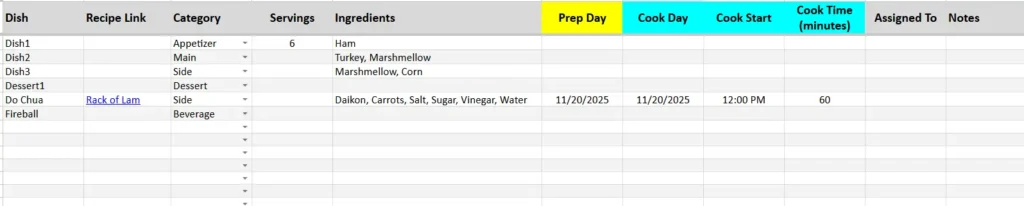
This is where you’ll start. The Menu Planner sheet lets you map out every dish you plan to serve, from main courses to desserts. You can use it to plan a single dinner or several meals across a week.
Each row includes structured columns that make planning straightforward:
- Dish Name – Write down what you’ll be making, such as “Garlic Butter Salmon” or “Veggie Lasagna.”
- Recipe Link – Add a clickable recipe URL for quick reference while cooking.
- Category – Use the dropdown menu to tag each dish as Appetizer, Main, Side, Dessert, or Beverage.
- Servings – Estimate how many people the dish will feed.
- Ingredients – List key items needed for that dish.
- Prep Day and Cook Day – Spread your tasks across multiple days if you’re preparing early.
- Cook Start Time and Cook Time (minutes) – Plan your kitchen schedule precisely.
- Assigned To and Notes – Perfect if you’re hosting with others and want to delegate tasks.
This sheet is especially useful for multi-course meals or large dinners where oven space and timing matter. You can sort or filter by category, prep day, or cook day to organize your workflow efficiently.
Guest List Sheet
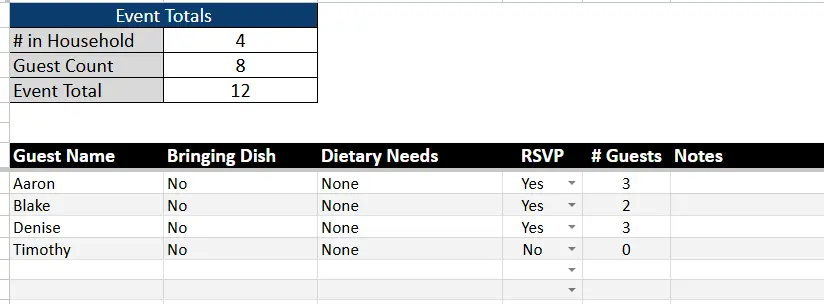
The Guest List sheet helps you keep track of everyone joining you for dinner. It’s flexible enough to manage small family dinners or large gatherings.
Each entry gives you room for:
- Name or Family – Identify each household or person.
- Bringing Dish – Track if someone is contributing food or beverages.
- Dietary Needs – Note allergies, vegetarian preferences, or other restrictions.
- RSVP Status – Choose between Yes, No, or Maybe using a dropdown.
- # Guests – Record how many people are included in each group.
- Notes – Add reminders or special instructions.
At the top of this sheet, you’ll find a Dinner Summary section that automatically updates as you fill in data. It shows:
- # in Household – The number of people living in your home.
- Guest Count – Total number of people who RSVP’d “Yes.”
- Total Attending – The complete number of people eating, combining household members and guests.
This summary is especially useful when deciding how much food to prepare or how many seats you’ll need. It takes the guesswork out of estimating portions.
Dropdowns Sheet
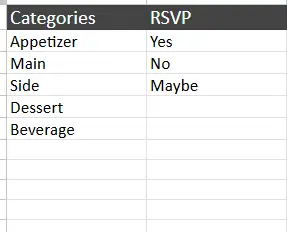
The Dropdowns sheet is the hidden engine behind your planner. It keeps all your lists and selections consistent throughout the spreadsheet.
You’ll find pre-filled dropdown options for:
- Dish Categories: Appetizer, Main, Side, Dessert, Beverage
- RSVP Options: Yes, No, Maybe
These lists make the sheet cleaner and reduce typing errors. You can customize them anytime — for example, adding “Snack,” “Lunch,” or “Breakfast” if you want to expand the planner’s use.
Having this sheet in the background also ensures that formulas and filters across other tabs stay consistent. It’s a simple but powerful way to keep your data organized.
How to Use the Dinner Spreadsheet
This spreadsheet works right out of the box, but it’s fully editable to fit your routine. Here’s how to get started effectively:
- Start with the Menu Planner:
List all your dishes and sort them by category. Add your recipe links and note any prep days for make-ahead meals. For example, you might prep casseroles the night before or chop vegetables early in the morning. - Add Your Guests:
Move to the Guest List sheet and record who’s attending. If you’re cooking for your family, you can use this section to track dietary preferences — such as noting that one person prefers gluten-free options. - Adjust Your Shopping Plan:
Use the Ingredients column in the Menu Planner as a quick reference when building your grocery list. You can easily copy and paste ingredient names into a separate shopping sheet if you want to expand the template. - Plan Timing and Coordination:
The Cook Day and Cook Start Time columns help you line up overlapping dishes. For example, you can see that your roast takes 90 minutes, while the side dish needs only 25 — helping you time them to finish together. - Delegate and Collaborate:
If multiple people are helping, assign tasks in the “Assigned To” column. You might note “Alex – Salad” or “Jordan – Drinks” to balance responsibilities.
Once you’ve filled it in, the sheet doubles as a dinner dashboard — showing what’s ready, what’s cooking, and what’s left to do.
Why the Dinner Spreadsheet Is Worth Using
This template was designed for real people who love food but want structure. It doesn’t require advanced spreadsheet skills — everything works through simple dropdowns and editable cells.
Here’s why users love it:
- It saves time. You can reuse the same layout for weekly meal planning or special dinners.
- It prevents mistakes. You’ll never forget a dish or overcook because you misjudged timing.
- It’s flexible. Use it for family meals, dinner parties, or even potlucks.
- It’s collaborative. Share it through Google Sheets so others can add dishes or confirm RSVPs in real time.
- It’s printable. The layout fits neatly on one page, perfect for taping to your fridge or countertop.
Realistically, this is the kind of tool used by anyone who enjoys organization — from busy parents planning family dinners to hosts organizing multi-course events. Even small restaurants or caterers can adapt it for team use.
Get Your Free Dinner Spreadsheet
- Free Template
- Fully Editable
- Instant Access
- Organize your information
How to Access Your Copy
- Enter your email for instant access
- Open the link we send you
- Start using the spreadsheet right away
Make dinner planning something you look forward to — organized, relaxed, and ready to enjoy.





