
Easter dinner often comes with a mix of excitement and pressure. Between planning recipes, keeping track of guests, and coordinating prep times, it’s easy to feel like you’re juggling too much. That’s exactly why the Easter dinner spreadsheet from Sheetrix exists — to help you stay organized while still enjoying the holiday.
This free Google Sheets template simplifies every part of hosting. It helps you create your menu, manage guest RSVPs, track ingredients, and schedule your cooking. Whether you’re hosting a big family meal, a potluck, or a cozy Easter brunch, this planner makes it easy to keep everything under control.
Overview of the Template
The Easter Dinner Spreadsheet brings structure and simplicity to your holiday meal. It’s divided into three intuitive sections that work together to guide your planning process from start to finish:
- A Menu Planner sheet for mapping out all dishes and timing.
- A Guest List sheet for RSVPs, dietary notes, and total headcounts.
- A Dropdowns Sheet to keep all your lists and categories consistent.
Everything is color-coded, fully editable, and formatted for easy reading. It’s as useful for a large gathering as it is for a small family dinner — and it can be reused year after year.
Key Features and Sections
Menu Planner Sheet

The Menu Planner sheet is where your Easter feast comes to life. It gives you space to list every dish, plan ahead, and assign tasks if others are helping in the kitchen.
Each column helps you organize important details:
- Dish Name – Write the name of each dish, such as “Glazed Ham,” “Roasted Carrots,” or “Hot Cross Buns.”
- Recipe Link – Paste links to recipes or note where they’re stored.
- Category – Choose from Appetizer, Main, Side, Dessert, or Beverage using a dropdown.
- Servings – Record how many people the dish will feed.
- Ingredients – Keep a list of key ingredients for quick shopping reference.
- Prep Day and Cook Day – Spread tasks across several days to avoid a last-minute rush.
- Cook Start Time and Cook Time (minutes) – Manage oven timing and avoid overlap.
- Assigned To and Notes – Delegate tasks or include personal reminders.
Example: You might assign “Easter Lamb Roast” to cook on Sunday at 1:00 PM, while “Potato Gratin” preps the night before. This structure lets you see your entire cooking schedule at a glance — no mental juggling required.
The Menu Planner is especially handy for those who like visual organization. You can filter by category or prep day, print a clean version for the kitchen, or share it digitally with helpers.
Guest List Sheet
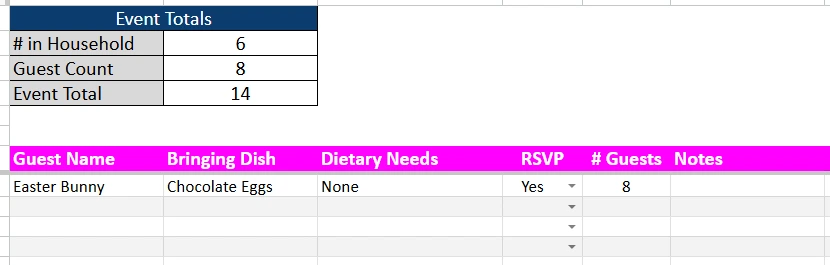
Hosting Easter dinner often involves family, friends, and sometimes extra guests from church or community gatherings. The Guest List sheet ensures everyone’s accounted for — and that you know exactly how much to prepare.
Each row captures useful information:
- Guest Name – The name of each guest or family group.
- Bringing Dish – Note if they’re contributing food.
- Dietary Needs – Record allergies or special meal preferences.
- RSVP Status – Choose from Yes, No, or Maybe.
- # Guests – Track how many people are attending from each invite.
- Notes – Add details like “Arriving early,” “Needs high chair,” or “Bringing dessert.”
At the top of the sheet is an automatic Event Totals box. It calculates your main numbers as you go:
- # in Household – The number of people in your home.
- Guest Count – Total number of confirmed guests.
- Event Total – Everyone attending dinner, household included.
Example: If your home includes 4 people and you have 10 confirmed guests, the Event Total shows 14 — giving you a clear picture of how much to cook.
This headcount tracker saves time when you’re scaling recipes or deciding how many place settings you need.
Dropdowns Sheet
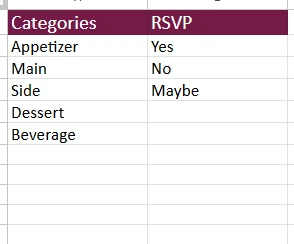
The Dropdowns sheet is where your planner stays organized behind the scenes. It holds the options for categories and RSVP statuses that feed into the other sheets, making the entire spreadsheet run smoothly.
You’ll find:
- Categories: Appetizer, Main, Side, Dessert, Beverage
- RSVP Options: Yes, No, Maybe
You can customize these lists anytime — for example, add “Brunch,” “Kids’ Table,” or “Potluck” to match your event style. This approach keeps your data clean, consistent, and easy to filter or sort.
How to Use the Easter Dinner Spreadsheet
This planner works for everyone — from experienced hosts to casual home cooks. It’s designed for real-world use, not just decoration. Here’s a simple guide to getting started:
- Plan Your Menu First
Start on the Menu Planner sheet. List out your dishes, serving sizes, and prep times. Add recipe links for quick access and use the Cook Day columns to plan what can be done early. For example, “Deviled Eggs” can be prepared the day before, while “Ham” cooks fresh on Sunday. - Record Your Guest Details
Move to the Guest List sheet and enter names, RSVPs, and dietary needs. As guests respond, your total headcount updates automatically. You’ll instantly know how much food to prepare. - Customize the Dropdowns
Go to the Dropdowns sheet if you want to personalize the template. Add new dish categories, adjust RSVP wording, or include event types. - Coordinate Cooking Times
Once everything’s planned, use the Cook Time and Cook Start columns to avoid scheduling conflicts. You can line up what’s in the oven, what’s on the stove, and what can be served fresh. - Share or Print
Because it’s built in Google Sheets, you can collaborate with others in real time. Share it with family, print it out for your fridge, or open it on a tablet while cooking.
This workflow keeps your Easter dinner organized from prep to dessert — with no surprises along the way.
Why You’ll Love This Template
The Easter Dinner Spreadsheet isn’t just practical — it’s a planner built for real life. It helps you move through the busy holiday calmly, knowing every dish, time, and guest detail is right in front of you.
Here’s why it stands out:
- User-friendly layout – Intuitive design, easy for beginners.
- Reusable – Copy and reuse for Easter, Mother’s Day, or any special meal.
- Collaborative – Share it with friends or family who are helping.
- Flexible – Works for small family gatherings or larger community events.
- Customizable – Edit colors, lists, or structure to fit your traditions.
It’s the kind of tool that turns hosting from stressful to satisfying. Once you’ve used it, you’ll wonder how you managed without it.
Get Your Free Easter Dinner Spreadsheet
- Free Template
- Fully Editable
- Instant Access
- Organize your information
How to Access Your Copy
- Enter your email for instant access
- Open the link we send you
- Start using the spreadsheet right away
Celebrate Easter with more peace of mind — and more time to enjoy good food and good company.





