Keeping track of equipment maintenance should not require complicated software, expensive subscriptions, or a full maintenance management system. For many small businesses, churches, warehouses, contractors, and facility managers, a structured spreadsheet is more than enough, as long as it is built correctly.
This Equipment Maintenance Tracking Spreadsheet is designed to do exactly that. It combines a structured Maintenance Log, a centralized Service Library, and a detailed Equipment Register to create a simple but powerful maintenance system inside Google Sheets. Instead of manually calculating due dates or guessing when something was last serviced, the spreadsheet connects each sheet together so updates happen automatically.
Whether you manage forklifts in a warehouse, rooftop HVAC units in a commercial building, backup generators at a church, or hydraulic presses in a small manufacturing shop, this template gives you one organized place to track service history, costs, parts used, and upcoming maintenance.
The structure is intentionally straightforward. You log maintenance events. The system calculates next due dates. The equipment sheet updates last service automatically. The service library controls intervals and defaults. Everything works together without requiring advanced spreadsheet knowledge.
This makes it practical for real-world use, not just theoretical planning.
Key Features and Sections
Maintenance Log
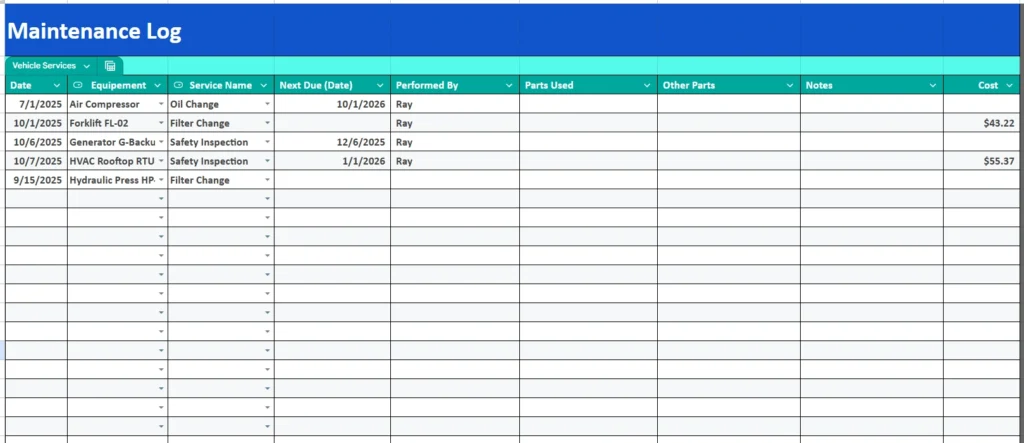
The Maintenance Log is the working sheet where day-to-day activity happens. Every time maintenance is performed, you enter a new row with the service date, equipment name, service performed, technician, parts used, notes, and cost.
The most important part of this sheet is that it is connected to the Service Library. When you select a Service Name, the spreadsheet can automatically reference:
- The service interval in days
- The due rule
- The estimated cost
- The default parts list
For example, if you log an Oil Change on an Air Compressor with a 180-day interval, the Next Due (Date) field calculates automatically based on the service date. There is no need to manually count forward on a calendar.
This sheet also supports different types of services:
- Date-based services such as safety inspections or annual calibrations
- Usage-based services such as lubrication or oil changes
- Hybrid rules if needed
The Cost column allows you to track actual expenses over time. For example, if your forklift filter change normally costs $45 but occasionally runs higher due to additional parts, you can capture that variation. Over time, this creates a reliable maintenance cost history for each piece of equipment.
For facility managers, this sheet becomes a service history log. For small manufacturers, it becomes proof of preventive maintenance. For property managers, it becomes documentation that systems were maintained on schedule.
Service Library
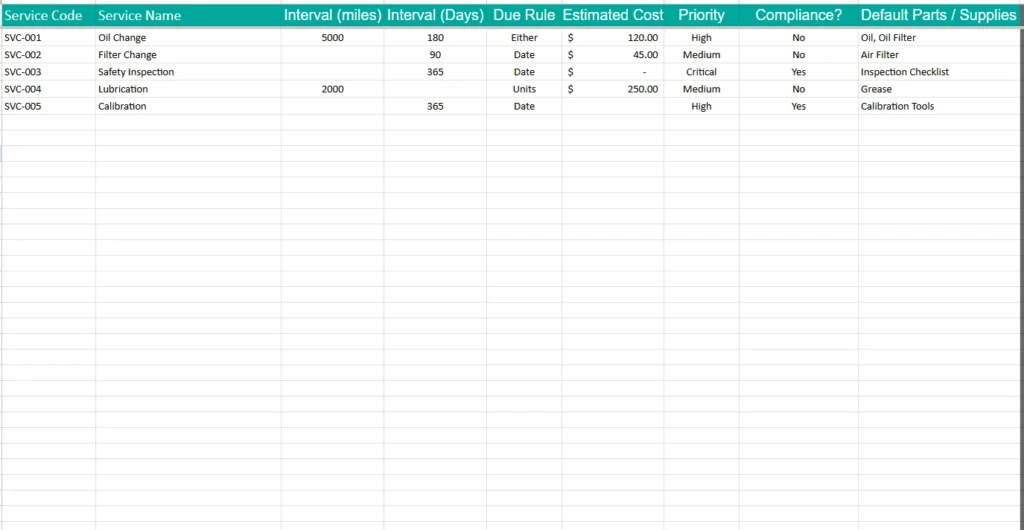
The Service Library is the engine behind the automation.
Instead of typing intervals or parts every time you log maintenance, this sheet defines them once and reuses them everywhere.
Each service includes:
- Service Code
- Service Name
- Interval (Days or Units)
- Due Rule
- Estimated Cost
- Priority
- Compliance flag
- Default Parts / Supplies
For example, your library may include:
- Oil Change with a 180-day interval and default parts of Oil and Oil Filter
- Safety Inspection with a 365-day interval and marked as Compliance Required
- Lubrication with a usage-based interval
- Calibration with an annual schedule
This design eliminates inconsistencies. If multiple employees log maintenance in Google Sheets, dropdowns ensure they select standardized service names instead of typing variations that break formulas.
The Priority column adds another level of structure. A Critical service like a Safety Inspection can be flagged differently from a Medium-priority lubrication task. This is especially helpful for businesses that must meet safety or insurance requirements.
By centralizing service definitions, the spreadsheet becomes scalable. You can add new services without redesigning formulas in the Maintenance Log.
Equipment Register
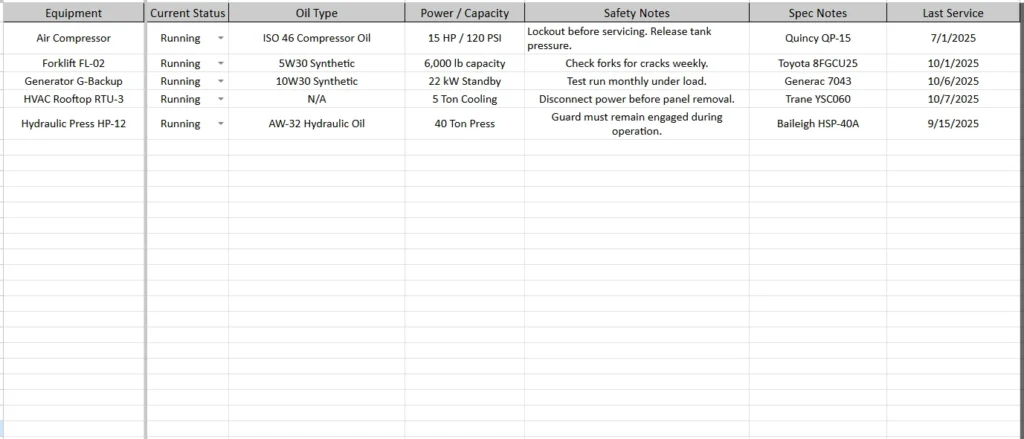
The Equipment Register acts as your asset database.
Each piece of equipment includes:
- Equipment Name
- Current Status
- Oil Type
- Power or Capacity
- Safety Notes
- Spec Notes
- Last Service (auto-calculated)
The Last Service column automatically pulls the most recent date from the Maintenance Log for that specific equipment. This means as soon as a new service entry is logged, the equipment sheet updates itself.
This is particularly useful for managers who want a high-level view without scrolling through log entries. You can instantly see:
- When each asset was last serviced
- Whether it is currently running or down
- Key specifications for ordering parts
- Important safety instructions
For example, a generator may show a Last Service date of 10/6/2025 and include a note that it must be tested monthly under load. An HVAC unit may include instructions to disconnect power before panel removal. These details reduce mistakes and improve maintenance quality.
For growing businesses, this sheet becomes a living inventory of physical assets, not just a maintenance tracker.
How to Use the Template
Start with the Service Library. Define your recurring services first. Add oil changes, inspections, lubrication cycles, or any other preventive maintenance tasks that apply to your equipment. Set realistic intervals based on manufacturer recommendations.
Next, complete the Equipment Register. Add each piece of equipment with accurate names. Avoid generic labels like “Item 1.” Instead, use descriptive names such as “Forklift FL-02” or “HVAC Rooftop RTU-3.” This makes reporting and filtering much easier later.
After setup, daily use is simple:
- Go to the Maintenance Log.
- Add a new row when service is performed.
- Select the equipment and service from dropdown lists.
- Enter the date, technician, and actual cost.
The spreadsheet handles the rest.
Next Due (Date) calculates automatically based on the defined interval. The Equipment Register updates Last Service automatically. Over time, the log builds a full maintenance history.
You can filter the Maintenance Log by equipment to see all services for a single asset. You can filter by service type to analyze recurring costs. You can also use built-in sorting in Google Sheets to identify the most recently serviced items.
For example:
- A warehouse manager can quickly see all services performed on a specific forklift over the past year.
- A church administrator can confirm that backup generators were inspected annually.
- A contractor can review calibration records before an audit.
Because everything is structured, the spreadsheet remains organized even as it grows.
Why Choose This Template
There are many generic maintenance logs available online. Most of them are simple tables that require manual tracking and do not connect sheets together. This template is different because it is structured around relationships.
The Maintenance Log feeds the Equipment Register.
The Service Library feeds the Maintenance Log.
Dropdowns prevent data errors.
Intervals calculate due dates automatically.
It is powerful without being complicated.
It is also flexible. You can use it for:
- Small manufacturing facilities
- Commercial property maintenance
- Church facilities
- Auto service fleets
- Construction equipment
- Agricultural machinery
Because it runs in Google Sheets, it is accessible from anywhere. Multiple users can update it if needed. You can create filtered views for supervisors or share read-only versions for reporting.
Most importantly, it encourages preventive maintenance instead of reactive repairs. When due dates are visible and service history is organized, equipment lasts longer and unexpected breakdowns become less common.
This spreadsheet is not designed to replace a large maintenance management system. It is designed to provide structure and clarity for teams that need something reliable and straightforward.
If you are looking for a practical way to track equipment maintenance, document service history, monitor costs, and stay organized without complex software, this template provides exactly that balance.
Download Your Free Equipment Maintenance Spreadsheet
- Free Template
- Fully Editable
- Instant Access
- Organize your information
How to Access Your Copy
- Enter your email for instant access
- Open the link we send you
- Start using the spreadsheet right away