When someone passes away, managing their estate can quickly become overwhelming. There are forms to file, accounts to close, beneficiaries to notify, and countless details to track. That’s why we created this free estate executor spreadsheet — a clean, easy-to-use Google Sheets template that keeps everything organized in one place.
This spreadsheet combines the essential tools an executor needs: a task checklist, asset and debt tracking, and a contact list with beneficiary information. It’s designed for both first-time executors and professionals who want a clear, customizable structure for estate management.
Overview of the Template
The Free Estate Executor Spreadsheet is built for simplicity and accuracy. It includes three main sheets that organize your executor duties step by step:
- Executor Checklist & Summary – Track your to-dos and see a real-time financial overview.
- Assets, Debts & Liabilities – Document the full financial picture of the estate.
- Contacts & Beneficiaries – Keep key people and inheritance details together for quick access.
Each sheet uses dropdowns, formulas, and structured tables so you can focus on completing tasks rather than formatting cells.
Key Features and Sections
Executor Checklist & Summary
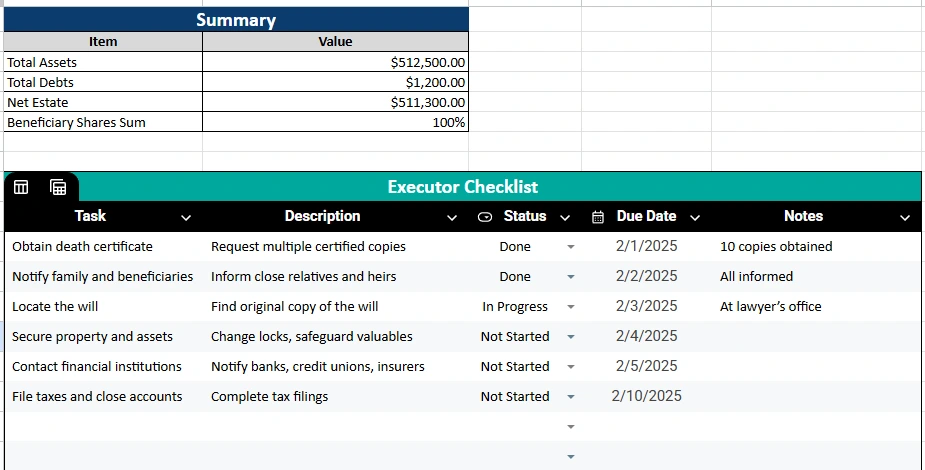
This first sheet is the command center of the template. It combines two crucial areas: the Executor Checklist for daily tasks and the Summary for overall financial totals.
Executor Checklist
This section provides a clear list of responsibilities, such as:
- Obtain the death certificate
- Notify family and beneficiaries
- Locate the will
- Secure property and assets
- Contact financial institutions
- File taxes and close accounts
Each task includes a Description, Status dropdown, Due Date, and Notes column. The dropdown lets you easily mark progress as “Not Started,” “In Progress,” or “Done.” This structure makes it simple to see what’s completed and what still needs attention.
For example, if you’ve already notified the family and obtained death certificates, mark those as Done and move on to “Secure property and assets.” Adding due dates helps you stay on track, especially when you’re balancing multiple deadlines like filing taxes or submitting court paperwork.
Summary Section
At the top of this sheet, you’ll see automatic totals that update as you fill in other sections:
- Total Assets
- Total Debts
- Net Estate (Assets minus Debts)
- Beneficiary Shares Sum
These values pull directly from your Assets and Beneficiaries sheets. It’s a quick, real-time snapshot of the estate’s financial position.
Assets, Debts & Liabilities
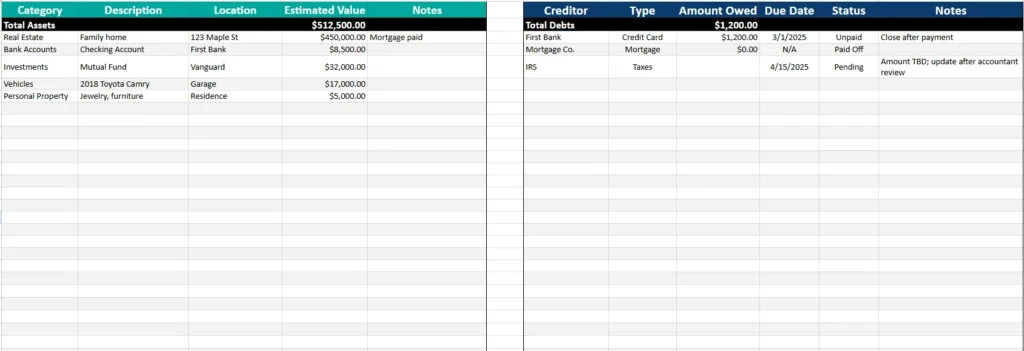
This second sheet gives you a full view of the estate’s financial landscape — everything owned and owed. It’s divided into two structured tables that align side by side:
Assets Table
Use this table to record every valuable item and account associated with the estate. Common categories include:
- Real Estate (e.g., family home, vacation property)
- Bank Accounts (checking, savings, CDs)
- Investments (stocks, mutual funds, retirement accounts)
- Vehicles (cars, boats, RVs)
- Personal Property (jewelry, furniture, collectibles)
Each entry has columns for Category, Description, Location, Estimated Value, and Notes.
The sheet automatically calculates Total Assets at the bottom, so you always know the current estate value.
Debts & Liabilities Table
Right beside the assets, this table tracks obligations such as credit cards, mortgages, and unpaid taxes. It includes:
- Creditor name (e.g., First Bank, IRS)
- Type of debt (credit card, mortgage, tax)
- Amount owed
- Due date
- Status (Unpaid, Pending, Paid Off)
- Notes
Totals are also calculated automatically. For instance, if you list a $1,200 credit card balance and a $0 mortgage, your total debts will reflect $1,200 — and your Net Estate in the Summary will adjust instantly.
This layout keeps both sides of the estate — assets and debts — visible in one view. It’s ideal for executors preparing inventories or reporting values to an attorney or probate court.
Contacts & Beneficiaries
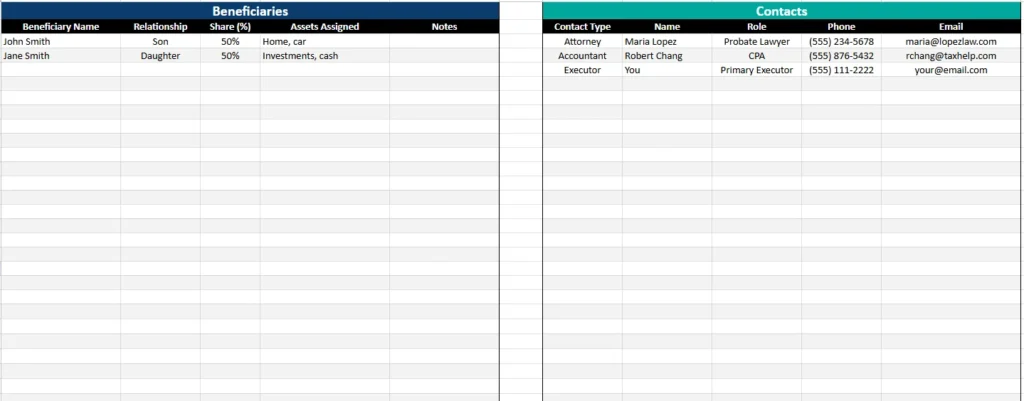
The third sheet connects the people involved. It’s split into two sections: Beneficiaries and Contacts.
Beneficiaries
List everyone entitled to receive assets from the estate. Columns include:
- Beneficiary Name
- Relationship (e.g., son, daughter, sibling)
- Share (%)
- Assets Assigned
- Notes
The Share (%) column uses percentage formatting, and the Summary sheet automatically checks whether these add up to 100%. This helps prevent errors when dividing the estate.
For example, if John Smith and Jane Smith each have 50% shares, the summary confirms that the total equals 100%. If you change one to 60%, you’ll see a warning to rebalance.
Contacts
This section keeps professional and personal contacts in one place:
- Attorney (handles probate)
- Accountant (manages tax filings)
- Executor (you or another appointed person)
- Financial Advisor or Insurance Agent, if needed
Each contact includes a name, role, phone number, and email, making it easy to reference without digging through emails or documents.
How to Use the Template
- Start with the Executor Checklist. Go line by line through the sample tasks and edit or add your own. Assign due dates, update statuses, and keep notes as you complete items.
- Record all assets. List property, accounts, and valuables in the Assets table. The totals will update automatically in the Summary.
- Enter debts and liabilities. Add all outstanding obligations, such as credit cards or taxes. Mark “Paid Off” once resolved.
- Update beneficiaries and contacts. Fill in the details of heirs and professionals you’re working with. Check the Summary to confirm the share percentages equal 100%.
- Review the Summary tab frequently. This section updates automatically as you work, giving you an instant overview of the estate’s status.
Pro tip: If multiple family members are involved, share the Google Sheet with view-only permissions for transparency. You can also use comments to assign small tasks or clarify updates.
Why Choose This Template
Managing an estate involves coordination, documentation, and emotional balance. This free estate executor spreadsheet simplifies all of it with structure, automation, and accessibility.
Here’s what makes it different:
- All-in-one organization: No more juggling separate files. Everything — from tasks to totals — is integrated.
- Real-time calculations: Totals update automatically, so you always know the current financial picture.
- Clear formatting: Date, currency, and percentage styles are built in for readability.
- Customizable: Add rows, columns, or additional sheets to suit unique estate situations.
- Collaboration-friendly: Works perfectly in Google Sheets for shared access and updates.
- Error-proof: Data validation for task status and beneficiary shares helps reduce mistakes.
Whether you’re handling a small estate or supporting someone as an advisor, this spreadsheet gives you the confidence and clarity you need.
Get Your Free Estate Executor Spreadsheet
- Free Template
- Fully Editable
- Instant Access
- Organize your information
How to Access Your Copy
- Enter your email for instant access
- Open the link we send you
- Begin adding info to your new spreadsheet
Once open, you’ll have a complete free estate executor spreadsheet designed to help you stay organized, meet deadlines, and ensure every asset and responsibility is accounted for. Customize it, share it, and let it make the executor process smoother from start to finish.