
Tracking tithes and offerings accurately is one of the most important administrative responsibilities for any church. This Excel church tithe and offering spreadsheet was created to help churches record donations clearly, summarize giving automatically, and maintain organized financial records without relying on complex accounting software.
Built specifically for Microsoft Excel, this template is ideal for churches that prefer offline access, desktop-based workflows, or internal file storage. It provides a structured system for logging donations, calculating weekly totals, and reviewing monthly and annual giving trends, all within a familiar spreadsheet environment.
The design emphasizes clarity and reliability. Churches only need to enter donation details once, and all summaries update automatically. This reduces manual calculations, limits errors, and saves time for volunteers, treasurers, and finance teams.
Key Features and Sections
Offerings Log Sheet
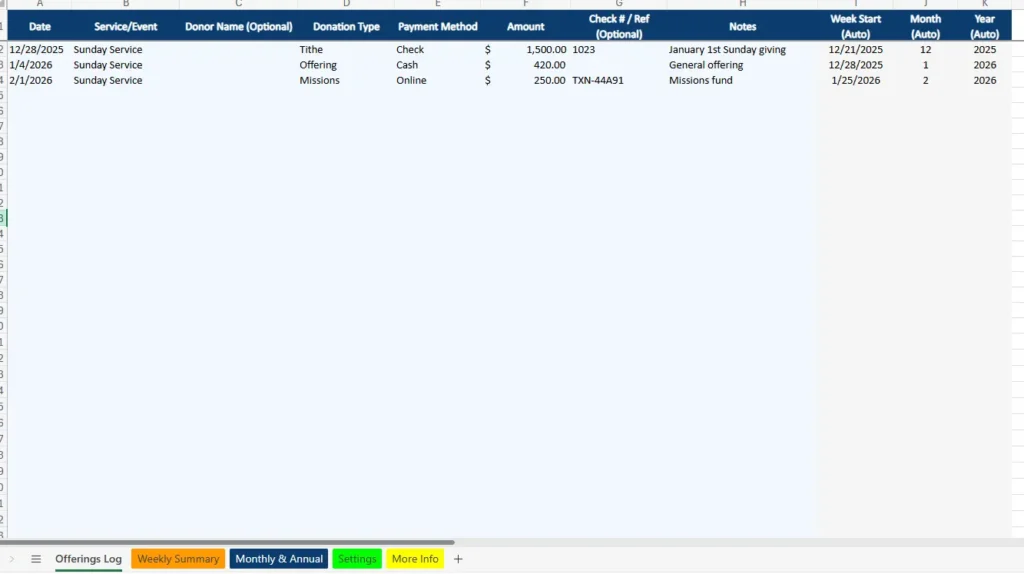
The Offerings Log sheet is where all donation data is entered. Each row represents an individual donation received by the church, whether it comes from a regular Sunday service, a midweek gathering, or an online contribution.
Columns include the donation date, service or event, optional donor name, donation type, payment method, amount, optional check or reference number, and notes. To keep entries consistent, the Service/Event, Donation Type, and Payment Method fields use Excel data validation dropdowns that pull directly from the Settings sheet.
Several columns are automatically calculated based on the entered date. The spreadsheet determines the corresponding week start date, month number, and year for each donation. These calculated fields are essential for powering the weekly, monthly, and annual summaries without requiring users to apply filters or formulas manually.
This structure works well for churches that receive donations through multiple channels. For example, a single week might include cash offerings from a Sunday service, online donations during the week, and a special contribution designated for missions. All of these entries remain organized in one table while still rolling up correctly in summary views.
Weekly Summary Sheet
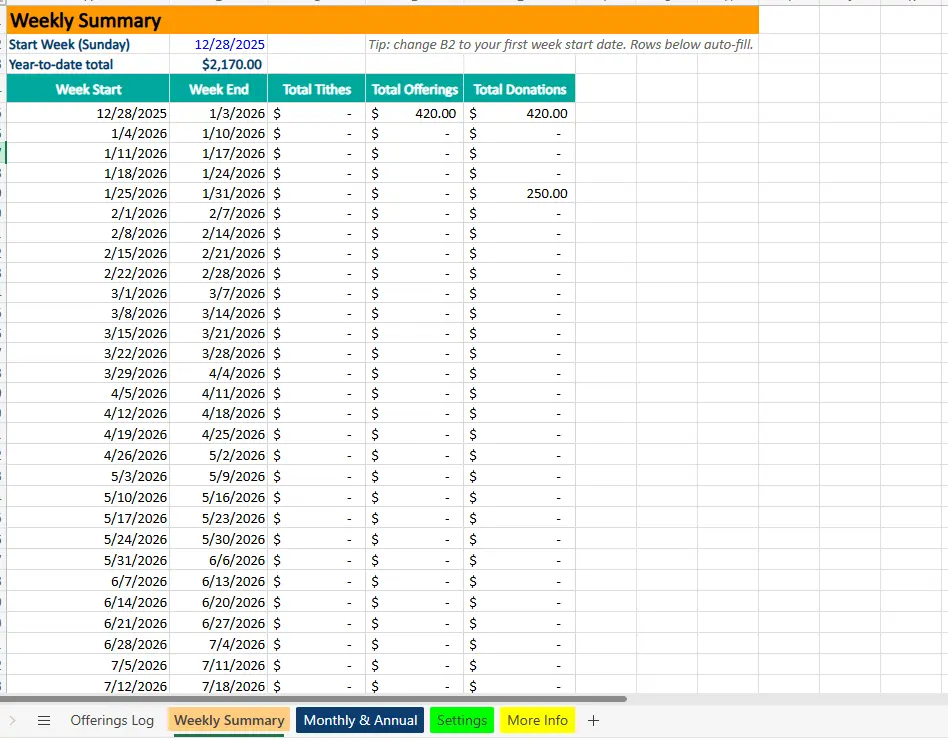
The Weekly Summary sheet provides a clear breakdown of giving by week, starting on Sunday. At the top of the sheet, users set the initial start week date, and Excel automatically fills the remaining weeks below.
For each week, the spreadsheet calculates total tithes, total offerings, and overall donations using SUMIFS formulas tied to the Offerings Log. A year-to-date total is displayed prominently, giving leadership a quick snapshot of cumulative giving without scrolling through data.
This sheet is especially useful for churches that review finances weekly. Pastors, finance committees, or treasurers can quickly see how much was received during a specific week and identify trends over time. Because the weeks auto-fill, the sheet continues working year after year with minimal setup.
Monthly & Annual Summary Sheet
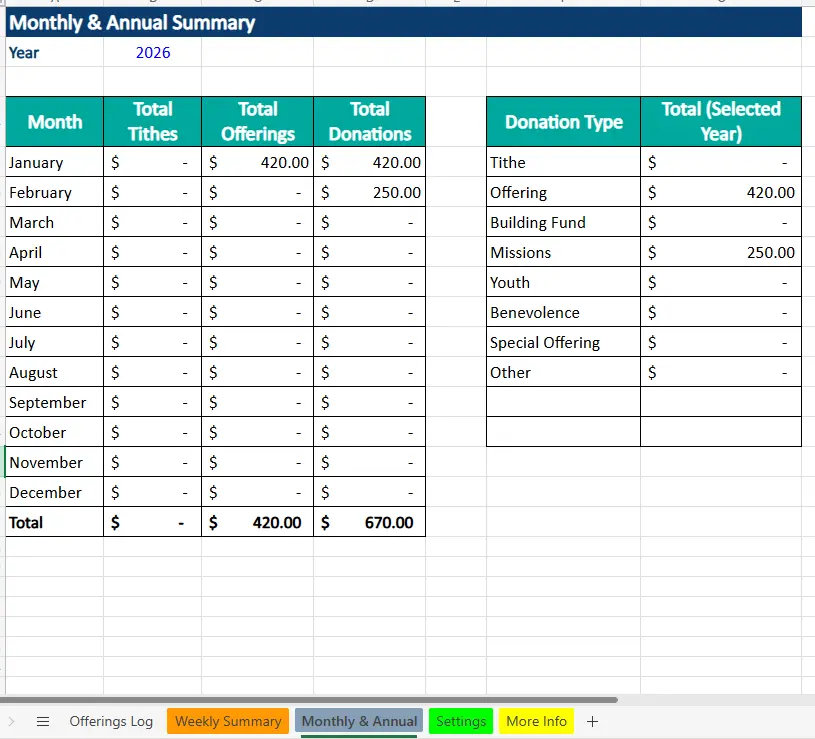
The Monthly & Annual Summary sheet is designed for higher-level reporting and long-term analysis. Users select a year from a dropdown list, and all monthly totals update automatically based on that selection.
Each month displays separate totals for tithes, offerings, and total donations. A total row at the bottom provides annual sums, making it easy to review full-year giving at a glance.
On the right side of the sheet, donations are also summarized by donation type for the selected year. This allows churches to see how funds are distributed across categories such as tithes, offerings, missions, building funds, or special offerings. This view is particularly helpful during budget planning or leadership meetings where understanding fund allocation is important.
Because everything is formula-driven, users can switch years instantly without modifying any calculations.
Settings Sheet
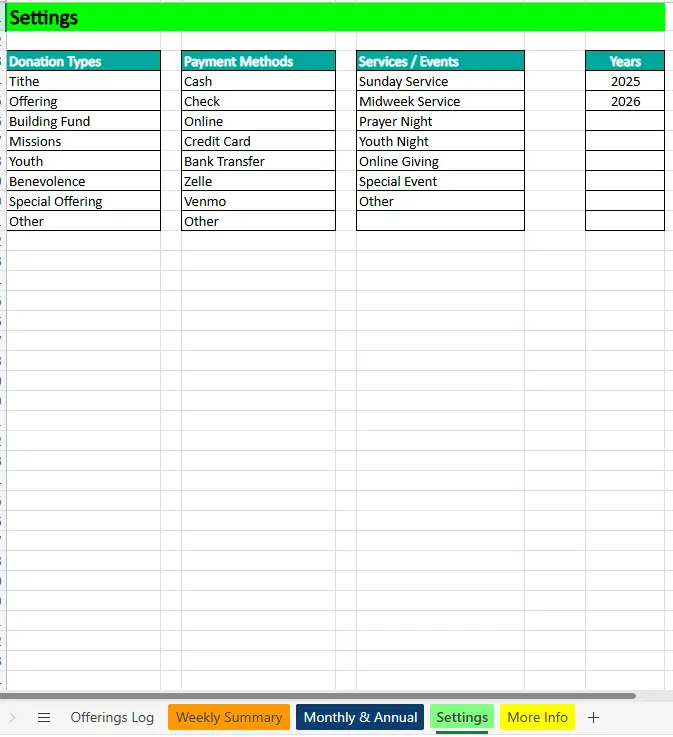
The Settings sheet controls all dropdown lists and makes the spreadsheet easy to customize. Churches can update donation types, payment methods, services or events, and available years without touching any formulas.
If a church introduces a new fund or offering category, it can be added to the Donation Types list and becomes immediately available throughout the spreadsheet. The same applies to new services, events, or payment methods.
This design keeps the spreadsheet flexible while protecting the integrity of the calculations, making it safe for volunteers and staff to adjust as needed.
How to Use the Template
Using the Excel church tithe and offering spreadsheet follows a straightforward workflow. After each service or throughout the week, donations are entered into the Offerings Log. Users select the appropriate service, donation type, and payment method, then enter the amount received.
Once entered, no additional steps are required. Weekly totals appear automatically in the Weekly Summary sheet, and monthly totals build over time in the Monthly & Annual Summary. Churches can review giving by week, by month, or by year without filtering or creating pivot tables.
For example, a church might record offerings from a Sunday service, an online donation made midweek, and a missions contribution from a prayer night. Excel automatically assigns each donation to the correct week, month, and year, ensuring accurate summaries across all reports.
At the end of the month or year, leadership teams can use the summary sheets to review performance, prepare internal reports, or share high-level numbers with boards or accountants.
Why Choose This Template
This Excel church tithe and offering spreadsheet was built for churches that want a reliable, no-friction system for donation tracking. It avoids unnecessary complexity while still providing automated summaries that save time and reduce errors.
Because it runs entirely in Microsoft Excel, it works offline and fits naturally into existing church workflows. There are no subscriptions, no accounts to manage, and no dependency on external platforms. Churches retain full control over their financial data.
The template is structured to encourage consistent data entry, protect formulas from accidental changes, and provide clear financial visibility. Whether a church tracks a small number of weekly donations or manages multiple services and giving categories, the spreadsheet scales smoothly.
Most importantly, the template reflects real-world church needs. It focuses on practical reporting, clear organization, and ease of use, making it a dependable tool for churches of all sizes.
Download Your Excel Church Tithe and Offering Spreadsheet
- Free Template
- Fully Editable
- Instant Access
- Organize your information
How to Access Your Copy
- Enter your email for instant access
- Download from the link we send you
- Start using the spreadsheet right away





