Managing an estate in Excel gives executors something many online tools don’t: full control, offline access, and familiar spreadsheet functionality. This estate executor spreadsheet Excel template is designed to help executors track tasks, assets, debts, beneficiaries, and key contacts in one structured workbook.
Whether you’re handling an estate for a family member or supporting someone in a professional role, this Excel template provides a clear framework that reduces confusion and helps you stay organized throughout the process.
Overview of the Template
This estate executor spreadsheet Excel workbook is built as a three-sheet system, combining all essential estate information without unnecessary complexity. Instead of juggling multiple files or handwritten notes, everything lives in one Excel workbook that updates automatically.
The three sheets included are:
- Executor Checklist & Summary
- Assets, Debts & Liabilities
- Contacts & Beneficiaries
Each sheet is formatted for Excel with tables, dropdowns, formulas, and totals that update as you enter data. The structure is intentionally straightforward so it works for both simple estates and more detailed situations.
Key Features and Sections
Executor Checklist & Summary
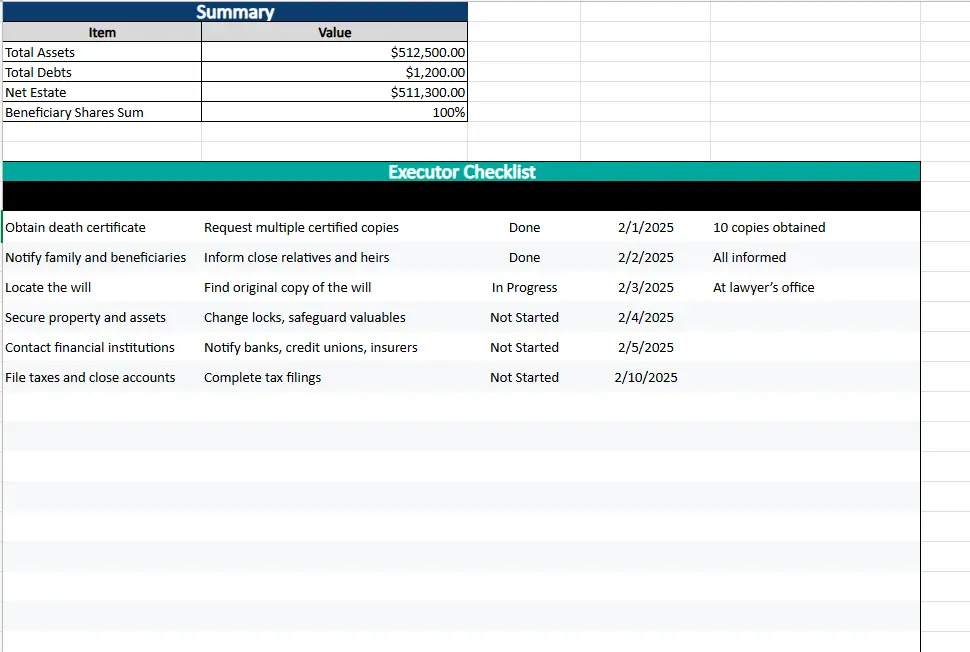
This sheet acts as the central dashboard of the Excel workbook.
Executor Checklist
The checklist organizes common executor responsibilities into a clear task list. Each row includes:
- Task name
- Description
- Status dropdown
- Due date
- Notes
The Status column uses dropdown selections such as Not Started, In Progress, and Done. This allows you to quickly scan what’s complete and what still needs attention. Due dates help prioritize time-sensitive actions like filing taxes or contacting financial institutions.
For example, you might mark “Obtain death certificate” as Done, while “Locate the will” remains In Progress with notes explaining where it’s stored. This keeps progress documented directly inside Excel.
Summary Section
At the top of this sheet is a financial overview that pulls data from other sheets automatically. It displays:
- Total Assets
- Total Debts
- Net Estate
- Beneficiary Shares Sum
These values update in real time as you add or edit entries elsewhere in the workbook. The Net Estate calculation helps executors understand the estate’s value after liabilities, while the beneficiary share total confirms distributions add up correctly.
Assets, Debts & Liabilities
This sheet captures the financial foundation of the estate. It is split into two structured tables that work together.
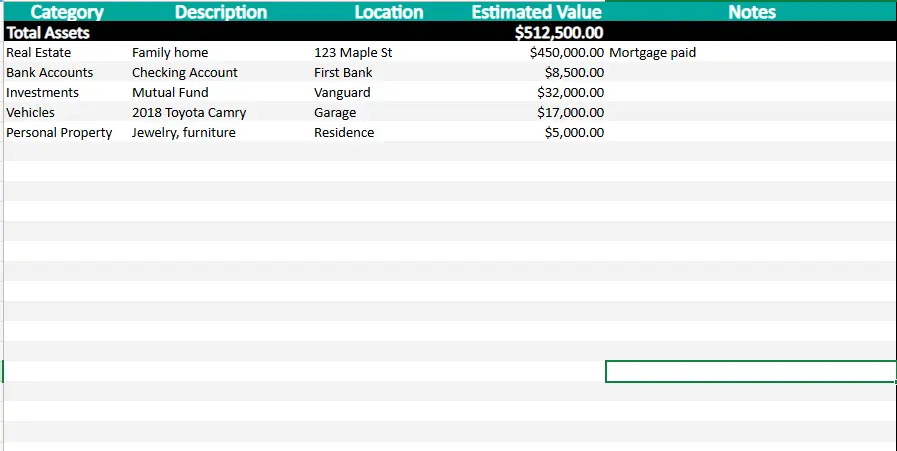
Assets Table
Use this section to list everything owned by the estate. Common asset categories include:
- Real estate
- Bank accounts
- Investments
- Vehicles
- Personal property
Each asset includes columns for description, location, estimated value, and notes. Excel automatically calculates the Total Assets value at the top of the table, which then feeds into the Summary sheet.
For example, entering a home valued at $450,000, a checking account with $8,500, and an investment account with $32,000 will immediately update the total asset value without manual calculations.
Debts & Liabilities Table
This section tracks obligations that must be resolved before distribution. Typical entries include:
- Credit cards
- Mortgages
- Medical bills
- Taxes
Each row includes creditor name, type, amount owed, due date, status, and notes. As debts are paid off, you can update the status while keeping a clear historical record.
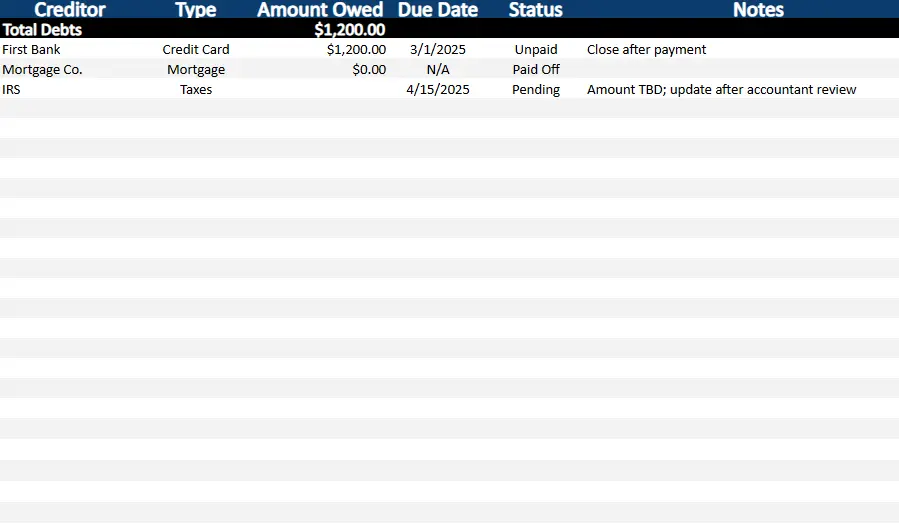
Excel automatically totals all liabilities and sends that figure to the Summary sheet, ensuring the Net Estate calculation stays accurate.
Contacts & Beneficiaries
This sheet organizes the people involved in the estate process.
Beneficiaries
The beneficiary section records:
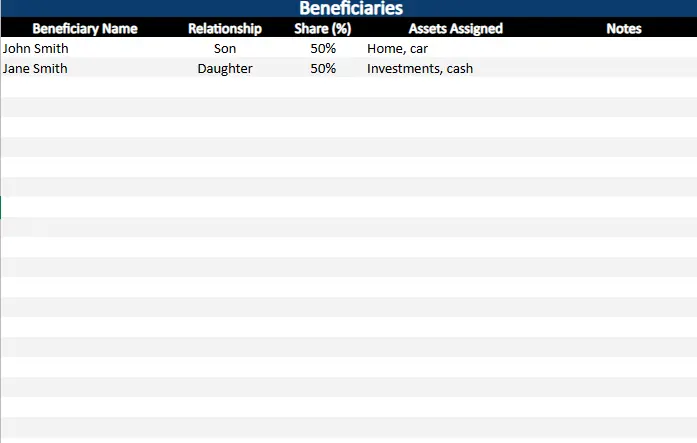
- Beneficiary name
- Relationship
- Share percentage
- Assets assigned
- Notes
Share percentages are formatted correctly in Excel, and the Summary sheet checks that all shares total 100%. This helps prevent distribution errors and ensures clarity when dividing assets.
For example, if two beneficiaries are assigned 50% each, the summary confirms everything balances correctly. If shares are changed later, Excel immediately reflects whether adjustments are needed.
Contacts
The contacts section keeps key individuals easy to find, including:
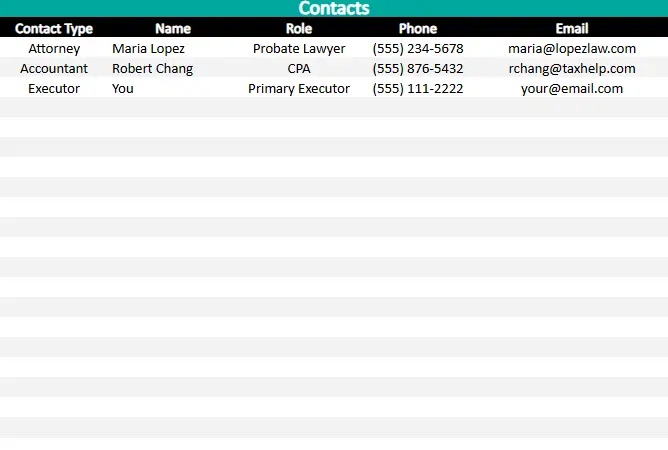
- Estate attorney
- Accountant or CPA
- Executor
- Financial advisors or insurance contacts
Each contact includes role, phone number, and email. Having this information inside the same Excel workbook saves time and avoids searching through emails or paperwork.
How to Use the Template
- Download the Excel file and save a copy to your computer.
- Rename the workbook to match the estate name for easy reference.
- Start with the Executor Checklist, reviewing each task and adjusting due dates as needed.
- Enter all known assets into the Assets table with realistic estimated values.
- Add outstanding debts and liabilities, updating statuses as they are resolved.
- Fill in beneficiary information, confirming share percentages total 100%.
- Add professional and personal contacts you’ll need throughout the process.
- Review the Summary section regularly to track financial progress and estate balance.
Because this is an Excel file, you can also sort, filter, print, or customize the workbook to match court requirements or personal preferences.
Why Choose This Template
Many executors prefer Excel because it’s reliable, familiar, and flexible. This estate executor spreadsheet Excel template is built specifically for that audience.
Key advantages include:
- Works entirely offline
- No subscriptions or software setup
- Automatic calculations reduce errors
- Clean layout designed for clarity
- Easy to customize for different estate sizes
- Suitable for both personal and professional use
Instead of using complex estate software, this Excel template gives you a practical system you can understand at a glance.
Download Your Excel Estate Executor Spreadsheet
- Free Template
- Fully Editable
- Instant Access
- Organize your information
How to Access Your Copy
- Enter your email for instant access
- Download from the link we send you
- Start using the spreadsheet right away