Managing inventory as a reseller gets complicated quickly. Between sourcing items, listing across multiple platforms, tracking fees, and calculating real profit, it is easy to lose visibility into what is actually making you money. This Excel reseller inventory spreadsheet was built to solve that exact problem.
Instead of juggling notes, receipts, and multiple spreadsheets, this template gives you one structured Excel file that tracks every item from purchase to sale. It automatically summarizes your inventory, calculates profit, and helps you understand how your reselling business is performing over time. Whether you are a part-time side hustler or running a growing resale operation, this spreadsheet is designed to be simple, reliable, and easy to expand.
How This Excel Reseller Inventory Spreadsheet Is Structured
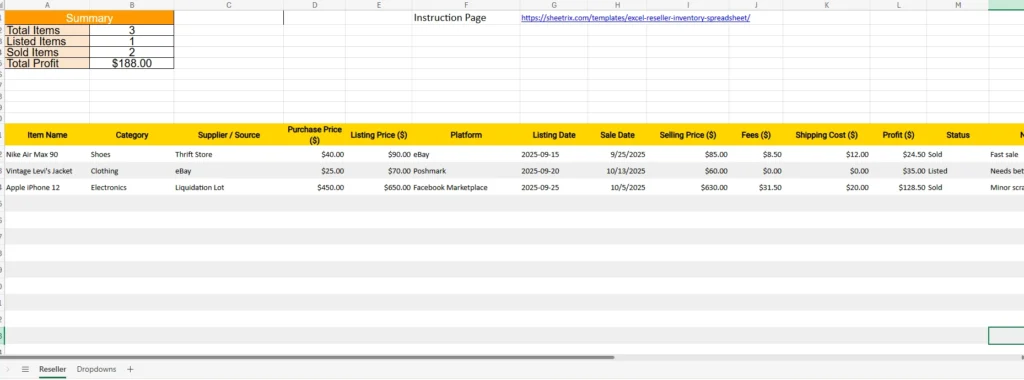
This template is organized into two main working areas that mirror how resellers actually operate day to day.
The first is the Reseller sheet, which acts as your main inventory ledger. Every item you buy and sell is entered here, one row per item. This sheet is where all calculations originate.
The second is a Dropdowns sheet, which stores predefined lists for categories, suppliers, platforms, and item status. These dropdowns keep your data clean and consistent, which is especially important when you start filtering, sorting, or analyzing performance.
At the top of the Reseller sheet, there is also a built-in Summary section that automatically updates as you add or sell items. This gives you an instant snapshot of your business without needing to create separate reports.
Understanding the Summary Section at the Top
The Summary area is designed to answer the most common reseller questions at a glance.
It shows:
- Total number of items tracked
- How many items are currently listed
- How many items have sold
- Total profit earned
These values update automatically based on the data entered below. For example, when an item’s Status changes from “Listed” to “Sold,” the Sold Items count updates instantly. When profit is calculated for a sale, Total Profit reflects the change without any manual input.
This section is especially useful if you review your inventory weekly or monthly. You can open the file and immediately see whether you are moving inventory efficiently or sitting on unsold items.
The Reseller Inventory Table Explained Column by Column
Each column in the Reseller sheet serves a specific purpose and mirrors how real resale transactions work.
Item Name records the exact product being sold. This could be something like sneakers, vintage clothing, electronics, or collectibles.
Category helps you group items logically. Using categories like Shoes, Clothing, or Electronics makes it easier to filter and identify which types of products perform best.
Supplier / Source tracks where the item came from, such as a thrift store, eBay, or a liquidation lot. Over time, this data helps you identify your most profitable sourcing channels.
Purchase Price records what you paid for the item. This is a critical input for accurate profit calculation.
Listing Price is the price you initially list the item for. Comparing listing price to final selling price can help refine your pricing strategy.
Platform identifies where the item is listed or sold, such as eBay, Poshmark, or Facebook Marketplace. This allows platform-level analysis later.
Listing Date and Sale Date track how long items take to sell. This is useful for identifying slow-moving inventory.
Selling Price records the final amount received from the buyer.
Fees captures marketplace and payment processing fees. This ensures your profit reflects real earnings, not gross revenue.
Shipping Cost accounts for outbound shipping expenses, which are often overlooked by new resellers.
Profit is calculated automatically using Excel formulas. It subtracts purchase price, fees, and shipping from the selling price. You never need to manually calculate profit for individual items.
Status uses a dropdown to mark items as Listed or Sold. This drives both the Summary section and filtering.
Notes allows you to capture extra context, such as condition issues, bundle deals, or pricing adjustments.
How the Profit Calculation Works in Excel
Profit is one of the most important metrics for any reseller, and this spreadsheet handles it cleanly.
The Profit column uses an Excel formula that only calculates when an item has a sale date and selling price. This prevents incorrect profit values for items that are still listed.
The formula subtracts:
- Purchase Price
- Fees
- Shipping Cost
from the Selling Price.
Because this calculation is built directly into Excel, the profit updates instantly when you change any of those values. This makes it easy to test different pricing scenarios or correct mistakes without recalculating anything manually.
Why the Dropdowns Sheet Matters More Than You Think
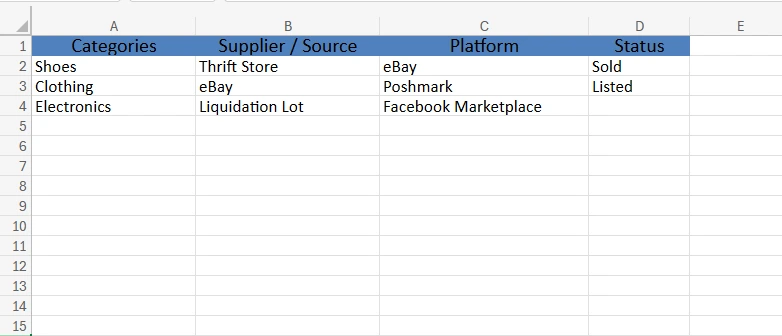
The Dropdowns sheet might look simple, but it plays a critical role in keeping your spreadsheet reliable.
By defining categories, suppliers, platforms, and status values in one place, you eliminate inconsistent spelling and formatting errors. This is especially important when filtering data or building future reports.
For example, using a dropdown ensures that “Facebook Marketplace” is always entered the same way, instead of appearing as multiple variations. This keeps your data clean and usable as your inventory grows.
If your business evolves, you can easily add new platforms or categories to the Dropdowns sheet, and they instantly become available in the main Reseller sheet.
How Resellers Use This Spreadsheet in Real Life
This Excel reseller inventory spreadsheet works well for a wide range of sellers.
A thrift store reseller might use it to track clothing purchases, monitor which brands sell fastest, and identify profitable sourcing locations.
An electronics flipper can use it to track higher-value items, account for fees accurately, and see which platforms yield the highest net profit.
A part-time side hustler can use the Summary section to decide whether reselling is worth scaling or staying casual.
Even experienced sellers benefit from having all inventory and profit data centralized in one Excel file that they fully control.
Why This Excel Template Is a Smart Choice
This spreadsheet was designed with simplicity and accuracy in mind.
It does not rely on macros, external add-ins, or complex dashboards. Everything works using standard Excel formulas and tables, making it compatible with most versions of Excel.
You own your data, you can customize it freely, and you are not locked into any paid software or subscription. It is fast to use, easy to understand, and flexible enough to grow with your business.
Download the Excel Reseller Inventory Spreadsheet
If you want a clear, reliable way to track inventory and profit in Excel, this template is a solid foundation.
Once downloaded, you can open it in Excel, start entering your items, and immediately see how your reselling business is performing. The Summary section updates automatically, the profit math is handled for you, and the dropdowns keep your data clean.
This spreadsheet is built for real resellers who want clarity, not complexity. Download it, customize it if needed, and start managing your inventory with confidence.