
Managing a fundraising campaign can be exciting, but it also comes with a lot of moving pieces. Donations come in from multiple sources, supporters give at different times, and organizers need to track progress toward goals. That’s exactly why I created this free Fundraising Tracker Template for Google Sheets—a simple, beginner-friendly tool designed to help individuals, nonprofits, schools, clubs, religious groups, and community organizations keep every donation organized in one place.
This template includes two streamlined sheets: a FundraisingTracker sheet where you enter donations and view your overall progress, and a DonorSummary sheet that automatically breaks down giving by each donor. Together, they create a complete donation-tracking system that’s easy to understand, easy to update, and perfect for teams of any size.
Whether you’re running a school fundraiser, planning a charity event, organizing a community project, or collecting donations online, this fundraising tracker template gives you clarity and confidence. It removes the guesswork, keeps your records neat, and allows you to focus on what really matters—reaching your goal and making an impact.
Key Features and Sections
This template is designed to be lightweight but powerful, giving you the essential tools without overwhelming you with unnecessary complexity. Below is a breakdown of the sheets included and how they work.
Fundraising Tracker Sheet
The FundraisingTracker sheet is the heart of the template. It combines a visual fundraising summary with a clean donation-entry table so you can manage everything in one place.
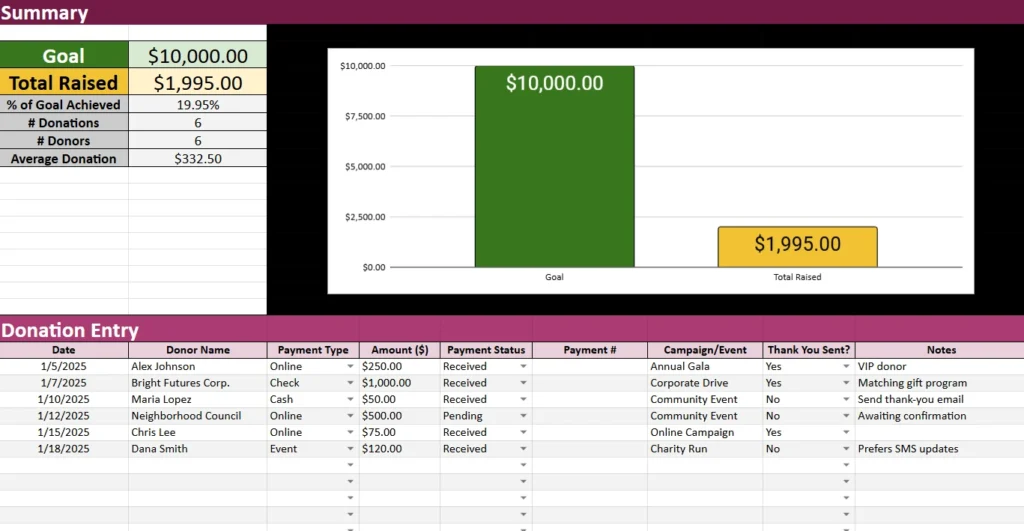
At the very top is the fundraising summary, which automatically updates as you add donations. The summary includes:

- Goal Amount: You can set your fundraising goal for the campaign, such as $10,000 for a community event or $2,500 for a school project.
- Total Raised: This number grows with each new donation you enter.
- % of Goal Achieved: A real-time percentage that shows how close you are to completing your goal.
- # Donations: A running total of how many individual contributions you’ve received.
- # Donors: A count of unique donors based on the names you enter.
- Average Donation: A quick view of the average amount given per donation.
Beside the summary is a progress chart that visually compares your goal to the total raised so far. This graphical element is particularly useful for presentations, team meetings, school newsletters, or online fundraising updates.
Below the summary is the donation entry table, where you record all individual contributions. This table includes:
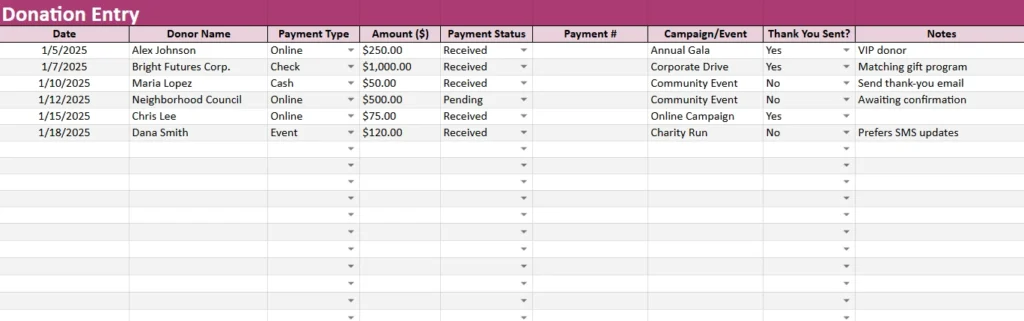
- Date – The date the donation was received
- Donor Name – Person or organization contributing
- Payment Type – Cash, Check, Online, Event, or In-Kind
- Amount ($) – The dollar value of the contribution
- Payment Status – Received, Pending, Cancelled, or Refunded
- Payment # – Optional field for check numbers or transaction IDs
- Campaign/Event – Helpful if you’re managing multiple fundraising activities
- Thank You Sent? – A simple Yes/No dropdown
- Notes – Space for special details or follow-up reminders
The dropdowns make data entry fast and consistent, while color formatting keeps headers and sections easy to navigate. This sheet gives you everything you need to keep donation records accurate and accessible.
Donor Summary Sheet
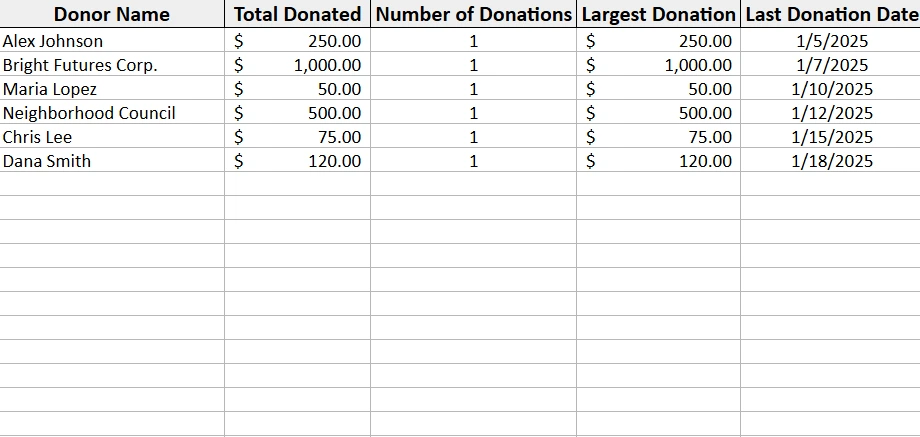
The Donor Summary sheet gives you a detailed breakdown of every donor who appears in the main donation table. It uses formulas to automatically generate:
- Total Donated – The sum of all donations per donor
- Number of Donations – Helpful for identifying repeat supporters
- Largest Donation – Useful for recognizing top contributors
- Last Donation Date – Allows you to follow up at the right time
This sheet updates automatically as soon as you add a donation to the main sheet. There is no manual data entry required here, which keeps it clean and reliable.
This summary is ideal for donor appreciation, tax reporting, year-end letters, and campaign planning. It also helps you analyze giving patterns and see which supporters are most engaged.
How to Use the Template
The template is designed to be simple for anyone to use, even if you have limited experience with spreadsheets. Below is a step-by-step guide to help you get the most out of it.
Step 1: Enter Your Fundraising Goal
Start by entering your goal in the Goal Amount field at the top of the FundraisingTracker sheet. This could be:
- $1,000 for a youth group
- $5,000 for a charity event
- $20,000 for a nonprofit campaign
Once the goal is set, the summary and chart automatically adjust as donations come in.
Step 2: Log Each Donation
Whenever a contribution is received, scroll to the Donation Entry table and fill in a new row. Add the date, donor name, payment type, amount, and other details. The dropdown menus make this quick and help prevent mistakes.
For example, if your school receives:
- $250 from a parent via online donation
- $1,000 from a local business by check
- $50 cash at a community event
you simply enter each line, and the totals will update instantly.
Step 3: Track Progress Over Time
As you add more entries, the summary at the top gives you a real-time snapshot of how your campaign is performing. The progress chart provides a visual indicator that’s easy to share with others.
You can check things like:
- Are donations slowing down?
- Are most donations coming from events or online?
- How many donors have given more than once?
These insights help you make better fundraising decisions and adjust your strategy if needed.
Step 4: Review Donor Details
The DonorSummary sheet is fully automated. As soon as you enter data on the main sheet, donor totals, last donation dates, and contribution histories are updated.
This is especially valuable for:
- Sending personalized thank-you messages
- Identifying major donors
- Preparing tax receipts
- Planning future fundraising cycles
You never have to calculate these numbers yourself—the template does it for you.
Step 5: Share With Your Team
Because the template is built for Google Sheets, you can easily share it with:
- Other organizers
- Volunteers
- Board members
- School administrators
- Team leaders
Everyone stays aligned, and updates happen in real time.
Why Choose This Template
With so many fundraising tools available, you might wonder what makes this template stand out. Here’s why it works so well for individuals and small organizations:
Simple and Beginner-Friendly
You don’t need bookkeeping skills or spreadsheet experience. Everything is labeled clearly and designed for quick, intuitive use.
Automated Insights
The formulas handle the math for you. Totals, averages, counts, and donor summaries generate instantly as you enter data.
Flexible for Any Type of Campaign
This template works for:
- School fundraisers
- Nonprofit campaigns
- Mission trips
- Medical fundraisers
- Youth clubs
- Sports teams
- Community projects
- Personal fundraising efforts
If you need to track donations and progress toward a goal, this template fits perfectly.
Easy to Customize
You can adjust colors, add new columns, rename events, or modify the structure to match your organization’s needs.
Perfect for Reporting and Transparency
Whether you’re sharing results with donors, presenting to a board, or preparing end-of-year summaries, this template keeps your records organized and trustworthy.
Conclusion
If you’re looking for a clean, simple, and effective way to keep your fundraising efforts organized, this Fundraising Tracker Template for Google Sheets is the perfect solution. It helps you track donations, monitor progress, understand donor behavior, and communicate impact—all in one easy-to-use spreadsheet.
You can download the template today, start entering donations, and watch your progress grow in real time. It’s designed to save you time, reduce errors, and keep your entire fundraising campaign on track.
Get Your Free Donation Tracker Spreadsheet
- Free Template
- Fully Editable
- Instant Access
- Organize your information
How to Access Your Copy
- Enter your email for instant access
- Open the link we send you
- Start using the spreadsheet right away





