Managing gifts throughout the year sounds simple—until birthdays, holidays, anniversaries, and special occasions start overlapping. Most people either forget gifts, overspend, or end up scrambling at the last minute. This all-year gift list tracker was built to solve that problem in a practical, spreadsheet-driven way.
Instead of separate notes, reminders, and budget lists, this template brings everything together into one organized system. It helps you plan gift ideas, track spending, monitor delivery status, and stay on budget across every occasion, not just the holidays. Whether you’re buying one gift a month or managing dozens each year, the spreadsheet is designed to stay useful without becoming complicated.
The goal of this template is simple: give you a clear view of what needs to be done, what’s already handled, and how much money you have left to spend—at any point in the year.
Key Features and Sections
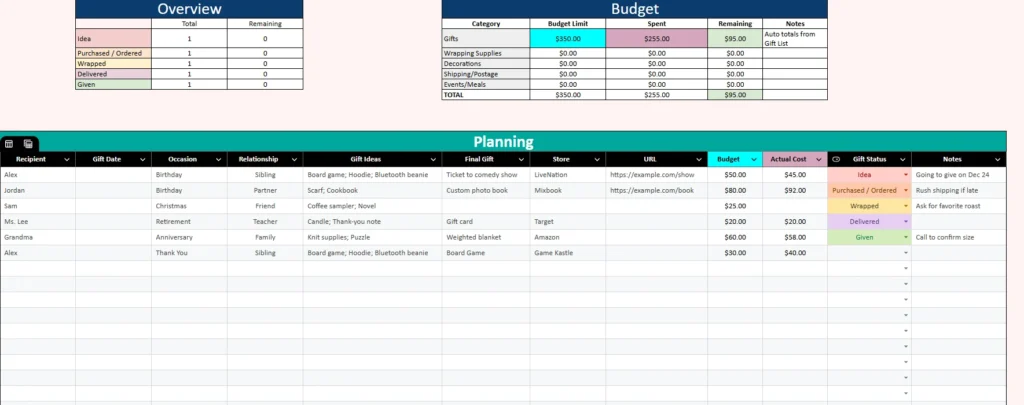
This template is divided into clear sections that work together automatically. Each section has a specific purpose, so you always know where to look and what to update.
Overview Section
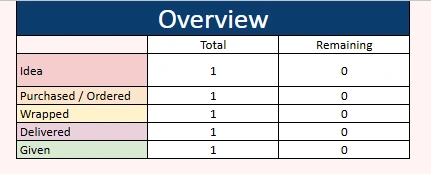
The Overview section gives you a quick snapshot of your progress. Instead of scanning rows of data, you can immediately see how many gifts are still ideas, how many have been purchased or ordered, how many are wrapped, delivered, or already given.
This is especially helpful when you’re juggling multiple occasions at once. For example, if you see several gifts still marked as “Idea,” you know it’s time to start shopping. If most gifts are marked as “Purchased / Ordered” but not delivered, you can focus on tracking shipments instead of planning.
Because this section updates automatically based on your gift entries, it becomes a reliable status dashboard you can check in seconds.
Budget Section
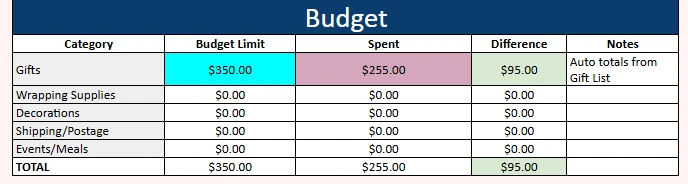
The Budget section is designed to prevent overspending without requiring constant calculations. You can set a budget limit for gifts and related categories such as wrapping supplies, decorations, shipping, or events and meals.
As you enter actual gift costs in the planning table, the spreadsheet automatically totals how much you’ve spent and how much remains. This makes it easy to answer questions like whether you can afford one more gift or if you need to scale back.
For people who tend to lose track of small purchases, this section is especially valuable. Even modest costs add up over a year, and seeing everything summarized in one place makes spending patterns much clearer.
Planning Sheet
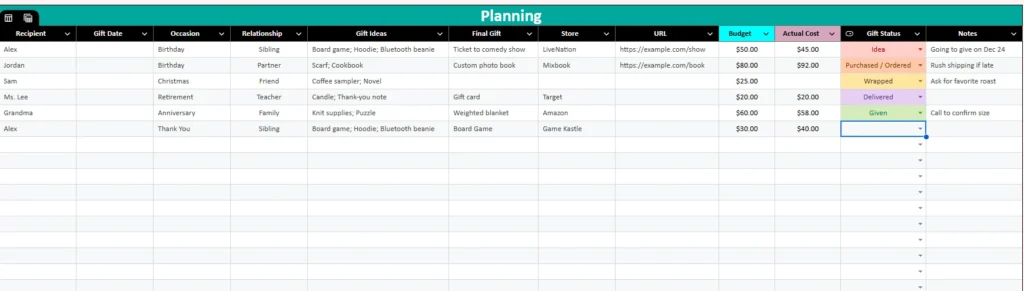
The Planning sheet is where most of the work happens. Each row represents a single gift or planned gift, with columns that guide you through the entire process from idea to completion.
You can record the recipient, gift date, occasion, relationship, and gift ideas before deciding on a final gift. Once you’ve chosen what to buy, you can add the store, URL, budgeted amount, and actual cost. A single Gift Status column keeps things simple by tracking progress using clear stages like Idea, Purchased / Ordered, Wrapped, Delivered, and Given.
This structure allows the sheet to work equally well for early planning and last-minute purchases. You might add ideas months in advance, then gradually update the status as the gift moves forward.
How to Use the Template
The template is designed to be flexible, but using it in a consistent way will give you the best results.
Start With Planning
Begin by adding recipients and upcoming occasions to the Planning sheet. You don’t need to know exactly what you’re buying yet—this is where gift ideas are especially useful. Writing down a few ideas early helps reduce stress later and makes shopping faster when the time comes.
For example, you might add a sibling’s birthday with a few potential gift ideas weeks or months ahead. Even if you don’t buy anything right away, the reminder stays visible.
Set Budgets Early
Next, set your overall gift budget in the Budget section. This doesn’t have to be perfect, but having a target number helps guide decisions. As you start filling in actual costs, the spreadsheet will automatically calculate totals and remaining amounts.
If you notice that you’re close to your budget limit, you can adjust future gifts before overspending becomes a problem.
Update Status as You Go
As you purchase gifts, update the Gift Status column instead of adding notes everywhere else. This keeps the system clean and consistent. The combined “Purchased / Ordered” status removes confusion and works for both in-store and online purchases.
When gifts arrive, mark them as Delivered. After wrapping or giving the gift, update the status again. These small updates are what keep the Overview section accurate and useful.
Review Before Important Dates
Before major gift-giving moments, take a quick look at the Overview section. You’ll immediately see if anything is still in the idea stage or hasn’t been delivered. This makes it easy to prioritize tasks and avoid last-minute surprises.
Why Choose This Template
Many gift trackers focus only on holidays or only on budgets. This template stands out because it works as a complete system that stays relevant all year long.
It’s ideal for people who want structure without complexity. You don’t need advanced spreadsheet skills to use it, but the built-in automation still saves time and reduces errors. The layout is clean, the logic is intuitive, and every section supports the others.
This template is especially useful for busy households, planners, and anyone who likes staying organized without relying on multiple apps or reminders. It’s also a great fit for people who want to be more intentional with spending while still giving thoughtful gifts.
Because everything lives in one spreadsheet, you always know where you stand—financially and logistically. Over time, it becomes a personal system you can reuse and refine year after year.
Download Your Free Gift Tracker Spreadsheet
- Free Template
- Fully Editable
- Instant Access
- Organize your information
How to Access Your Copy
- Enter your email for instant access
- Open the link we send you
- Start using the spreadsheet right away