
Grocery costs can add up fast, especially when you don’t have a clear system for tracking what you buy each week. Our Grocery Budget Template for Google Sheets is designed to help you plan, record, and analyze every dollar spent — all in one easy-to-use, color-coded spreadsheet.
Whether you’re managing a family budget, living on your own, or just trying to save more on food, this template gives you a practical way to stay organized and aware of your shopping habits.
See Your Grocery Budget in One Organized View
The template keeps everything you need in one clean sheet — no flipping through multiple tabs or files. You can set your planned budget, record what you actually spend, and instantly compare totals.
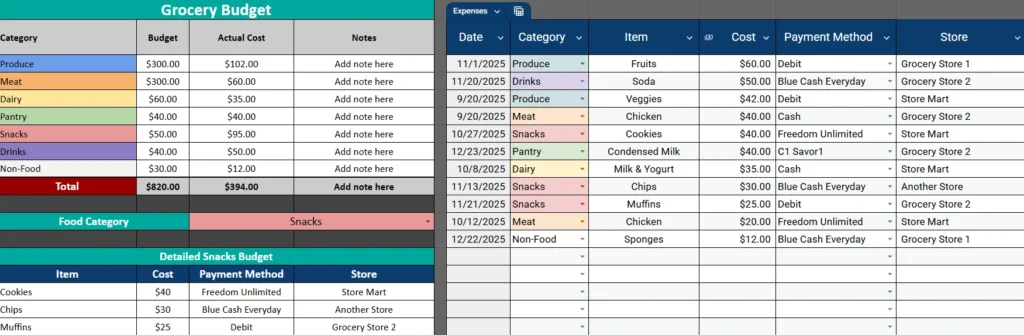
The sheet is split into two main parts: a budget summary at the top and a detailed expense tracker beside it. Every time you add a new expense, your totals update automatically.
This layout is perfect for anyone who prefers simplicity. It’s easy enough for beginners but still detailed enough for anyone serious about tracking their food spending.
Inside the Grocery Budget Template
The spreadsheet is designed to be functional, visually clear, and simple to update each month. Here’s how the key sections work and what they do.
Budget Overview Section
At the top of the template, you’ll see the main budget summary table, which lists all the grocery categories along with three columns — Budget, Actual Cost, and Notes.
Each category row represents a different area of your grocery spending. For example:
- Produce: fruits, vegetables, and fresh herbs
- Meat: chicken, beef, seafood, or frozen protein
- Dairy: milk, yogurt, cheese
- Pantry: grains, pasta, canned goods, and dry staples
- Snacks: chips, cookies, or anything that sneaks into your cart
- Drinks: coffee, soda, juice, and bottled water
- Non-Food: household cleaning supplies, sponges, and paper goods
The Budget column is where you plan how much you expect to spend in each category per month. The Actual Cost updates automatically based on the purchases you record in the detailed tracker.
At the bottom of the table, a Total row summarizes your entire grocery spending so you can quickly see if you’re under or over budget. The Notes column is available for reminders, like “buy in bulk next time” or “compare store prices.”
Expense Tracker Section
On the right side of the sheet is your Expense Tracker, where you log every grocery purchase. Each new row you add automatically connects back to the category totals in your summary.
You’ll enter details such as:
- Date: when you made the purchase
- Category: select from a dropdown list (Produce, Snacks, Drinks, etc.)
- Item: what you bought (e.g., “Apples” or “Chicken Breast”)
- Cost: the amount you spent
- Payment Method: choose from Debit, Cash, or Credit Card
- Store: where you shopped
This section gives you a full picture of your grocery habits — from where you spend the most to which items tend to push your budget limits.
The dropdown filters make it easy to sort or view specific categories, such as reviewing all “Dairy” or “Snacks” expenses at once.
Category Detail Section
Beneath the main table, you’ll find a smaller section designed for category analysis. This area uses a dropdown called Food Category that lets you zoom in on one specific area of your budget — for example, “Snacks.”
When you select a category, the table below (titled Detailed [Category] Budget) displays all items logged under that type. This view helps you pinpoint where your money goes in more detail.
For example:
- Under Snacks, you might see “Cookies – $40,” “Chips – $30,” and “Muffins – $25.”
- You can instantly total these costs and see that your snack budget needs some adjustment next month.
It’s a practical way to review and control the spending habits that add up without you realizing it.
How to Use the Grocery Budget Template
You don’t need any special spreadsheet skills to use this — just a Google account and a few minutes to set it up.
Here’s how to get started:
- In the Budget Overview, enter your planned amounts for each category.
- As you shop, record each purchase in the Expense Tracker.
- The Actual Cost and Total fields update automatically.
- Use the dropdown at the bottom to review individual category details.
You can duplicate this sheet each month to track changes over time. Some users even color-code new months or create charts to visualize how their grocery spending shifts throughout the year.
Why This Grocery Budget Template Works So Well
This isn’t just a basic table — it’s a small budgeting system built right into Google Sheets. It’s flexible enough for different lifestyles and shopping habits while keeping the math and structure automated.
Here’s why users love it:
- Everything in one place: The single-sheet design eliminates clutter.
- Visual organization: Each category has its own color, so your eyes immediately find what you need.
- Smart automation: Totals and category calculations update without manual math.
- Practical filters: Review only what matters — by store, category, or payment type.
- Flexible budgeting: Adjust your category limits monthly as your needs change.
Many families use it to stay within a weekly or monthly food budget, while college students use it to control limited spending. Even small households benefit — it’s surprising how much awareness comes from just writing down each grocery trip.
Make the Most of Your Grocery Budget
Here are a few helpful ways to use this template effectively:
- Review your totals weekly instead of waiting until the end of the month.
- Compare store prices in the Notes column to find where you save most.
- Use it for meal planning: Combine your grocery spending with a simple meal list to forecast future costs.
- Track payment methods: If you often use multiple cards, this helps keep tabs on where your money is really going.
- Set savings goals: For example, reduce your Snacks category by 10% next month.
The key is consistency. When you record every expense, you’ll start noticing patterns — maybe you overspend on drinks or forget how often you buy small convenience items. This awareness helps you adjust your habits naturally.
Get Your Free Grocery Budget Spreadsheet
- Free Template
- Fully Editable
- Instant Access
- Organize your information
How to Access Your Copy
- Enter your email for instant access
- Open the link we send you
- Start using the spreadsheet right away
Final Thoughts
Managing your grocery budget doesn’t have to be overwhelming. With this one-sheet spreadsheet, you get structure, flexibility, and instant visibility — all from a familiar tool like Google Sheets.
Whether you’re budgeting for a large household or just trying to eat better on a budget, this template helps you make smarter choices and see real progress each month.





