Creating positive daily habits doesn’t have to be complicated. With this Habit Tracker Google Sheets template, you can track your progress, visualize your consistency, and stay motivated — all in one colorful and easy-to-use spreadsheet.
Unlike most habit apps, this Google Sheets version gives you full control. You can customize it for any goal, from morning routines to productivity habits, and reuse it every month without limits.
A Clear Overview of the Habit Tracker Template
This template is designed for people who like structure and visibility in their daily routines. It’s built in Google Sheets, meaning you can access it from anywhere — desktop, mobile, or tablet — without downloading any extra apps.
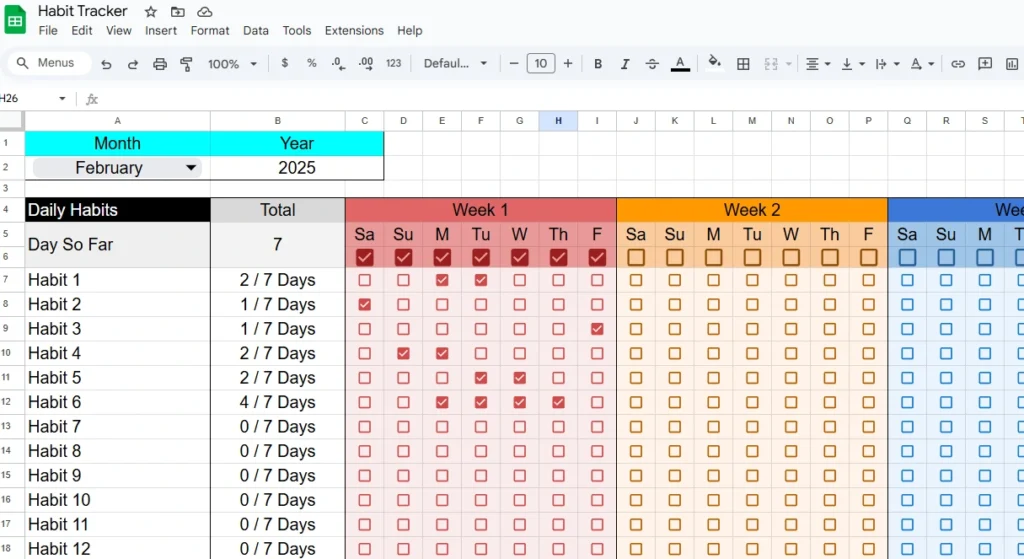
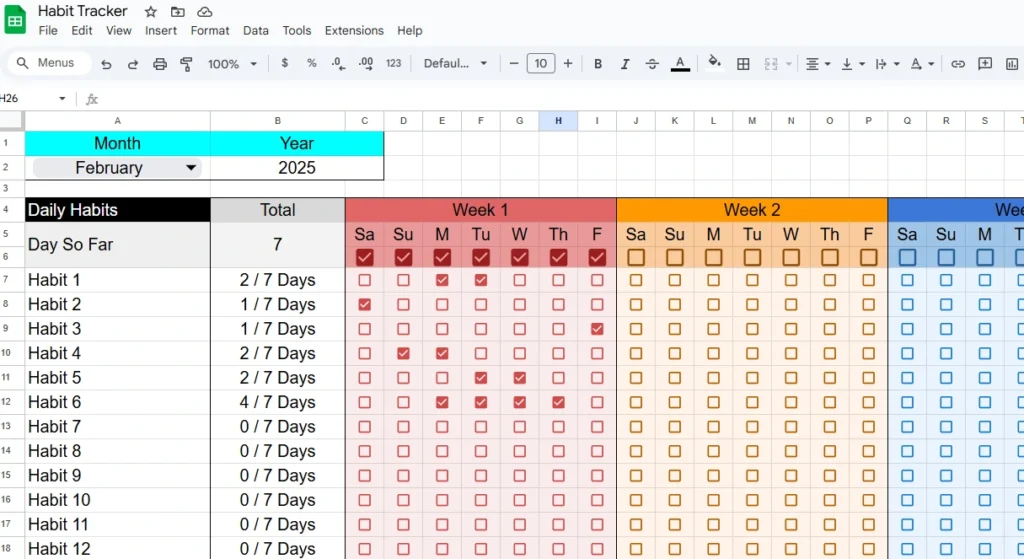
The layout is divided by weeks and days, with colorful sections that make tracking enjoyable. Each row represents one habit, while each column represents the days of the week. You simply tick a checkbox for each day you complete a habit, and the spreadsheet automatically updates your totals.
At the top of the sheet, you’ll find Month and Year dropdowns that allow you to switch between months effortlessly. You don’t have to recreate a new sheet every time — just pick your new month, reset your checkboxes, and start fresh.
For example, if you’re tracking habits in February, the sheet automatically adjusts for 28 or 29 days. If you move to March, the layout expands for 31 days. Everything remains organized and color-coded for clarity.
This makes it a great tool for anyone who wants to improve their lifestyle in small, trackable ways — whether that’s drinking more water, exercising, journaling, or sticking to a sleep routine.
Exploring the Key Features and Sections
The Habit Tracker Google Sheets template includes several practical sections that make it both functional and visually appealing.
- Color-Coded Weekly Layout: Each week has its own color (red, orange, blue, purple), separating one week from the next. It’s not only visually pleasing but also helps you focus on short-term goals instead of feeling overwhelmed by the whole month.
- Dynamic Month and Year Controls: You can switch months without changing the structure. These dropdowns are powered by simple data validation tools, making the template reusable indefinitely.
- Daily Checkboxes: Each day’s cell includes a clickable checkbox. When you complete your habit, just tick it — and the satisfaction of seeing those boxes fill up is instant motivation.
- Automatic Totals: The “Total” column next to each habit calculates how many times you’ve completed it for the current week. It updates automatically, giving you a quick summary of your consistency.
- Expandable Habit List: The template starts with twelve sample habits, but you can easily add or remove rows depending on your needs.
Every part of the sheet is editable, making it suitable for all kinds of users — from students building study routines to professionals trying to balance work-life habits.
Step-by-Step Guide on How to Use the Template
Getting started is simple, even if you’re new to Google Sheets.
- Make a Copy: Click the link to the template and select “Make a copy” to save it to your own Google Drive.
- List Your Habits: In the “Daily Habits” column, type the habits you want to track. Examples: “Exercise,” “Read 10 Pages,” “No Sugar,” or “Meditate.”
- Choose Month and Year: Use the dropdown menus at the top to set your current month and year. The layout adjusts automatically.
- Track Daily Progress: Each day, mark the checkbox when you complete the habit. As the week progresses, you’ll see your total count increase (for example, “4 / 7 Days”).
- Review Weekly Patterns: At the end of each week, check your totals. This helps you identify which habits you’re consistent with and which ones might need more effort.
- Reset for the Next Month: When a new month begins, uncheck all boxes and update the month selector. You can reuse the same sheet throughout the year.
You can even print it or export it as an Excel file if you prefer working offline.
For example, a user who’s focusing on fitness goals can track daily workouts, hydration, and sleep hours. Another person might use it for self-improvement habits, like writing affirmations, journaling, or limiting screen time.
Helpful Tips for Customizing the Habit Tracker
One of the biggest advantages of this template is flexibility. You can modify it however you like to match your personal system or workflow. Here are a few ideas:
- Add More Habits: Insert extra rows for new habits — the formulas and formatting will adjust automatically.
- Change Colors: Customize weekly colors using the fill tool to create your own visual style. Some users prefer neutral tones or dark mode themes for a minimalist look.
- Add Notes or Comments: Create a “Notes” column to jot down reflections, triggers, or reasons why you skipped a habit. This helps you track behavior patterns.
- Include Progress Charts: Insert a bar or line chart to visualize your progress week by week. Seeing improvement over time can be a huge motivator.
You can also duplicate the sheet within your workbook to track multiple people — for example, couples, roommates, or family members who want to compare their progress together.
Why This Template Stands Out
There are countless habit trackers online, but this Google Sheets version focuses on clarity, control, and motivation.
Unlike mobile apps that hide your data behind accounts or ads, this template keeps everything in your hands. You own your data, and you can tweak it however you like.
It’s especially useful for:
- Students building study or self-discipline routines
- Freelancers organizing work-life habits like breaks, focus hours, or client outreach
- Fitness enthusiasts tracking daily workouts, water intake, or step goals
- Individuals developing mindfulness or productivity systems
Because it’s spreadsheet-based, it also appeals to users who enjoy analytical tracking. You can even integrate it with other Sheetrix templates — for example, pairing it with your Goal Setting Template or Productivity Planner Template to get a complete overview of your personal growth.
Download Your Free Habit Tracker Spreadsheet
- Free Template
- Fully Editable
- Instant Access
- Organize your information
How to Access Your Copy
- Enter your email for instant access
- Open the link we send you
- Start using the spreadsheet right away
Within a few days, you’ll start seeing patterns — which habits come easily, and which ones need attention. Over time, those checkmarks become a visual reminder of your progress and persistence.
This is a tool designed to grow with you — whether you’re starting new habits for the new year, resetting your wellness routine, or simply trying to live more intentionally.
Premium Habit Tracker
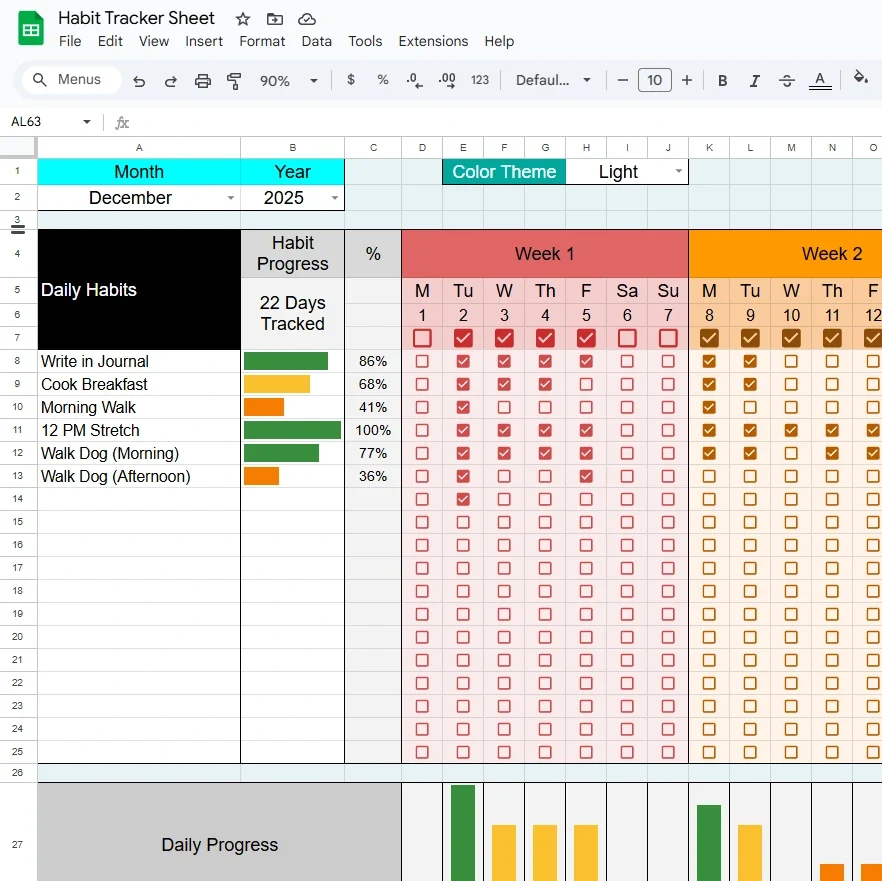
- Everything in the free version
- Automatic progress bars
- Completion percentages
- Daily progress chart
- Weekly + monthly routines
- Progress bars for weekly & monthly tasks
- Theme selector (Light, etc.)
- Month & year dropdowns
- Lifetime updates included
Final Thoughts
Building habits takes consistency, not perfection. This Habit Tracker Google Sheets template makes that process simple, visual, and motivating.
By tracking each day, week, and month in one easy spreadsheet, you’ll gain the insight and discipline needed to form lasting routines.
Start today — make a copy of the free template, and take the first small step toward your bigger goals.