
The holiday season is full of moments we look forward to — family dinners, cozy decorations, gift exchanges, and celebrations that make the year feel special. But those moments often come with an overlooked challenge: managing the cost of it all.
If you’ve ever found yourself wondering where all your money went after the holidays, you’re not alone. Between Halloween costumes, Thanksgiving feasts, and Christmas presents, expenses can add up quickly. That’s why this Holiday Budget Spreadsheet was designed — to make it easier to plan, track, and stay on top of every seasonal expense in one simple, color-coded tool.
This template works in both Google Sheets and Microsoft Excel, and it’s completely customizable for your own budget style. Whether you’re a family planner preparing for multiple holidays, a student organizing small gatherings, or simply someone who loves staying financially organized, this spreadsheet gives you everything you need to enjoy the holidays without overspending.
Understand the Purpose of the Template
At its core, this holiday budget spreadsheet is a planning and expense-tracking system that helps you set financial goals, record your spending, and monitor your progress in real time.
It breaks down your holiday finances into three easy steps:
- Set your goals — how much you want to spend or save.
- Track your spending — log each purchase as it happens.
- Compare results — see the difference between your budget and your actual costs.
You can view all holidays together or focus on one at a time using the holiday dropdown filter, which updates all totals automatically. It’s simple enough for beginners yet powerful enough for anyone who loves to see their data clearly visualized.
The template covers Halloween, Thanksgiving, and Christmas by default, but you can easily expand it to include New Year’s, Easter, or any other celebration you plan throughout the year.
Explore the Key Features and Sections
The holiday budget spreadsheet includes two main sheets: one for tracking and analysis, and another for managing dropdown options and categories. Together, they make the system both flexible and highly visual.
Budget Sheet
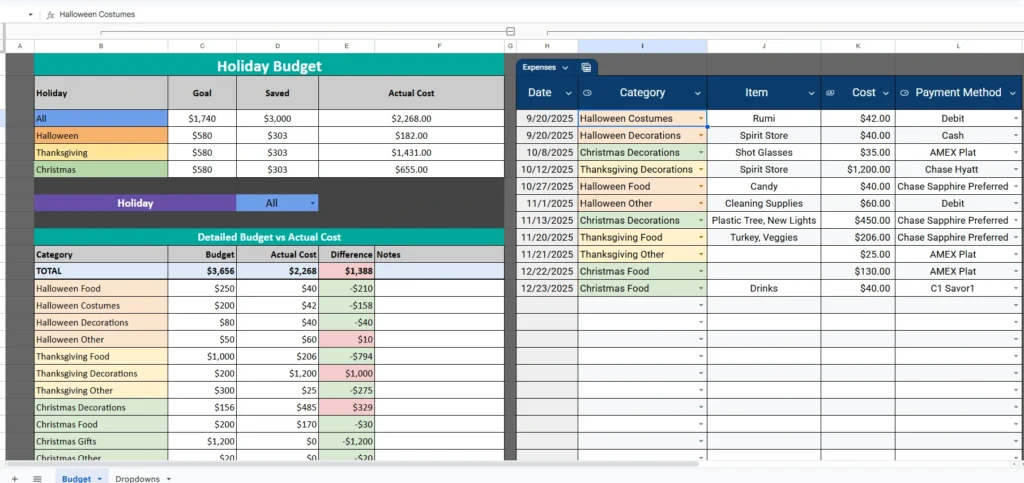
This is the main control center of your holiday budgeting process. It brings all your data together in a clear, easy-to-read format.
Holiday Overview
At the top of the sheet, you’ll find a summary table that displays each holiday’s goal, amount saved, and actual cost. The totals update automatically as you enter expenses, giving you a quick glance at whether you’re staying on target.
For example, if your goal for Christmas is $580 and you’ve saved $303 so far, the spreadsheet calculates your progress and lets you know how much you’ve spent to date. It’s a simple way to see if you’re over or under budget before the season ends.
Holiday Filter Dropdown
One of the most useful features is the holiday dropdown selector. You can choose to view All holidays combined or isolate just Halloween, Thanksgiving, or Christmas. When you select a specific holiday, all the totals and expense lists adjust instantly to show only those entries.
This makes it easy to focus on one celebration at a time — for example, viewing only Halloween spending when buying costumes and candy, or switching to Christmas mode when tracking gift purchases.
Detailed Budget vs. Actual Cost
Below the summary, the spreadsheet provides a category-level breakdown. Each row lists your planned budget, your actual spending, and the difference between the two.
If you budgeted $200 for Halloween costumes but only spent $42, the spreadsheet highlights your $158 savings in green. If you went over on Thanksgiving decorations, it will display the overspend in red. The visual cues make it easy to identify where adjustments are needed.
This section helps you pinpoint problem areas and make smarter spending choices next year. Many users also add short notes in the final column — like “shop early for deals” or “skip extra desserts next year” — to remember what worked and what didn’t.
Expense Log
To the right of the main table is the Expenses section, where you can record every purchase with its date, category, item name, cost, and payment method.
For example, you might log:
- Date: 10/27/2025
- Category: Halloween Food
- Item: Candy
- Cost: $40.00
- Payment Method: Chase Sapphire Preferred
Each entry automatically feeds into your totals. You don’t have to calculate anything — the spreadsheet handles it all. Over time, this builds a detailed record of your spending patterns, helping you make data-driven decisions for future holidays.
Dropdowns Sheet
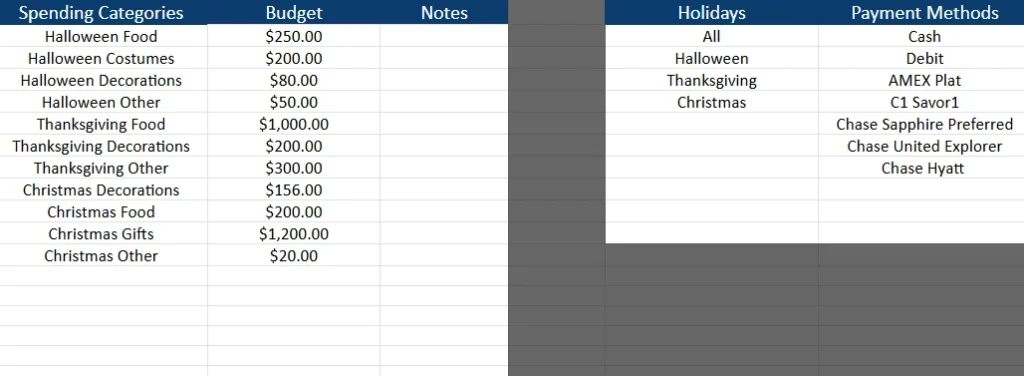
This sheet works quietly behind the scenes but is essential for keeping your main tracker running smoothly. It stores and organizes all dropdown menu options used throughout the template.
Spending Categories
Here you can customize your list of spending areas — such as Halloween Food, Thanksgiving Decorations, or Christmas Gifts. If you celebrate additional holidays or want to track something unique like Travel or Charity Donations, you can easily add it to this list.
Budgets and Notes
Next to each category, there’s space to record your estimated budget and any personal notes. This information feeds into the Budget sheet automatically, keeping everything connected.
Holidays and Payment Methods
You can also manage the list of holidays and payment options here. By default, it includes All, Halloween, Thanksgiving, and Christmas — but you can add others like New Year’s Eve or Valentine’s Day.
For payment methods, you might include Cash, Debit, AMEX Plat, C1 Savor1, or any card you regularly use. Keeping this list organized ensures your expense log stays consistent and easy to filter.
How to Use the Template
Using the Holiday Budget Spreadsheet takes just a few minutes to set up.
- Make your copy — open the link and choose “File → Make a Copy” to save it to your own Google Drive.
- Customize your budget — open the Dropdowns sheet and adjust the spending categories, budget amounts, and holidays to fit your plans.
- Set your savings goals — in the Holiday Budget sheet, fill in how much you’ve saved or plan to save for each holiday.
- Record expenses as they happen — log each purchase in the Expenses area.
- Monitor your progress — check the Budget section to see where you stand. Use the dropdown filter to focus on one holiday at a time.
It’s designed for simplicity, so you don’t need advanced spreadsheet skills. Most users find that after entering a few expenses, the layout starts to make perfect sense.
Why This Template Is Worth Using
There are hundreds of holiday budget templates online — but this one is built to actually fit real life.
- It covers multiple holidays at once. Most budget sheets focus on a single event, but this template lets you manage your entire holiday season from one dashboard.
- It’s fully automated. Totals, differences, and color coding update instantly as you type.
- It’s customizable. You can add categories, rename holidays, or include extra payment methods without breaking the formulas.
- It’s visual. Color-coded sections make it easy to see trends and stay motivated.
- It’s reusable every year. Simply clear your old expenses and start fresh for the next holiday season.
This spreadsheet is especially useful for families managing shared expenses, couples planning gift budgets, or anyone who likes to stay financially mindful during busy times. It helps prevent the “holiday hangover” — that January moment when you realize you overspent without realizing it.
Get Your Free Holiday Budget Spreadsheet
- Free Template
- Fully Editable
- Instant Access
- Organize your information
How to Access Your Copy
- Enter your email for instant access
- Open the link we send you
- Start using the spreadsheet right away
No matter how you celebrate — Halloween treats, Thanksgiving feasts, or Christmas gifts — this tool helps you enjoy the moments that matter most, knowing your finances are organized and under control.





