
If you’ve ever tried to remember the exact model of your television after it broke, or had to list everything in your home for insurance, you know how stressful it can be. That’s exactly why we created the House Inventory Template — a ready-to-use Google Sheets file that helps you record every item you own, along with purchase details, estimated value, and even photo links for proof of ownership.
This isn’t just another spreadsheet. It’s a practical, flexible tool designed for homeowners, renters, and landlords who want peace of mind and better organization. Whether you’re preparing for an insurance claim, planning a move, or simply want to understand the value of your belongings, this template gives you a clear, organized overview of your home inventory in one place.
Overview of the House Inventory Template
The House Inventory Template is structured to make tracking your household items simple yet thorough. It includes two connected sheets — one for your inventory list and another for dropdown options like categories and conditions. This setup keeps your data clean, organized, and easy to update.
House Inventory Sheet
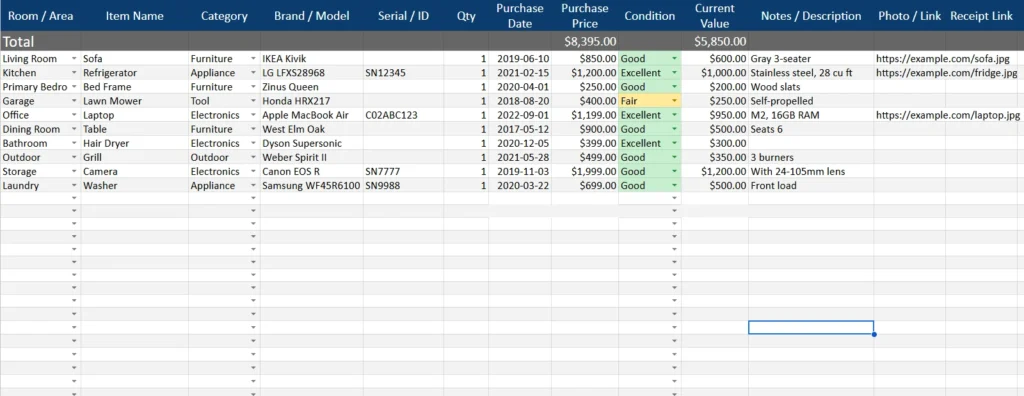
The main sheet is where you’ll log each item. Every column is purpose-built to capture essential details.
Here’s what you’ll find:
- Room / Area: Select from rooms such as Living Room, Kitchen, Bedroom, Garage, or Outdoor Space.
- Item Name: Enter what the item is — for example, “Sofa,” “Microwave,” or “Lawn Mower.”
- Category: Choose from dropdown options like Furniture, Appliance, Electronics, or Tool.
- Brand / Model: Record the specific make or model, such as “IKEA Kivik” or “LG InstaView Refrigerator.”
- Serial / ID: Include serial numbers or identifying codes for expensive items.
- Quantity: Track how many of each item you have.
- Purchase Date: Log when you bought it — helpful for warranty or depreciation.
- Purchase Price: Enter the original cost of the item.
- Condition: Select from “New,” “Excellent,” “Good,” “Fair,” or “Needs Repair.”
- Current Value: Estimate its current worth.
- Notes / Description: Add extra information such as color, size, or special features.
- Photo / Link: Include a Google Drive or image link for easy visual reference.
- Receipt Link: Store digital proof of purchase for insurance or resale purposes.
Each column can be filtered, sorted, or searched — making it incredibly easy to find what you need. Conditional formatting also highlights item conditions automatically: green for excellent, yellow for fair, and red for poor or repair-needed items. This gives you an instant view of which belongings might need attention or replacement soon.
Dropdowns Sheet
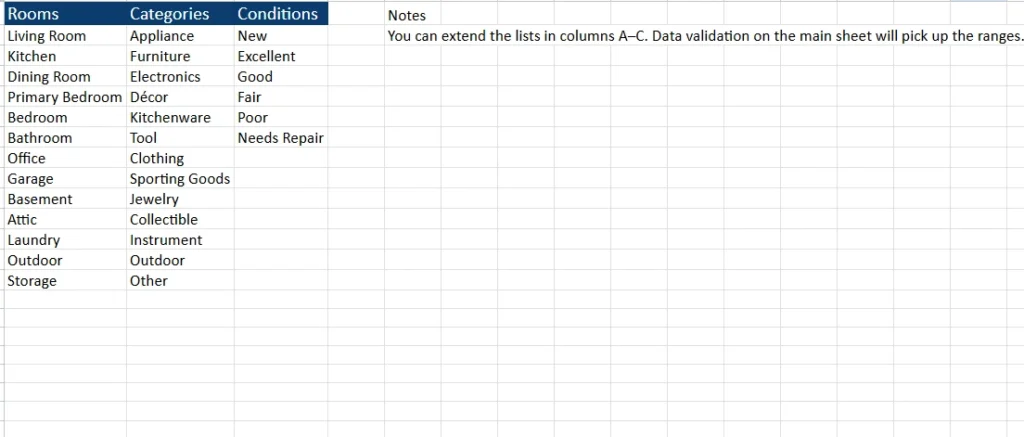
This supporting sheet keeps your data consistent. It includes editable lists for Rooms, Categories, and Conditions that populate the dropdown menus in your main sheet.
For example:
- Under Rooms, you might list Kitchen, Bedroom, Garage, Storage, or Outdoor.
- Under Categories, you can include Appliance, Furniture, Electronics, Décor, Tool, or Clothing.
- Under Conditions, you’ll find New, Excellent, Good, Fair, Poor, and Needs Repair.
You can easily add or remove items in these lists as your needs change. The dropdowns automatically update across your main sheet, so there’s no manual editing required.
Key Features and Sections Explained
The House Inventory Template was designed to look professional while staying simple enough for everyday use. It combines features that spreadsheet users love — automation, filters, and formulas — with a clean layout that’s easy to navigate.
Built-in Value Totals
At the top of the main sheet, two key figures automatically calculate:
- Total Purchase Price: The sum of all the original costs you’ve entered.
- Total Current Value: The estimated worth of all your items today.
This feature helps you instantly understand your home’s asset value — a big help for insurance coverage reviews or financial planning.
Conditional Formatting for Condition
Every item’s condition is color-coded automatically:
- Excellent and Good = Green
- Fair = Yellow
- Poor or Needs Repair = Red
You can quickly scan your inventory to identify which items may need replacement, cleaning, or maintenance.
Filters and Sorting
Every column has a filter built in, so you can quickly sort items by room, category, or purchase year. For example, you could filter only “Kitchen” items or sort your inventory by the highest-value items first.
Example Data
The sheet includes a set of example rows so users can see how it’s supposed to work. Examples include:
- Living Room – Sofa (Furniture) purchased for $850 in 2019, currently valued at $600.
- Kitchen – Refrigerator (Appliance) purchased for $1,200 in 2021, currently valued at $1,000.
- Garage – Lawn Mower (Tool) purchased for $400 in 2018, with a current value of $250.
- Office – Laptop (Electronics) purchased for $1,199 in 2022, currently worth $950.
These samples show how to track different item types while giving users ideas on how to fill in their own details.
How to Use the House Inventory Template
Getting started takes just a few minutes, and you’ll have a full, digital record of your household items that you can update anytime.
- Make a Copy: Open the Google Sheets template and go to File → Make a copy to save it to your own Drive.
- Start Listing Items: Go room by room, entering each item’s details. For example, under “Living Room,” you might list your TV, sofa, and lamps.
- Use Dropdowns for Consistency: Select categories and conditions from the dropdown menus to keep your data clean.
- Add Values and Photos: Enter purchase and current values, and link images or receipts using Google Drive or cloud storage.
- Check Totals Automatically: Watch the total purchase and current values update instantly.
- Update Regularly: Add new purchases, remove old items, or adjust values as needed.
Many users also duplicate the sheet for separate properties or apartments. For example, a landlord might maintain one sheet per rental unit, while a homeowner could keep separate tabs for home, vacation cabin, or storage unit.
Why Choose This Template Over Others
There are plenty of inventory spreadsheets online, but few are built as intuitively as this one. The House Inventory Template from Sheetrix focuses on both function and clarity, with real-world usability at its core.
- Practical for Everyday Users: No complex formulas or confusing layouts. Everything is labeled clearly and works out of the box.
- Perfect for Insurance and Claims: Attach photos and receipts for easy documentation — a huge advantage in case of loss or damage.
- Customizable for Any Home: Add more rooms, expand the dropdowns, or create new columns for insurance numbers or storage locations.
- Visually Organized: The formatting and color coding help you read at a glance, even if your inventory grows to hundreds of items.
- Accessible Anywhere: Because it’s built in Google Sheets, your inventory is automatically backed up to the cloud and accessible from any device.
Who Can Benefit from It
- Homeowners tracking assets for insurance or estate planning.
- Renters who want a record for rental insurance.
- Landlords managing multiple units and furnishings.
- Students moving into dorms or shared housing.
- Collectors cataloging valuable items like art, jewelry, or electronics.
Get Your Free House Inventory Spreadsheet
- Free Template
- Fully Editable
- Instant Access
- Organize your information
How to Access Your Copy
- Enter your email for instant access
- Open the link we send you
- Start using the spreadsheet right away
Whether you’re documenting your belongings for peace of mind or preparing for the unexpected, this template helps you stay one step ahead. Keep your possessions organized, your values clear, and your home life a little more stress-free — all with a single, smart spreadsheet.





