
Planning a trip often means juggling flights, hotel bookings, activities, and budgets across multiple apps and notes. With this free itinerary template, you can organize everything in one place — your travel plans, spending, and packing list — using a simple Google Sheet.
This itinerary template for Google Sheets is built for travelers, professionals, and event planners who want an efficient way to stay organized. It includes three connected sheets that automatically update based on your trip dates and budget categories. Whether you’re planning a vacation, a business trip, or a multi-city journey, this spreadsheet adapts to your needs while keeping your travel plans clear and structured.
A Complete Overview of the Itinerary Template
This Google Sheets itinerary template is designed to do more than just list your daily plans — it helps you manage your entire trip from start to finish. The file contains three main tabs:
- Travel Itinerary – the core planning area for each day’s activities.
- Budget/Spend Summary – a live-updating budget tracker connected to your itinerary costs.
- Packing List – a simple, checkbox-style list to help you remember what to bring.
Each section works together, saving you from repetitive data entry. When you log an expense in the Travel Itinerary, it automatically appears in the Budget Summary. When you add or rename a budget category, the change instantly updates across the entire sheet.
The design is clean, color-coded, and optimized for ease of use. All you need to do is enter your start and end dates, and the template automatically calculates your trip length and populates the correct dates for planning.
Key Features and Sections That Make Planning Simple
This itinerary template is built for real-world usability. Every formula, dropdown, and visual element has a purpose — to help you stay organized without spending hours formatting or calculating. Let’s look at each part in detail.
1. Travel Itinerary Sheet
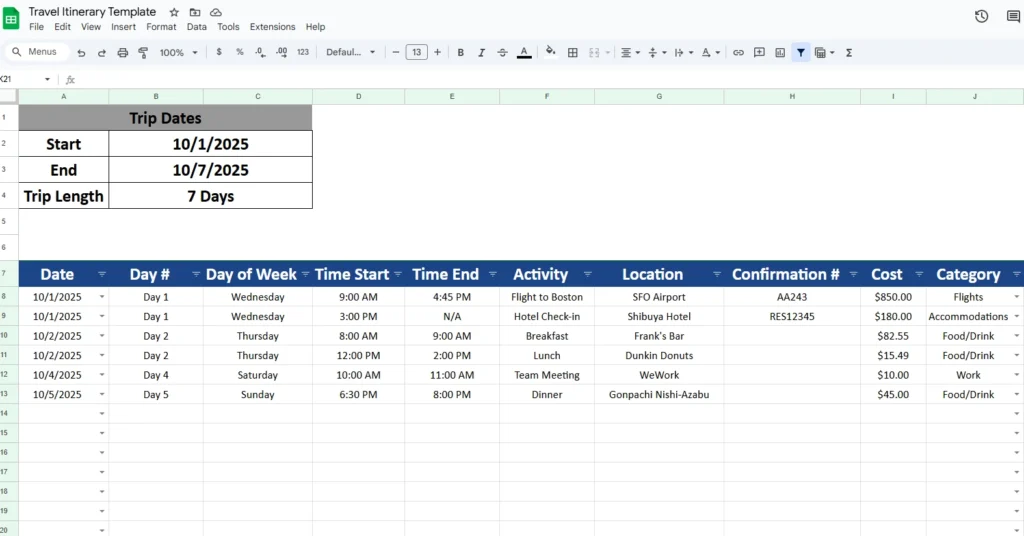
This is the main tab where you’ll plan the details of your trip day by day. The top section includes a Trip Dates summary box. When you input your Start and End dates, the template automatically calculates your Trip Length (for example, “7 Days”) and fills the Date dropdowns in the main table. You don’t have to manually enter each date — they’re generated based on your trip window.
Below the summary is the structured itinerary table with columns for Date, Day #, Day of Week, Time Start, Time End, Activity, Location, Confirmation #, Cost, Category, and Notes.
Each column has a clear purpose:
- Date and Day # are linked to your trip’s duration, ensuring consistent daily tracking.
- Day of Week auto-fills to help you visualize which day of the week you’ll be traveling or resting.
- Time Start/End fields are flexible enough for flights, tours, meetings, or even downtime.
- Activity and Location let you note where you’ll be and what you’ll do.
- Confirmation # is ideal for flight numbers, hotel reservations, or tickets.
- Cost feeds directly into your Budget Summary for automatic total tracking.
- Category uses a dropdown list that syncs with the categories in the Budget/Spend Summary sheet.
- Notes can include reminders like “Check in 2 hrs early” or “Ask for late checkout.”
Everything is color-coded for readability — headers in navy blue, alternating rows for clarity, and total cells highlighted automatically.
Example:
If you’re traveling from October 1–7, the date dropdown will include only those days. Let’s say you add:
- Flight to Boston on October 1, Category “Flights,” Cost $850
- Hotel Check-in later that day, Category “Accommodations,” Cost $180
- Team Meeting on October 4 under “Work”
- Dinner Reservation on October 5 under “Food/Drink”
The template automatically sums your costs and categorizes them correctly in the Budget Summary.
2. Budget/Spend Summary Sheet
The second tab tracks how your money is being spent during the trip. It’s directly connected to your itinerary, meaning you only have to input costs once.
You’ll see columns for Category, Budget, Actual Cost, and Notes. As you log expenses in your Travel Itinerary, the Actual Cost column automatically updates. The sheet then compares your planned Budget to Actual spending.
If you go over budget in any category, the cell turns red — thanks to built-in conditional formatting — giving you a quick visual alert before you overspend.
The Category list here also controls the dropdown options in your itinerary. Add or rename a category (like “Entertainment” or “Local Transport”), and it instantly appears in your main sheet’s Category list.
Example:
If your budget for “Food/Drink” is $300 and you record $350 worth of restaurant meals in the itinerary, the cell in Actual Cost automatically updates and turns red. You can then adjust plans or reallocate funds.
This feature is especially useful for business travelers tracking expenses or families managing shared costs during vacations.
3. Packing List Sheet
The third sheet helps you keep your essentials in check before departure. It’s simple but effective — exactly what most travelers need.
The columns are Item, Category, Packed (✓), and Notes.
Each row includes a checkbox under Packed so you can mark off items as you prepare.
Typical entries might include:
- T-shirts (Clothes) – “4 total”
- Toothbrush (Toiletries) – “Keep in carry-on”
- Laptop (Tech) – “Bring charger and adapter”
- Passport (Documents) – “Check expiration date”
You can customize it with extra rows for hiking gear, photography equipment, or kids’ items. Since this is a Google Sheet, you can also share it with travel companions so everyone can tick off what they’ve packed.
Step-by-Step: How to Use the Itinerary Template
Using this template is simple even if you’re new to spreadsheets. Here’s how to set it up for your next trip:
- Make a copy of the file in Google Sheets (File → Make a copy).
- On the Travel Itinerary tab, enter your Start and End trip dates. The Trip Length and date dropdowns update automatically.
- Fill in your activities, times, and costs. Choose each cost’s Category from the dropdown list.
- Move to the Budget/Spend Summary tab and set your Budget for each category. As you add new activities, the Actual Cost column will populate automatically.
- If you overspend in a category, the cell turns red, making it easy to spot overages at a glance.
- Go to the Packing List tab and add the items you want to bring. Check them off as you pack.
That’s it. You’ll have a professional-looking itinerary with your total costs, activities, and plans all neatly connected.
Why This Template Stands Out
There are many travel planners online, but few combine simplicity, automation, and flexibility like this Google Sheets itinerary template.
- Automatic updates: You enter your trip dates once; everything else adjusts.
- Linked budget tracking: No need to double-enter expenses — they’re pulled directly from your itinerary.
- Smart alerts: Red highlights warn you when your spending exceeds your budget.
- Mobile-friendly: Works smoothly on phones, tablets, and laptops.
- Easy customization: Add more categories, new destinations, or extra rows without breaking formulas.
This template isn’t limited to vacations. It’s also perfect for:
- Business trips — track client meetings, travel reimbursements, and receipts.
- Event planning — map out schedules, vendors, and setup times.
- Family trips — plan daily activities and shared budgets.
- Group travel — collaborate easily by sharing the Sheet and dividing tasks.
Get Your Free Itinerary Spreadsheet
- Free Template
- Fully Editable
- Instant Access
- Organize your information
How to Access Your Copy
- Enter your email for instant access
- Open the link we send you
- Start using the spreadsheet right away
Plan your wedding with clarity, stay on budget, and eliminate last-minute surprises.
If you’re ready to plan your next trip with clarity and control, this template is free to access and easy to start using.
With this itinerary template, you’ll never need to juggle multiple apps or guess your trip costs again. Everything — your schedule, spending, and packing list — will stay connected, accurate, and easy to update from anywhere.
In short: this template is made for travelers who want structure without complexity. Whether you’re planning a solo adventure or managing corporate travel, it’s a clear, flexible, and professional solution that keeps every detail right where it belongs — in one sheet.





