
Searching for a new job can feel like a full-time job itself. Between applications, interviews, and follow-ups, it’s easy to lose track of where you’ve applied or when to reach out again. That’s why we created this free Job Application Tracking Spreadsheet — a simple yet powerful Google Sheets template that keeps your job hunt organized from start to finish.
Whether you’re applying to five roles or fifty, this spreadsheet helps you see the full picture of your job search. You can record each company, track your application progress, and manage follow-ups all in one clean, color-coded dashboard.
A Clear Overview of the Template
The Job Application Tracking Spreadsheet is designed to simplify one of the most stressful parts of job hunting — staying organized. Instead of relying on scattered notes or emails, this single Google Sheet captures every important detail in a structured, easy-to-scan format.
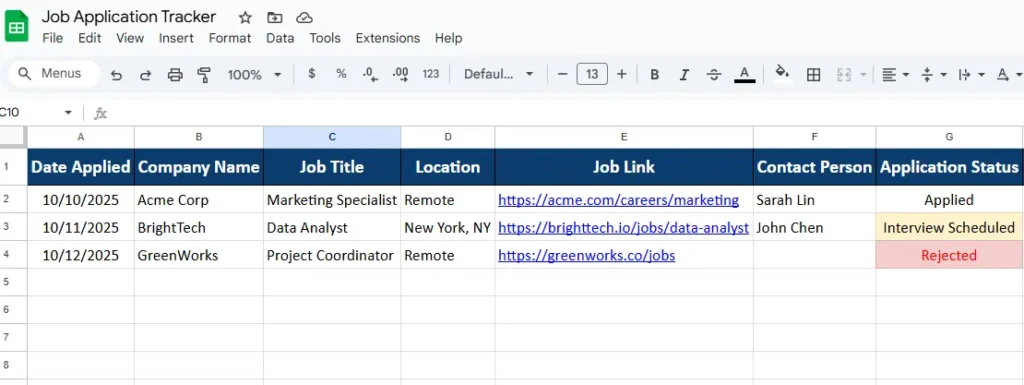
Each row in the spreadsheet represents one job application. You’ll find columns for the date applied, company name, job title, location, job link, contact person, application status, interview date, follow-up date, and notes. This layout gives you an instant snapshot of where you stand with each employer.
It’s built to work for everyone — whether you’re a recent graduate applying to your first few roles, a seasoned professional exploring new opportunities, or a freelancer tracking project-based gigs. Because it’s built in Google Sheets, you can use it from any device, collaborate with mentors, or share it with a career coach.
Key Features and Sections Explained
The spreadsheet is made up of one main sheet that includes everything you need for tracking your applications. You can start entering information immediately — no setup required. Let’s take a closer look at how each section works and what makes it effective.
Application Tracker Overview
This section lists all the essential details for each position you apply to. The columns are fully editable, so you can customize them based on what you need to track. For example, if you’re in tech, you might add columns for the hiring platform (LinkedIn, Indeed, company site) or the recruiter’s name.
Each row is color-coded using conditional formatting:
- Applications marked as “Interview Scheduled” appear in light yellow to grab your attention.
- “Rejected” applications turn red automatically, so you can move on quickly.
- “Offer Received” highlights in gold — always a nice motivator when scanning your progress.
This simple visual system makes it easy to understand your job search status at a glance.
Contact and Follow-Up Tracking
Many job seekers lose momentum because they forget when to follow up or who to contact. The spreadsheet solves that problem by combining contact details and follow-up dates into one place.
You can enter recruiter names, emails, or LinkedIn profiles directly into the Contact Person column. The Follow-Up Date column can then be used with a reminder formula (for example, =TODAY()-A2) to show how many days have passed since your application.
It’s a small detail that makes a big difference — especially when you’re juggling multiple applications at once.
Notes and Job Links
The Job Link and Notes columns are built for quick reference. You can paste the URL of the job posting so you can revisit it anytime, even after it’s closed. In the Notes section, you might jot down details from conversations, upcoming interview questions, or next steps suggested by the recruiter.
For instance:
- “Sent resume through LinkedIn — follow up next week.”
- “Prepare SQL case study before 10/20 interview.”
- “Waiting for HR feedback — check again on 10/25.”
This section becomes a mini journal of your job search, helping you track what’s working and what’s not.
How to Use the Job Application Tracking Spreadsheet
Getting started is simple — the spreadsheet is ready to use as soon as you make your own copy in Google Sheets. Here’s how to set it up and make the most of it:
- Open the spreadsheet and click “File → Make a copy.”
This saves a private version in your own Google Drive so you can edit freely. - Start adding job entries.
Each new application gets its own row. Fill in as much detail as possible — company name, job title, and date applied are the essentials. - Use the dropdown menu for Application Status.
The default options include Applied, Interview Scheduled, Offer Received, Rejected, No Response, and Follow-Up Sent.
These can easily be customized to fit your process. - Set reminders for follow-ups.
Enter a follow-up date and use Google Sheets’ conditional formatting to highlight dates approaching soon. It’s a great way to stay proactive. - Add filters to stay organized.
Use the filter feature to sort applications by company, status, or date. For example, you can instantly view only the companies where interviews are scheduled this week.
Within minutes, you’ll have a clear, automated system that keeps your job search moving forward.
Why This Template Works Better Than Lists or Notes
Many job seekers try to manage their search with handwritten notes, spreadsheets they build from scratch, or simple to-do lists. The problem is that these systems quickly become cluttered or incomplete.
The Job Application Tracking Spreadsheet from Sheetrix was built with real-world job hunters in mind. Every column and color choice serves a purpose — helping you save time and reduce stress. Here are a few reasons users love it:
- It’s completely customizable. Add or remove columns as needed.
- You can access it anywhere. It’s built on Google Sheets, so you can update it from your phone, tablet, or computer.
- It’s visually organized. Color-coding and clean layout make it easy to spot what needs your attention.
- It saves you from missed opportunities. The Follow-Up Date feature keeps you engaged with potential employers.
- It supports long-term tracking. Over time, you can see patterns — like which types of roles or companies give you the best results.
For example, a marketing professional using the tracker might notice that roles applied to directly through company websites yield more interview requests than those through job boards. That insight helps refine future applications.
Real-Life Example of How It Helps
Let’s say you’re applying to 15 different positions in a month. Without a tracker, you might forget whether you already applied to “Acme Corp” or when you last heard back from “BrightTech.” With this spreadsheet, you can instantly filter your list to see:
- Which companies haven’t responded yet
- Which ones are moving forward to interviews
- Which follow-ups are due this week
One Sheetrix user mentioned how the tracker “turned chaos into clarity” — making it easy to stay on top of applications during a long job search.
Get Your Free Job Application Tracker Spreadsheet
- Free Template
- Fully Editable
- Instant Access
- Organize your information
How to Access Your Copy
- Enter your email for instant access
- Open the link we send you
- Start using the spreadsheet right away
This job application tracker isn’t just a tool; it’s a simple system that helps you stay motivated and organized while job hunting. Instead of wondering what to do next, you’ll always know where you stand and what to follow up on.
Final Thoughts
A well-structured job search can make the difference between feeling overwhelmed and staying confident. This Job Application Tracking Spreadsheet was designed to help you take control of your process, keep every detail in one place, and focus on landing the right role — not just any role.





