
Keeping track of what’s in your kitchen can easily become a guessing game. You open the fridge, see three jars of the same sauce, and realize you’ve forgotten that one item you actually needed. The Kitchen Inventory Spreadsheet from Sheetrix was designed to stop that cycle. It gives you a simple, visual, and structured way to manage your pantry, fridge, and freezer items all in one Google Sheet.
This spreadsheet isn’t just a list—it’s a dynamic tool that helps you stay stocked up without overspending. With built-in color formatting, dropdown lists, and auto-updating summaries, it turns kitchen management into something clear and even satisfying.
Whether you’re managing a family household, meal prepping for the week, or running a small café, this free Google Sheets template makes it easy to see what you have, what’s running low, and what’s about to expire—all in real time.
Overview of the Kitchen Inventory Template
The Kitchen Inventory Spreadsheet is made up of two connected sections: the Inventory List and the Food Location Summary. Together, they track every food item in your kitchen and automatically calculate what needs to be reordered. There’s also a smart Shopping List sheet that fills itself out based on what’s running low, plus a Dropdowns sheet that makes data entry faster and more consistent.
Every part of this spreadsheet is built for efficiency:
- Color formatting instantly flags low quantities or near-expired items.
- The “Qty to Buy” column calculates how much you need to restock.
- A summary table updates automatically to show totals by Pantry, Fridge, and Freezer.
In short, it replaces sticky notes, messy grocery lists, and half-used pantry apps with a single, reliable dashboard.
Key Features and Sections That Make It Work
Inventory List Sheet
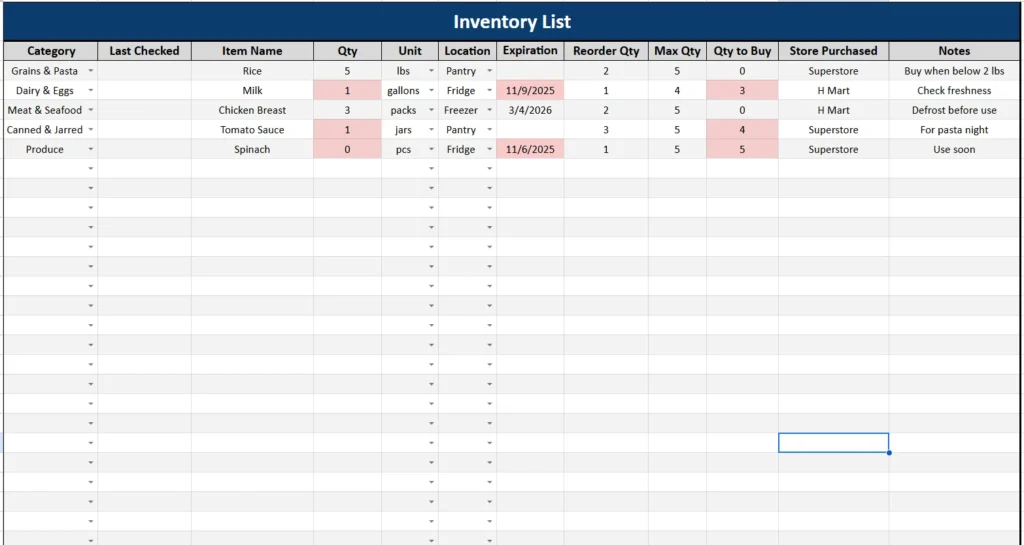
The Inventory List is the heart of the template. It’s where you’ll enter all your kitchen items—organized, sortable, and color-coded for clarity. Each row represents one product, and every column plays a role in keeping your inventory accurate and up to date.
Here’s what each column does:
- Category: Choose from categories like Grains & Pasta, Meat & Seafood, Baking, or Condiments. The drop-down makes it easy to stay consistent.
- Last Checked: A small but valuable addition. You can record when you last verified that item’s quantity or expiration, so you know how recent your information is.
- Item Name: List your ingredients or products—such as rice, milk, or chicken breast.
- Qty & Unit: Enter how much you currently have, using standard units like pcs, lbs, jars, or gallons.
- Location: Specify where it’s stored—Pantry, Fridge, or Freezer.
- Expiration Date: Add the date, and the spreadsheet automatically highlights items expiring within three days.
- Reorder Qty & Max Qty: Define the minimum and maximum levels you want for each item.
- Qty to Buy: Calculates how many units you should purchase to restock to your Max Quantity.
- Store Purchased: A helpful addition for tracking where you usually buy each product.
- Notes: Space for comments such as “Buy organic,” “For pasta night,” or “Use soon.”
Conditional formatting makes this sheet visual and practical. Low-stock items turn light yellow, and products nearing expiration turn light red, so you can quickly see what needs action.
For example:
If your pantry’s rice stock drops to 2 lbs while your reorder level is set at 5 lbs, the cell highlights automatically and the “Qty to Buy” column will show 3, reminding you to restock before you run out.
Food Location Summary
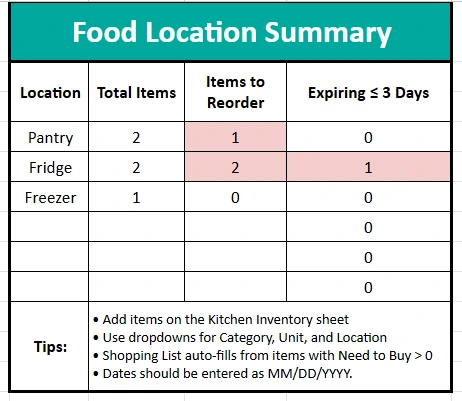
At the bottom of the same sheet, you’ll find the Food Location Summary, a built-in dashboard that automatically updates based on the items above. It totals all your entries and shows:
- Total Items: The number of items currently stored in each location.
- Items to Reorder: How many items are below your reorder threshold.
- Expiring ≤ 3 Days: A count of products that are about to expire soon.
For example, if you have two items in the fridge that will expire within the next few days, the summary instantly updates to show Fridge: Expiring ≤ 3 Days = 2.
This snapshot helps you see which area of your kitchen needs the most attention, whether it’s restocking pantry staples or checking items in the freezer.
Shopping List Sheet
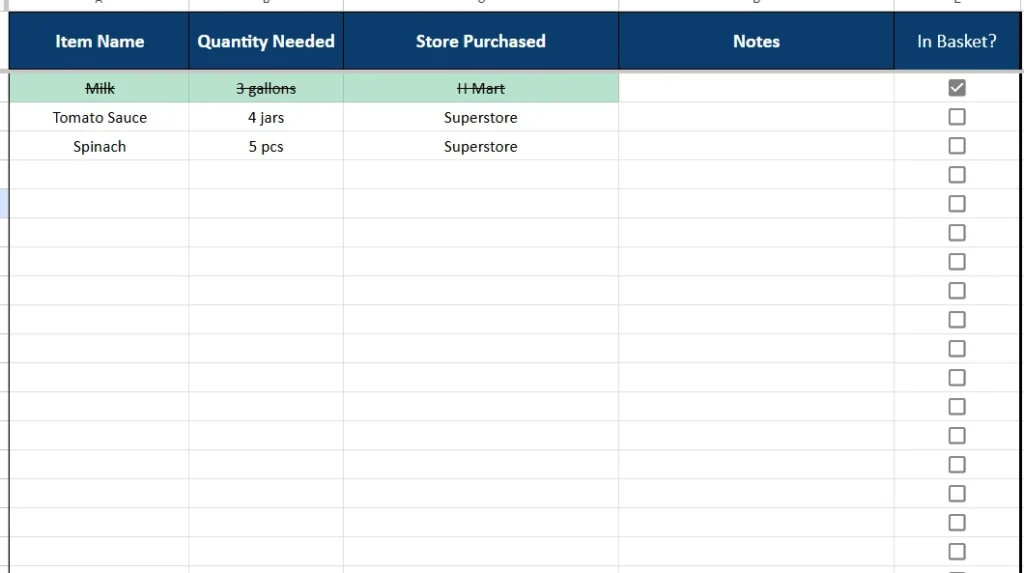
The Shopping List sheet is your auto-generated grocery planner. It pulls all items from the Inventory List that have a positive “Qty to Buy” value and displays them neatly for easy shopping.
Each row shows:
- Item Name
- Quantity Needed
- Store Purchased
- Notes
A simple checkbox column labeled “In Basket?” lets you mark off items as you shop. When you check the box, the row text is automatically struck through, helping you visually confirm what you’ve already picked up.
This feature is especially handy for mobile users. You can open the Google Sheet on your phone while shopping and tick off items as you go—no need for printed lists.
Dropdowns Sheet
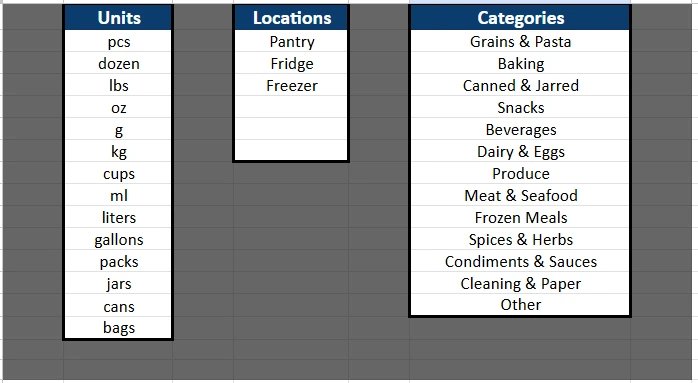
To keep everything consistent and prevent typos, the Dropdowns sheet contains the predefined lists that power all your dropdown menus. You can customize them anytime.
Included dropdown lists:
- Units – pcs, dozen, lbs, oz, kg, cups, ml, liters, jars, packs, cans, etc.
- Locations – Pantry, Fridge, Freezer.
- Categories – a broad range covering Grains & Pasta, Dairy & Eggs, Frozen Meals, Cleaning & Paper, and more.
This makes entering data faster and ensures that your summary calculations always remain accurate.
How to Use the Kitchen Inventory Template
Using this template is simple and flexible. Once you open it in Google Sheets, follow these steps to get started:
- Go to File → Make a copy to save your own editable version.
- On the Inventory List, enter your current items with category, location, and quantity.
- Set reorder and max quantities for each item based on how you shop.
- Add expiration dates so the spreadsheet can highlight upcoming expirations automatically.
- Check the Food Location Summary at the bottom to see totals for each area.
- Switch to the Shopping List sheet to view what needs restocking—then check items off as you buy them.
You can also sort or filter by any column. For example, filter by Location = Freezer to view only frozen goods, or by Category = Produce to plan your next grocery trip around fresh items.
If you share a kitchen with others, you can even share the sheet so everyone can update it in real time. One person can handle grocery runs while another monitors expiration dates. It’s collaborative and always synced.
Why This Template Is Worth Using
Unlike a simple printable checklist, this Kitchen Inventory Spreadsheet actually works with you. It’s dynamic, visual, and smartly automated.
Here are a few reasons it stands out:
- Saves Time: No more guessing or rechecking what’s in the pantry. The color coding and automatic calculations tell you exactly what to buy.
- Reduces Waste: Expiration alerts prevent forgotten items from spoiling.
- Budget-Friendly: By setting reorder levels, you only buy what you need, reducing overstocking.
- Customizable: Add or change categories, adjust colors, or expand the dropdown lists to fit your household.
- Practical for All Users:
- Families can plan weekly meals more easily.
- College students can track groceries and shared kitchen items.
- Meal preppers can organize ingredients across multiple storage locations.
- Small businesses like cafés or bakeries can monitor supplies in one simple file.
Real users have found this format surprisingly efficient. For instance, a home baker can quickly see if she’s running low on flour or butter before starting a batch. A family of four can avoid buying a fourth jar of peanut butter when two are already hidden in the pantry.
It’s these small improvements that make a spreadsheet like this genuinely useful day to day.
Get Your Free Kitchen Inventory Spreadsheet
- Free Template
- Fully Editable
- Instant Access
- Organize your information
How to Access Your Copy
- Enter your email for instant access
- Open the link we send you
- Start using the spreadsheet right away
If you’ve been looking for an easy, digital way to track pantry, fridge, and freezer items, this Kitchen Inventory Spreadsheet is the perfect starting point. Try it once, and you’ll never go back to handwritten lists or messy notes again.





