If you’re looking for a simple, clean macro tracker spreadsheet you can use in Google Sheets, this template is built to do the two things people actually want: log meals fast, and see daily totals automatically. Instead of making you manually add totals or build dashboards, the spreadsheet uses a straightforward Daily Log + auto-summing Daily Summary, plus a Targets sheet so you always know what you’re aiming for. It’s designed to be beginner-friendly, but still “spreadsheet-smart” in the way it handles dropdowns and daily rollups.
Overview of the Template
This macro tracker spreadsheet includes 4 sheets that work together: Daily Log (where you enter meals), Daily Summary (where totals calculate automatically per date), Macro Targets (where you set goals like calories and protein), and Dropdowns (a simple list that powers your meal selector). The flow is intentional: you only type in one place (Daily Log), and everything else updates based on your entries. In the screenshots, you can see the Daily Log capturing multiple meals across two dates (1/21/2026 and 1/22/2026), and the Daily Summary automatically producing totals like 2,100 calories on 1/21/2026 and 1,600 calories on 1/22/2026 without extra steps. The Targets sheet stores daily goals such as 2,200 calories, 180g protein, 220g carbs, 70g fat, 30g fiber, which makes it easy to personalize the template for fat loss, maintenance, or muscle gain.
Key Features and Sections
Daily Log sheet
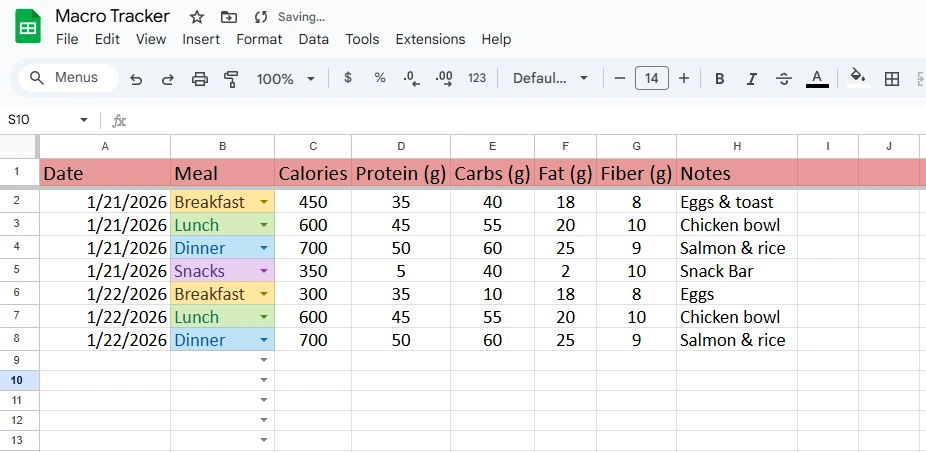
The Daily Log is the only place you need to actively enter data, and it’s structured to match how real people eat. Each row captures a single meal or snack with columns for Date, Meal, Calories, Protein (g), Carbs (g), Fat (g), Fiber (g), and Notes. In the example, the Meal column uses a dropdown with options like Breakfast, Lunch, Dinner, Snacks, and the dropdown choices show as colored labels for quick scanning (so you can visually group meals without filtering). This matters more than it sounds: when you’re logging consistently, speed and clarity are everything. A realistic day might look like the example: Breakfast (eggs & toast), Lunch (chicken bowl), Dinner (salmon & rice), and a Snack (snack bar). Even if you don’t track every micronutrient, these five macro-related columns cover what most people need to make decisions: calories for overall intake, protein for satiety and muscle, carbs/fat for energy balance, and fiber for digestion and appetite control. The Notes column is intentionally included because real tracking isn’t just numbers; it’s context. Notes can capture things like “ate out,” “post-workout,” “late-night snack,” “felt hungry,” or “high sodium meal,” which helps users spot patterns over time.
Daily Summary sheet
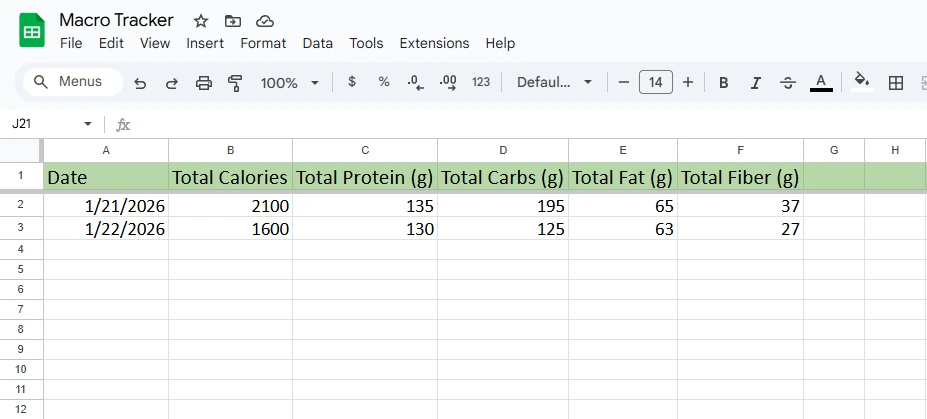
The Daily Summary is where this macro tracker spreadsheet becomes “hands-off.” Instead of requiring you to create your own formulas, the template automatically pulls in dates and totals your macros for each day. In the screenshots, you can see the summary producing one row per date with totals for Total Calories, Total Protein (g), Total Carbs (g), Total Fat (g), and Total Fiber (g). For example, on 1/21/2026, the totals show 2100 calories, 135g protein, 195g carbs, 65g fat, 37g fiber. On 1/22/2026, the totals show 1600 calories, 130g protein, 125g carbs, 63g fat, 27g fiber. This is the core value of the template: you log meals normally, and the spreadsheet does the daily math for you. It also keeps your summary view “clean,” which is important if you’re trying to stay consistent—people are far more likely to keep tracking when they can see a simple daily result instead of scrolling through dozens of meal rows.
Macro Targets sheet
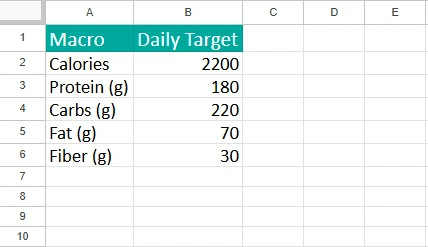
The Macro Targets sheet is your control panel. It’s a simple two-column table: Macro on the left and Daily Target on the right, with common defaults already filled in (Calories: 2200, Protein: 180g, Carbs: 220g, Fat: 70g, Fiber: 30g). Users can change these in seconds without touching anything else in the spreadsheet. This is important for a download template because different people have different goals. A fat-loss user might set calories lower (for example, 1900) and keep protein high. A strength-training user might raise calories and protein. Someone focusing on digestive health might pay extra attention to fiber. Targets also make the template easier to explain in a blog post and easier for users to adopt because they immediately know what success looks like for the day.
Dropdowns sheet
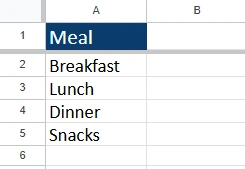
The Dropdowns sheet is intentionally boring—and that’s exactly what makes the template reliable. It’s a simple list of meal labels (Breakfast, Lunch, Dinner, Snacks) that powers the Meal dropdown in the Daily Log. This approach is cleaner than hardcoding dropdown values directly into a Data Validation rule because it lets users customize the dropdown later without rebuilding anything. If someone prefers “AM Snack / PM Snack,” or wants to track “Pre-Workout” and “Post-Workout,” they can edit the list on the Dropdowns sheet and the Meal dropdown can reflect that structure. Keeping dropdown sources in one place also reduces errors, especially for beginners who might accidentally delete a validation rule while editing.
How to Use the Template
Start on the Daily Log sheet and log one row per meal. Pick the date first, then choose the meal from the dropdown (Breakfast, Lunch, Dinner, or Snacks), then fill in calories and macros. If you’re using nutrition labels, you can enter exact values; if you’re estimating from an app, you can round to keep it simple. A practical approach is to log consistently even if your numbers aren’t perfect—consistency beats precision for most goals. For example, if your breakfast is eggs and toast, you might enter 450 calories, 35g protein, 40g carbs, 18g fat, 8g fiber, then add “Eggs & toast” in Notes. Repeat for lunch and dinner. If you eat multiple snacks, log each snack separately so the totals stay realistic and the Notes stay useful. Once you’ve entered your meals, switch to the Daily Summary sheet to see your daily totals. You don’t need to sort or filter anything—the sheet is built to recognize dates from your log and sum the totals per day automatically. This makes it easy to answer questions like “Did I actually hit my protein yesterday?” or “Why did I feel hungry today—was my fiber low?” Next, go to Macro Targets and set your goals. If your goal is fat loss, you might lower calories while keeping protein steady. If your goal is training performance, you might raise carbs. Targets work best when they’re realistic; if you’re new to tracking, choose targets you can actually hit most days so the spreadsheet feels motivating instead of punishing. Finally, if you want to customize meal labels, update the Dropdowns sheet first. Then confirm the Meal dropdown in Daily Log still reflects your updated list. This simple workflow—log meals, check totals, adjust targets—makes the template easy to stick with, which is the real win for any macro tracker.
Why Choose This Template
Most “macro tracker spreadsheet” downloads fall into two frustrating categories: they’re either too basic (a blank table with no automation), or they’re overly complex (dashboards, charts, and tabs that scare beginners away). This template sits in the sweet spot. It’s simple enough that anyone can use it immediately, but smart enough that users get daily totals automatically. The design also reflects how people actually track in real life: you log meals as you go, and the summary gives you quick feedback without extra effort. It’s also flexible: users can track just calories and protein if that’s their priority, or fill in all macros and fiber for more complete nutrition awareness. It’s ideal for people cutting weight, bulking, maintaining, meal prepping, training for performance, or anyone who wants structure without paying for a subscription app. It’s also a strong fit for users who want more control over their data—Google Sheets lets them keep history, make copies for new months, or share with a coach or accountability partner.
Download Your Free Macro Tracker Spreadsheet
- Free Template
- Fully Editable
- Instant Access
- Organize your information
How to Access Your Copy
- Enter your email for instant access
- Open the link we send you
- Start using the spreadsheet right away