
Remembering every pill, supplement, or prescription can feel overwhelming, especially when schedules change or multiple medications are involved. The free Medication Tracker Template from Sheetrix is a practical and customizable Google Sheets tool that helps you record, organize, and monitor your entire medication routine in one place.
Unlike paper logs or basic reminder apps, this spreadsheet combines flexibility with structure. You can track medications, dosage times, and side effects while also storing refill and provider information. Each section is designed to be simple enough for everyday use yet detailed enough to satisfy healthcare or caregiver needs.
If you’ve ever missed a dose, confused two prescriptions, or wished for a better way to keep records for your doctor, this template was made for you.
A Complete Overview of the Template
The Medication Tracker Template is built for Google Sheets and includes four well-organized tabs: Tracker 1, Tracker 2, Medication List, and Refills & Providers. Together, they create a full system for managing your medication schedule and details.
The layout mirrors how people actually handle medication in real life. There are places to plan ahead, log daily progress, and review the information later. Instead of juggling multiple lists, you can store everything in one document that automatically connects between sheets.
Here’s how each part works in broad terms:
- Tracker 1 and Tracker 2 act as your daily or weekly medication logs. Many users set up one tracker for morning doses and another for evening, or one for themselves and one for a family member.
- Medication List is your master database — the foundation for all dropdowns and automatic suggestions in the trackers.
- Refills & Providers keeps track of your doctors, pharmacies, and refill dates.
Each tab is linked intelligently so that adding or changing a medication in one place instantly updates your dropdown menus in both Tracker sheets. This connection ensures consistency and prevents mistakes like typos or outdated doses.
The goal is to give you an easy way to stay consistent without needing to memorize medication details or rewrite them each day.
Key Features and Sections Explained
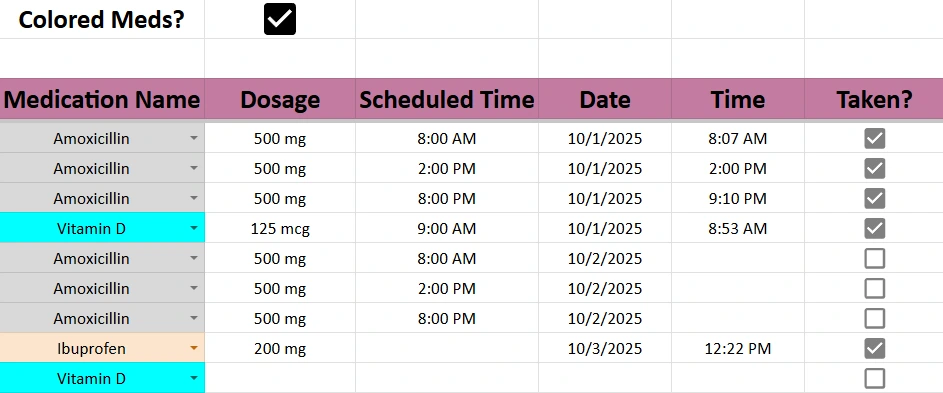
Tracker 1 and Tracker 2
These are the heart of the system — your daily medication logs. Each tracker includes the following columns:
- Medication Name: A dropdown menu that pulls directly from your Medication List sheet.
- Dosage: A conditional dropdown that changes depending on which medication you select. For example, if you pick Amoxicillin, the dosage options might be 250 mg, 500 mg, or 875 mg. If you pick Vitamin D, it might list 125 mcg, 2000 IU, or 5000 IU.
- Scheduled Time: The time you plan to take the medication, such as 8:00 AM or 2:00 PM.
- Date: The current date or the date you intend to take it.
- Time Taken: When you actually take the dose. Some users keep this column empty until they mark it complete, while others use an automatic timestamp script that fills the time once the “Taken?” box is checked.
- Taken?: A simple checkbox that makes it easy to mark a dose as completed.
- Side Effects: A space to note any symptoms or reactions you notice.
- Notes: Perfect for reminders like “Take with food” or “Missed due to travel.”
This layout turns the act of taking medication into a quick, trackable habit. The checkboxes add visual clarity — once all boxes are ticked, you know you’re done for the day. If you prefer automation, adding a short Google Apps Script can freeze the time value when “Taken” is selected, creating an accurate log that doesn’t change when the sheet refreshes.
Medication List
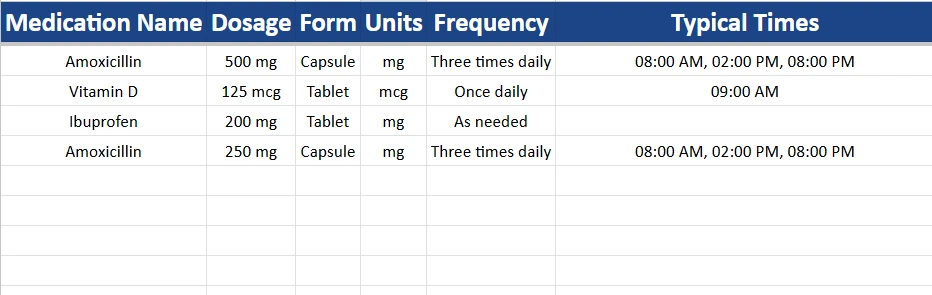
The Medication List sheet powers your dropdowns and ensures accuracy. Instead of typing medication names repeatedly, you create a clean list of everything you take, including dosage, form, and timing details.
Here’s an example:
| Medication Name | Dosage | Form | Units | Frequency | Typical Times |
|---|---|---|---|---|---|
| Amoxicillin | 500 mg | Capsule | mg | Three times daily | 08:00 AM, 02:00 PM, 08:00 PM |
| Vitamin D | 125 mcg | Tablet | mcg | Once daily | 09:00 AM |
| Ibuprofen | 200 mg | Tablet | mg | As needed | — |
Each entry here becomes an option in the Tracker dropdowns. If you update a dosage or add a new medication, it automatically appears in both Tracker 1 and Tracker 2.
This structure also supports dependent dropdowns, meaning that when you choose “Ibuprofen” in the Medication column, only relevant dosages appear under “Dosage.” It’s a feature usually found in professional spreadsheets and adds an extra layer of accuracy.
Refills & Providers
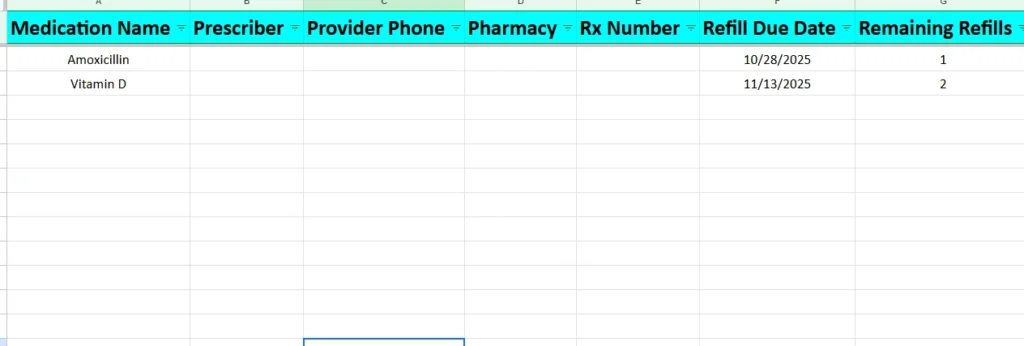
The Refills & Providers tab organizes your healthcare and pharmacy details. It’s especially helpful for people who manage long-term prescriptions or multiple doctors. Typical columns include:
- Medication Name
- Prescriber
- Provider Phone
- Pharmacy
For example, you might log that Amoxicillin was prescribed by Dr. Smith at (555) 123-4567 and filled at Main Street Pharmacy. If your prescription runs low, you already know who to call.
Users often expand this section with extra columns like refill due dates, insurance numbers, or prescription IDs. You can even add conditional formatting to highlight upcoming refills automatically.
How to Use the Template Effectively
To get started:
- Set up your Medication List first. Enter each medication you take, along with the dosage, units, and times. This acts as your central reference.
- Go to Tracker 1 or Tracker 2. Begin selecting medications from the dropdown menu — the correct dosage options will appear automatically.
- Record each scheduled time and date. You can pre-fill your entire week to stay ahead.
- When you take your medication, check “Taken.” If you prefer automation, you can use a simple Apps Script to record a permanent timestamp in the “Time” column when the box is checked.
- Add notes or side effects as needed. Over time, these notes form a personal health journal that can help you and your doctor spot patterns.
- Keep your Refills & Providers sheet updated. Add contact details or reminders whenever you get a new prescription.
Example scenario:
Suppose you take three medications — Amoxicillin (three times daily), Vitamin D (once daily), and Ibuprofen (as needed). You would enter them in the Medication List once, then use Tracker 1 for your scheduled doses. When you check a box for Amoxicillin at 2:00 PM, the Time column could automatically record 2:03 PM, giving you a timestamp for your adherence log. If you experience mild nausea that day, you can note it in the “Side Effects” column for your next visit.
Over time, the template provides a clear history of when you’ve taken each medication and how your body responded.
Why This Medication Tracker Template Stands Out
There are plenty of medication reminder apps and printable charts, but few offer the flexibility, detail, and control that a spreadsheet does. This template combines automation with the simplicity of checkboxes, making it ideal for:
- Patients with multiple prescriptions who need a reliable, central system.
- Caregivers tracking doses for family members or elderly parents.
- Anyone managing supplements or vitamins on different schedules.
- People preparing for medical appointments who want to bring clear records of their dosage history.
Unlike apps that lock you into one format, this spreadsheet is fully editable. You can add charts, color-coded rows, or new tabs for specialized tracking — for example, a weekly calendar view or adherence summary.
Because it’s built in Google Sheets, you can access it on your phone, tablet, or computer, and share it securely with your doctor or caregiver. There’s no need for additional software, subscriptions, or accounts.
Get Your Free Medication Tracker Spreadsheet
- Free Template
- Fully Editable
- Instant Access
- Organize your information
How to Access Your Copy
- Enter your email for instant access
- Open the link we send you
- Start using the spreadsheet right away
Taking medication consistently shouldn’t feel stressful. With this Medication Tracker Template, you can manage everything — schedules, dosages, and side effects — in a single document that adapts to your routine.
The template is free to use, easy to personalize, and built to save you time. Whether you’re recovering from surgery, managing chronic conditions, or helping a loved one stay on track, this spreadsheet keeps your health information organized and accessible wherever you go.
Start today by setting up your medication list, logging your first doses, and seeing how much easier it is to stay consistent. Small changes — like checking off each pill you take — can make a big difference in your overall health and peace of mind.





