
The start of a new year is the perfect excuse for great food and even better company — but if you’ve ever hosted a New Year’s Eve or New Year’s Day dinner, you know how easily things can get hectic. The new year dinner spreadsheet from Sheetrix takes the stress out of hosting by keeping your entire meal plan in one clear, organized space.
This free Google Sheets template helps you coordinate your menu, plan your cooking timeline, and manage your guest list all in one place. Whether you’re throwing a lively dinner party or a cozy family gathering, it makes every detail easy to handle so you can focus on celebrating the year ahead.
Overview of the Template
The New Year Dinner Spreadsheet was built to simplify event planning for one of the busiest nights of the year. It’s divided into three main sheets — each with its own purpose and design — that work together to give you a complete dinner planning system.
Inside the spreadsheet, you’ll find:
- A Menu Planner sheet for planning dishes, servings, and prep timing.
- A Guest List sheet for RSVPs, dietary needs, and total headcounts.
- A Dropdowns Sheet that keeps your dropdown lists consistent and editable.
The template is fully customizable, color-coded for readability, and designed to look great whether you’re viewing it on-screen or printing it for the kitchen.
Key Features and Sections
Menu Planner Sheet
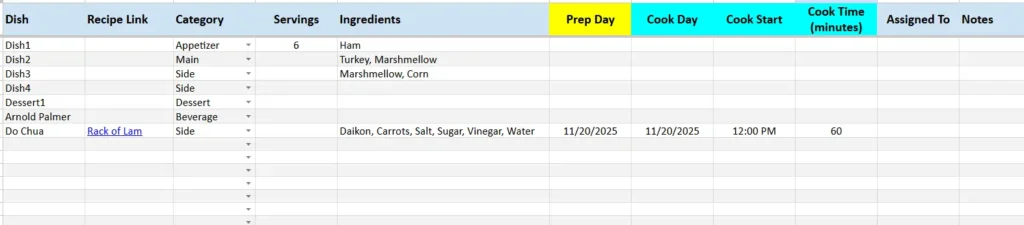
The Menu Planner is where your New Year’s dinner ideas come together. It’s a structured workspace for listing every dish, assigning tasks, and keeping your timing under control.
Each column plays a key role in helping you plan with confidence:
- Dish Name – List everything you plan to serve, from appetizers to desserts.
- Recipe Link – Add clickable links to online recipes or your own files.
- Category – Choose from dropdown options like Appetizer, Main, Side, Dessert, or Beverage.
- Servings – Record how many people each dish will feed.
- Ingredients – Note the main ingredients for easy shopping reference.
- Prep Day and Cook Day – Spread out your work so everything isn’t last-minute.
- Cook Start Time and Cook Time (minutes) – Schedule cooking efficiently to avoid kitchen bottlenecks.
- Assigned To and Notes – Delegate tasks or include special reminders.
Example: You might list “Stuffed Mushrooms” as an appetizer to prep on December 31 at 3:00 PM, while “Beef Tenderloin” cooks at 6:00 PM and rests before serving at 7:00.
With color-coded columns for timing and preparation, you’ll instantly see what needs to be done and when. It’s especially useful for balancing oven use or planning multiple courses.
Guest List Sheet
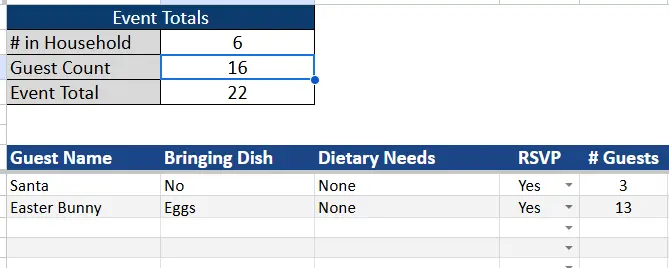
The Guest List sheet helps you keep track of who’s attending, what they’re bringing, and any special notes. Whether it’s a sit-down dinner or a shared potluck, this sheet ensures everyone’s accounted for.
Each row provides essential details:
- Guest Name – Record individual names or entire families.
- Bringing Dish – Add notes if guests are contributing food or drinks.
- Dietary Needs – Mark allergies or preferences, like “vegetarian” or “no shellfish.”
- RSVP Status – Choose from Yes, No, or Maybe using the dropdown menu.
- # Guests – Track how many people are attending per invitation.
- Notes – Use for arrival times, seating, or event-specific details.
At the top of the sheet, an automatic Dinner Headcount Summary displays real-time totals as you enter data:
- # in Household – The number of people in your home.
- Guest Count – Confirmed attendees who RSVP “Yes.”
- Event Total – The full number of people eating at your New Year dinner.
Example: If your household has 3 people and 9 guests confirm, your Event Total updates to 12 automatically. It’s a small but powerful feature that makes planning portions much simpler.
Dropdowns Sheet
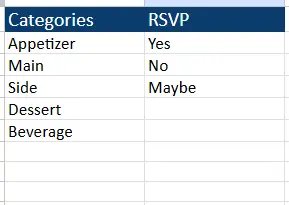
The Dropdowns sheet is your control center for keeping dropdown lists consistent. It stores all your category and RSVP options in one place, ensuring that every dropdown across the spreadsheet stays uniform.
Default entries include:
- Categories: Appetizer, Main, Side, Dessert, Beverage
- RSVP: Yes, No, Maybe
You can easily modify these lists to match your style of event. Add “Snack,” “Cocktail,” or “Brunch” categories if you’re hosting a late-night party or a New Year’s Day breakfast. It’s fully editable, so you can use the template for future events, too.
How to Use the New Year Dinner Spreadsheet
This planner is designed for simplicity. You don’t need advanced spreadsheet skills — just fill it in and start organizing.
- Plan Your Menu
Begin with the Menu Planner sheet. Enter each dish you’ll serve and use the Category and Cook Time columns to keep things balanced. Add recipe links for easy access during prep. For example, “Shrimp Cocktail” can be prepped in advance, while “Chocolate Lava Cake” needs to bake fresh before dessert. - Organize Your Guest List
Move to the Guest List sheet and input everyone invited. As they RSVP, update their status and note how many people they’re bringing. The totals at the top will change automatically, giving you an accurate count in seconds. - Adjust the Dropdown Options
Open the Dropdowns sheet to personalize categories or RSVP wording. You can rename “Beverage” to “Drinks” or add “Late Arrival” if your event includes multiple waves of guests. - Coordinate Your Timeline
Review the Cook Day and Cook Time columns before your event. This lets you identify overlapping dishes and avoid scheduling conflicts. - Share or Print Your Plan
If you’re co-hosting, share the Google Sheet with others so they can view and edit it in real time. You can also print the planner for quick reference during cooking and setup.
This workflow turns what used to be a stressful process into a calm, repeatable system that helps you focus on enjoying your night.
Why You’ll Love This Template
The New Year Dinner Spreadsheet was designed for real-world hosting. It’s flexible, straightforward, and helps you manage details without overcomplicating your planning.
Here’s why it stands out:
- Practical and visual: Everything is organized logically and color-coded for easy reading.
- Collaborative: Multiple people can use it at the same time in Google Sheets.
- Reusable: Copy it for birthdays, anniversaries, or any special event.
- Adaptable: Works for formal dinners, buffets, or casual family meals.
- Time-saving: Keeps your entire dinner plan — guests, recipes, and timing — in one document.
This template works just as well for a New Year’s Eve celebration as it does for a January 1st brunch. It’s designed to grow with you, year after year, turning planning into a quick, enjoyable part of your holiday.
Get Your Free New Year Dinner Spreadsheet
- Free Template
- Fully Editable
- Instant Access
- Organize your information
How to Access Your Copy
- Enter your email for instant access
- Open the link we send you
- Start using the spreadsheet right away
Welcome the new year with confidence — a clear plan, a smooth dinner, and more time to celebrate.





